17likes
900uses
Explore Thinking Hats templates and examples from Miro. Free editable templates ready to use for teams, online and collaborative.
5 templates
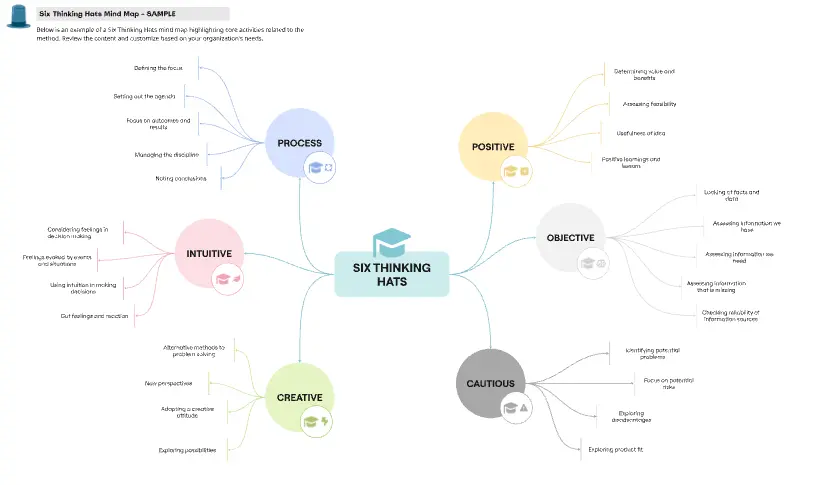
The Six Thinking Hats template is a highly collaborative visual workspace based on the parallel thinking framework developed by Dr. Edward de Bono. In typical team debates, individuals often lock themselves into fixed adversarial roles—the optimist clashes with the pessimist, while the data analyst gets lost in details, leading to fractured discussions and biased decisions. By utilizing a standardized Miro template, teams can practice "parallel thinking," where everyone wears the same cognitive "hat" at the exact same time. This structure guides cross-functional groups to thoroughly explore a problem from six unique perspectives, boosting emotional intelligence, speeding up alignment, and uncovering hidden project risks.
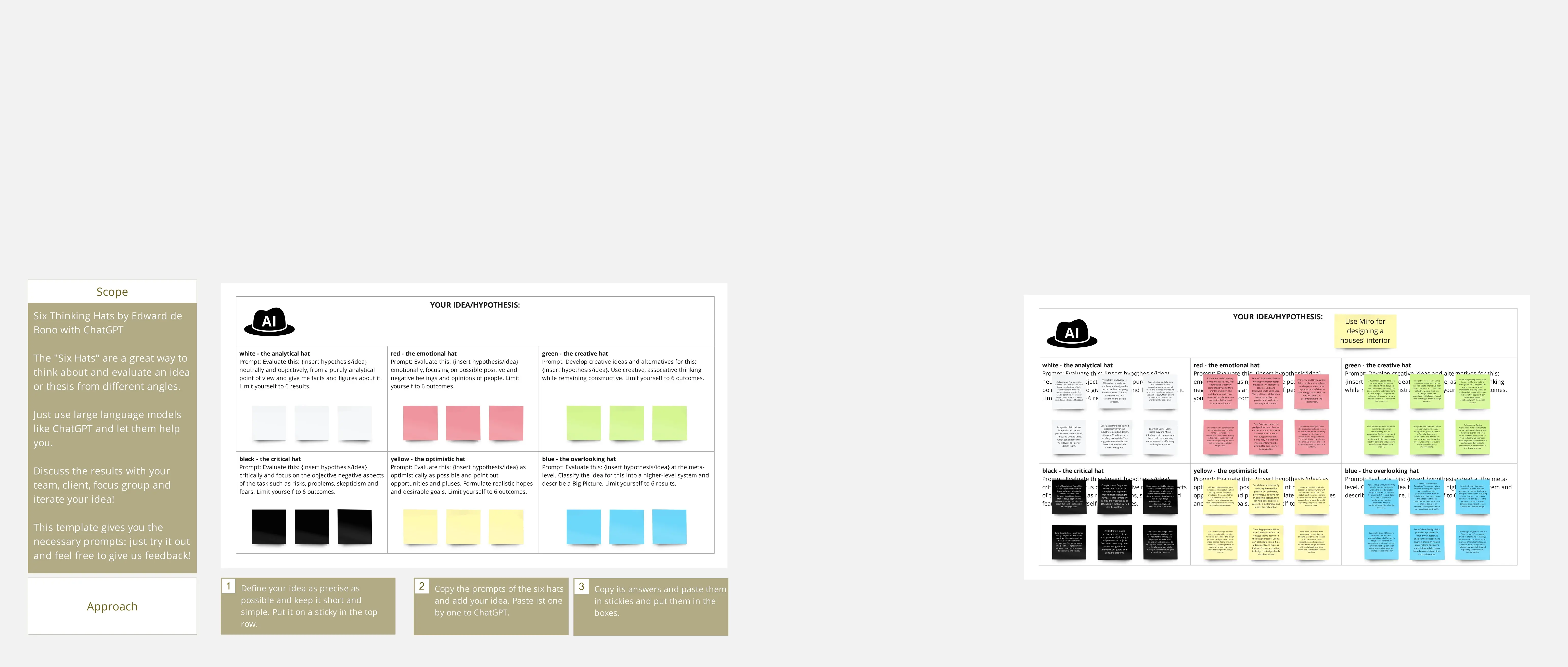
A professional Six Thinking Hats canvas is organized into distinct, color-coded brainstorming zones that represent each cognitive perspective. Every actionable Miro template features these six foundational elements:
The White Hat Grid (The Data Collector): A space focused entirely on hard data, facts, historical metrics, and missing information. It strips away all opinions, gut feelings, and interpretations.
The Red Hat Area (The Emotional Radar): A safe, time-boxed zone where team members drop immediate gut feelings, anxieties, intuitions, and unvarnished emotions about an idea without needing to justify them.
The Black Hat Chamber (The Risk Assessor): A critical evaluation lane designed for cautious, logical criticism. This area captures potential failures, legal risks, resource bottlenecks, and worst-case scenarios.
The Yellow Hat Sandbox (The Value Explorer): The optimist's playground. This section focuses strictly on positive outcomes, hidden benefits, best-case scenarios, and value generation.
The Green Hat Engine (The Creativity Hub): A wide-open space for lateral thinking, alternative options, creative pivots, provocative ideas, and out-of-the-box brainstorming.
The Blue Hat Command Center (The Process Facilitator): The overarching framework lane (usually managed by the facilitator) used to set the workshop agenda, manage timeboxes, synthesize themes, and document next steps.
1. Define the Central Challenge Open your Six Thinking Hats template in Miro. Use the central Blue Hat frame to clearly write out the specific idea, proposal, or problem statement you are evaluating (e.g., "Moving our enterprise software platform to a 100% self-serve onboarding flow"). Lock this text box to keep the workshop anchored.
2. Put on the White Hat to Gather Facts Start the sequence by directing everyone to the White Hat section. Give the team 3 to 5 minutes to drop sticky notes listing what they currently know to be true (e.g., “Current conversion rate is 2.4%,” “Support tickets spike on day 3”). Identify any missing data points that need to be researched later.
3. Explore Potential with the Yellow Hat Move the entire team over to the Yellow Hat workspace. Instruct everyone to look exclusively for the benefits and value of the proposal. Even the most skeptical team members must contribute positive, optimistic sticky notes during this timebox.
4. Pressure-Test Flaws with the Black Hat Shift the team to the Black Hat lane to uncover risks. Have everyone think critically and defensively about why the idea might fail.
The Separation Rule: Keeping the Yellow and Black hats in completely separate visual zones prevents arguments. Skeptics cannot shoot down ideas during the Yellow phase, and optimists cannot sugarcoat real problems during the Black phase.
5. Spark Creative Fixes with the Green Hat Review the risks flagged in the Black Hat section. Move the group to the Green Hat engine to brainstorm creative ways to bypass those specific roadblocks, pivot the concept, or find alternative solutions. Encourage out-of-the-box ideas.
6. Take a Final Pulse with the Red Hat Before wrapping up, run a 60-second lightning round in the Red Hat area. Have everyone drop a single sticky note expressing their unfiltered gut check on the final idea (e.g., "I'm excited but worried about engineering capacity," or "I feel completely aligned now").
7. Synthesize and Create the Action Plan Return to the Blue Hat Command Center. Review the visual map of insights, group similar themes together, and convert your best solutions into concrete action items with explicit owners and deadlines. Export the completed Miro board as a summary graphic to guide your upcoming execution sprint.