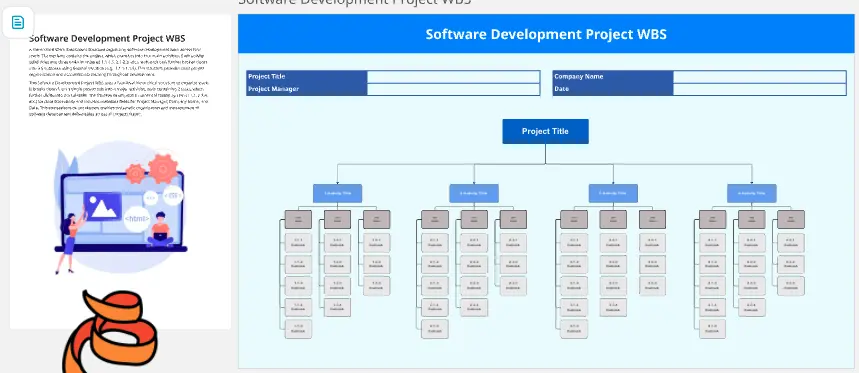
The Multiple Project WBS Template is a high-level strategic framework designed for Program Managers and PMOs (Project Management Offices) to decompose complex, multi-stream portfolios into manageable deliverables. In fast-paced business environments, this visual hierarchy ensures that parallel workstreams remain organized, transparent, and aligned with organizational goals.
What Problems Does the Multiple Project WBS Solve?
Managing several concurrent projects often leads to "scope creep" and resource exhaustion. This template mitigates those risks by providing:
Granular Visibility across Portfolios: It breaks down the "silo" effect, allowing stakeholders to see how individual sub-tasks contribute to the success of multiple independent projects.
Elimination of Overlapping Efforts: By visualizing tasks side-by-side, teams can identify redundant activities across different projects, enabling better resource sharing.
Logical Scope Definition: It prevents teams from feeling overwhelmed by large-scale initiatives by dividing them into 100% manageable work packages.
Standardized Reporting: It creates a unified "language" for progress tracking, making it easier for executives to understand the status of the entire project portfolio at a glance.
How to Use the Multiple Project WBS (The 3-Tier Hierarchy)
To maximize project control and delivery precision, structure your WBS using this professional decomposition framework:
Tier 1: The Program/Portfolio Level (The Parent Node)
Tier 2: Individual Project Streams (The Child Nodes)
Project Categorization: Separating work by department, product line, or client (e.g., Project A: Infrastructure, Project B: Software Dev).
Owner Assignment: Designating Project Leads responsible for the high-level delivery of each specific branch.
Tier 3: Work Packages & Task Clusters (The Execution Level)
Deliverable-Based Breakdown: Dividing project streams into tangible outputs (e.g., Design Docs, Code Modules, Marketing Assets).
Terminal Elements: Defining the smallest unit of work that can be scheduled, cost-estimated, and monitored.
Dependency Mapping: Identifying where Project A’s output becomes the necessary input for Project B’s start.
Frequently Asked Questions (FAQ)
How deep should I break down the tasks in a Multiple Project WBS?
Follow the 8/80 Rule: A work package should not take less than 8 hours or more than 80 hours to complete. If a task is too large, it’s a "Phase"; if it’s too small, it’s just a "to-do" item that belongs in a checklist, not the WBS.
Can this template be used for Agile and Waterfall projects simultaneously?
Yes. The WBS is methodology-agnostic. You can have one branch representing a Waterfall construction project and another branch representing an Agile software sprint, provided the high-level deliverables are clearly defined.
What is the difference between a WBS and a To-Do List?
A WBS is deliverable-oriented, focusing on "what" is being built. A to-do list is action-oriented, focusing on "how" it is done. The WBS provides the skeletal structure of the project scope, while the Gantt chart or task list provides the timeline.