
Table of contents
Table of contents
A guide to user-centered design
Summary
In this guide, you’ll learn:
- What user-centred design is and why it focuses on real user needs
- Why UCD leads to more effective products
- The core principles of UCD, including involving users early and iterating often
- A simple, step-by-step UCD process from research to launch and continuous improvement
- The benefits of applying UCD in real organisations
User-centred design puts real people at the center of every decision. By grounding work in real user needs, teams become empowered with clearer decisions and can build towards products and services that keep the user at their core.
Collaborative AI Workflows
Join thousands of teams using Miro to build the right thing, faster.
What is user-centred design?
User-centred design (UCD) is an iterative way to build products and services that starts with real people. Their needs are put at the forefront of every consideration and decision. Instead of forcing people to adapt to a product, UCD adapts the product to how people actually think, behave, and work.
Teams doing UCD keep users close from day one. They dig into real goals and blockers, prototype early, and test often. They deliver solutions that are usable, accessible, and dial into the most pressing problems users have.
Why is user-centred design important?
User-centred design helps teams build products and services that work for real people in real situations. When you base decisions on user needs (not guesses), you get solutions that are easier to use and more effective. You also catch usability issues earlier - before they turn into expensive and time-consuming fixes.
For organisations, this pays off quickly. Happier users, less rework, and a clear connection between what you build and what people really need.
UCD stops putting the work on users to adapt. Instead, the product adapts to them - making it easier to use while giving your teams more confidence in what they’re building.
The video below demonstrates a structured, collaborative workflow that mirrors user‑centred design principles. It emphasizes starting with discovery to understand problems and gather insights, organizing ideas and goals clearly, iterating through prototypes, and delivering solutions effectively.
This aligns with why user‑centred design is important: by focusing on real needs, testing ideas, and refining solutions collaboratively, teams create products that are usable, effective, and satisfying for users, rather than relying on assumptions or guesswork.
User-centred design vs human-centred design
User-centred design (UCD) and human-centred design (HCD) are closely related, and you might even hear them used interchangeably. However, they do have a slight difference in their scope.
Human-centered design zooms out. Instead of focusing on one moment or one user, it looks at the full system. This includes users, stakeholders, and the wider communities involved with what you build.
User-centered design does feature many of those same principles, just with a tighter focus. It drills down into the people who will use a specific product or service, and the task they’re trying to get done.
Both rely on understanding your user, building a complete picture of them, and building your product with them in mind.
Core principles of user-centred design
These user-centred design principles are the foundation of how UCD teams think and work.
Focus on users and their context
Let user goals, behaviors, environments, and constraints lead the design - not the loudest stakeholder opinion. This means understanding what people are trying to do, what gets in their way, and what “success” looks like in their world.
Involve users throughout the process
UCD isn’t just an arbitrary step you throw in at the end of testing your product. You want to keep users involved as early as you can, from discovery all the way through to launch. Always be learning so you can always be adjusting.
Iterate early and often
In practice, UCD runs in small loops:
- Design
- Prototype
- Test
- Learn
- Refine
Quick prototypes and frequent feedback beat big-bang releases. They allow you to course-correct before you’ve sunk too much time into the wrong thing.
Design the whole experience
Taking a user-centered approach also means you have to think about the end-to-end experience. What will your products and services be like before, during, and after use?
You’ll want to think about onboarding, support, comms, and even offline interactions.
Make designs accessible and inclusive
Being user-centred means your design approach needs to capture real diversity. You need to consider how unique each individual can be, each with their own differing abilities, devices, settings, and needs.
Implement accessibility guidance, test with accessibility tools, and aim for experiences that work well for everyone. The focus can’t only be on the “average” user.
The user-centred design process (step-by-step)
Here is a repeatable UCD loop you can run on almost any product or service.
1 - Understand users and context
This is the first step in user-centred design: getting close to and understanding the users you’re designing for. Learn who they are, what they’re trying to do, and where things break down in the real world.
During this step, you’ll undertake activities like:
- Interviews with users, surveys, and field observations
- Reviewing feedback and support tickets
- Analytics to spot drop-offs and patterns
- Customer personas and customer journey maps to capture what you’re learning
2 - Define problems and requirements
Next, turn research into something the team can act on. This means you’ll need to develop clear problem statements, user needs, and requirements that every team can see.
3 - Generate ideas and concepts
Now it’s time to explore all your options before you commit. Your goal shouldn’t be to create the perfect idea right off the bat - you want to create a few strong directions and pressure test them.
You might consider:
- Hosting brainstorming sessions
- Running Workshops with stakeholders
- Agreeing on what a “good” product will look like
4 - Start testing your ideas
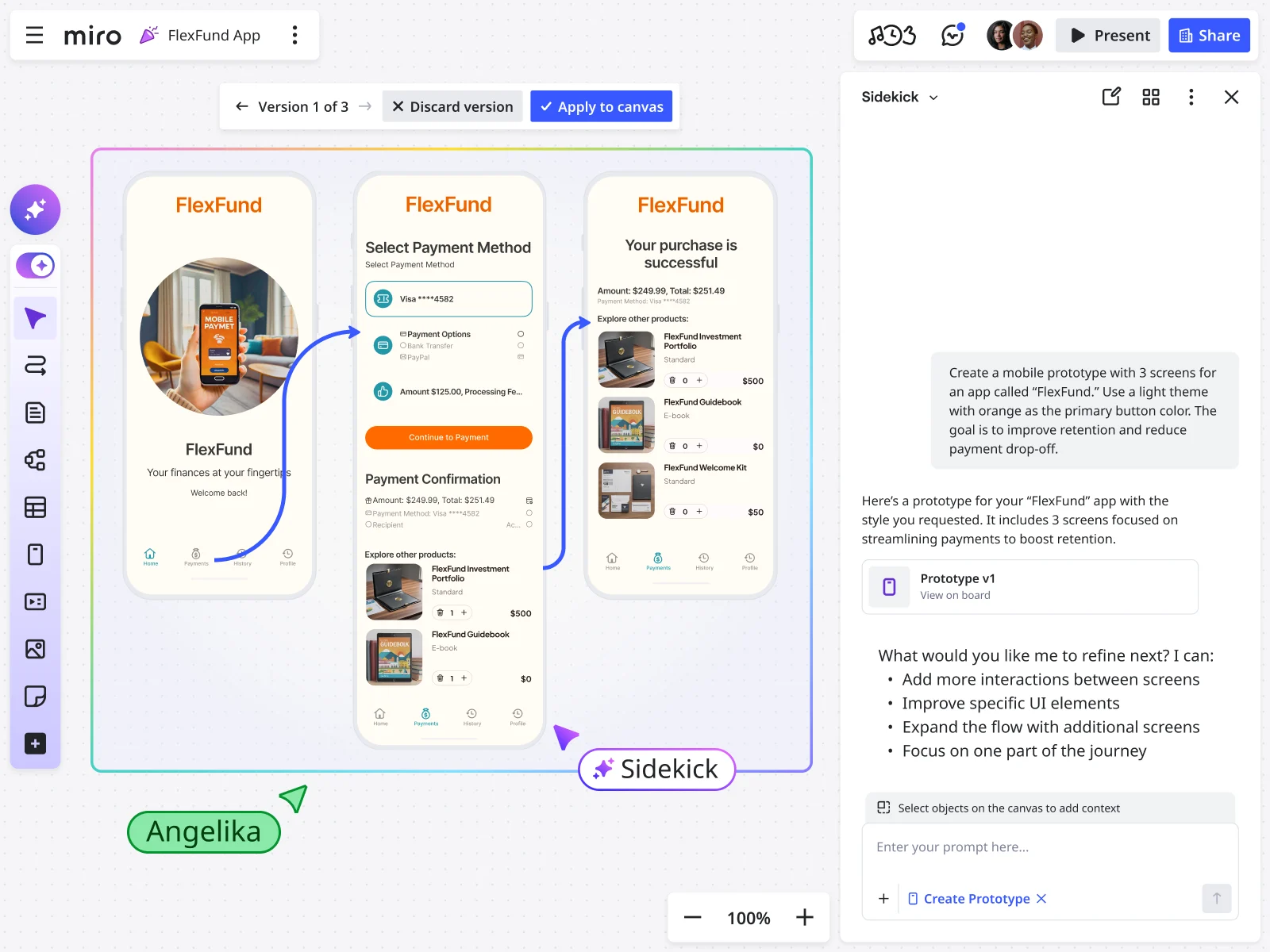
Turn your best ideas into something people can try. Start rough, but start learning fast and add the detail you need as you go.
Try creating:
- Low-fidelity sketches and wireframes
- Interactive prototypes
- Simple information architecture diagrams
5- Learn from real users
Put designs in front of real users early, then keep doing it. Usability and concept testing will show you what works, what confuses people, and what’s missing.
Consider:
- Usability testing
- Concept testing
- A/B testing
6 - Launch and keep improving
UCD doesn’t stop at release. Once it’s live, there’s still a need to keep learning from behaviour and feedback. Then, as needs change, make improvements.
Post-launch, teams often:
- Monitor usage, funnels, and key metrics
- Gather and manage feedback
How to use Miro for UCD
Researching, coming up with ideas, and testing are the three central pillars of effective UCD. To manage them all in a single space, you’ll need an arsenal of techniques and tools - like Miro - to keep your users at the forefront of your decisions.
User research methods
Interviews
Miro enhances interviews by letting you structure and capture everything in one place and then use AI to turn that raw material into insights. You can use interview templates to take organized notes collaboratively, and Miro’s AI synthesis feature instantly summarizes interview content into clear themes and insights without manual effort. This makes it easier to spot patterns and extract learnings from multiple sessions.
Surveys
Open-ended survey responses and feedback can be imported into Miro as sticky notes, text blocks, or spreadsheet snippets. Miro AI helps identify patterns and group related responses, making it easier to see which themes are emerging across large datasets. Teams can then use visual tools like journey maps, affinity diagrams, or charts to turn this feedback into clear insights that guide decisions.
Field observation
Miro helps you organize and understand field observation data by letting you upload and visualize qualitative notes, photos, and artifacts on a shared canvas. Its AI can then identify clusters, highlight common observations, and uncover trends within that unstructured data. This makes field notes easier to interpret and share within teams.
Diary studies
For diary studies, Miro’s flexible canvas means you can collect longitudinal entries over time and then use AI tools to surface recurring themes, summarize user experiences, and highlight patterns across entries.
Analytics
Miro’s AI capabilities (like its Ask AI feature) let you ask questions in natural language to extract insights from large sets of user feedback, analytics trends, or product data, returning summaries and patterns that inform decision‑making. You can also embed analytics visuals onto a board and connect them with qualitative research findings to give context to your insights. In Miro, add all research to one shared workspace. Notes, quotes, screenshots, recordings, it’s all lives on the board. From there, you can group what matters, find patterns, and identify what you need to provide your users.
Ideation and mapping techniques
Workshops
Workshops in Miro structure brainstorming, alignment, and decision-making using facilitation patterns like voting, clustering, and timed activities. There is also Workshop planner which contains two sections to help you create dynamic and effective workshops.
Sketching and co-creation
It helps teams explore and evolve ideas visually. Miro’s whiteboard and sticky notes enable sketching, while AI helps teams synthesize content by grouping related ideas, generating summaries, and turning brainstorms into organized frameworks.
Journey mapping
Journey mapping lets teams visualize the steps users take through an experience, surface pain points, and ideate on improvements, tying user understanding directly into idea generation and solution design.
Empathy mapping
Empathy mapping captures what users say, think, feel, and do so teams can build shared understanding and generate better ideas based on real user insight. Miro also offers AI‑assistance that helps understand themes and insights.
Opportunity mapping
Opportunity mapping helps teams connect user needs to strategic outcomes and potential solutions, guiding ideation toward impactful areas and prioritized paths.
In Miro, teams run these collaboratively with templates, sticky notes, clustering, and lightweight facilitation tools like a timer and voting. We make it easy to ensure the best ideas are always at the forefront.
Prototyping and usability tests

Low-fidelity prototypes (sketches, wireframes)
Low‑fidelity prototypes are, early representations of your design that focus on structure, flow, and core functionality. In Miro, these can be created using sketching tools or wireframe templates to map layouts, basic screens, and navigational paths, helping teams validate broad ideas and user flows before investing in detailed designs. These prototypes allow everyone to participate in co‑creating and iterating concepts. Miro AI can help generate initial low‑fidelity screens and wireframes from text or canvas content, speeding up early concept creation.
High-fidelity prototypes (interactive, polished)
High‑fidelity prototypes in Miro look and feel much closer to the final product with refined visuals, interactive elements, and realistic content. They can be built by linking frames and components to simulate real interactions, enabling more detailed usability testing and feedback. These polished prototypes help teams test specific interactions and get clearer insights into how users will experience the finished product. Miro’s AI features can convert sketches or screenshots into editable screens and assist with styling and refinement as part of building more polished prototypes.
Moderated tests
Moderated tests are where a facilitator guides participants through a prototype and observes their behavior. The Moderated Usability Testing Template in Miro helps teams set up sessions that uncover users’ thought processes and identify design issues by prompting deeper discussion and clarification during testing. While moderated tests themselves are manual, Miro’s AI can help generate usable prototypes quickly so you can run usability sessions sooner.
Unmoderated tests
Unmoderated tests refers to unmoderated prototype sessions as part of planning experiments, showing that teams can structure tests where participants complete tasks independently without a facilitator. These unmoderated sessions help gather feedback from a larger or more diverse user sample and can be integrated into your prototyping workflow alongside other methods. Miro’s AI‑generated prototypes can be shared as interactive click‑throughs for users to explore independently, supporting broader unmoderated feedback.
In Miro, map wireflows, embed prototypes, collect observation notes during tests, and review findings - all in one space. After each round of testing, it’s easy to group issues, prioritize changes, and plan the next iteration.
Customer story: How Munich Re built customer-centric cloud products with Miro
Munich Re wanted to build more customer-centric products and do it faster as a hybrid team. The challenge was keeping research, workshops, prototyping, and stakeholder needs in complete alignment, without work getting lost across different tools, documents, and platforms.
Using Miro, they were able to build a collaborative workspace for their product development. They ran design thinking sessions, captured research, built empathy maps and journeys, and prototyped ideas early with cross-functional teams and customers - all on the same board.
This led to:
- Saving $10,000+ in travel and lodging per design session
- More inclusive workshops for hybrid teams
- Faster decision-making with customer involvement from day one
- Less context switching and quicker time to value
- Streamlined workflows, with fewer tools to manage
Read the full Munich Re case study.
The benefits and challenges of UCD
UCD helps teams build the right thing, but it can be difficult and require discipline to implement it effectively.
User-centred design benefits
When you keep users close, the work gets clearer, and the results get better.
- Higher usability - Products are easier to learn and easier to use, because they’re built around real tasks and behaviors.
- More satisfied users - You solve the problems people actually have, which builds trust and keeps them coming back.
- Products built for everyone - Designing for a wider range of abilities, devices, and contexts makes the experience work for more people.
- Reduced rework - Testing early surfaces issues before they’re expensive to fix in build and launch.
- Stronger adoption - When a product fits how people work, it gets used (and recommended) instead of ignored.
- Clearer differentiation - A better experience becomes a competitive edge, especially if you’re competing in an oversaturated market.
User-centred design challenges
UCD works, but implementing it well can be more difficult for your teams than you expect.
- Stakeholder resistance - Teams may default to opinions, which blocks learning.
- Time and budget constraints - Research and testing can get squeezed, especially when delivery timelines are tight.
- Recruiting the right users - Finding participants who can stand in for your audience (and who actually show up) takes effort and coordination.
- Catering to both users and your business - User feedback won’t always agree, but that’s normal. Decide on what matters most and then explore the best trade-offs you can make.
- Too much research data - Notes, quotes, and recordings pile up fast. Without synthesis, insights get lost, and teams stop trusting the process.
- Turning insight into action - Even with good research, translating learning into clear decisions, requirements, and next steps can still present a challenge.
Start your next user-centred design project with Miro
User-centred design helps you build products people actually want to use. You learn what matters early, test as you go, and ship with fewer surprises.
And it works best when insights are not scattered across five different places.
As Philip McCusker, Product Manager at Munich Re, puts it:
“Miro is great as a knowledge base. A lot of research findings are relevant to multiple teams, and Miro helps us disseminate this in a visual way, which improves communication across teams.”
Ready to start? Sign up for Miro free today, pick a template, and map out your next UCD cycle with your team.
FAQs
How does Miro help teams practice user-centred design?
By offering a shared workspace where teams can freely collaborate, Miro helps put user-centred design into practice. It can hold all your research insights, user journeys, ideas, and design concepts.
Teams can then collect research, map information, come up with new ideas, and review designs in one place, keeping user needs visible throughout the process.
Are there user-centred design templates or examples from other teams in Miro?
Yes. Miroverse is Miro’s community library with templates created by other teams and design practitioners. You’ll find reusable user-centred design examples and templates for user journeys, personas, workshops, research synthesis, and more, so teams don’t have to start from scratch.
What’s the difference between user-centred design and human-centred design in practice?
In practice, user-centred design focuses on the specific users of a product or service and how they complete tasks. Human-centred design takes a broader view, considering wider systems, stakeholders, and societal context.
How do I convince stakeholders to invest in user-centred design?
You can make the case by linking user-centred design to reduced risk, less rework, and better outcomes. Early research and testing help teams catch issues sooner, make more confident decisions, and build popular products.
H3: Can small teams or early-stage startups still apply user-centred design?
Yes. Even small teams can apply user-centred design using lightweight research, quick prototypes, and frequent feedback. It's an approach that can be implemented by teams of any size.
Author: Miro Team
Last Update: February 20, 2026
Read more
Join our 100M+ users today


