Table of contents
Table of contents
By signing up, you agree to Miro's Terms of Service and Privacy Policy.
How to use AI as a team when everyone already has their own AI tool
Eugene Chung is the founder of Delta Work, an AI consultancy, and a former Team Coach Lead at Atlassian, where he was one of the primary designers of the Atlassian Team Playbook. He focuses on the gap between individual AI adoption and team-level capability. Based in Sydney, he's also a lifesaver at Bondi Beach.
Last published
Key takeaways: Using AI as a team starts with shared context. Eugene’s TEAM.MD file is a shared markdown file that tells your AI tools how your team works. Your team writes it together in about 60 minutes, covering who you are, how you decide, how you communicate, and where humans stay in the loop. Your AI tools then read it before they answer.
Beyond the human in the loop
Rebuild team collaboration for the age of AI. Get the WongDoody x Miro playbook.
AI made every person on your team more productive, and it made the team itself harder to run. In my last few years in software, I noticed that AI helped individuals but created new challenges once it reached the team. That's why I started Delta Work, my AI consultancy in Sydney, and I still see the same pattern in the organizations I work with: output goes up for each individual, and shared decisions and ways of working get harder.
Every team needs to figure out how to use AI as a team, and that starts with a conversation about when, how, and why each person reaches for it. That conversation sits at the center of my work at Delta Work, and the tool I built to start it is a TEAM.MD file. This article walks you through a seven-step workshop you can run in 60 minutes with The Team's AI Context File template in Miro, plus the reasoning behind each step.
When everyone has an AI tool, teamwork gets harder
When I go into companies that are adopting AI, I see the same thing: everyone gets more productive on their own, like a little team of one plus an AI tool. Then tension and frustration build, and the outcomes the team is trying to deliver get worse. Decisions get harder to make, and it gets harder to know when a human is necessary. Should the team give AI everything it works on, or only parts of it?
At Delta Work, I guide organizations from their first AI adoption and training to making AI work as part of a team. My mission is to save teamwork from the rise of AI. AI tools give individuals a boost, and teams need new practices to stay together while their members use those tools on their own.
What a fully remote Atlassian taught me about shared understanding
My first week at Atlassian was the first week of the pandemic. I spent about four years there as team coach lead, leading all of Atlassian's team coaches around the world, and I onboarded remotely while the company moved from working in offices to working fully from home. Atlassian now runs Team Anywhere, where people choose where they work.
That experience is where I fell in love with Miro. Distributed teams had complex problems to work through together, like product design and development, mapping technical architecture, and designing new workflows, and they needed to run rituals like sprint planning and retros. Miro became my go-to for all of it.
What I like most is that Miro is easy to use and brings everything together visually. Complex problem solving involves a lot of unstructured thinking, and a shared board helps a team keep a shared understanding of what they're trying to do. Everyone adds their perspective straight onto the board, and then the team synthesizes it into real action. I've built hundreds of templates and run sessions with hundreds of people at a time, and Miro's year-end wrap put me in the top 1% of power users last year.
Give your AI tools the context your team already carries in its head
Anyone who uses modern AI tools has probably met the markdown file, a plain text file that tells your AI tools about you, how you like to work with AI, and a set of global rules. In Claude, that's a CLAUDE.md file, and other setups use an AGENTS.md file. Those files cover the individual but leave out the team, and while organizations often have instructions that explain how the business works, a team's own context has no home.
So I asked a simple question: why not a TEAM.md file that gives your AI tools context about your entire team?
The idea is to get your team to build a shared understanding of how it works first, which many teams struggle with. That means spelling out who's on the team and what each person owns, how you decide and which decisions need human judgment that stays sacred, how you communicate across so many channels and places to put valuable context, and how you use AI and which guardrails apply.
Many of those answers are shifting. Since AI tools arrived, many teams have introduced new workflows and new ways of making decisions, and those fundamentals are up for debate. Writing the file brings that rethink into the open, with the people who do the work in the room.
How to use AI as a team: seven sections, 60 minutes, one board
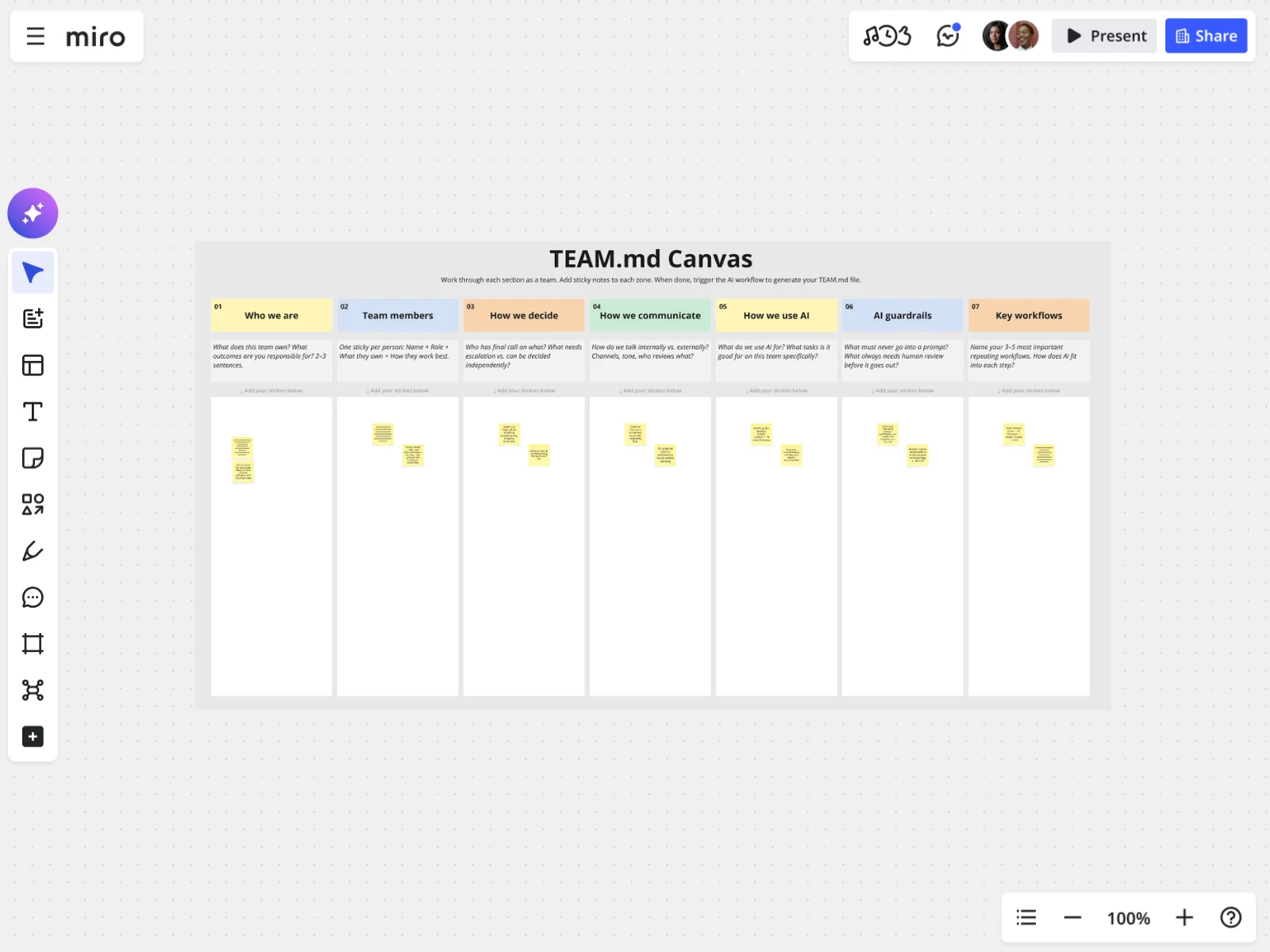
The workshop takes 45 to 60 minutes as a group, or one to two days if you work async. I built the template so your team can work through these questions together on one board.
Before the session, share the board link with everyone and ask people to read the prompt in each column header before they add stickies. Nominate one person as the owner who will commit the final file to a shared library or repository like GitHub.
I pre-filled the template with an identity platform team at a fictional company called Bumblebee.ai. The team works on single sign-on and authorizations, and the workshop has seven sections:
- Who we are (5 minutes). One person drafts a two- to three-sentence description of what the team owns, and everyone reacts and edits with stickies. The example team names the key platform features it's responsible for.
- Team members (10 minutes). Each person adds a sticky with their name, role, what they own, and how they work best. Go beyond a list of names. In the example, Sarah is the product manager who owns the roadmap, PRDs, and customer communications, Marcus is the engineering manager, and Lucy is the design manager. Be honest, because this is for the AI and not for a performance review.
- How we decide (10 minutes). List your actual decision rights, not your aspirational ones. Map who has the final call, what needs to escalate outside the team, and what groups of teammates can decide on their own.
- How we communicate (5 minutes). Cover channels, tone, and review gates, and focus on what a new person or an AI would get wrong without guidance. The more specific you get, the better it works, so link your Jira board and backlog, your Confluence space or Notion workspace, and your Miro team space, and name the Slack channel and the tone you use there.
- How we use AI (10 minutes). Split it into what you actively use AI for and what you consciously keep human. Both matter, and disagreement will come up here, which is useful.
- AI guardrails (10 minutes). This is the most important section. Map what data must never go into a prompt and what always needs human sign-off. Include org-wide policies and team-specific ones, and say how the human should behave while they're in the loop.
- Key workflows (10 minutes). Name your three to five most important repeating workflows. For each one, mark where AI helps and where a human stays in the loop.
Expect question marks, especially in the decisions section. Flag them, because those gaps matter. Your team can go outside the group to get clarity, or you can talk through how those decisions happen, and either route works. When you finish, discuss where people disagreed and which gaps you can close together.
Ready to run it? Open the template in Miro, share the link with your team, and start with section one.
Turn sticky notes into a TEAM.MD file in about a minute
By the end of the workshop, you have a canvas full of stickies and a blank document next to it. The template includes a prewritten prompt that a Miro AI Sidekick runs against your board. It explains what a TEAM.MD file is, how to structure the information, and how Claude or ChatGPT should read it, and it carries a few rules that keep the file efficient so your team isn't constantly burning tokens. Run it, and it takes everything from the canvas and writes the file in about a minute.
The finished file shows when someone made it and who last updated it, then follows the sections from your board, including your open questions. I'm fine with the open questions staying open, because some fuzziness is okay to sit with.
Review the draft together, which usually takes about 15 minutes. Then go to Share, choose Export, and download it as a very lightweight Markdown file. Drop it into a shared team project in Claude or ChatGPT if your tool has one. In Claude, you can load it as a skill or as an MD file for context in individual projects. Put it anywhere your work touches a teammate or one of your key workflows, and have your owner commit the file to the repo.
Keep the file current by reviewing it once a quarter or whenever something big shifts, like new teammates, a new feature or domain, or a new strategy.
What changes when your AI tools know how your team works
With the file loaded in a project, you never have to call it up. Mention a key workflow or a teammate, and your AI tool references the context on its own. You use your tools the way you always do, and they check your team's context first.
That context changes what you get back. Your AI tool can point out that a decision should escalate outside the team, or tell you to talk to the teammate who owns that part of the platform. In my testing with other teams, the responses stop sounding like generic advice about how people should work and start giving specific direction based on how your team does work.
Why this lives in Miro and why Claude still matters
I don't think Claude can do what Miro does, and I don't think Miro can do what Claude does. They're two different jobs that work hand in hand, and the TEAM.MD file is the bridge between them.
Each person on a team holds only what's in their own head. Miro's shared canvas gets that knowledge into one place, where everyone can see the bigger picture of the context your AI tools need and the context each teammate needs to do better work. People can add their input at the same time or async over a couple of days.
AI tools are great at taking instructions, so the real question is what instructions you give them. Miro does an elegant job of helping teams form those instructions. Once the instructions and the context are set, your AI tools can do what they do best.
I'll admit the file is a bit of a Trojan horse. Every team needs to talk about how it uses AI, whatever the industry or type of work, and the TEAM.MD gives people a reason to have that conversation, be more intentional about it, and decide how they'll use AI day to day. Hopefully that leads to better work.
Start with one 60-minute conversation
Block an hour with your team this week and open The Team's AI Context File in Miro. Share the board link, ask everyone to read the column prompts first, and fill in one section at a time. If you can't get everyone together at once, give them a day or two to add stickies async. When the hour ends, your AI tools know who owns what, which decisions escalate, and where a human stays in the loop, so your very next prompt can start from there.
Want to try it? Grab the template and start with a free Miro account.
Read more
Join our 100M+ users today


