Table of contents
Table of contents
By signing up, you agree to Miro's Terms of Service and Privacy Policy.
How I built a research hub that remembers my work so I don’t have to
Catalin Ciubotaru is a Staff DevEx Engineer at Miro, where he helps teams iterate on their ideas and builds Miro’s in-house Iteration Platform. He started out as a .NET developer, spent years working in Angular, including at SnappCar, and now balances coding with coaching and trying to make the life of engineers just a bit more fun. Originally from Romania, he lives in the Netherlands and likes board games, video games, and walking his dog, Koda.
Last published
My job centers on iteration: specifically temporary feature flags, like gradual rollouts, and experiments. We built an internal platform for all of it, and people use it to configure flags, pick who gets a rollout, turn a feature on or off, and analyze the results. The platform is called the Iteration Platform. Everyone uses it, and there's always room for improvement.
There are two of us on the team behind that platform, with me handling product and frontend, and my colleague Carlos handling backend and infrastructure, so our capacity is very limited. Mironeers (the people who work at Miro) have great feedback, which means we get swamped with issues to fix, experience improvements to make, and new features to build.
AI looked like a way to get more done with just the two of us. But you can't point AI at Slack and tell it to implement everything. You'd make a mess of your product, and you would still have to maintain that mess for now. I needed a different plan, so I started with a question: how do I put all my work in one place, so I can step out of a topic and back in without losing my footing?
I'm also a visual person. I don't like wading through walls of text. I wanted something with colors and sparkles and glitter.
Collaborative AI Workflows
Join thousands of teams using Miro to build the right thing, faster.
Start with a folder and a few robots
I began with a plain folder on my machine. I told my robots (my name for AI agents like Claude and Codex) that whenever we talked about the iteration platform, they should take notes and consolidate them in that folder. That folder became the start of my AI context management: one place where the context for every topic lives.
The folder grew one file per topic at a time. One file covers simulation, a feature we recently built. Another covers MCP for the iteration platform. A third covers how to rename stages. Each topic had its own home before I built anything visual.
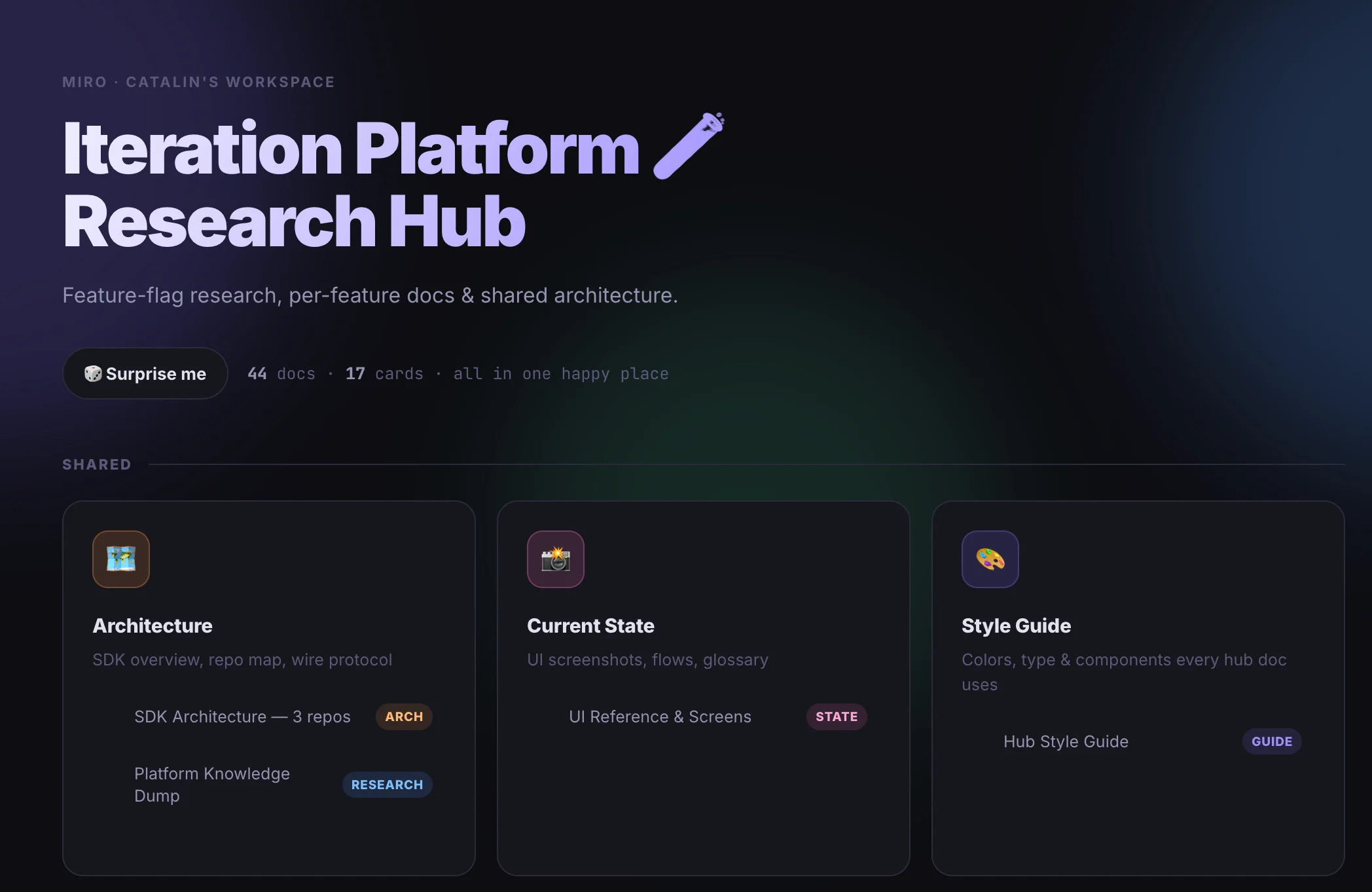
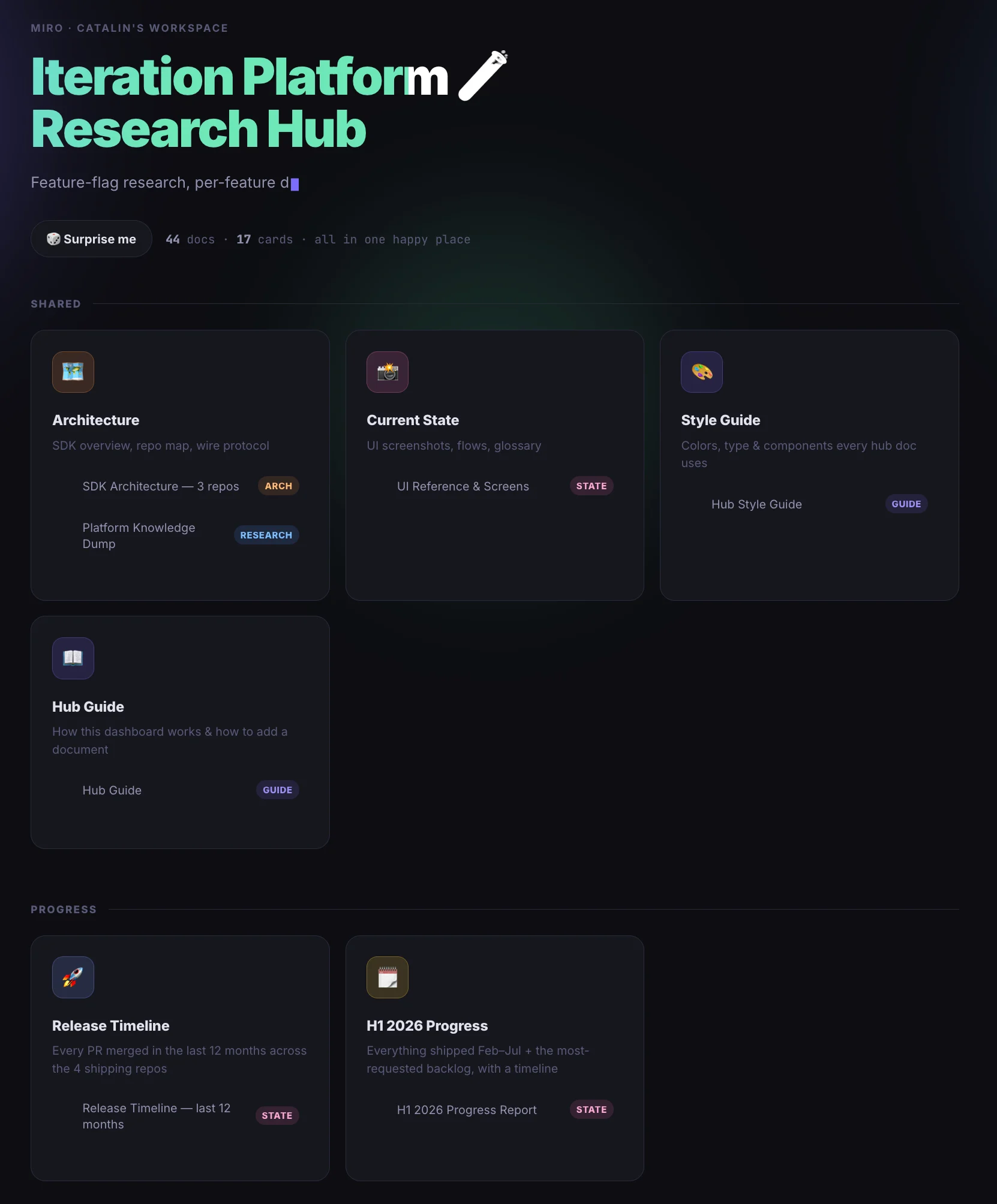
Next, I asked the robots to take all those files and build me a website that shows where I stand on every topic. AI tools are good at building websites right now, so I let them handle that.
Give every feature a short path from idea to code
Once the folder worked, I gave each feature a rough path. A feature like global simulation goes through these steps:
- Brainstorm. I reflect on the problem I want to solve using the feedback that I have.
- Research, when the feature needs it. I tell the robots to look at other products on the market and report how they solve the same problem. The answer lands in a research document next to my first file.
- Design the UX. I open Claude Design and give it the first file and the research. Then we work out together what the hypothetical user experience could look like. At the end, I export an HTML page that becomes the design file.
- Implement. I use Claude Code. At the end of every conversation, I ask it to write down the plan we followed and what we built, and to save it in the same place. I also tell it to skip the nitpicking. It shouldn't go into too much detail, just enough for future me to understand what happened.
Each feature ends up with a brainstorm, a research file, a design, and an implementation plan.
The payoff is how easily I move around. I don't have to take a feature from zero to hero in one go. Maybe it isn't top of mind this week, or maybe something more important lands on my desk. I can pause it, and when I come back, I open a new session with a robot and it knows where to pick up. We skip the whole process the second time around.
My perfectionism added friction, so I let it go
Not everything went smoothly, because I was too pedantic about how my files should look. I'm a perfectionist, and I think a lot of engineers are, so I wanted every file to follow the same format, and that created too much friction.
The trouble was that features come in different sizes and scopes. Global simulation is a well-rounded feature with distinct phases, while renameable stages, as we call it internally, is an augmentation of a feature that already exists, so it skips the market research and follows a different path.
It took me a while to let go of the idea that everything should follow the same process, but I eventually settled on a format somewhere between a complete brain dump and a fully structured document, and I made peace with whatever format each topic ended up in, because the robots understand it either way.
I didn't want to build in a bubble
Once the dashboard worked for me, I started thinking about my colleagues, because people at Miro have a lot of good opinions, and I didn't want to build in a bubble around the things I'm biased to think are important.
So I made the dashboard public as a non-contractual roadmap, which means anyone can visit it at any time and see what the iteration platform is working on right now, and I'm constantly iterating on it, pun intended.
It also works retroactively, because every engineer knows that no feature ships without compromises, and the hub keeps track of them. If someone looks at global simulation and wonders why they can’t filter by Segments, for example, they'll find out that we didn't implement that one yet, because the segments API is too slow, and would degrade the user experience, but it's coming soon.
Most of the feedback came from people who were excited to see what goes through my brain, which was pretty fun, and I think that happened because I introduced the site with a clear message that it's a non-contractual roadmap showing what's on my mind right now, not a list of things I promised to build.
That framing matters because if I made the hub part of our official process, I'd box myself into specific commitments, and it would lose its fun. Building it was insightful, and looking at it is rewarding because it validates everything I've built. Since nobody had an obligation attached, my colleagues could treat it as a whimsical look at how I work and take inspiration from it, whether that meant trying something for themselves, or just perusing.
Leadership can use the hub too, because a senior product manager can put it next to the official roadmap and see why a past feature took longer, where we got blocked, and what decisions we made along the way. They can also see whether work has already started on something planned for the next cycle, which adds an extra layer of information to whatever the roadmap says.
Let the hub do the remembering
David Allen once said that the brain is made for processing information, not for storing it. That idea set this whole project in motion for me.
Remembering every plan and every topic on standby is no longer my job. I used to juggle all of it in my head, from what I was working on to which stage projects like the Simulation Feature or Stage Renaming had reached, and now the hub holds that for me. When a thought shows up, I write it down, and it goes straight into the hub. Because there's no friction, nothing gets lost, and I stop reminding myself to write things down. That freed up some of my brain capacity, and it came as a big relief.
The visual side pays off in other ways as well. One of my latest additions to the dashboard is a page with a timeline of everything I released in the last six months. It's visual and easy to follow, and it links to GitHub pull requests, issues, and Jira tickets. Looking at it gives me a sense of satisfaction and validation. That's what I delivered!
It also helps if a performance review is coming. You can see what you worked on, in a layout that's easy to follow. And because the data lives in one place, I can mix and match it for whatever I need.
How to build your own AI context management system, whatever tools you use
Skip copying my setup and focus on the process, which works in any format. This is the order I'd follow:
- Figure out how you take in information best. Maybe you like a card format like Twitter, images, walls of text, articles, or a website. If you never read what you build, it won't help you.
- Pick a central place that lets you read in that style. Make it flexible enough to hold a pseudo-structured mix. I dump HTML, images, screenshots, videos, and Slack messages in mine, and it curates everything into the right topic and makes it look good.
- Tell your robots to write there. Whenever you discuss something, they should synthesize and save it.
- Tell your robots to read from there. Whenever you start a new session, they should load what's already in the hub.
It doesn't matter which robot you use, whether you work with voice or notes, or where the content lives. If you try to keep everything in your head instead, you'll slowly burn out. Context switching is constant, and too many topics run at once to hold them all.
Once those steps work, use the system for a while and see what it's missing. I added automatic jobs that run daily and send me a summary, for example. Wait to add extras until you know the core works for you. Write for yourself, in a form you will follow, instead of writing content for nobody.
Try it on a Miro board
When a Miro board suits you best, put all of this there. Miro has an MCP server, so you can tell your robots to write notes onto a board and read them back when a new session starts.
A board suits the visual thinkers among us. Screenshots, sketches, and notes can sit side by side on Miro's Intelligent Canvas™, where people and AI agents work in the same space. You could give each feature its own frame, with the research, design, and plan in a row. Your colleagues can then open the board, add a comment, or drop in a sticky note. Anyone who wants to react to your thinking can do it right where it lives.
If you want to try the process without building a website first, create a free Miro board, connect your AI assistant through the Miro MCP, and run the four steps above. Start with one topic.
What AI changed about my work, and what I'm keeping
AI changed how I spend my days. My robots take the notes, look at what other products do, work through the UX with me, and write down the plan of what we built, so I no longer carry every topic in my head. That's how I get more done as one half of a two-person team, and it lets me stay productive while enjoying my job.
Where is all of this heading? I read somewhere that anyone who tells you what the future of AI looks like is a liar, so I'll try not to be one; in other words, I don’t know.
I do have a feeling that human cognitive capacity is under strain right now. We might be in a pendulum swing, from no AI to too much AI, and the truth will land somewhere in the middle. It's up to us to work out how much we can take and to build processes that make us more efficient without overworking us, so we enjoy our jobs more.
I love AI processes that make work more enjoyable, so I automate the boring stuff and keep what brings me joy. Take a performance review. The timeline of my last six months already gathers the links to every pull request, issue, and Jira ticket, and I wouldn't hand the writing to AI, because the personal part is the most important part of a review.
My advice is to hand the tedious work to AI and keep the work you love.
Read more
Join our 100M+ users today


