Table of contents
Table of contents
By signing up, you agree to Miro's Terms of Service and Privacy Policy.
Why good ideas stall before they ever reach AI product development
Last published
I run design thinking workshops out of Bali, mostly for university students, digital nomads, and professionals who don't come from a technical background. For years I watched the same thing happen. Someone would get to the end of a great brainstorm, a real problem defined and a real solution taking shape, and then stop, because the next step meant coding, hiring someone who could, or learning a design tool from scratch.
That gap between "we know what we want to build" and "here's a working prototype" is where most good ideas quietly die, and it's rarely because the idea itself was weak. More often, nobody in the room had a way to actually see it yet.
Collaborative AI Workflows
Join thousands of teams using Miro to build the right thing, faster.
Why a good brainstorm doesn't survive contact with a coding tool
Here's the pattern I kept running into with my workshop groups. They'd get excited about an AI tool, drop in a one-line prompt like "build me an app for reporting local issues," and get back something technically fine but generic, the kind of result that could belong to any team working on any problem.
The issue usually wasn't the AI. It was the input. Tools like Claude and Lovable can build genuinely strong interfaces, but they need real detail to work with: what problem you're solving, who it's for, what the flow looks like, what style you're going for. Without that context, an AI product development tool has to guess, and it tends to guess toward the average of everything it's seen before.
Most people don't have that detail organized in one place. It's scattered across a notes app, a half-finished PRD template, a few screenshots they liked, and a conversation from three weeks ago that nobody wrote down. So instead of prototyping, they spend the first hour trying to remember what they meant.
What actually needs to happen before you touch an AI tool
The teams who consistently get a prototype that looks like their idea, often on the first or second try, tend to do one thing differently before they open a build tool: they organize the thinking first, and only then start generating.
In practice, that means putting the problem into words everyone can see and agree on, deciding on a direction before jumping to solutions, and picking a style reference instead of leaving the visual identity to chance. It also means turning all of that into a structure an AI tool can use, rather than a loose paragraph of vibes typed into a prompt box at the last minute.
This is really just good design thinking, the same process I've used in workshops for years. The difference now is that it can lead straight into a working prototype instead of stopping at a wireframe someone has to hand off to a developer.
Miro is the shared space where that thinking happens, and where AI tools plug in
This is where Miro comes in, and it's worth being clear about the role it plays: it's not another design tool competing with Claude or Lovable for the same job. It's the layer that sits between your team's thinking and whatever AI tool ends up building the thing, which is why I describe it to people as a kind of middleman, in the best sense of that word. It fills the gap between people who think in problems and solutions and tools that only think in code.
On an infinite board, I can put a team's entire process in one place, with the problem, the proposed solution, a style reference, a rough flow, and a PRD all connected and visible at once. Everyone in the room, technical or not, can look at that board and understand exactly what's being built and why, which is genuinely harder to pull off in a static document or a chat thread, where context gets buried the moment someone scrolls past it.
Because Miro connects directly to AI-assisted product development tools through Miro MCP, that board isn't just a reference people glance at before opening a separate tool. It becomes the actual input for the build. Nobody has to retype their idea into a prompt box and hope they remembered every detail, because the tool is pointed straight at the thinking the team already did together.
Walking through it: turning a Bali flooding problem into a working app
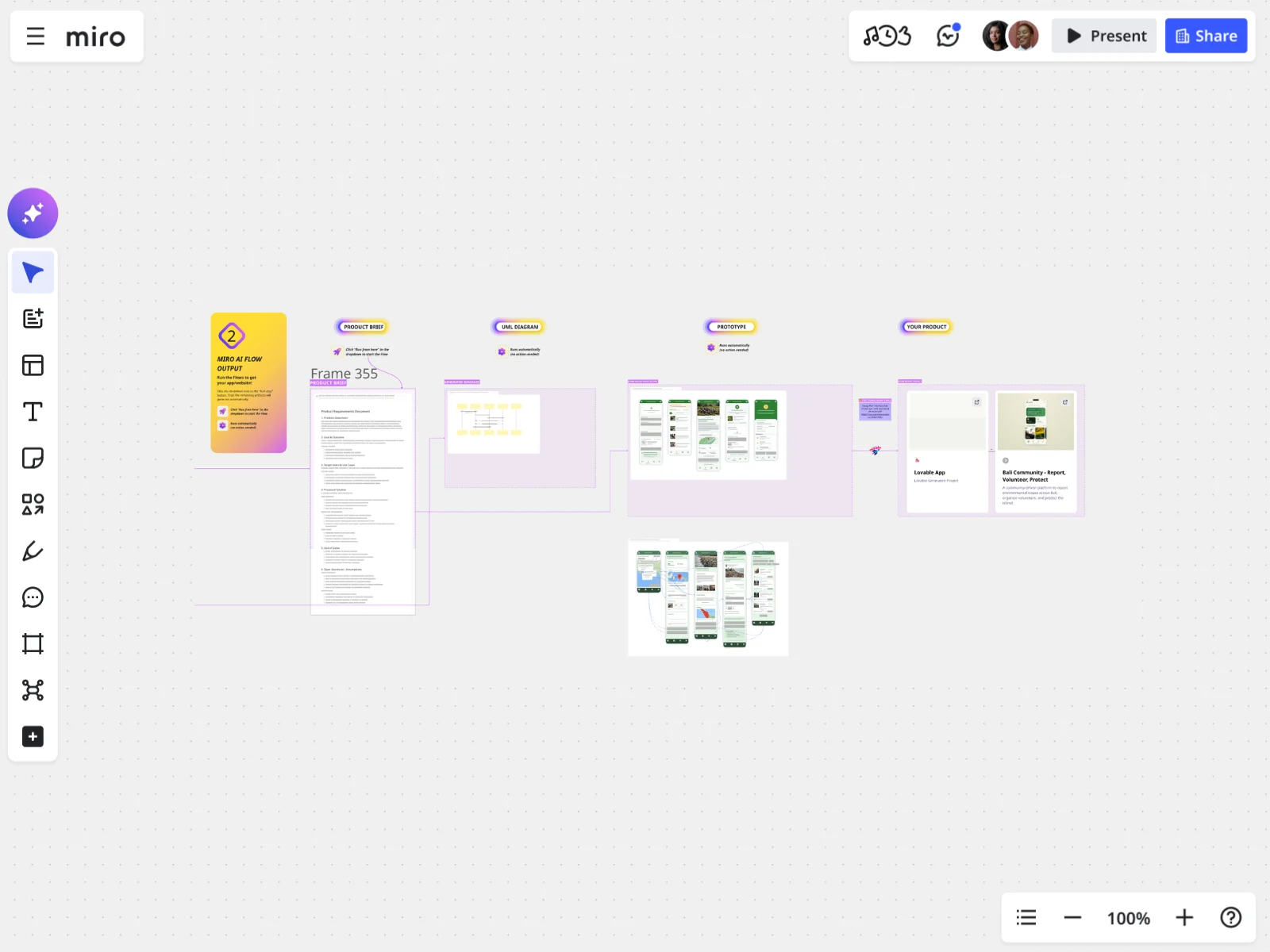
I built the Idea to Prototype with Miro MCP x Lovable template around a real problem I ran into myself, and I still use it as my go-to example because it shows the whole path from a messy issue to a clickable prototype.
Bali has a serious trash problem, and it's not just a matter of appearances. Trash buildup is tied directly to flooding in several areas, and because not every location is easy to reach, some areas need a motorbike rather than a truck to get to, which makes it genuinely hard for anyone to flag a problem happening near them.
Here's how I worked through it on the board.
- I defined the problem in one place: trash buildup contributing to flooding, and no easy way for locals to report or track it.
- I worked out the solution before touching any build tool, landing on a monitoring and reporting app where locals could flag trash hotspots and volunteers could sign up to help clear them.
- I picked a style reference, choosing green pastels and tosca based on an image I liked, so the app wouldn't come out looking generic.
- I turned it into a PRD, with help, since most people I teach don't come in knowing PRD structure. I asked a Miro Sidekick to help build the prompt around problem statement, goals and outcomes, target users, proposed solution, what's out of scope, and open questions, because that structure matters as much as the content.
- I mapped the flow with a UML sequence diagram right on the board, so anyone with a technical background could see the back end, front end, and database without switching tools.
- I connected the board to Lovable through Miro MCP, without re-explaining the idea or re-typing the style guide, because the board's context went straight into the build.
The result on the first pass was a multi-screen app: an area map for spotting problems, a way to report a trash issue, and a volunteer sign-up flow with a schedule. I also ran the same board into Replit to build a companion landing page, and it held the same visual identity, because the source thinking, the style reference, and the PRD stayed consistent no matter which tool was doing the building.
"Wait, Miro can do this?"
That's the reaction I get almost every time, six or seven workshops in at this point, and it's usually some version of the same realization. People already had the idea sitting in their head, but they never had a way to actually see it take shape. Once sticky notes turn into a connected flow, and that flow turns into an actual screen they can click through, something clicks for them too.
What I tell people afterward matters just as much as the generation itself, because this first version is a starting point rather than a finish line. If they don't like a logo, they can change it. If a label feels off, they can fix it themselves. That's really the value of vibe coding an idea into existence quickly: it gives a team something concrete to react to, which is a much easier conversation than staring at a blank page together.
I've also shown people the difference a detailed prompt makes, by running the same idea through with a thin PRD and then again with a thorough one. The gap in output quality is obvious every time, and it's the clearest way I know to prove that the thinking put into a Miro board is the real engine behind a good result, not just whichever AI model happens to be on the other end.
Why this matters beyond one Bali workshop
I work with people who've never built anything technical, and I work with people who build for a living, and both groups get value out of this, just for different reasons. For the non-technical folks, Miro removes the excuse that they don't know how to code or design well enough to start. For the technical folks, it gives their whole team a shared visual reference to rally around before a single line of code gets written.
Either way, nobody has to leave the screen to make real progress, and that's the part I keep coming back to. The idea, the reasoning behind it, the style, the flow, and the eventual prototype generator AI output all live in the same place, so people don't lose context jumping between tools, and they don't lose the reasoning behind a decision three days after they made it.
If you've got an idea that's been stuck in your head, or scattered across a random notes app, longer than it should be, that's exactly what this template is built for.
Grab the template and see how far your own idea gets on the first pass.
Read more
Join our 100M+ users today


