Table of contents
Table of contents
By signing up, you agree to Miro's Terms of Service and Privacy Policy.
AI as your virtual UX reviewer: Automate your usability analysis before you code
Summary
In this article:
- What prototype usability testing actually is (and why skipping it costs you)
- Why testing and evaluating a prototype is important before you write a single line of code
- Questions to ask during prototype testing
- How to run AI-powered usability validation in Miro: a step-by-step guide
- The best usability testing tools available today
Collaborative AI Workflows
Join thousands of teams using Miro to build the right thing, faster.
Picture this: your team spends three sprints building a feature. Developers write clean code. Designers deliver polished screens. Then the first real users try it, and within five minutes, they're confused about where to click. That feature gets shelved, or worse, ships and generates a wave of support tickets.
You can now get severity-ranked usability feedback on a prototype in minutes, without recruiting a single participant, without scheduling a single session, and without leaving the canvas where you built it.
According to a Forrester Consulting study commissioned by Miro, organizations lose the most momentum during the discovery and definition phases of product development, at 38% and 35% respectively. By the time a feature reaches engineering, the decisions that determine whether it actually works for users have already been made, and most of them were made without real testing.
AI changes that. Teams can now get detailed, heuristic-based usability analysis on a prototype in minutes, before the first participant is ever recruited.
What is prototype usability testing?
Prototype usability testing is the process of putting an early version of your product in front of real or simulated users to identify friction, confusion, and failures before you commit to building it. The prototype can be anything from a rough wireframe to a fully interactive screen. The goal is always the same: find out what doesn't work while it's still cheap to fix.
There are two traditional approaches. Moderated testing involves a facilitator guiding a participant through tasks in real time, asking follow-up questions and probing for clarification. It produces rich qualitative insight, but requires scheduling, a facilitator, and meaningful time from everyone involved. Unmoderated testing asks participants to complete tasks independently through a platform that records their interactions, which scales faster and costs less.
Both ask the same core question: does this design make sense to someone who wasn't in the room when you built it? AI-assisted usability validation adds a third option that can answer that question before any participant is ever recruited.
Why testing and evaluating a prototype is important
The most common reason teams skip usability testing is time pressure. What that usually means in practice: there's no time to find out something was built wrong until after it's already been built.
Testing a prototype takes hours. Reworking shipped code takes weeks.
Beyond the raw time comparison, testing before you code has real stakes.
The most visible payoff is stakeholder confidence. Björn Ehrlinspiel, Product Owner at Miles & More (part of the Lufthansa Group), found this directly when his team used Miro Prototypes to validate a concept in under a day. "I'm way more confident that the things we are implementing for the product are the right things," he said. "Miro Prototypes helps me show my vision to the management team."
A prototype also gives your PM, designer, and engineer a shared artifact to react to, surfacing disagreements about requirements before they become bugs in production. And once you've shipped something confusing, user trust is hard to earn back.
Questions to ask during prototype testing
The questions you build a test around should focus on task completion and navigation, not on whether users think they like the design.
Questions to ask during prototype testing
Category | Goal | Questions to ask |
Task-based evaluation | Understand how users navigate the design | Walk me through what you'd do first on this screen. / What do you expect to happen when you click here? / If this were a real product, what would you do next? |
Comprehension evaluation | Check whether the design's purpose is clear | What do you think this feature is for? / Who do you think this product is designed for? / What information would you need before taking this action? |
Emotional and confidence evaluation | Identify hesitation and friction | How confident do you feel about completing this task? / What would make this easier? / Is there anything here that makes you hesitate? |
Whether you're prompting a human participant or configuring an AI Sidekick, the goal is the same: find where users get stuck before that friction makes it into your codebase.
How to run AI-powered usability validation in Miro: a step-by-step guide
Mathias Davidsen, who leads the Miro Prototypes team, walked through a complete AI-assisted usability validation workflow. This workflow demonstrates how teams can go from an existing product screen to a synthetically tested, revised prototype without leaving Miro. Here's how it works:
Step 1: Bring your existing screen and spec into Miro
Start with the screen or flow you want to validate. If you have a PRD or product spec in a connected tool like Confluence, pull it directly into your Miro board using Miro Sidekick and the Atlassian MCP integration. Davidsen demonstrated this with a fintech loan application screen: he asked Sidekick to find the FlexFund Loan Comparison Calculator PRD in Confluence and add it to the board, which it did with full visibility into the document's contents.
Having both the existing screen and the spec on the same canvas means the AI has everything it needs as context before generating or reviewing anything.
Step 2: Use Sidekick to generate or update your prototype
With both assets on the board, open a new Sidekick chat, select your screen and spec as context, and prompt Sidekick to implement the spec changes into the existing screen. Davidsen described the approach: "We tell Sidekick what we're looking at — we're looking at an existing screen, we're looking at a new PRD that outlines how we want to implement a loan calculator into this existing screen."
Sidekick generates an updated prototype that reflects the spec requirements, with all elements fully editable so you can make adjustments before testing.
Step 3: Iterate on layout with AI before running the review
Before you run the usability analysis, make sure the prototype reflects the direction you actually want to test. If a layout choice feels off, use the "Edit with AI" option to try an alternative. Davidsen found the initial sidebar layout cramped and prompted Sidekick to create a horizontal section instead. The revised version placed the loan calculator between the loan details and recent activity sections, which was significantly cleaner.
Getting the layout right before the review matters because you want the AI to evaluate a design you're genuinely considering, not a placeholder.
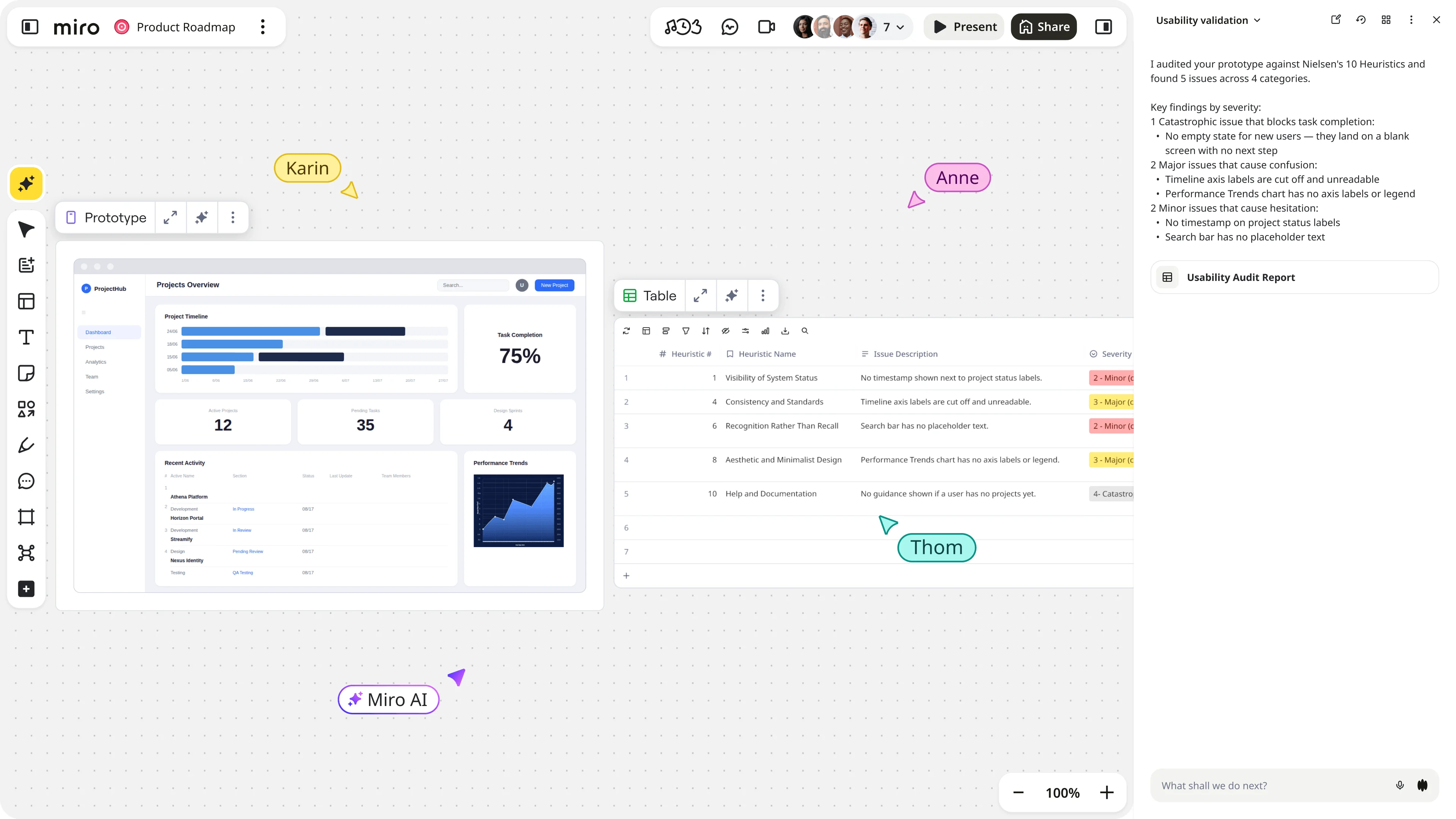
Step 4: Switch to the usability validation Sidekick
Once your prototype is in a state worth evaluating, switch to a custom Sidekick configured as a usability research expert. As Davidsen explained: "If I change my Sidekick up here to the usability validation Sidekick, you'll see that I prompted and instructed my Sidekick to be a usability research expert."
Select your prototype and ask the Sidekick to analyze it for usability issues. Davidsen's prompt was direct: "Analyze the selected prototype and provide recommendations and improvement points from a usability perspective."
Step 5: Review the severity-ranked findings
The Sidekick returns a categorized list of issues mapped to Nielsen's 10 usability heuristics, each rated by severity. In Davidsen's demo, the analysis surfaced 33 distinct violations covering navigation, lack of context, and usability flow. The findings are organized so you can see at a glance which issues need immediate attention and which can wait.
As Davidsen put it: "This means we don't have to get this feedback from our stakeholders — we can implement it right away and they can focus on the more high-value things."
Step 6: Generate a revised prototype from the findings
Select the findings table and the original prototype, then prompt Sidekick to create a new version with the prioritized issues resolved. Davidsen filtered to severity 3 and 4 items: "Create a new prototype with the recommendations from the table implemented. Only implement severity three and four."
The revised prototype reflected concrete, specific improvements: the status field now shows exactly what the applicant needs to provide (bank statements), submission conditions are visible at the top of the screen, and live sync controls are clearly actionable. These are the kinds of details that get missed in design reviews and only surface during user testing, or after launch.
Step 7: Hand off to build
When the revised prototype is ready, you have two options. Copy it directly to Figma for design handoff, where it arrives fully editable. Or pass it to a coding agent via MCP. Davidsen demonstrated the latter by opening Claude Code and prompting it: "Please create a pixel-perfect React app based on this prototype." Claude Code generated a working application from the design, ready for continued development.
From existing screen to AI-reviewed prototype to handoff, the whole cycle happens on a single canvas without switching tools.
The best usability testing tools for product teams
Choosing the right tool depends on what stage you're at and what kind of feedback you need. The table below covers the main options across four use cases.
The best usability testing tools for product teams
Tool | Use case | What it does | Best for |
Miro Prototypes with AI Sidekicks | AI-assisted prototype review | Runs heuristic-based analysis directly on your prototype, returns severity-ranked findings mapped to Nielsen's 10 heuristics, and generates a revised design from those findings in the same session. Custom Sidekicks can be configured for specific review lenses: business logic, accessibility, or implementation complexity. | Teams who want synthetic usability validation before recruiting real participants, and who are already prototyping in Miro |
Maze | Remote unmoderated testing | Task-based prototype testing with quantitative metrics including misclick rate, time on task, and completion rate, alongside qualitative comment capture. Also offers five-second tests, preference tests, and click tests for quick visual direction feedback. Integrates with Figma. | Teams that need fast, scalable feedback from real users with minimal facilitation overhead |
Lyssna | Remote unmoderated testing | Task-based prototype testing with quantitative and qualitative outputs. Integrates with Figma. | Teams looking for a Maze alternative with a similar feature set |
UserTesting | Live moderated sessions | Facilitated sessions with access to a built-in participant panel for recruiting. | Teams that need observed, real-time sessions with participants they haven't sourced themselves |
Lookback | Live moderated sessions | Facilitated sessions with screen and audio recording. Works best when you bring your own participants. | Teams running moderated research with an existing participant pool |
Davidsen described the flexibility of Miro's AI approach: "You can prompt your custom Sidekicks to be whatever you need them to. So this is a really great way of getting feedback from different types of personas depending on your needs."
Stop asking "is it ready to build?" — start knowing
The teams that consistently ship products users actually want tend to have one thing in common: they find problems early enough that fixing them is still fast.
Before AI, getting useful usability feedback required recruiting, coordination, and waiting. Now, a team can prototype a feature in the morning, run a severity-ranked heuristic review by midday, revise based on findings, and hand off to engineering the same afternoon.
AI-assisted review and real user testing do different things. Real users bring domain knowledge, unexpected workarounds, and emotional responses that a model can't replicate. But AI clears the obvious obstacles before anyone wastes engineering time building the wrong version of something.
Run your AI review first. Know what you're handing to real users before they ever see it.
Sign up for Miro free and run your first AI-assisted usability review today.
FAQ
What is prototype usability testing?
It's the practice of evaluating a design before it gets built. The prototype can range from a rough wireframe to a fully interactive screen; what matters is that you're testing intent and navigability early, when changing something costs hours rather than sprints. One thing teams often miss: you don't need a high-fidelity prototype to get useful signal. Even a static screen can surface navigation assumptions that won't hold up with real users.
Why is testing and evaluating a prototype important?
The assumptions baked into a design are invisible to the team that made them, and only become visible when someone outside that context tries to use it. You will find the problems eventually. The only variable is whether you find them before the engineers have built around them, or after.
What questions should I ask during prototype testing?
Ask users to show you what they'd do, rather than tell you what they think. "Was that easy?" invites a polite answer. "What would you do next?" reveals whether they actually know. Keep questions open-ended, avoid hinting at the correct behavior, and pay close attention to where users pause or hesitate even when they don't say anything. Silence and second-guessing are often the most informative moments in a session.
What are the best usability testing tools?
It depends on what you're trying to learn and when. For catching heuristic violations before involving real users, AI-assisted tools like Miro Prototypes with AI Sidekicks give you severity-ranked findings without any recruitment overhead. For behavioral data from real users, Maze and Lyssna handle unmoderated testing at scale. Moderated sessions with a facilitator are where UserTesting and Lookback come in. Most mature product teams combine all three across different stages: AI review first, then targeted real-user testing on the questions AI can't answer.
Can AI replace user testing?
For catching structural and navigational issues against established frameworks, AI is fast, consistent, and available on demand. What it can't replicate is the unpredictability of real users: the domain knowledge they bring, the workarounds they invent, and the emotional responses they have to things that look fine on paper. A well-configured AI reviewer clears the problems that are straightforward to catch. Real users find the ones that aren't.
What is the prototype testing process in Miro?
Start on the canvas where your prototype lives. Switch to a usability validation Sidekick, select the prototype, and prompt it to analyze the design against Nielsen's 10 heuristics. The Sidekick returns a prioritized issue list you can filter by severity, then generates a revised prototype with the selected fixes applied — all in the same session. When you're ready, hand off directly to Figma or to a coding agent via MCP, without leaving Miro.
Last updated: June 26, 2026
Read more
Join our 100M+ users today


