Table of contents
Table of contents
By signing up, you agree to Miro's Terms of Service and Privacy Policy.
From sticky notes to clickable prototype in 3 minutes: The AI-powered prototyping workflow
Summary:
In this article, you'll learn:
- Most product teams lose momentum not in the building phase, but in the discovery and alignment phase, where ideas stay stuck in docs, slides, and scattered sticky notes.
- AI prototyping for product managers closes that gap by turning rough concepts into clickable, shareable prototypes in minutes, not days.
- The best prototype process isn’t about pixel-perfect screens. It’s about getting your team aligned on the right idea, early.
- Mid-fi prototypes hit the sweet spot: visual enough to gather real feedback, fast enough to throw away if the idea doesn’t hold up.
- Miro brings together AI, visual collaboration, and the full prototype process, from discovery to delivery, on one shared canvas.
- Tools like Miro Prototypes, Miro Flows, and Miro AI Sidekicks help product managers run faster discovery cycles without waiting for a designer.
Collaborative AI Workflows
Join thousands of teams using Miro to build the right thing, faster.
You’re three days out from a stakeholder review. Your team has a promising idea, but it only lives in a Confluence doc and a few sticky notes from last Tuesday’s brainstorm. You need something visual, something people can click through and actually react to, but your design team is heads-down on a different sprint.
Sound familiar? For most product managers, this is the bottleneck that never goes away.
Prototyping has always been one of the highest-leverage activities in product development. But the prototype process has traditionally been slow, designer-dependent, and reserved for ideas that had already survived multiple rounds of written debate. By the time you got a clickable prototype in front of stakeholders, weeks had passed and the conversation had moved on.
AI prototyping for product managers changes that equation entirely. Today, you can go from a whiteboard full of sticky notes to a clickable, shareable prototype in the time it used to take to write the Jira ticket requesting one. This article draws on insights from the Scrum Alliance and Miro webinar to break down how Agile workflows and AI actually look in practice, and why the product teams moving fastest right now are the ones who prototype earlier, more often, and more collaboratively.
Why product managers are the ones who need this most
There’s a common assumption that prototyping is a designer’s job. It’s not, or at least, it shouldn’t be exclusively. Product managers sit at the intersection of user needs, business goals, and technical constraints. You’re the one who needs to communicate a vision upward to leadership, sideways to engineering, and outward to stakeholders who need to see something concrete before they’ll commit. A written spec can describe an idea. A prototype makes it real.
The challenge has always been the time and skill gap. Building a mid-fi prototype used to mean knowing Figma well enough to not embarrass yourself, having a few hours free, and ideally looping in a designer to clean things up before anyone important saw it. AI removes that barrier, not by replacing good design judgment, but by handling the mechanical work fast enough that PMs can prototype their own thinking, iterate in real time, and use the output as a starting point for proper design work rather than a polished deliverable.
In the From Backlog to Build webinar, Shipra Kayan, Design Evangelist at Miro, made a distinction that reframes the whole conversation: there are two fundamentally different reasons to prototype, and most teams only think about one of them. The first is prototyping for delivery: pixel-perfect screens, edge cases covered, something close to what you’ll actually build. The second is prototyping for alignment: broad strokes, happy path only, just enough visual fidelity to get your team on the same page about what you’re actually trying to build. That second type is chronically underused, and it’s exactly where AI prototyping for product managers delivers the most value.
The real bottleneck isn’t building. It’s deciding.
Before you can prototype anything, you have to know what problem you’re solving. And this is where most product teams actually get stuck.
According to Miro’s own research, organizations lose the most momentum during the discovery and definition phases of product development, not in the build phase. Teams can ship features quickly. What they struggle to do is agree on which features are worth shipping. This plays out in a predictable pattern: individual contributors are more productive than ever, thanks to AI tools that help them generate code, write docs, and research faster. But project velocity hasn’t kept up, because those individuals are still waiting for the team to converge. The decision meetings are still weekly. The alignment is still slow.
This dynamic was central to the From Backlog to Build webinar. As Kayan described it: “Individual tasks are getting compressed, but projects and teamwork aren’t really flowing any faster.” AI is making people run faster, but in different directions. The fix isn’t more individual productivity tooling. It’s AI that helps teams make decisions together, faster, and that’s where the prototype process becomes a team alignment tool, not just a design deliverable.
What a modern AI prototyping workflow actually looks like
Here’s a concrete walkthrough of how product teams are using Miro to compress the full prototype process, from raw discovery to clickable screen, into a single working session. Each step below is grounded in the workflows demonstrated live in the From Backlog to Build webinar.
Step 1: Synthesize your discovery data on the canvas

Most PMs have customer research sitting in spreadsheets, survey tools, and interview recordings. The first step is getting that data into a shared visual space where the team can actually work with it. In Miro, you can paste raw survey data directly onto a board and convert it into sticky notes instantly. From there, Miro AI clusters those notes by theme, surfaces patterns, and helps you identify where customer pain is concentrated, without anyone having to manually sort and label for an hour before the meeting starts.
What makes this particularly powerful is that Miro AI can read not just the text of your sticky notes, but where they are on the canvas. Notes your team has already grouped together, marked with dots, or crossed out all carry meaning. The AI works with the full visual context of your board, not just the words on it.
Step 2: Define the problem and surface your assumptions
Once you have a rough picture of the problem space, the next step is to articulate what you’re actually trying to build and, critically, what assumptions that idea rests on. This is a step that teams skip constantly, and it’s expensive when they do.
David Pereira, product leadership coach and adviser, and co-host of the From Backlog to Build webinar, puts it directly: “Not all assumptions are important. Naming assumptions is one step, and the second step is prioritizing.”
With Miro Flows, you can build automated AI workflows that take a brief problem description, including audience, proposed solution, and general approach, and generate a prioritized assumptions table automatically. The flow identifies which assumptions carry the most business risk and have the weakest evidence, so your team can focus experimentation where it actually matters. This is the kind of step that used to get skipped because it felt slow. AI makes it fast enough to do in the meeting itself.
Step 3: Generate your mid-fi prototype
Now you’re ready to prototype, and this is where the “3 minutes” in the title becomes real.
A mid-fi prototype sits between a rough sketch and a fully designed screen. It has enough visual structure that stakeholders can understand the intended experience, but it’s not so polished that people feel awkward suggesting you scrap it. For prototyping for alignment, the early-stage, high-iteration work, mid-fi is exactly the right level of fidelity. It’s fast to create, fast to change, and honest about where the thinking still needs work.
In Miro, there are three ways to generate a mid-fi prototype with AI:
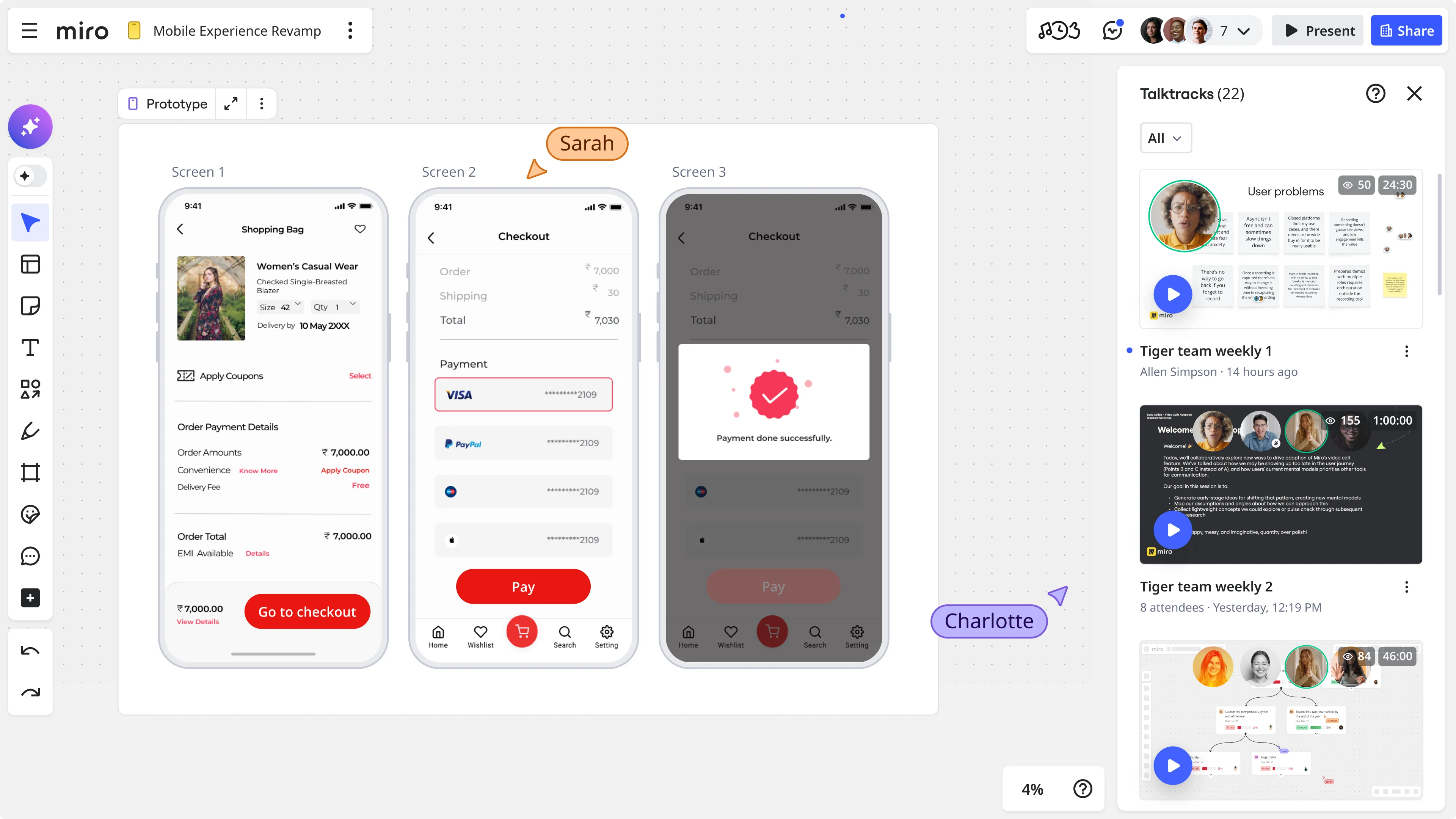
- From scratch, using a text prompt. Describe the screens you need, for example "a three-page mobile flow covering hotel search, search results, and a single hotel detail page," and Miro Prototypes generates an editable, linked set of screens without any design skills required.
- From an existing screenshot. If you already have a product, take a screenshot and ask Miro AI to convert it into an editable prototype. Everything becomes movable, including buttons, icons, text, and layout, so you can quickly mock up what a new feature might look like in context.
- From a sketch or user flow diagram. Draw out the flow by hand or in a diagram, select it, and prompt Miro AI to generate a prototype that matches. This approach works especially well in workshop settings where teams want to move from whiteboard thinking to something clickable without leaving the room.
In every case, the output is fully editable. You can change colors, swap icons, add new screens, link flows together, and iterate directly in Miro, or copy the prototype to Figma when you’re ready for higher-fidelity work.
Step 4: Gather feedback collaboratively
The prototype is only as useful as the conversation it creates. In Miro, everyone on the team can be in the same board at the same time, commenting, reacting, dot-voting, and annotating. Distributed and async teams can leave feedback directly on the prototype, so when you do get everyone live together, you’re not starting the conversation from zero. This is the compounding benefit of doing your prototype process on a shared canvas: the discovery data, the assumptions, and the prototype all live in one place, so when leadership asks “why did you make this choice?”, the answer is one scroll away.
Using Miro Sidekicks to go deeper on specific problems
For product managers who want more than a one-time AI prompt, Miro AI Sidekicks offer a different kind of support: a persistent, customizable AI partner that knows your specific context and helps you work through a particular challenge.
Where a one-off prompt gives you a fast output, a Sidekick helps you think through a problem iteratively, pushing back on your framing, suggesting angles you haven’t considered, and helping you develop your thinking before you commit to a direction. Think of it less like autocomplete and more like a thinking partner who’s always available and never has a conflicting calendar. For PMs running new product prototype development, Sidekicks are particularly useful in the fuzzy front end, when you’re still figuring out the problem and not yet ready to generate solutions. They can help you pressure-test your assumptions, draft a problem statement worth prototyping, or challenge whether the feature you’re about to build is actually solving the right thing.
From prototype to build: closing the loop with Miro’s MCP connector
One of the friction points in the traditional prototype process is the handoff. You build something in a prototyping tool, then you have to somehow translate that into a prompt or spec for an engineering team using a different tool entirely. Miro’s MCP (Model Context Protocol) connector closes that gap. When your prototype is ready, engineers can connect Miro directly to their vibe coding tool of choice. The tool reads the full Miro board, not just the text but the visual layout, screen connections, and design intent, and generates a prompt that captures what you actually built. No long prompt-writing session. No translation layer. The prototype becomes the brief.
This is what a full-cycle workflow looks like: start with customer data on a shared canvas, move through assumptions and prioritization, generate a prototype for alignment, gather team feedback, and then hand directly to engineering, all without the idea ever leaving Miro.
What this looks like in practice: Miles & More
Björn Ehrlinspiel, Product Owner at Lufthansa Group’s Miles & More loyalty program, used Miro Prototypes to do something that used to take weeks in a single day: create, validate, and align on the right solution with his team and management.
“I’m way more confident that the things we are implementing for the product are the right things,” Ehrlinspiel said. “Miro Prototypes helps me show my vision to the management team of the product.”
That last part matters. For product managers, one of the most time-consuming parts of the job isn’t building. It’s convincing. Getting leadership to understand and commit to a direction requires making the abstract concrete, and a clickable prototype does that in a way that a written spec simply can’t.
The PM’s checklist for faster prototype cycles
The following checklist is grounded in the workflows and frameworks demonstrated in the Scrum Alliance and Miro webinar From Backlog to Build: Streamlining Agile Workflows with Integrated AI Tools, hosted by Shipra Kayan, Design Evangelist at Miro, and David Pereira, product leadership coach and adviser. The webinar focused on how AI-first product teams can move beyond individual workflow acceleration to keep cross-functional teams aligned from discovery through delivery.
This checklist is built around the actual stages where product teams lose time, based on what practitioners and researchers consistently report as the biggest blockers to moving from idea to customer value. If your team is stuck at any one of these points, the steps below will help you move faster without skipping the thinking work that matters.
Before the next brainstorm: turn your raw research into something workable
Most brainstorms start with someone summarizing research that everyone has technically already read but not really processed together. The result is a lot of nodding, vague alignment, and decisions that fall apart the moment the meeting ends. Instead, paste your survey data, interview transcripts, and customer feedback directly into a Miro board before the session. Convert them into sticky notes and let Miro AI cluster and theme them automatically. When your team arrives, they’re not starting from a blank whiteboard or a slide deck summary. They’re looking at the actual data, already organized, and they can start dot-voting and discussing what matters most right away.
Kayan demonstrated exactly this workflow live in the From Backlog to Build webinar: she exported audience responses into Miro, clustered them with AI, and the group could immediately see themes around decision latency, alignment gaps, and vision clarity, patterns that would have taken a facilitator the better part of an hour to surface manually. The conversation didn’t start with “what did we learn?” It started with “here’s what we learned, and here’s what it means.”
During discovery: name your assumptions before you fall in love with the solution
This is the step that separates product teams that iterate quickly from those that build the wrong thing confidently. Once you have a rough problem statement and a proposed solution direction, run a Miro Flow to generate a prioritized assumptions table. The flow surfaces what you’re taking for granted, rates each assumption by business criticality and strength of evidence, and flags the ones that could kill the idea if they turn out to be wrong.
Pereira walked through this process in detail in the webinar, showing how a simple problem description, in his example a meal planning app for busy people, could generate a full assumptions table in seconds. His guidance was clear: use AI to generate, then apply your own critical thinking to evaluate. “You use AI to help you amplify your potential, then you apply critical thinking. If something doesn’t make sense, you feel free to delete it.” And his broader point on failure applies directly here: “You fail, you learn, and then you iterate.” That only works if you’re running small, targeted experiments against your riskiest assumptions rather than building out a full feature and discovering the flaw six months later.
Before the next stakeholder review: replace the slide deck with a prototype
Slide decks describe what you plan to build. Prototypes show it. When you bring a clickable mid-fi prototype to a stakeholder review instead of a deck, the conversation shifts from “I think I understand what you mean” to either “yes, that’s it” or “no, that’s not what I had in mind.” Both outcomes are valuable, but only one of them gets you to a real decision. The other sends you back to clarify in writing for another two weeks.
Generating a mid-fi prototype in Miro takes a few minutes regardless of whether you’re starting from a text prompt, a screenshot of an existing product, or a sketch from your last whiteboarding session. It doesn’t need to be polished. It needs to be concrete enough that people can react to it. As Kayan put it in the webinar, the whole point is a conversation: “Is this what you were thinking? This is what I was thinking.” A prototype makes that conversation possible. A slide deck just delays it.
After the review: iterate in the room, not in the next meeting
One of the biggest sources of drag in product development is the gap between when feedback is given and when it shows up in a revised artifact. Someone gives notes in the review, you spend three days updating the PRD or the Figma file, you schedule a follow-up, and by the time everyone is back in a room together, the context has shifted and you’re relitigating decisions you thought were settled.
Because your prototype and your team’s feedback live in the same Miro board, you can iterate directly on the canvas, in real time, during or right after the review. Change a flow, swap a screen, add a new state, and the stakeholders who flagged the issue can see the update immediately. The From Backlog to Build webinar framed this as one of the core benefits of the canvas-as-context approach: when everything lives in one shared space, the team can converge on a decision inside the meeting rather than scheduling another one to do it.
Before engineering handoff: use the prototype as the brief
The traditional handoff from product to engineering involves translating a set of design decisions, made visually, into a written spec that someone else has to re-translate back into visual decisions. This process is slow and lossy. Details fall out. Intent gets lost. Engineers end up making judgment calls that should have been made earlier in the process.
With Miro’s MCP connector, engineers can connect directly to the Miro board and let their coding tools read the prototype as context. The visual layout, screen connections, and interaction flows feed directly into the brief, so the build starts from the actual design intent rather than a written approximation of it. Kayan demonstrated this live in the webinar, showing how a Miro prototype can be passed directly to a vibe coding tool via the MCP connector, giving the tool a far richer and more accurate starting point than a text prompt written from memory.
Why prototyping for alignment changes everything
The mindset shift that makes all of this work is straightforward: prototyping is not a design activity that happens at the end of discovery. It’s a team alignment activity that should happen throughout it. When you prototype early, before you’ve committed to a direction, before you’ve written the PRD, before you’ve made the case to leadership, you give your whole team a shared visual reference point. You replace “what are we building?” with “is this what we’re building?” That’s a much faster conversation to have.
According to Forrester Consulting’s research, 76% of cross-functional product leaders agree that most AI tools focus on individual rather than team productivity. That’s the gap. The product teams winning right now aren’t the ones with the most capable individual contributors. They’re the ones who’ve figured out how to make the team move together, from discovery to decision to delivery, without the usual alignment tax. AI prototyping for product managers, done on a shared canvas, is how you close that gap.
Start building faster today
The next time your team is stuck in a doc arguing about what a feature should feel like, try this instead: open Miro, describe what you’re trying to build, and generate a prototype in the time it takes to write the Jira ticket. You’ll have something your team can actually react to, something leadership can actually understand, and something engineering can actually build from. That’s what the prototype process looks like when it works the way it should.
Sign up for Miro for free and run your first AI-powered prototyping session today.
FAQ
What is AI prototyping for product managers? AI prototyping for product managers means using AI tools to generate clickable, visual prototypes quickly, without needing advanced design skills. Instead of waiting days for a designer to build mockups, PMs can describe a flow, select existing content on a canvas, or sketch a user journey, and AI generates an editable prototype in minutes. The goal isn’t a pixel-perfect design. It’s a fast, visual artifact that helps teams align on what they’re building before they commit to building it.
What is a mid-fi prototype and when should I use one? A mid-fi (medium-fidelity) prototype sits between a rough sketch and a fully designed screen. It has enough visual structure to communicate an intended user experience, but it’s not so polished that it takes days to create or feels precious to discard. Mid-fi prototypes are ideal for the alignment phase of product development, when you need stakeholders, engineers, and designers to react to a direction, not just a description. They’re fast to generate, fast to iterate on, and honest about work-in-progress thinking.
Does Miro Prototypes replace Figma? No. Miro Prototypes and Figma serve different parts of the prototype process. Miro is designed for early-stage, collaborative prototyping for alignment: getting a cross-functional team to agree on the right thing to build, fast. Once you’re ready for higher-fidelity, production-ready designs, you can copy your Miro prototype directly to Figma and continue there. They work together, not against each other.
Can product managers use Miro Prototypes without design experience? Yes. Miro Prototypes is built for cross-functional use, not just designers. You can generate a prototype from a text prompt, an existing screenshot, or a rough user flow sketch. Everything in the output is editable, including layout, colors, icons, and screen connections, without needing to know design software. The goal is to give product managers a way to make their thinking visual without depending on a designer for every iteration.
What is Miro Flows and how does it help with new product prototype development? Miro Flows are automated AI workflows you can run directly on your Miro board. For new product prototype development, they’re particularly useful in the discovery phase: you can feed in a problem description and customer data, and Flows will generate outputs like prioritized assumptions tables, experiment suggestions, or structured PRD drafts. They help teams move from raw research to a clear prototype brief without getting stuck in synthesis work.
How does Miro handle security and data privacy for enterprise teams? Miro takes enterprise security seriously. The platform is SOC 2 Type II and ISO/IEC 27001 certified, and Miro AI is built with privacy controls including data residency options (EU, US, and Australia), admin controls to enable or disable AI features at the team or company level, and a clear policy that Miro does not train AI models on your data. For enterprise customers who need additional data governance, Miro Enterprise Guard provides automated sensitive data classification, intelligent guardrails, and encryption key management. You can find the full details in Miro’s Trust Center.
Is Miro Prototypes available on the free plan? Miro Prototypes is currently available as a beta feature. Access may require sign-up by Company Admins. For the most up-to-date plan availability, check Miro’s pricing page or the Help Center. Last updated: April 29, 2026
Read more
Join our 100M+ users today


