





Brainstorming for educators

Turn lesson planning chaos into structured ideas fast. Run sessions that actually produce curriculum, not just sticky notes.

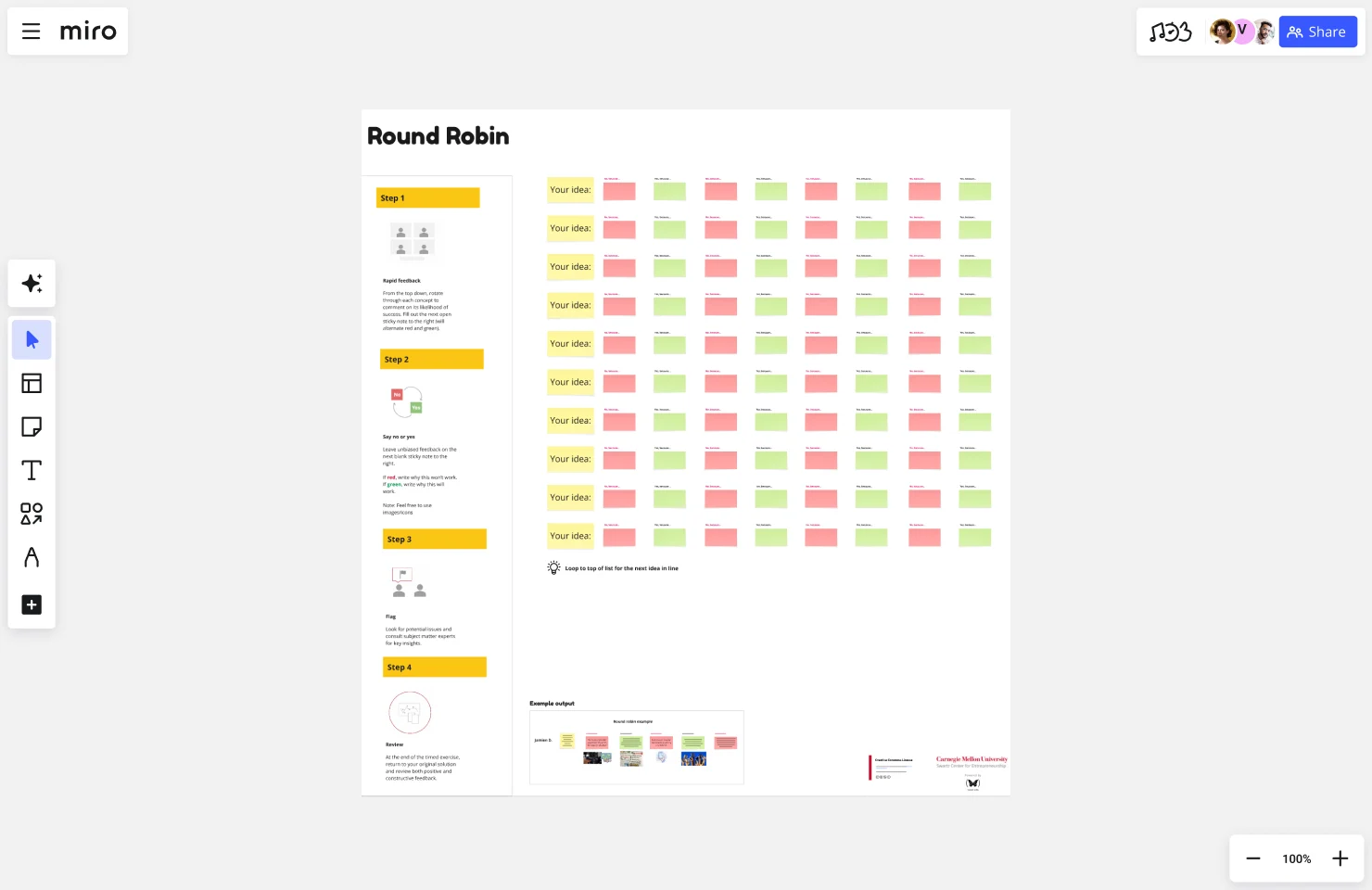
Miro board displaying a Round Robin brainstorming template with a 4-step instruction panel on the left and a structured grid of rows labeled 'Your idea:' paired with alternating red and green sticky notes representing feedback columns for multiple participants, plus an example output section at the bottom.

What experts say

  • Well suited: brainstorming, visual discussions with colleagues in different locations and time zones. I think of it as a whiteboard in a room where people from different locations can come in and look, ask questions, and make their own contributions

    Stanley Wong

    Chief Engineer · Philips

    Miro Customer
  • At the same time, educators are in terested in facilitating the creativity of students and thus have a vested interest in formulating design briefs that promote creative student project outcomes.

    Design Society

    Research source · Design Society

    Industry Expert

The research on brainstorming

  • 5x

    Facilitator-led brainstorming groups produced 5x more ideas than unfacilitated groups across nine procedure variants

    Source: Creative Problem Solving Group - Buffalo (Isaksen & Gaulin)

  • Brainstorming can broaden exploration of possible solutions, increase idea quantity, and help participants build on each other's ideas.

    Source: University of Michigan

See brainstorming in action

Related templates for educators

We have 193 templates in our library for Brainstorming.

Why educators love brainstorming in Miro

  • From scattered lesson ideas to a structured curriculum plan

    Building a new unit from scratch means juggling learning objectives, activity ideas, and assessment formats across a dozen tabs and sticky notes on your monitor. Teachers and instructional designers map ideas onto Miro's infinite canvas, cluster them by theme, and walk away with a curriculum outline - not a pile of unorganized thoughts.
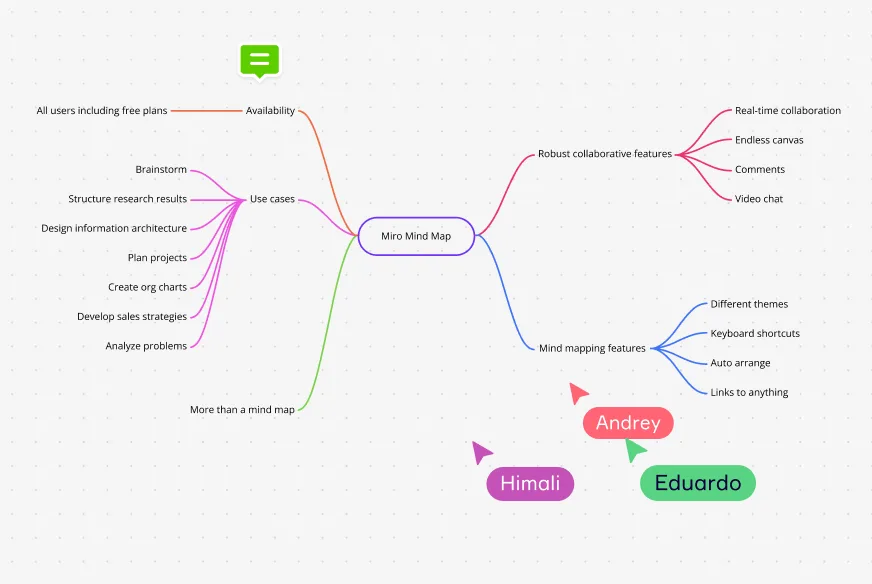
    A Miro mind map centered on 'Miro Mind Map' with five main branches covering Use cases (brainstorm, structure research, design information architecture, plan projects, create org charts, develop sales strategies, analyze problems), Availability (all users including free plans), Robust collaborative features (real-time collaboration, endless canvas, comments, video chat), Mind mapping features (different themes, keyboard shortcuts, auto arrange, links to anything), and More than a mind map —…
  • Are your students actually contributing, or just the loudest voices?

    In a classroom or faculty workshop, the same three people tend to speak first - and everyone else follows their lead. Miro's anonymous voting and parallel sticky-note rounds give every participant, from a quiet first-year student to a skeptical department head, an equal shot at contributing before discussion begins.

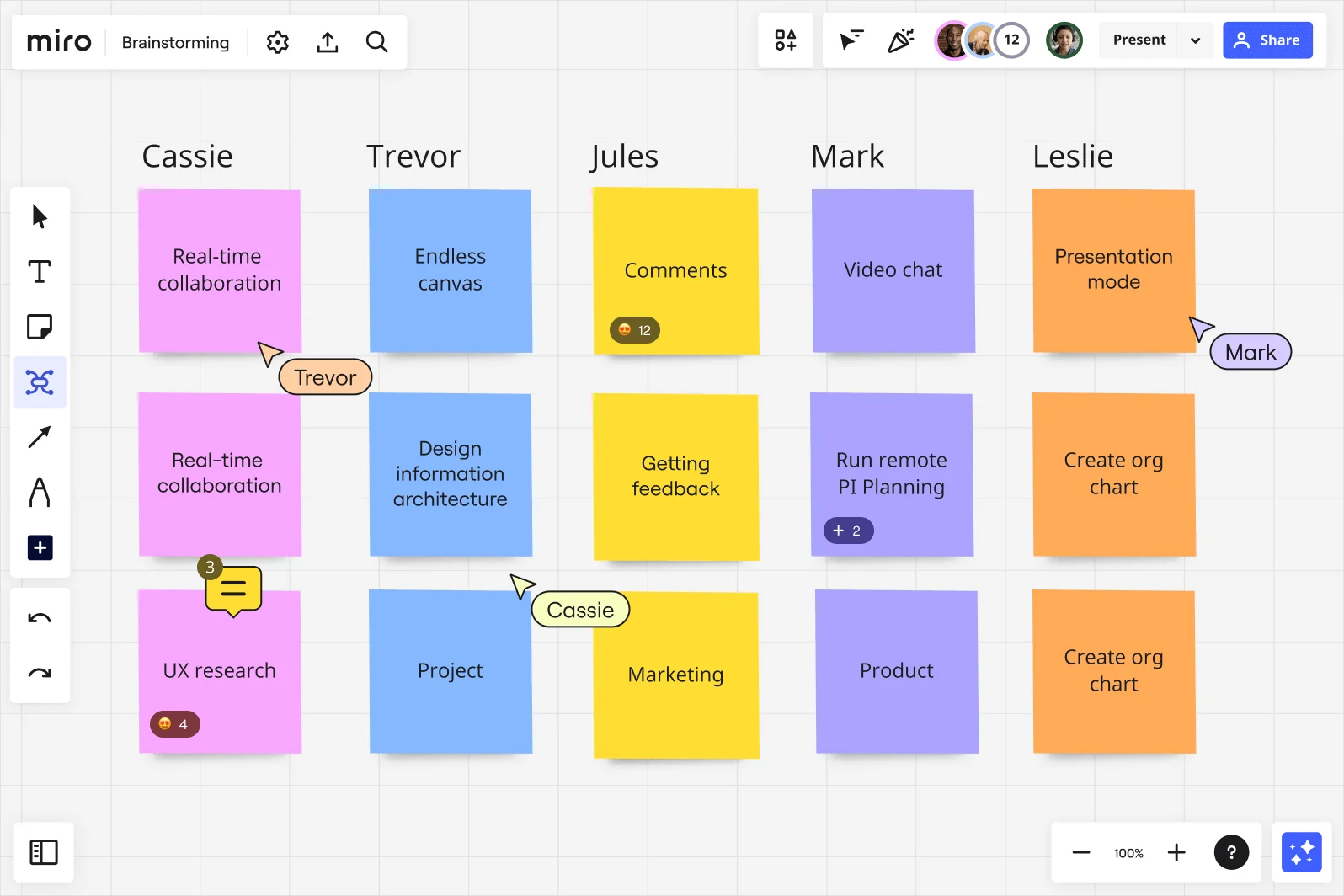
    Miro brainstorming board showing a multi-column layout with five named participant columns (Cassie, Trevor, Jules, Mark, Leslie), each containing colorful sticky notes in pink, blue, yellow, purple, and orange, with ideas including Real-time collaboration, Endless canvas, Comments, Video chat, and Presentation mode, along with visible collaboration features like emoji reactions, comment counts, and live cursors with participant names.
  • When your co-teachers are in three different time zones

    A remote curriculum team can't huddle over a whiteboard. Async brainstorming in Miro lets faculty in different time zones drop ideas, react with emoji, and vote on priorities without scheduling another cross-timezone meeting. Small departments get speed; large institutions get governance and a searchable record of every session.

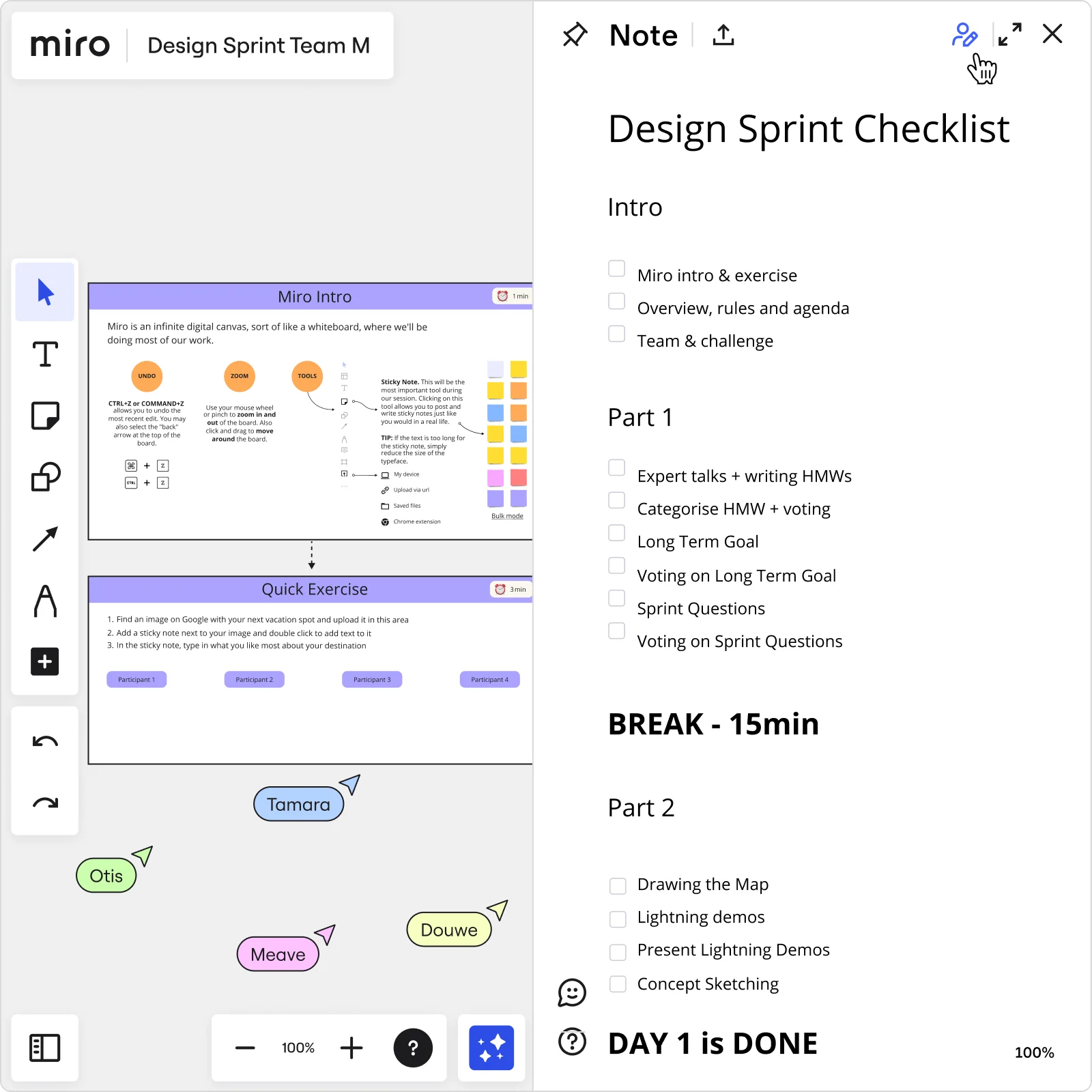
    Miro board showing a Design Sprint workspace with a 'Miro Intro' tutorial slide and 'Quick Exercise' panel on the left, alongside a structured Day 1 checklist note panel on the right listing tasks including HMW exercises, voting, long-term goal setting, sprint questions, lightning demos, and concept sketching, with four participant cursors visible on the board.
  • Your workshop agenda, ready before the room fills up

    Designing a professional development day or faculty retreat means building the agenda, preparing activities, and briefing facilitators - all before anyone arrives. Miro's Workshop Planner Sidekick analyzes your session topic, recommends the right ideation technique (brainwriting, reverse brainstorm, SCAMPER), and generates the agenda in seconds.

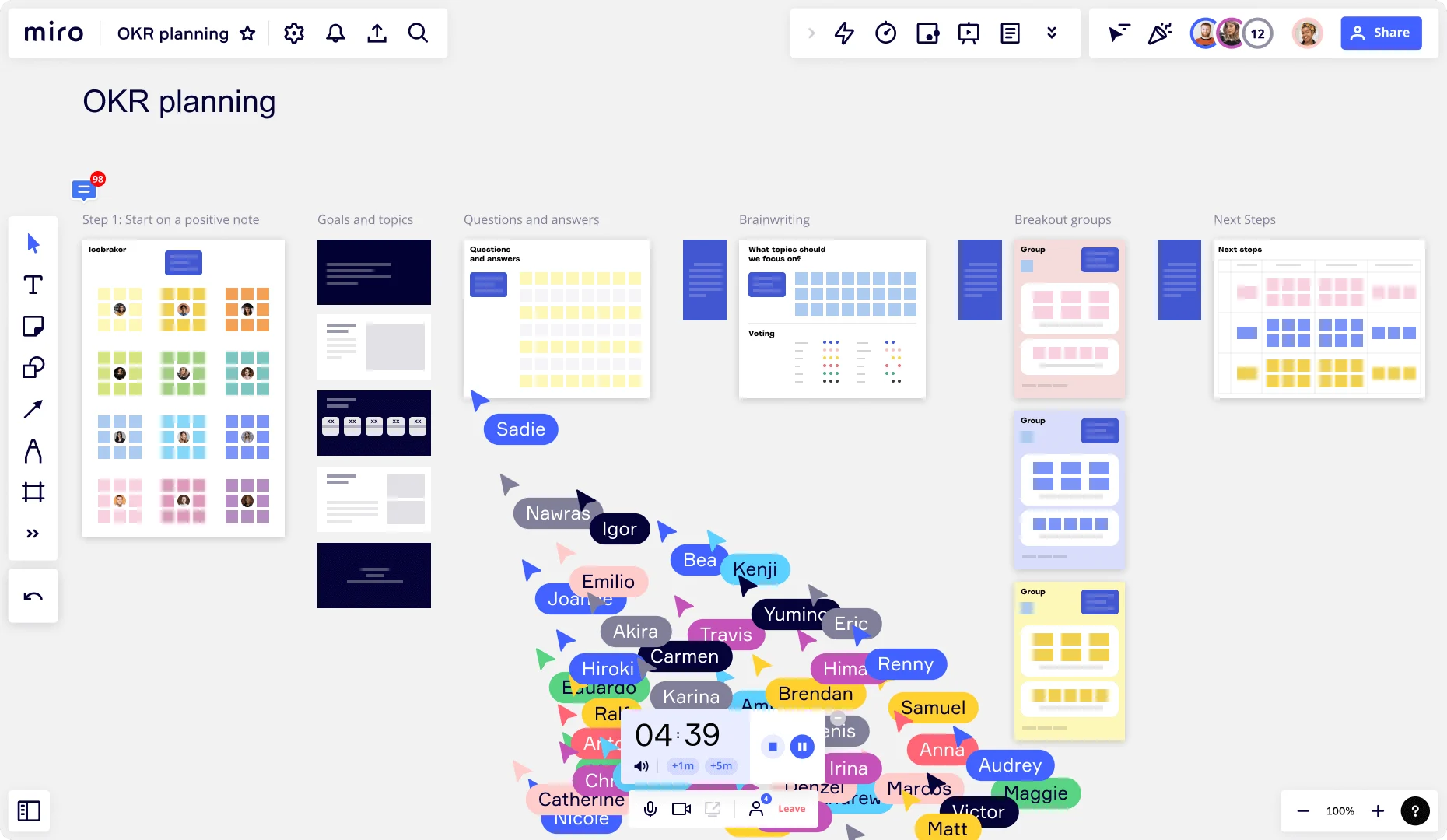
    Miro OKR planning board showing a structured multi-step workshop template with columns for Icebreaker, Goals and topics, Questions and answers, Brainwriting, Breakout groups, and Next Steps, with 20+ live collaborator cursors clustered in the center and a visible 04:39 countdown timer, indicating an active real-time session.
  • Stop losing great ideas after the session ends

    After a faculty brainstorm, raw sticky notes sitting on a canvas are hard to share with administrators or turn into an action plan. Export a clean Miro Doc summary with clustered ideas and a prioritized shortlist, then embed it directly into Confluence or Notion so your department wiki and follow-up meeting pull from one live source.

    Miro board split view showing colorful brainstorming sticky notes on the left (blue, pink, yellow) alongside an AI-powered document generation panel on the right, with a 'Generate product brief' button and Miro AI label actively generating content from the brainstorm.

How educators get started with Brainstorming in Miro

  • Open a brainstorming template for your unit

    Pick a brainstorming template from the Template Library - the Brainwriting Grid works especially well for curriculum redesign - and use Frames to carve out separate zones for your learning objectives, activity ideas, and assessment options.

  • Run your PLC ideation round

    Set the Timer to 7 minutes and have grade-level teachers drop ideas into color-coded Sticky Notes - one color per Bloom's taxonomy level - then use Bulk Mode so everyone captures multiple thoughts at once without waiting their turn.

  • Surface patterns across the room

    Use AI Generate Sticky Notes to seed any thin areas (say, higher-order thinking tasks that nobody's covered yet), then let Clustering automatically group contributions by theme so your team sees a coherent unit arc instead of a wall of disconnected ideas.

  • Turn the board into a shareable deliverable

    Pull your prioritized ideas into a Miro Doc using the Meeting Notes template, use Miro AI inline to reframe top ideas in language your department chair or curriculum committee expects, then export to PDF before the marking period turns.

Brainstorming tips for educators

  • If thirty colleagues are walking into a professional development day, set up Breakout Frames with identical scaffolding so smaller groups ideate in parallel - you'll get far more ideas per teacher than one whole-room discussion ever produces.

  • Use Dot Voting with a 3-vote limit when your PLC needs to agree on which instructional strategies actually make the shortlist - fewer votes force the deliberate choices that a curriculum committee expects to see justified.

  • Lock board objects before any faculty session starts so less tech-confident teachers interact only with sticky notes, not accidentally dismantle the structure you built during prep period.

Understand how educators transform their work

  • Brainstorming and beyond

    Strategist in Research & Development at Marketing & Advertising

    TrustRadius
    TrustRadius
    Verified user
    Read review
  • Great for brainstorming

    Consultant in Research & Development at Research

    TrustRadius
    TrustRadius
    Verified user
    Read review

Brainstorming essential guide for educators

CategoryKey insights
  • Common mistakes to avoid

    Don't skip the warm-up and dive straight into ideation - teachers facilitating a PLC or curriculum planning session will quickly lose the quieter voices in the room, and a blank canvas with no on-ramp makes that worse. Lock your board objects before the session starts so a colleague who's new to Miro doesn't accidentally move or delete the framework you spent your prep period building. The other trap: ending a brainstorm without connecting sticky notes to actual next steps. A wall of ideas about differentiating instruction means nothing if nobody leaves with a name attached to a deliverable before the marking period closes.

  • Key integrations for educators

    Google Meet and Zoom keep the session running without switching tabs, which matters when you've got thirty minutes of PLC time and can't afford a tech detour. Slack and Microsoft Teams let grade-level teams continue the conversation asynchronously after the bell rings, so ideas don't die in a shared Drive folder nobody opens again. For schools and districts using Confluence, you can push the organized output straight into shared curriculum documentation so the work actually lands somewhere permanent.

  • When to use it

    Reach for Miro's brainstorming tools when a curriculum mapping session is on the calendar and you need every teacher at the table to contribute equally - not just the loudest voice in the department. It's also the right call when your grade-level team is spread across buildings or time zones and needs to brainstorm a cross-curricular project framework without waiting for everyone to be in the same room at the same time. Picture this: a department chair sets up a Brainwriting template, runs three silent ideation rounds with Timer, and uses Clustering to group the output - walking out of a 45-minute session with a draft unit arc the whole team has buy-in on.

  • Security & Compliance

    Miro is SOC 2 Type II certified, which satisfies the baseline security requirements most school districts and educational institutions ask for before approving a new platform. Private Mode keeps sensitive conversations - think assessment redesign or student performance discussions - from influencing each other before instructors are ready to share. For larger districts with stricter data governance requirements, Miro's data residency controls and granular sharing permissions give IT administrators the oversight they need to approve it at scale.

Frequently asked questions for educators

Last updated: Monday, August 31, 2026