Table of contents
Table of contents
By signing up, you agree to Miro's Terms of Service and Privacy Policy.
Design prototyping with AI: How one skill got agents to follow our design system
Ale Contini is a Staff Product Designer at Miro, working on the Security, Compliance, and Administration stream. They started their career as a sound designer, building interactive installations and unusual synthesizers, then fell in love with human-computer interaction. Their path since then runs through Berlin’s startup scene, Arduino, the Growth team at Wikipedia, and Red Hat. Even though they've been working in tech for many years, sound and music never really left them, and they remain their main focus away from the screen.
Last published
Ever asked an agent to build something with your design system, only to find it making up components and styles as it went? That was my first experience of prototyping with AI, and fixing it changed the way I work with engineers.
I'm Ale Contini, a Staff Product Designer at Miro. For two and a half years, I've worked on the security, compliance, administration, and infrastructure stream, mostly with the authentication team, which owns everything to do with signing in to Miro and signing up for an account. If you've ever used Miro, you've been through pages I designed or improved. It’s an important part of the product, because no great feature matters if users can’t easily get in.
During the first half of this year, my team gradually moved all of our design work to VibeLab, the platform my colleague Mauricio Wolff built for prototyping with AI agents. We hit a wall almost immediately because the agents kept ignoring our design system. Designing a UI from scratch with AI is one thing. Designing with AI for a product like Miro is another, because that UI goes into production, follows a well-established design framework, and is used by millions of people every day. Here is what we learned along the way, in case it saves you some trial and error.
Collaborative AI Workflows
Join thousands of teams using Miro to build the right thing, faster.
The problem: Agents that invent their own buttons
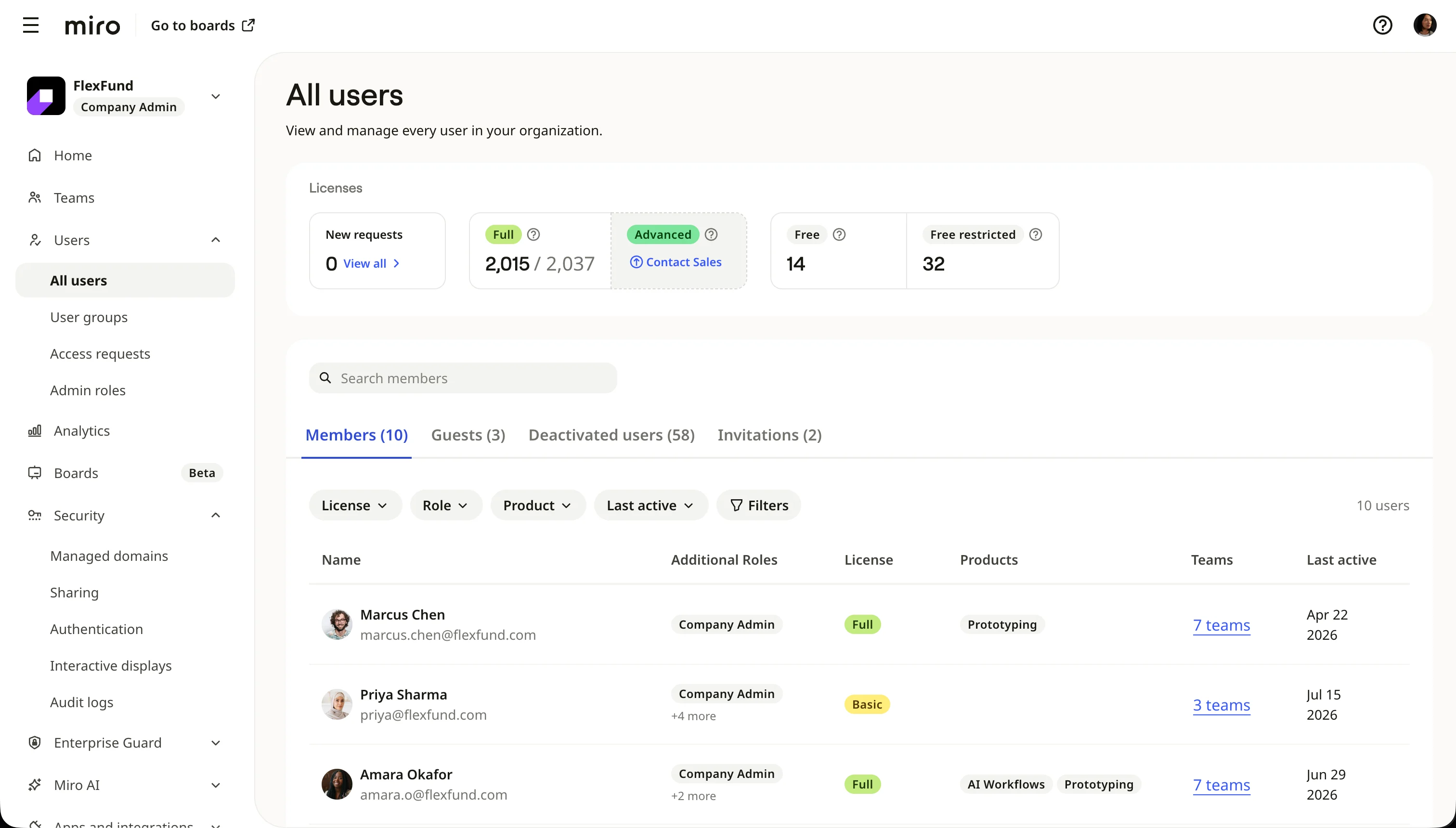
Most people know Miro as a canvas, but paying subscribers, mostly enterprise customers, also use the Miro admin console. It's where they set up Miro so their employees get the right level of privacy and easy access. From a design standpoint, the admin console extends Miro's core design system to cover these use cases, so it uses a wider variety of components than the boards do.
VibeLab gives designers a starting template that recreates the core of Miro, the boards and the dashboard, together with a Claude Code plugin from the design system team that teaches agents how to use our components. Both come with guardrails, but neither covers the admin console, so we extended the template to recreate it in full, first for my team and later for any designer who needs admin pages.
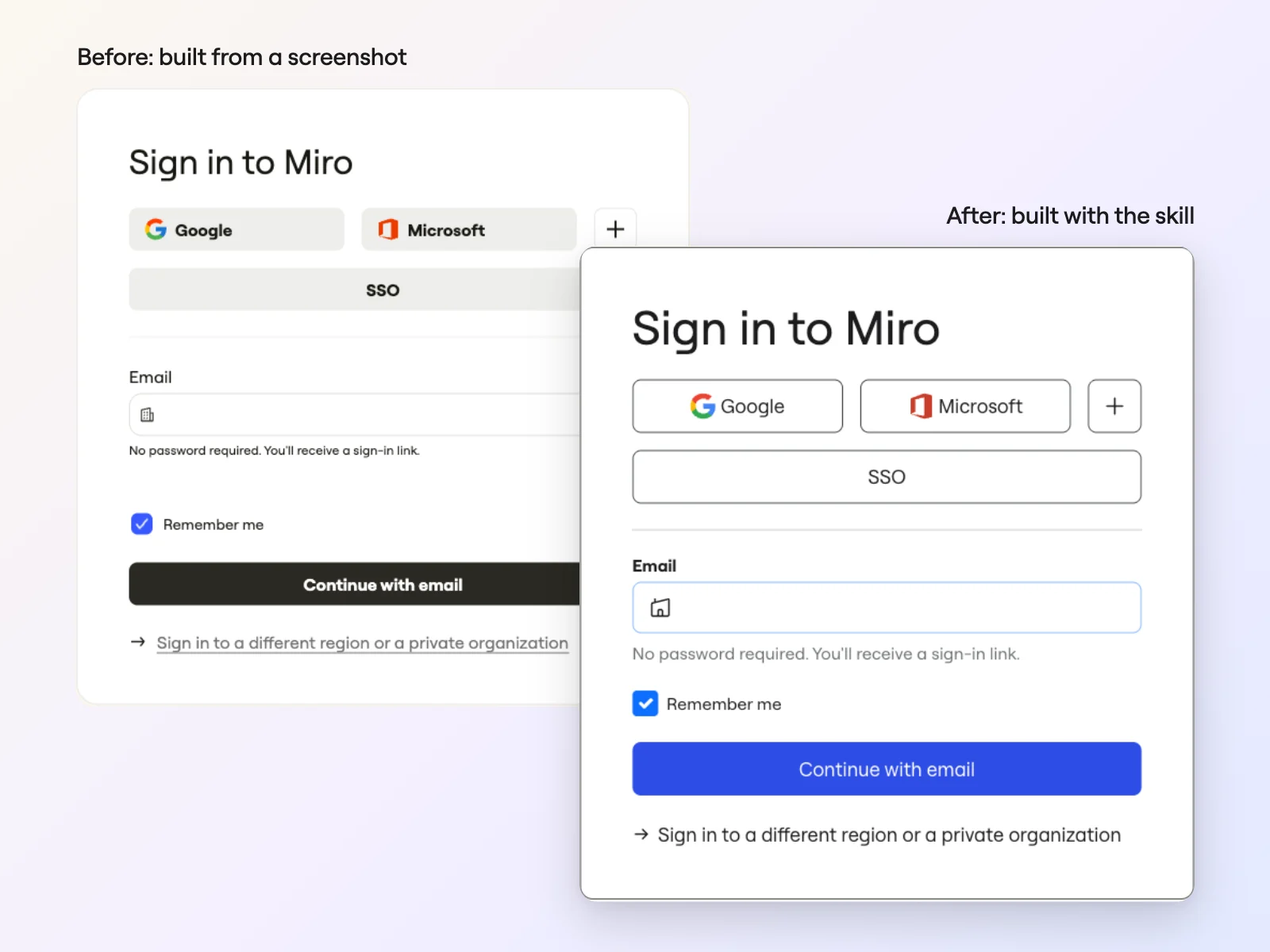
My first attempt was the obvious one. I gave the agent a screenshot and asked it to recreate the page. It got part of the way there, then started inventing its own buttons, its own colors, its own everything, despite the guardrails in both the template and the plugin.
Some people call this hallucination. I prefer to say agents get creative, because they usually solve the problem in a reasonable way, just in their own way. That's useful on a blank page and a real dealbreaker when you work within the constraints of a design system, so I built a new skill to tame it.
The solution: A skill that reads the code and writes the spec first
I built a Claude Code skill called Rebuild in MDS (short for Miro Design System), and it's now part of the VibeLab project. A skill is a set of written instructions an agent follows for a particular task. This one looks at a page with an engineer's analytical mindset and a designer's eyes.
You tell it what to rebuild, whether that's a whole page, one tab, or a single dialog or flow, and give it as many references as you can: the source code, the design system docs, the live page, a Figma file, or a screenshot. More references mean more accuracy and fewer design flaws to fix later. Micro-interaction details like whether a panel animates when it opens rarely live in a single source, so the agent pieces them all together.
The agent dives into what builds the real page, clicks through the live page one state at a time, and writes a spec the way a designer would describe it: two tabs, a page called Teams, a primary button labeled "Create" with a specific icon. For each element, it names the design system component it will use, and also labels every part of the spec by how it knows it, whether that's from the code, from the live page, or from a guess. Then it turns every guess into a question for you.
You read the spec, correct what's wrong, and answer the questions. Only when you sign off does it start building, and when it's done, it compares the build with the original side by side. The result matches the original to the pixel.
The whole admin console, then the sign-in flows
With the skill, we recreated the entire admin console in VibeLab. When we showed the prototype to stakeholders, they couldn't tell it apart from production. Once the admin console was done, we recreated all of the authentication flows too.
You might wonder why we rebuilt these pages instead of working in the production code. Mauricio explains it in his article on how we use AI in product design. Prototyping in production or staging code is extremely resource-heavy when you have to deploy a codebase as large as Miro's, sometimes for a small UI change. VibeLab gets you from an idea to a shareable link in minutes, and a working prototype lets people try an idea quickly and give more useful feedback. Engineers still turn the prototype into production code, so the prototype stays a place to explore ideas, not code we ship directly.
A bonus: A map of every sign-in flow
While the skill was scanning the codebase to analyze the sign-in pages, I realized I could also ask the agent to map every authentication flow. We had never had a complete map. The knowledge was spread across code, help articles, old Miro boards, and mostly people's heads, so building one by hand would have taken ages. Using Miro MCP, the agent drew every flow on a Miro board, from signing in with email or SSO to signing up from an invitation. The engineers called it a game changer.
The map paid off sooner than I expected. A few days later, after an incident, the engineers had to change sign-in quickly, with no time for design input. They replaced password sign-in with a magic link sent by email, and users soon shared feedback that sometimes they couldn't open their email on the device they were signing in from. I proposed sending a verification code alongside the link, and thanks to the map, I could point the engineers to the exact step to change. Because the sign-in pages already lived in VibeLab, it took a couple of hours to go from the meeting with the engineers to a high-fidelity prototype they could inspect for design system specs and start building right away.
What went wrong, and what to do instead
A screenshot gives an agent too little to work with, and general guardrails didn't stop the agent from improvising to fill the gaps. Three things made the difference for us.
First, give the agent access to the real source of truth. For us, that meant the production code, the design system docs, and the live page itself rather than a picture of it.
Second, work side by side with the agent. Read what it produces, correct it, answer its questions, and add what it can't find on its own, like how an animation should feel. You're helping it learn the page, much as you would help a new teammate.
Third, only let it build when you feel it's ready. The spec shows you what the agent understood, and fixing a misunderstanding there is much cheaper than iterating endlessly in the finished prototype.
My take: The craft got better, and coordination got harder
I'm an old-school designer. When I started, designing interfaces and coding them were sometimes more or less the same job, until the industry pushed us toward mockupping screens in Figma. AI has made it easy to get our hands dirty with code again. I can redesign a page and see it in the browser, exactly where it should live, and it has brought back my love for the craft.
It has also changed how I solve problems. When something in my process doesn't work, like an agent failing to recreate pages, I can build a fix for it right away, as I did with this skill. Not knowing how to do something, or waiting for someone else to do it, shouldn't stop you anymore.
There's a catch, though. When everyone can do anything, it's easy to step on each other's toes, and coordination is definitely the number one challenge of this era. Still, it’s crazy that we can do all of this.
Try it with your own boards
If you want to try design prototyping with AI on your team, start by giving your agent real code and asking it to write a spec before it builds anything. Then give it a place to put what it finds. For me, that place was a Miro board.
The agent drew the sign-in map through Miro MCP, which connects AI tools like Claude, Claude Code, and Cursor to your Miro boards. Your agent can read board context, search and summarize boards, build boards, and generate diagrams, all within your existing board permissions. On Enterprise plans, an admin needs to turn it on first.
Want to see what your agent can map? Connect Miro MCP and try it on one of your own flows.
Read more
Join our 100M+ users today


