September 30, 2026
Miro Feature-Flags (Miffy) Architectural Overview
Author: Carlos Roberto Silveira Junior, Staff Software Engineer, Frontend DevX
This post explains how Miro ships features safely at scale through Iteration - our end-to-end approach to releasing, experimenting on, and reversing changes in production. By the end, you should understand (1) why we decouple code deployment from feature release, (2) the three levels of abstraction that make this possible, and (3) how a single flag moves through its lifecycle in practice.
Three Levels of Abstraction
"Iteration" at Miro means three different things depending on how deep you look, and it is worth separating them before going any further:
- Iteration (the practice). How we ship at Miro: expose a change gradually, measure its impact, and reverse it the moment something goes wrong. This is a way of working, not a system. It could be implemented with CI/CD rollbacks and one change at a time — some organizations do exactly that. We chose a different implementation.
- The Iteration Platform (where you work). The practice, codified. It is where an engineer goes to define a rollout, launch an experiment, pause a feature during an incident, or conclude an idea — without dealing with the machinery underneath. It owns ideas, workflows, bundles, segments, and the flag lifecycle.
Miffy (the engine). The technical implementation that powers the Platform:
Feature Flag Storage, the Feature Flag Evaluator, and the SDKs. It builds on the open-source go-feature-flag project, extended for Miro's needs, and is the part that stores flag definitions, serves them at scale, and answers "which variant does this user get?" in real time.
Closing the loop across all three is the Data pipeline: every evaluation emits an event that lands in Snowflake and surfaces in Eppo, which is what turns a rollout into a decision.
The rest of this section covers the business rationale; later sections dive into the architecture and a worked example.
The Strategic Core: Why Managed Iteration Matters
By decoupling the technical deployment of code from the business release of a feature, we transform "launching" from a high-stakes event into a controlled, data-driven evolution.
Risk Mitigation and "Blast Radius" Control
The primary business value of Iteration lies in its ability to protect the Miro brand and customer experience.
- Bundle: Every new feature is governed by a management layer that acts as a master controller. If a feature causes performance degradation or unexpected bugs, it can be neutralized instantly across the globe without requiring a code rollback.
- Gradual Exposure: We avoid "big bang" releases by controlling exactly who sees a feature and when, limiting the potential impact of any single failure to a tiny fraction of our user base.
Validated Product-Market Fit
Iteration closes the loop between an idea and its impact through our Data pipeline.
- Data-Driven Decisions: Every interaction with a feature flag emits an "experimentation-viewed" event. This data flows into Eppo, our analytical layer, where business stakeholders can see real-time metrics on how a new feature affects user behavior compared to a control group.
- Hypothesis Testing: Instead of investing months in a full-scale launch based on gut feeling, we test small iterations with specific cohorts to ensure the feature actually drives the desired business outcomes.
Orchestrating Complexity: The Concept of Bundles
A major product launch rarely involves just one toggle. Miro utilizes Bundles to coordinate complex rollouts that span multiple teams and platforms.
- Synchronized Rollouts: Bundles allow us to implement and test several features independently while ensuring they are released to the same cohorts at the exact same time. This ensures a cohesive customer journey where all elements of a new experience appear simultaneously.
- Operational Simplicity: A Bundle acts as a Parent Idea that tracks its dependents. This allows business leaders to manage high-stakes initiatives through a single high-level state, reducing the risk of fragmented or inconsistent feature availability.
The “Golden Path” of Rollout
The Golden Path is Miro's standard rollout path: a multi-stage progression designed to build stability and gather feedback as exposure grows. Teams follow it by default, and the exact stages and pace depend on the feature.
- Team & Org Unit: The initial activation, typically for the immediate development team, aimed at surfacing functional bugs early.
- Employees (Internal Dogfooding): The rollout expands to Miro employees. This internal "dogfooding" helps us exercise features against real-world usage patterns ahead of wider external exposure.
- Opt-in Beta: The feature becomes available to external users who choose to take part in the beta.
- Progressive Expansion: Exposure widens to progressively larger cohorts, so we can observe performance and behavior at increasing scale.
- General Release (GA): Once the team is satisfied with the safety and performance signals monitored in Eppo, the feature is set to 100% of the user base.
Conclusion: A Philosophy of Safety and Data
The Iteration ecosystem is designed to help teams make product decisions —from a minor UI tweak to a major backend overhaul —that are validated with data and precisely targeted. Its lifecycle runs from the first rollout stage until a flag is Archived after a "cooldown" period, giving teams a structured way to innovate with our customers' trust in mind.
Architectural Overview: The Iteration Architecture
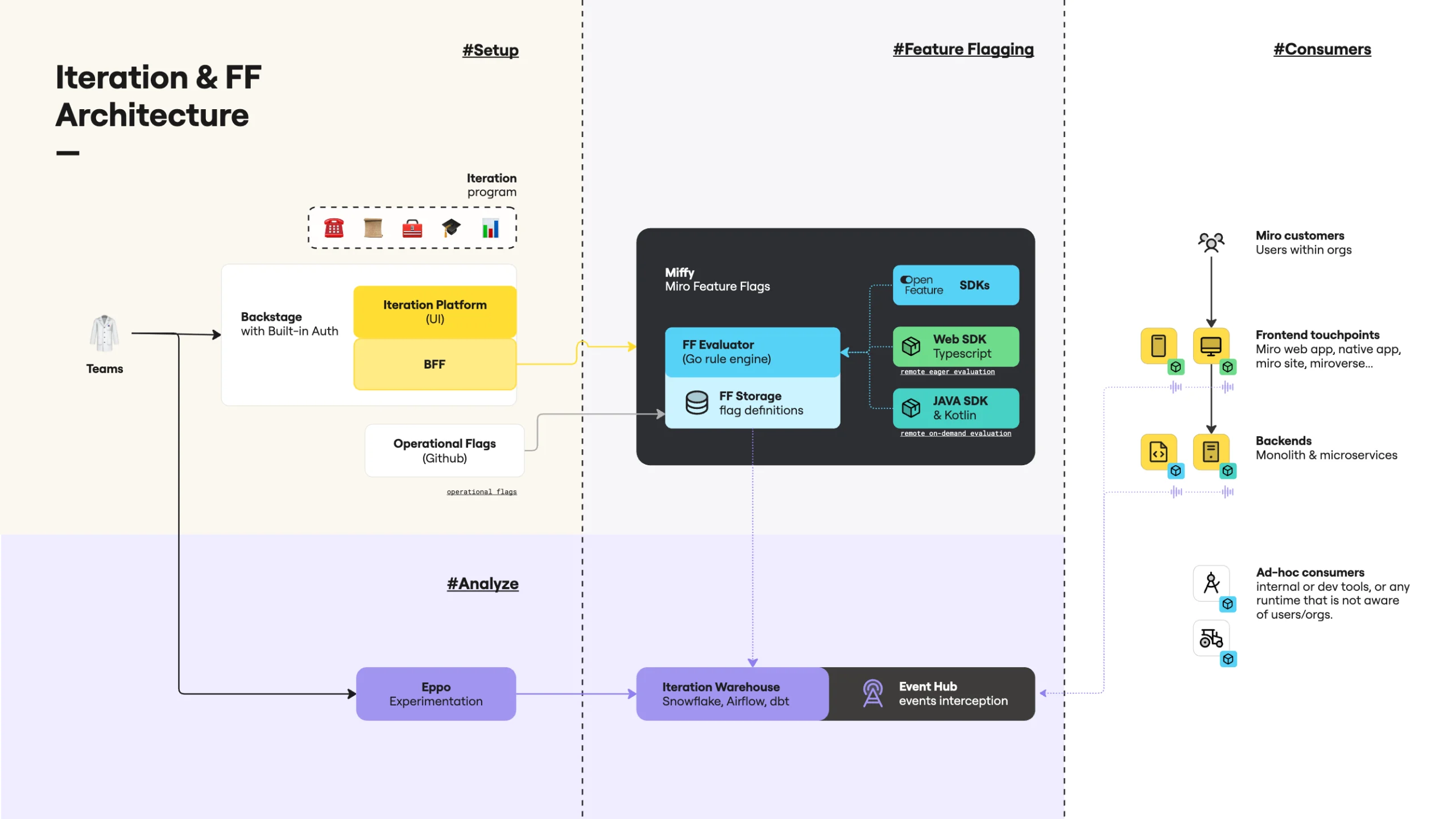
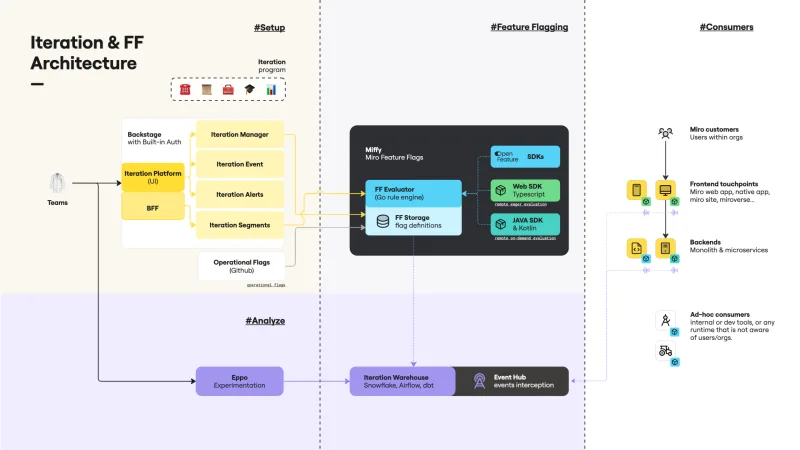
This document details the core components and data flow of Miro's Iteration ecosystem, layer by layer. Figure 1 presents a high-level diagram of this architecture.
The Architecture of Iteration
Of the three levels described above, the first — the practice — has no infrastructure of its own. The other two do, and the Data pipeline spans both. Each layer rests on the one below it:
The Iteration Platform (Management Layer): This is where product logic begins. Managed by Engineering Teams, it consists of the Iteration Platform UI (Backstage)
and the Iteration Manager, which acts as the "brain" for defining flag workflows, ideas, and segments. This layer also integrates external Operational Flags (sourced from GitHub) to ensure global system stability.
- Miffy (Execution Layer): The high-performance core of the system, and the only part of the ecosystem the name Miffy refers to. It houses the Feature Flag Evaluator (a Go-based rule engine) and the Feature Flag Storage, which maintains the translated source of truth for all flag definitions. It provides a suite of SDKs (OpenFeature, Web/TypeScript, and Java/Kotlin) supporting both eager and on-demand evaluation modes for various consumers.
The Data Pipeline (Insights Layer): This layer closes the feedback loop by intercepting
experimentation-viewed events via Event Message Queue. Data is processed through the Iteration Warehouse (Snowflake, Airflow, and dbt) and surfaced in Eppo, providing Engineering Teams with the metrics necessary to validate flag impact.
Consumer Ecosystem
The architecture is designed to serve a diverse range of consumers across the Miro landscape:
- Miro Customers: Users within organizations interacting with frontend touchpoints like the Miro web app, native apps, and the Marketplace.
- Backends: Core monoliths and microservices that rely on server-side flag evaluations.
- Ad-hoc Consumers: Internal developer tools or runtimes that require flag logic without traditional user/org context.
Diving Into Each Pillar
The Iteration Platform (Management & Definition)
This layer is the administrative heart of the feature flag lifecycle, focusing on the creation, validation, and monitoring of short-lived flags. Figure 2 shows a high-level diagram of its architecture.
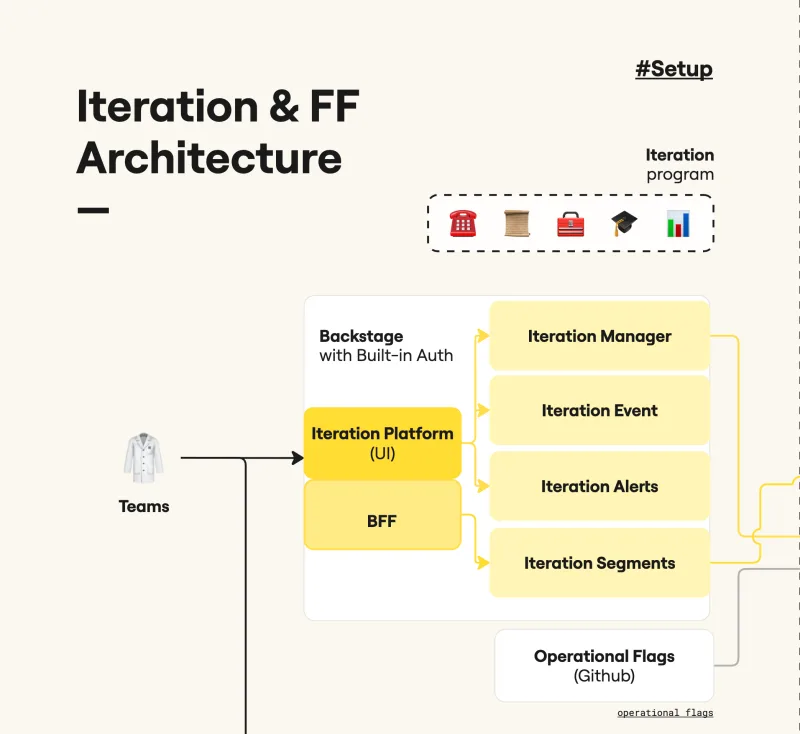
Iteration Platform UI (Backstage): The primary user interface. It is used to define
Ideas, manage their workflows, bundles, and kill switches. It provides comprehensive audit logs and handles the management and updating of segments.
- Iteration Manager: Acts as the central brain. It maintains the meta-information required for workflows and performs all validations related to the flag. It manages the audit mechanism and translates internal logic into the Feature Flag Storage format. It persists data via the Iteration DB (DynamoDB).
Iteration Segments: A dedicated service for segment management. It manages two distinct types of targets:
Ad-hoc Segments:
Manually created and updated by users.
Golden Segments:
Updated exclusively via automation (e.g., segments synced from our CRM).
- Iteration Events: The backend for the live tail. It acts as the interface to collect and compute experimentation-viewed events. This service is crucial for determining if a flag is active (receiving traffic) and consolidates this data to dump it back to the Iteration Manager.
- Iteration Alerts: Monitors for unexpected behavior. For example, it triggers notifications if a flag remains in the same state for too long.
Miffy (Evaluation & Distribution)
Miffy is the set of components that stores flag definitions, serves them at scale, and evaluates them in real time: Feature Flag Storage, the Feature Flag Evaluator, and the SDKs. Figure 3 shows a high-level diagram of its architecture.
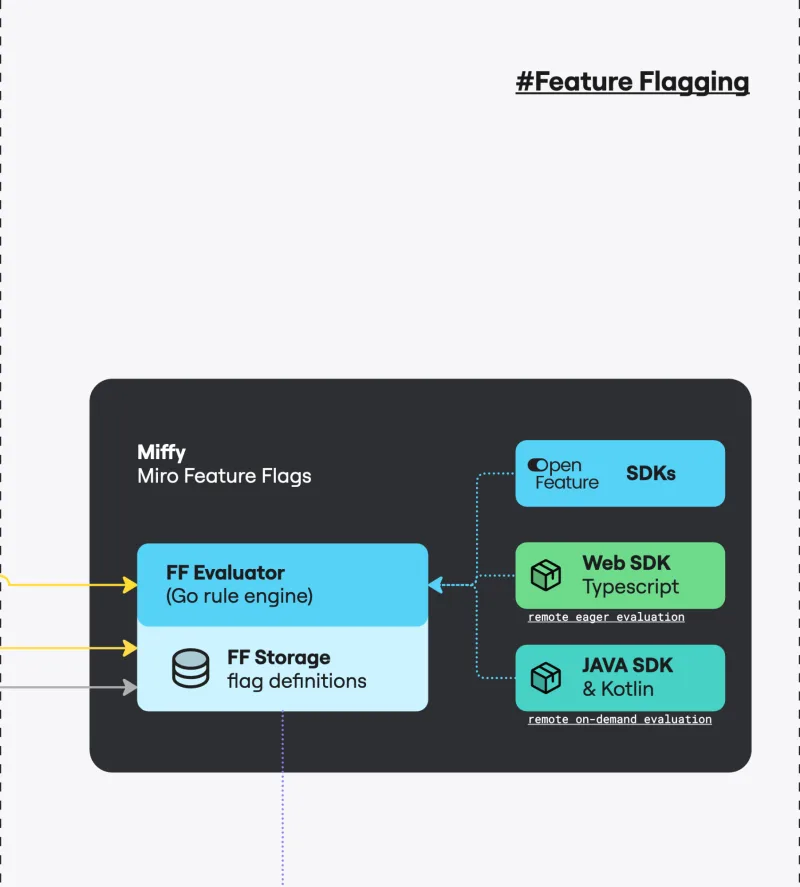
- Feature Flag Storage: The global source of truth for feature flag configuration — a single, globally unified store that holds every flag definition consumed by the Evaluator, regardless of region. Its primary responsibility is translation: it takes the business-level definition of a rollout or experiment as authored in the Iteration Platform and converts it into a configuration the Evaluator can execute, expressed as go-feature-flag rules. During translation, the configuration is also enriched — segment membership is attached, stage progression is encoded, and the targeting predicates are pre-resolved — so the Evaluator can solve segmentation and incremental rollout at evaluation time without additional lookups. It consolidates Iteration, Operational, and ad-hoc flags into a single, evaluator-ready document.
- Miro Feature Flag Evaluator: The runtime that answers, in real time, "should this flag be on for this user/organization/context?" It is built on the open-source go-feature-flag library and is natively compatible with the OpenFeature standard. It exposes two access modes — a low-latency channel for backend services and an HTTP endpoint for web clients — and supports a delta-style fetch that returns no payload when nothing has changed since the client's last call, cutting redundant traffic and cost. The Evaluator applies the rules emitted by Storage and combines them with live data from Iteration Segments to resolve targeting, segmentation, and incremental rollout. After each evaluation, it emits an experimentation-viewed event to the Event Message Queue, decoupling the evaluation hot path from downstream analytics.
- SDKs: The entry points for consumers — web clients, backends, and microservices — over a common Evaluator contract. Miro provides OpenFeature, Web/TypeScript, and Java/Kotlin flavors. Beyond simple getVariant-style calls, they encapsulate the cross-cutting concerns of using flags in production: emitting experimentation-viewed events automatically, propagating per-request overrides across service boundaries (used for autotests and manual QA), caching repeat evaluations to keep hot paths fast, and degrading gracefully when the Evaluator is unreachable.
The Data Pipeline (Data & Analytics)
The data pipeline is responsible for the long-term storage and analytical processing of flag evaluations. Figure 4 shows a high-level diagram of its architecture.
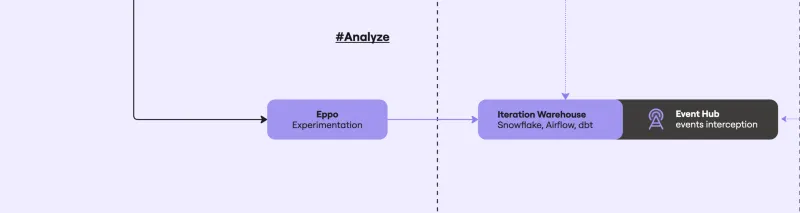
- Event Message Queue (Event Hub): The ingestion point for real-time experimentation-viewed events emitted by the SDK.
- Iteration Warehouse: Raw evaluation events are stored in Snowflake and transformed via DBT to create structured views of flag assignments and facts.
- Eppo: The analytical layer used to visualize flag definitions and performance metrics derived from the data warehouse.
Full Architecture Overview
Figure 5 shows the whole Iteration architecture in detail.
Inside the Evaluator: Why go-feature-flag
The Feature Flag Evaluator is the runtime that, for every request, answers the simple-looking question "what variant should this user see for this flag?". It runs at very high throughput (~36K RPS on our current baseline) on a hot path — backend services call it over gRPC and web clients reach it over HTTP — so the engine that resolves rules has to be fast, deterministic, and easy to evolve. This section explains why we adopted go-feature-flag as that engine, and how we extend it to cover three problems it does not solve out of the box: parent dependencies, segments, and delta payloads.
Why go-feature-flag
go-feature-flag gives us an evaluation engine we can run, tune, and extend ourselves. Two capabilities mattered most: clients can use flags from the very first moments of the Miro app's loading sequence, and we have direct levers over cost, latency, and behavior on the hot path. The short version of the alternatives analysis is:
OpenFeature-native, no vendor lock-in. go-feature-flag is a first-class OpenFeature
provider, which means our SDKs speak a vendor-neutral contract and we can swap the engine later without rewriting consumers.
- Eager client-side evaluation. The web/native SDKs receive a pre-resolved snapshot from the server, so initialization is effectively free, and we can run experiments during application bootstrap.
- In-house control over the hot path. Because it is an open-source Go module, we extend its relay-proxy behavior directly (custom endpoints, gRPC, metrics, polling strategy) and evolve it on our own schedule.
The rest of this section covers the three places where we go beyond stock go-feature-flag rules.
Parent Evaluation: Modeling Bundles and Kill Switches
A common rollout pattern at Miro is "only enable feature B for an organization if feature A is already on for them" — that is the mechanic behind Bundles (coordinated rollouts) and Kill Switches (operational overrides). go-feature-flag's targeting rules can match attributes on the evaluation context, but it has no native concept of "evaluate another flag first, then use its result".We model this by adding a dependency field to a flag's metadata. The evaluator resolves the parent first and injects its variant into the child's evaluation context as a custom attribute, so the child's targeting rules can reference it like any other attribute:
ABT-456-child-flag-key:
 bucketingKey: organizationId
 variations:
   "off": "off"
   "on": "on"
 targeting:
 - name: PARENT_IS_ON
   query: "ABT-123-bundle-parent eq \"on\""
   percentage:
     "off": 0
     "on": 100
 defaultRule:
   percentage:
     "off": 100
     "on": 0
 metadata:
   dependency: ABT-123-bundle-parent
   type: ITERATION
For single-flag gRPC calls, the evaluator resolves the parent recursively and injects its variant before evaluating the child. For batch /v1/allflags requests, the evaluator pre-computes the parent set from the loaded configuration and resolves them in a single pass before the regular flags, so a request never pays the cost of a parent lookup twice. Bundles and Kill Switches are simply the two flag types we mark as parents by convention.
Segment Evaluation: Externalized Membership
Segments at Miro can be huge — a Golden Segment synced from our CRM may contain hundreds of thousands of organization IDs — and they change continuously (Ad-hoc edits in Backstage, CRM syncs, etc.). Shipping that membership inside the flag configuration would make every flag update enormous and would couple the evaluator's deploy cycle to segment freshness.
Instead, segment membership lives in a dedicated service — Iteration Segments — and the flag configuration only carries a pointer: which segment to check, and which audience attribute identifies the subject. Feature Flag Storage encodes this on the flag's metadata:
metadata:
 segments:
   beta-segment: organizationId
   strategic-customers: organizationId
At evaluation time, the /v1/allflags handler aggregates every segment referenced by any flag in the request, asks Iteration Segments to resolve membership once per audience type (ORGANIZATION, TEAM, USER), and injects the result back into the evaluation context as boolean attributes:in-segment-beta-segment: true in-segment-strategic-customers: false
Targeting rules then reference in-segment-<name> like any other context attribute (in-segment-beta-segment eq true). The net effect is that segments are resolved once per request, the flag configuration stays small and stable regardless of segment size, and the source of truth for "who is in segment X" remains the segments service.
Delta Evaluation: Sending Only What Changed
Today, the /v1/allflags endpoint already optimizes the no-change case: clients send ?lastUpdate=<timestamp> and, if nothing has been updated since, the evaluator returns HTTP 204 No Content with no body. That alone removes a large share of redundant traffic from the wire.The next step — currently behind a progressive rollout — is to also handle the some-things-changed case incrementally. On each polling cycle, the evaluator computes a DeltaContext from the loaded flag set:
- topTimestamp — the newest lastUpdated across all flags.
- bottomTimestamp — topTimestamp minus a sliding window (default 1 hour, tunable).
- Three partitions of what changed in the window: regular flags, the parent flags they transitively depend on, and the union of segments they reference.
The endpoint then routes the request based on the client's lastUpdate:
Client’s lastUpdate -> Response
- >= topTimestamp -> 204 No Content — client is already current.
- >= bottomTimestamp (future iteration) -> Delta payload — only flags/parents/segments changed since the client last polled.
- < bottomTimestamp -> Full payload — fall back to the complete flag set.
The win is that a returning client which polled a few minutes ago only pays for what genuinely changed, instead of re-downloading the entire flag catalog. The window is intentionally bounded: if a client has been offline longer than the window, we serve the full set rather than reconstruct an unbounded history. This is the path we are rolling out next; once it is stable, it becomes the default behavior of the endpoint.
🎃 The Journey of a Feature Flag: A Technical Narrative via Hypothetical Example
The Birth of an Idea (The Iteration Platform)
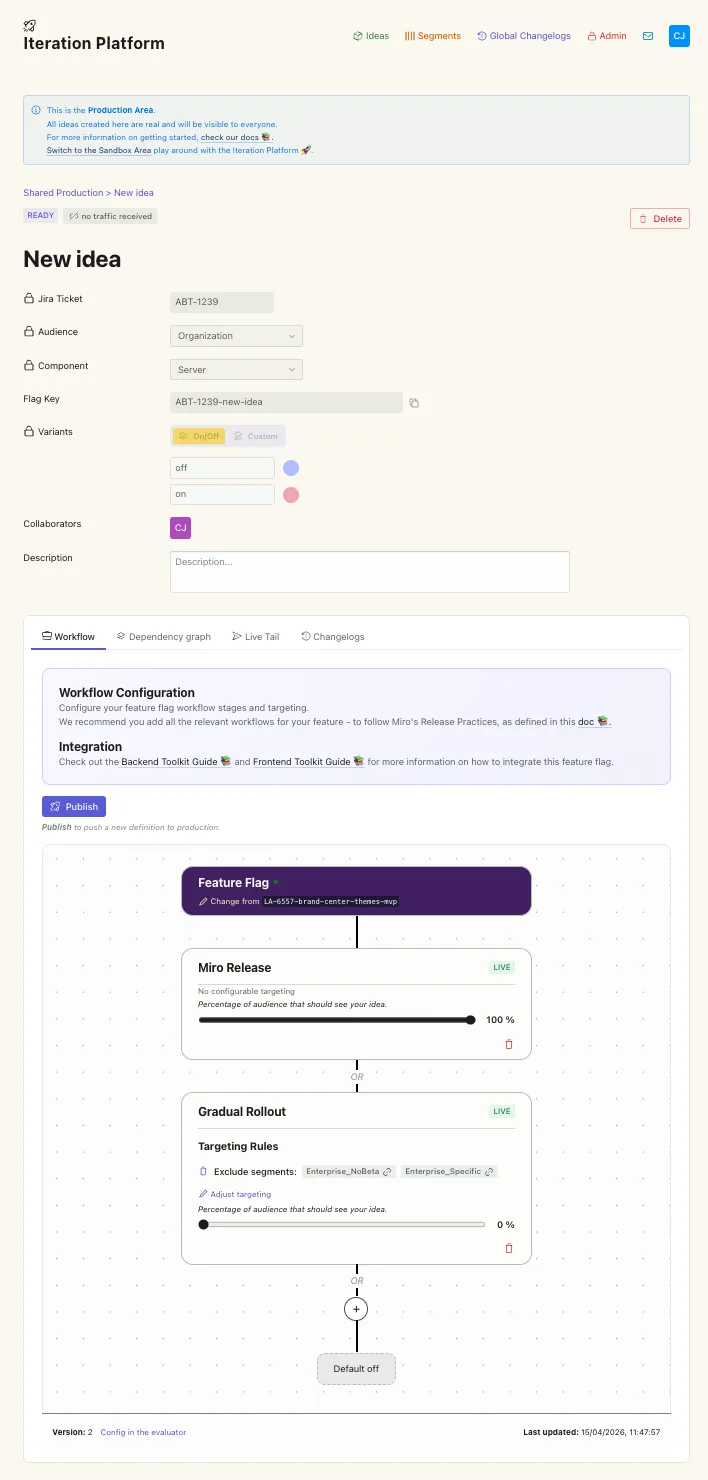
Our story begins with an Employee who has a concept for a new feature. They log into the Iteration Platform UI (Backstage) to bring this "Idea" to life. As they navigate the interface, they are actually conversing with the Iteration Manager—the "brain" of our system.The Manager acts as a sophisticated librarian; it provides the Platform with all the necessary metadata to define the Idea, such as the target audience (e.g., ORGANIZATION), the specific system components involved (e.g., SERVER), and the available flag keys. Once the Employee clicks "Save," the Manager commits these definitions to the Iteration DB (DynamoDB), ensuring the blueprint of the flag is safely stored.
The First Step: Version 1 (The Handover)
Next, the Employee defines the Workflow. Initially, they play it safe. They create a workflow for the first iteration that is essentially a placeholder—it contains a default rule where the flag is off for everyone.When the Employee hits Publish, a coordinated dance begins. The Iteration Manager performs a final validation of the logic and sends the flag information to Feature Flag Storage. Here, the system translates the human-friendly "Idea" into a machine-optimized configuration. This becomes Version 1 of our flag. The Storage service then broadcasts this configuration to the Miro Feature Flag Evaluator, telling it: "Here is a new flag key. For now, tell everyone it is off."The configuration looks like this under the hood:
ABT-123-mironeer-flag-key:
 bucketingKey: organizationId
 variations:
   "off": "off"
   "on": "on"
 targeting: []
 defaultRule:
   percentage:
     "off": 100
     "on": 0
 metadata:
   audience: ORGANIZATION
   version: 1
   type: ON_OFF
   lastUpdated: 1771855206077
   dependency: null
   segments: null
   component: SERVER
 disable: false
Going Live: The Activation Loop
With the flag defined, the Employee goes to their codebase and implements the SDK. They write the logic that asks the SDK, "Should I show this new feature to this organization?" The code is merged and deployed. Now, every time a Miro customer accesses the platform, the SDK calls the Evaluator. The Evaluator looks at Version 1, sees the 100% off rule, and tells the SDK to stay quiet. However, every time this check happens, the SDK emits an experimentation-viewed event.This event travels through the Event Message Queue and splits into two paths. One path goes to Snowflake for long-term record-keeping. The other path reaches Iteration Events, the backend for our "live tail." Iteration Events notices the traffic and shouts back to the Iteration Manager: "The flag is alive! People are hitting it!" Inside the Platform, the Employee sees the status of their flag change from Ready (waiting to be used) to Active (receiving live traffic).
The Evolution: Version 2 (Targeted Intelligence with Segment)
ABT-123-mironeer-flag-key:
 bucketingKey: organizationId
 variations:
   "off": "off"
   "on": "on"
 targeting:
 - name: PRIVATE_BETA
   query: "in-segment-beta-segment eq true"
   percentage:
     "off": 0
     "on": 100
 defaultRule:
   percentage:
     "off": 100
     "on": 0
 metadata:
   audience: ORGANIZATION
   version: 1
   type: ON_OFF
   lastUpdated: 1771855206077
   dependency: null
   segments:
     beta-segment: organizationId
   component: SERVER
 disable: false
The Result: Data-Driven Decisions
Now, the customer experience changes. When a user from the Beta Segment logs in, the Evaluator checks the rules, recognizes their ID in the segment retrieved from Iteration Segments, and returns on. Everyone else continues to get off via the default rule.This new wave of experimentation-viewed events, now tagged with "Version 2", flows through Event Message Queue and into Snowflake. Finally, the data reaches Eppo. The Employee can now open their dashboard and see exactly how the Version 2 cohort is performing compared to the rest of the world. The circle is complete: from an Idea in the manager's brain to a live, segment-targeted feature providing real-time data for the next iteration.
The Final Chapter: Conclusion and Archiving
The idea has been proven, the feature flag is a success, and it is now time to open the gates to everyone. While a real-world rollout is often a complex, multi-phase journey involving increasingly larger cohorts, we have reached the final stage of our simplified example.
Releasing to 100% or General Release (GA)
To wrap up, the Employee must move through the conclusion process. In the Iteration Platform, the workflow settings are updated to default to 100% on for every user. At this point, it is highly recommended to update the Idea description with a summary of the results or a direct link to the final analysis in Eppo. This ensures that the context and success of the flag are preserved for future reference.
The Cleanup and Wait
Conclusion also marks the beginning of the code cleanup. The Employee removes the conditional logic and the SDK calls from the codebase, effectively making the new feature a permanent part of the Miro experience.However, the flag doesn't disappear instantly. We enter a brief "cooldown" period where we monitor the system to ensure the flag is no longer being evaluated. This is particularly important for Client-side flags, where users may still be running older versions of the app that haven't received the cleanup code yet.
The Final Rest: Archiving
Once the Iteration Events service confirms the flag is no longer receiving traffic and evaluations have stopped, it is moved to Archived. This is the final stage of the lifecycle. An archived flag is no longer active in the evaluator or the storage engine; it exists solely as a historical record in our system, standing as a testament to a successfully validated Idea.
Acknowledgments
No architecture is built alone, and no article worth reading is written alone either. This piece owes a great deal to a small group of colleagues who generously lent their time, expertise, and candor — from the earliest whiteboard sketches that shaped its concepts to the careful, line-by-line reviews that sharpened its every section.
It is with sincere gratitude that we acknowledge Catalin Ciubotaru, Ivan Kuzyshyn, Olga Kosyreva, and Oussama Zaki for their invaluable contributions to the conceptualization and review of this work. Their thoughtful questions challenged our assumptions, their insights brought clarity where there was ambiguity, and their feedback elevated this article from a collection of diagrams into a coherent story. Whatever clarity these pages offer is in no small part theirs; any remaining errors are entirely our own.
🤓 References
[1] go-feature-flag documentation.
[2] OpenFeature specification.
[3] Amazon DynamoDB Global Tables.
[4] Eppo.
[5] Backstage.
[6] Snowflake.
[7] dbt.
[8] Apache Airflow.
Glossary
- Ad-hoc Segment: A manually curated list of user or organization IDs used as a flag target, maintained directly in the Iteration Platform.
- Archived: The terminal lifecycle state for a flag — removed from active evaluation and storage, kept only as a historical record after the cooldown period confirms no traffic remains.
- Backstage: Spotify's open-source developer portal; hosts the Iteration Platform UI.
- Bundle: A grouping of multiple flags coordinated as a single rollout unit, so dependent features reach the same cohort at the same time.
- Cohort: A defined group of users, organizations, or contexts targeted by a flag (e.g., beta opt-ins, a specific set of organizations).
- Cooldown: The monitoring window after a flag reaches General Release during which the team verifies that no traffic is still hitting the flag before archiving.
- Dogfooding: The rollout phase in which a feature is enabled for all company employees to surface issues before any external exposure.
- Eppo: Third-party experimentation analytics platform where Miro visualizes flag metrics and A/B test results.
- Event Message Queue: The event ingestion layer that receives experimentation-viewed events from SDKs and fans them out to the data warehouse and Iteration Events.
- experimentation-viewed event: The telemetry event emitted by an SDK every time a flag is evaluated. Powers live-tail traffic detection and downstream analytics in Eppo.
- General Release (GA): The final stage of the Golden Path — the flag is set to 100% on for the entire user base.
- Global DynamoDB:A DynamoDB table replicated across all AWS regions, used by Feature Flag Storage to make the same flag configuration available everywhere with low latency.
- go-feature-flag: Open-source feature flag rule engine. Foundation of the Miro Feature Flag Evaluator, and the format in which Feature Flag Storage emits configurations.
- Golden Path: Miro's standard multi-stage rollout path: Team & Org Unit → Dogfooding → Opt-in Beta → Progressive Expansion → GA.
- Golden Segment: An automated segment whose membership is populated by external systems (e.g., synced from our CRM), as opposed to a manually curated Ad-hoc Segment.
- Idea: Miro's term for a feature flag definition — the metadata, target audience, component, and flag keys before any rules are attached.
- Iteration: How Miro ships changes — exposing them gradually, measuring their impact, and reversing them when something goes wrong. A practice, not a system; the Iteration Platform and Miffy are what implement it.
- Iteration Platform: The management layer of Iteration, responsible for authoring, validating, and monitoring flags. Umbrella term for the Iteration Platform UI (Backstage) and the Manager, Segments, Events, and Alerts services. Powered by Miffy.
- Kill Switch: A flag whose sole purpose is to instantly disable a code path in production without requiring a deploy or rollback.
- Miffy: Miro's feature flag engine — Feature Flag Storage, the Feature Flag Evaluator, and the SDKs. It is the execution layer that powers the Iteration Platform, not the ecosystem as a whole.
- OpenFeature: A vendor-agnostic, CNCF-backed feature flag standard; the Miro Evaluator is natively compatible with it.
- Operational Flag: A flag used to control system stability (e.g., circuit breakers, rate-limit overrides) rather than product experimentation. Sourced from GitHub and integrated alongside Iteration flags.
- Opt-in Beta: The rollout phase where a feature becomes available to external users who choose to take part in the beta.
- Progressive Expansion: The rollout phase where exposure widens to progressively larger cohorts before General Release.
- Variant:A semantic identifier for a value. This allows for referral to particular values without necessarily including the value itself, which may be prohibitively large or otherwise unsuitable in some cases. Examples: on, off, with-image, with-text.
- Workflow: The set of rules attached to an Idea — which segments, percentages, and stages drive the flag's behavior in a given version.