Your whole project, in one Space
Spaces gives every project a home in Miro, so work stops getting lost across a thousand boards and finally has somewhere to live.
Your whole project, in one Space
Spaces gives every project a home in Miro, so work stops getting lost across a thousand boards and finally has somewhere to live.
Your whole project, in one Space
Spaces gives every project a home in Miro, so work stops getting lost across a thousand boards and finally has somewhere to live.
Your whole project, in one Space
Spaces gives every project a home in Miro, so work stops getting lost across a thousand boards and finally has somewhere to live.
Use Case
Your whole project, in one Space
Spaces gives every project a home in Miro, so work stops getting lost across a thousand boards and finally has somewhere to live.
More than 100M users and 250,000 companies are collaborating on the Intelligent Canvas











More than 100M users and 250,000 companies are collaborating on the Intelligent Canvas
More than 100M users and 250,000 companies are collaborating on the Intelligent Canvas
More than 100M users and 250,000 companies are collaborating on the Intelligent Canvas
More than 100M users and 250,000 companies are collaborating on the Intelligent Canvas
Why teams run their projects in Spaces
Most tools scatter your work across boards and folders. A Space keeps it together.
A place for every board to belong
All boards, docs, and formats for a project live in one Space, organized around a single goal like a product launch, a quarterly planning cycle, or a client account.
Share once, not board by board
Give people access to the Space and they are in every board that matters. The role you grant applies across the whole Space, so there is no chasing individual board owners for a link.
Every Space briefs itself with AI
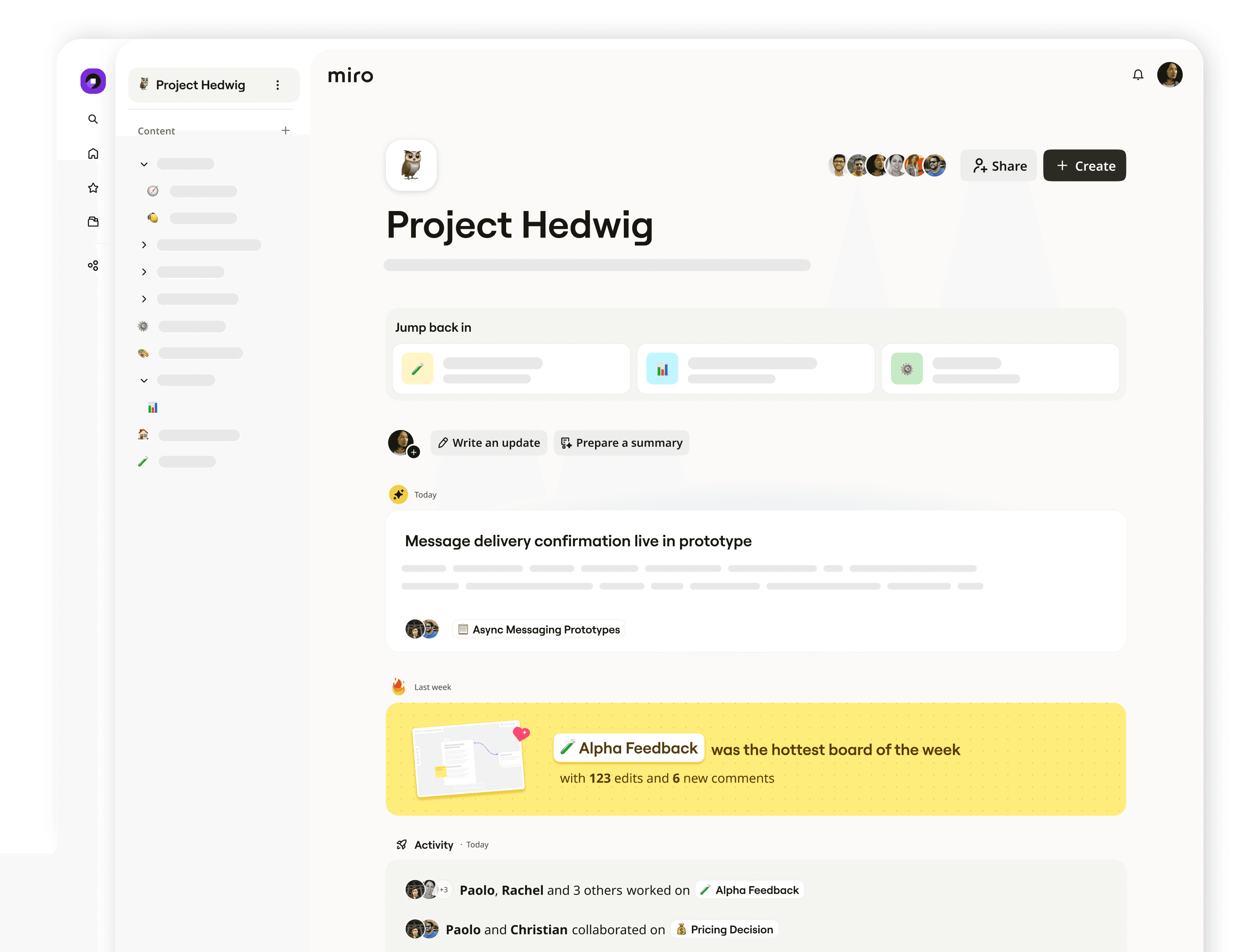
Each Space opens to a live overview where Miro AI posts a daily update on what moved and what needs attention, plus a weekly summary you can share directly with your team.
Why teams run their projects in Spaces
Most tools scatter your work across boards and folders. A Space keeps it together.
A place for every board to belong
All boards, docs, and formats for a project live in one Space, organized around a single goal like a product launch, a quarterly planning cycle, or a client account.
Share once, not board by board
Give people access to the Space and they are in every board that matters. The role you grant applies across the whole Space, so there is no chasing individual board owners for a link.
Every Space briefs itself with AI
Each Space opens to a live overview where Miro AI posts a daily update on what moved and what needs attention, plus a weekly summary you can share directly with your team.
Why teams run their projects in Spaces
Most tools scatter your work across boards and folders. A Space keeps it together.
A place for every board to belong
All boards, docs, and formats for a project live in one Space, organized around a single goal like a product launch, a quarterly planning cycle, or a client account.
Share once, not board by board
Give people access to the Space and they are in every board that matters. The role you grant applies across the whole Space, so there is no chasing individual board owners for a link.
Every Space briefs itself with AI
Each Space opens to a live overview where Miro AI posts a daily update on what moved and what needs attention, plus a weekly summary you can share directly with your team.
Why teams run their projects in Spaces
Most tools scatter your work across boards and folders. A Space keeps it together.
A place for every board to belong
All boards, docs, and formats for a project live in one Space, organized around a single goal like a product launch, a quarterly planning cycle, or a client account.
Share once, not board by board
Give people access to the Space and they are in every board that matters. The role you grant applies across the whole Space, so there is no chasing individual board owners for a link.
Every Space briefs itself with AI
Each Space opens to a live overview where Miro AI posts a daily update on what moved and what needs attention, plus a weekly summary you can share directly with your team.
Why teams run their projects in Spaces
Most tools scatter your work across boards and folders. A Space keeps it together.
A place for every board to belong
All boards, docs, and formats for a project live in one Space, organized around a single goal like a product launch, a quarterly planning cycle, or a client account.
Share once, not board by board
Give people access to the Space and they are in every board that matters. The role you grant applies across the whole Space, so there is no chasing individual board owners for a link.
Every Space briefs itself with AI
Each Space opens to a live overview where Miro AI posts a daily update on what moved and what needs attention, plus a weekly summary you can share directly with your team.
Five ways to accelerate your work
Discover how Spaces turns your ideas into outcomes
Start from a Blueprint
Every Blueprint comes pre-loaded with boards, flows, agents, and integrations — so your team jumps straight into the work. Build your own to roll out what works best across your whole org.

See the project at a glance
Open a Space and see what is going on across every board at a glance, so you are up to speed the moment you arrive instead of opening each board to find out.
Organize your Space with sections
Create and reorder sections to structure content inside a Space, and group related Spaces together on Home. Everything stays hierarchical and easy to navigate as the project grows.

Move through your space seamlessly
A collapsible sidebar follows you across every board in the Space, so you can jump to any board in a single click. Preview content, search, and reach starred boards without leaving what you're working on.

Bulk move your existing boards in your Space
Bring boards scattered across your team into a Space in one move. Select the boards, choose the Space, and optionally notify members, instead of moving them one at a time.

Five ways to accelerate your work
Discover how Spaces turns your ideas into outcomes
Start from a Blueprint
Every Blueprint comes pre-loaded with boards, flows, agents, and integrations — so your team jumps straight into the work. Build your own to roll out what works best across your whole org.
See the project at a glance
Open a Space and see what is going on across every board at a glance, so you are up to speed the moment you arrive instead of opening each board to find out.
Organize your Space with sections
Create and reorder sections to structure content inside a Space, and group related Spaces together on Home. Everything stays hierarchical and easy to navigate as the project grows.
Move through your space seamlessly
A collapsible sidebar follows you across every board in the Space, so you can jump to any board in a single click. Preview content, search, and reach starred boards without leaving what you're working on.
Bulk move your existing boards in your Space
Bring boards scattered across your team into a Space in one move. Select the boards, choose the Space, and optionally notify members, instead of moving them one at a time.
Five ways to accelerate your work
Discover how Spaces turns your ideas into outcomes
Start from a Blueprint
Every Blueprint comes pre-loaded with boards, flows, agents, and integrations — so your team jumps straight into the work. Build your own to roll out what works best across your whole org.
See the project at a glance
Open a Space and see what is going on across every board at a glance, so you are up to speed the moment you arrive instead of opening each board to find out.
Organize your Space with sections
Create and reorder sections to structure content inside a Space, and group related Spaces together on Home. Everything stays hierarchical and easy to navigate as the project grows.
Move through your space seamlessly
A collapsible sidebar follows you across every board in the Space, so you can jump to any board in a single click. Preview content, search, and reach starred boards without leaving what you're working on.
Bulk move your existing boards in your Space
Bring boards scattered across your team into a Space in one move. Select the boards, choose the Space, and optionally notify members, instead of moving them one at a time.
Five ways to accelerate your work
Discover how Spaces turns your ideas into outcomes
Start from a Blueprint
Every Blueprint comes pre-loaded with boards, flows, agents, and integrations — so your team jumps straight into the work. Build your own to roll out what works best across your whole org.
See the project at a glance
Open a Space and see what is going on across every board at a glance, so you are up to speed the moment you arrive instead of opening each board to find out.
Organize your Space with sections
Create and reorder sections to structure content inside a Space, and group related Spaces together on Home. Everything stays hierarchical and easy to navigate as the project grows.
Move through your space seamlessly
A collapsible sidebar follows you across every board in the Space, so you can jump to any board in a single click. Preview content, search, and reach starred boards without leaving what you're working on.
Bulk move your existing boards in your Space
Bring boards scattered across your team into a Space in one move. Select the boards, choose the Space, and optionally notify members, instead of moving them one at a time.
Five ways to accelerate your work
Discover how Spaces turns your ideas into outcomes
Start from a Blueprint
Every Blueprint comes pre-loaded with boards, flows, agents, and integrations — so your team jumps straight into the work. Build your own to roll out what works best across your whole org.
See the project at a glance
Open a Space and see what is going on across every board at a glance, so you are up to speed the moment you arrive instead of opening each board to find out.
Organize your Space with sections
Create and reorder sections to structure content inside a Space, and group related Spaces together on Home. Everything stays hierarchical and easy to navigate as the project grows.
Move through your space seamlessly
A collapsible sidebar follows you across every board in the Space, so you can jump to any board in a single click. Preview content, search, and reach starred boards without leaving what you're working on.
Bulk move your existing boards in your Space
Bring boards scattered across your team into a Space in one move. Select the boards, choose the Space, and optionally notify members, instead of moving them one at a time.


Need help getting started?
Access free courses to ace the canvas in no time, browse through our blog, get quick answers from our Help Center, and more.
Need help getting started?
Access free courses to ace the canvas in no time, browse through our blog, get quick answers from our Help Center, and more.
Need help getting started?
Access free courses to ace the canvas in no time, browse through our blog, get quick answers from our Help Center, and more.
Need help getting started?
Access free courses to ace the canvas in no time, browse through our blog, get quick answers from our Help Center, and more.
Need help getting started?
Access free courses to ace the canvas in no time, browse through our blog, get quick answers from our Help Center, and more.