
Table of contents
Table of contents
By signing up, you agree to Miro's Terms of Service and Privacy Policy.
Wireframe workshop: How cross-functional teams align on what to build (fast)
Summary
Wireframe workshops get product, design, and engineering teams aligned on interface solutions in 2-3 hours instead of weeks of back-and-forth. By sketching together on a shared canvas, your team surfaces misaligned assumptions immediately, catches technical constraints before development, and ships the right solution faster.
What you'll learn:
- How to plan and facilitate wireframe workshops that produce actionable outputs
- Structured exercises (Crazy 8s, silent sketching) that get everyone contributing directly
- How to navigate disagreements productively and document decisions in real-time
- Common mistakes that derail workshops and how to avoid them
- How to validate wireframes with users and connect them to your development workflow
Key takeaways:
- Effective workshops run 2-2.5 hours with 5-8 cross-functional participants
- Everyone contributes directly to wireframes—not just designers drawing while others watch
- Focus on structure and flow using rough sketches, not polished visual design
- Document the "why" behind decisions so future teams understand the rationale
- Assign clear next steps with owners and timelines before the workshop ends
Time investment: 2-3 hours for the workshop, plus 2-3 days of pre-work preparation
Expected outcome: Annotated wireframes with documented decisions, technical considerations, and clear action items that move directly into user testing and development
Wireframing workshop
You’ve seen it happen. Product writes detailed requirements. Design spends two weeks creating wireframes. Engineering reviews them and says “We can’t actually build that.” Three meetings later, you’re back to square one.
Here’s what actually works: Get everyone in the same room (or on the same canvas) and wireframe together. Not sequentially. Not with one person drawing while others watch. Together.
Wireframe workshops turn abstract requirements into concrete interface concepts in hours, not weeks. Your PM sees what they’re actually asking for. Your engineers catch technical constraints before design goes too far. Your designers apply interaction principles while requirements are still flexible. Everyone leaves aligned on what you’re building and why.
This guide shows you how to run wireframe workshops that produce actual outputs—wireframes your team can immediately validate with users and build from.
What is a wireframe workshop?
A wireframe workshop is a collaborative session where cross-functional teams sketch and iterate on interface structures together. You’re focusing on layout, information hierarchy, and user flow—not visual design, not final aesthetics, not pixel-perfect mockups.
Think of it as roughing out the blueprint before anyone starts building. Boxes and arrows. Labels and annotations. “The login button goes here, the error message shows up there, users can access settings from this menu.” Concrete enough to build from, rough enough to change without anyone feeling precious about it.
When to run wireframe workshops
Early product discovery: You have a concept but need to validate the interface structure before investing in detailed design work.
Feature planning: Your team knows what problem to solve but hasn’t aligned on the actual solution—how the feature works, what users see, what actions they can take.
Redesign initiatives: You’re reimagining an existing experience and need fresh input from people who see the current pain points from different angles.
Problem-solving sessions: You’ve hit a complex interaction pattern that’s hard to explain in words. Sketching it out together surfaces the real questions faster than three rounds of Slack threads.
Who should participate
The people who need to understand the solution to ship it:
- Product managers who know what users need and what the business requires
- Designers who understand interaction patterns and usability principles
- Engineers who can flag technical feasibility issues before anyone wastes time
- Key stakeholders who have decision-making authority and strategic context
Keep it focused: 5-8 participants. Larger groups dilute contribution. Smaller groups miss critical perspectives.
Why collaborative wireframing actually works
You align in hours instead of weeks
According to Forrester research, 71% of cross-functional product leaders say switching between tools interrupts their workflows. You know this firsthand—requirements in Confluence, questions in Slack, feedback in email, designs in Figma. By the time everyone’s seen everything, it’s been two weeks and you still don’t have alignment.
Wireframe workshops create shared understanding in one session. When your PM and engineer are both drawing on the same canvas, misaligned assumptions surface immediately. “Wait, I thought this whole section was optional?” “No, that’s the core feature.” Problem solved in two minutes, not two days.
You get better solutions
Engineers catch technical constraints before design goes too far. Product managers ensure user needs drive interface decisions. Designers apply interaction best practices to business requirements.
According to Forrester research, 89% of leaders say improving collaboration and teamwork is critical to achieving company goals. That's not just sentiment—it's backed by results. Nearly half of leaders plan to measure "improved collaboration" when evaluating the impact of their AI investments because they know it drives real business outcomes. Your engineer knows the API can’t return that data in real-time. Your PM knows users struggle with this exact workflow in the current product. Your designer knows that pattern fails accessibility requirements. All of that knowledge, applied while you’re still sketching boxes, not after you’ve built the feature.
You ship faster (really)
Catching misalignment at the wireframe stage prevents expensive redesigns during development. Your team ships the right solution faster when everyone contributes to defining it upfront.
Moladin, Indonesia’s leading mobility marketplace, doubled their story points with Miro—teams completing twice the work and delivering twice the value. Their Chief Product Officer, Praz Perkasa, put it simply: “Miro has become the backbone of our product development. Everyone now has a clear view of how their work connects to the bigger picture.”
That’s the unlock: when your team builds the interface together, nobody’s surprised by what they’re implementing.
Planning your wireframe workshop
Define what success looks like
Don’t start with “Let’s wireframe the new feature.” Start with what specific decisions need to be made.
- “Define the core user flow for checkout—from cart to confirmation”
- “Sketch three alternative approaches to dashboard navigation and pick one”
- “Align on information hierarchy for the product detail page”
- “Solve the multi-user permissions interface without overwhelming first-time admins”
Clear objectives mean clear outcomes. Vague workshops produce vague wireframes that require three follow-up sessions to interpret.
Prepare the right inputs
Your participants need context to contribute effectively. Send these 2-3 days before the workshop:
User research findings: Specific pain points from customer interviews, support tickets, or usability tests. Not “Users want better navigation”—actual quotes like “I can never find the export button when I need it.”
Business requirements and constraints: What must the interface accomplish? What are the technical or business limitations? “Must support guest checkout” or “Can’t require more than three fields at signup.”
Existing user flows or current-state wireframes: If you’re redesigning, show what exists today and what’s broken about it.
Competitive examples: Not to copy, but to establish baseline expectations. “Here’s how three competitors handle this—what works, what doesn’t?”
Set up your collaborative workspace
Here’s what doesn’t work: one designer drawing on a whiteboard while everyone else watches and comments. That’s a demo, not a workshop.
Here’s what does work: a digital canvas where everyone can contribute simultaneously. Where your PM can drop sticky notes with requirements while your engineer sketches a rough flow while your designer adds UI components—all at the same time, all visible to everyone.
Set up before the workshop:
- Infinite canvas with clear sections (user flow, individual screens, parking lot for questions)
- Device frames to ground wireframes in real constraints
- Basic UI component library (buttons, forms, navigation elements)
- Sticky notes for rapid ideation
- Voting tools for quick decision-making
Test everything beforehand. Technical difficulties kill momentum faster than anything else.
Create an agenda that actually fits the time
Most effective workshops run 2-2.5 hours. Here’s a structure that works:
Introduction (15 min): Align on objectives, constraints, and success criteria. Everyone needs to leave this section knowing what problem you’re solving and what decisions need to be made.
Context setting (20 min): Review user needs, business requirements, technical considerations. Share the research. Show the current-state problems. Make sure everyone has the same information to work from.
Individual ideation (15 min): Everyone sketches their own solution independently. No discussion yet. This prevents groupthink and gives quieter team members equal voice.
Share and discuss (30 min): Present ideas, identify patterns, debate approaches. “Three of us sketched a similar navigation pattern—maybe we’re onto something.” “I went a totally different direction because I was worried about this technical constraint.”
Collaborative refinement (45 min): Merge the best ideas into unified wireframes. This is where the real work happens—combining your engineer’s feasibility thinking with your designer’s usability principles with your PM’s user context.
Prioritization and next steps (15 min): Decide what to validate with users, who’s refining the wireframes, who’s building the prototype, when you’re testing. Leave with clear owners and timelines.
Facilitating an effective wireframe workshop
Start with the user, not the interface
Open with the problem you’re solving, not the solution you’re building. Show the user research. Share the pain points. Reference specific quotes from customer interviews.
“Users told us they feel overwhelmed when they first log in—too many options, no clear starting point. Let’s solve that overwhelm problem.”
Not: “Let’s redesign the dashboard.”
Frame every decision around user needs, not personal preferences. When debates arise (and they will), return to this: “Which version better solves the user’s problem?”
Use structured exercises to generate ideas
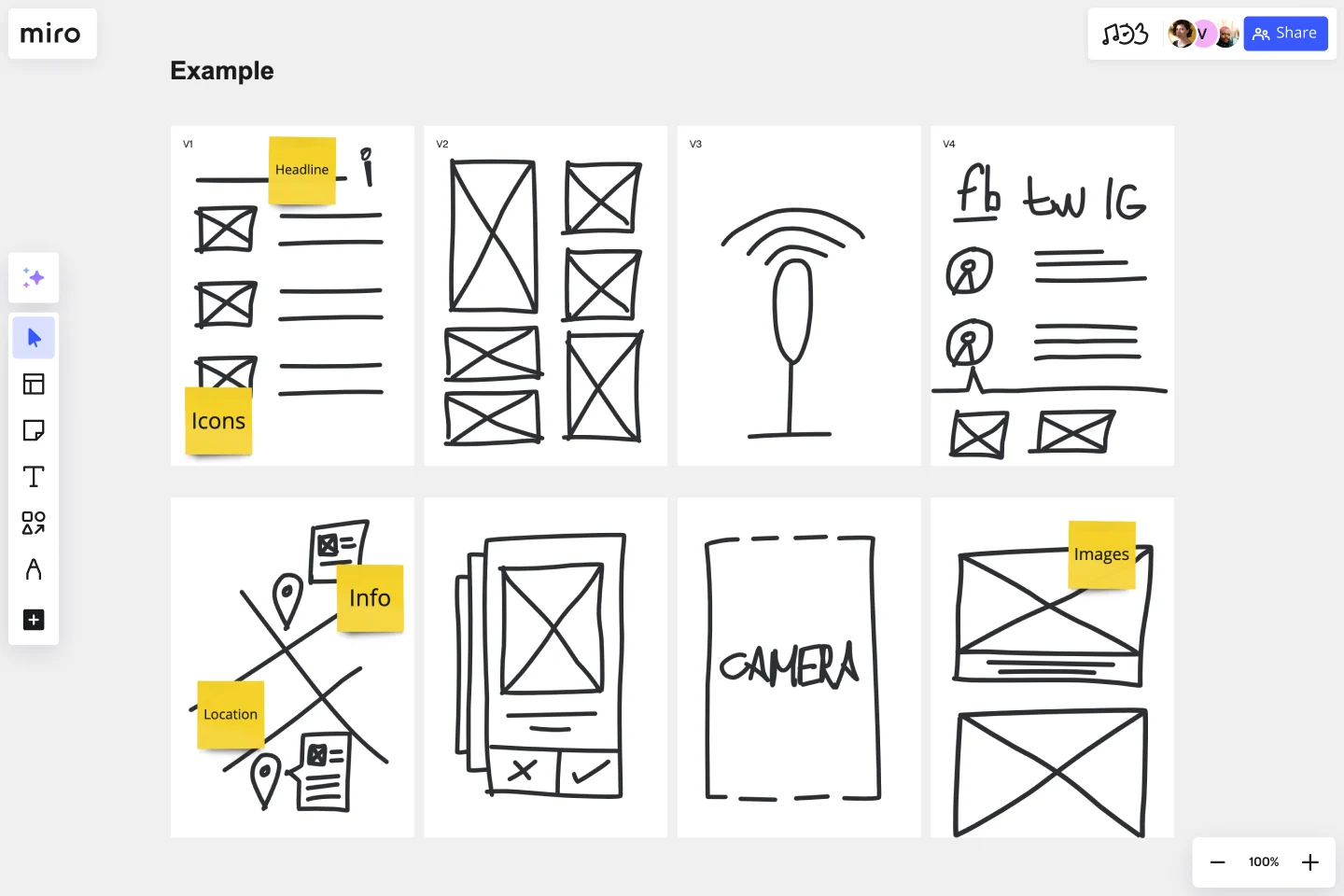
Crazy 8s: Each participant sketches 8 different solutions in 8 minutes. The time pressure forces creative thinking—no room for overthinking or perfectionism. Quantity over quality at this stage reveals unexpected approaches.
Silent sketching: Everyone wireframes simultaneously for 10 minutes before discussing. This prevents the first person who speaks from anchoring everyone else’s thinking. Introverts contribute as much as extroverts. The PM who’s never designed before might sketch something the designer hasn’t considered.
“How Might We” framing: Turn constraints into creative prompts. “How might we show order status without overwhelming users with every detail?” “How might we surface advanced settings without cluttering the main interface?”
Make it visual and make it collaborative
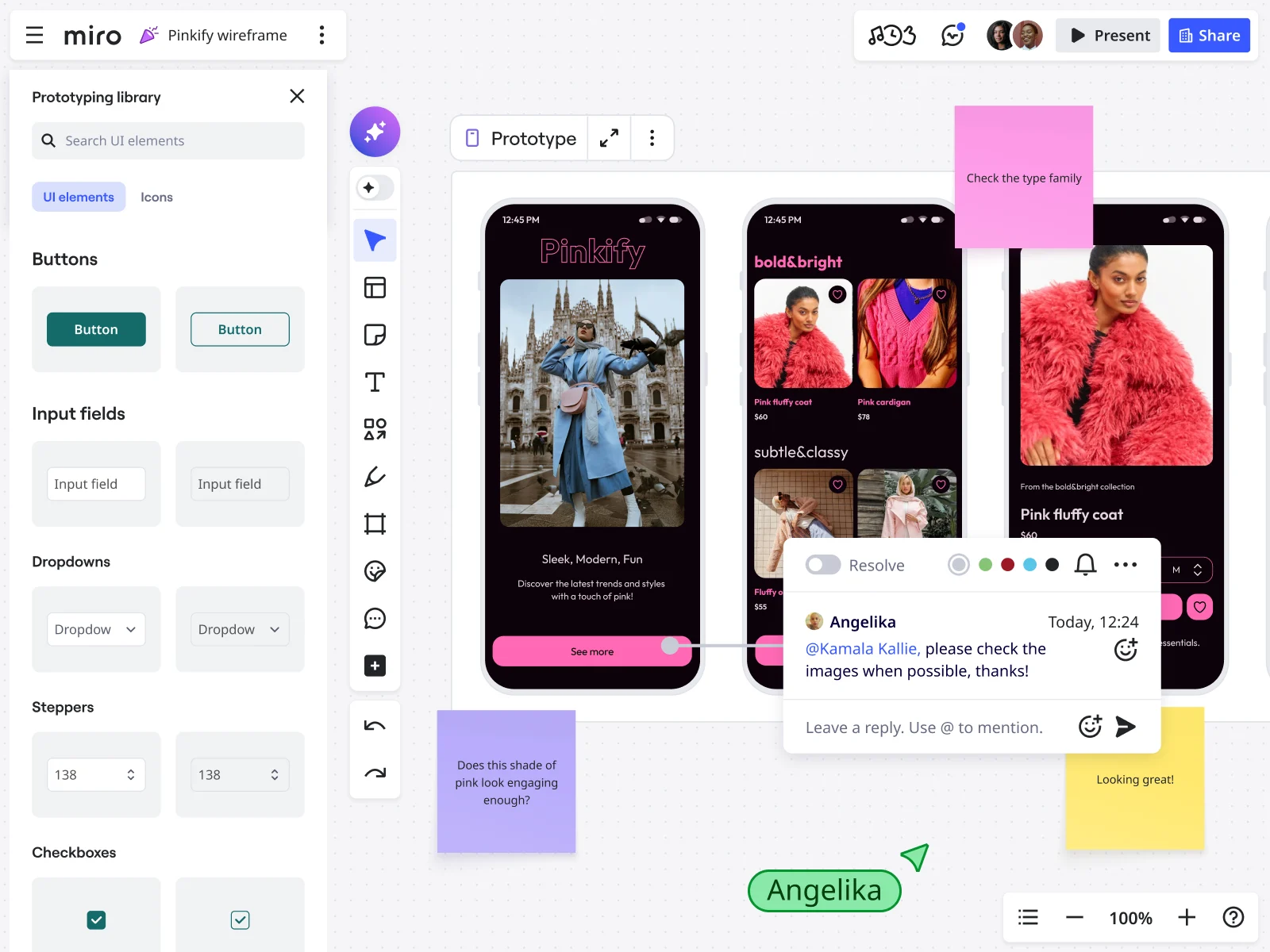
Everyone contributes directly to the canvas. Not taking turns. Not waiting for the designer to translate verbal feedback into visual concepts. Actually wireframing together.
Use sticky notes for rapid ideation—easy to add, easy to rearrange, easy to cluster similar ideas. Draw rough wireframes in real-time using basic shapes. Vote with dots or emojis to quickly gauge preferences without lengthy debates about subjective opinions.
This is where the right tool matters. If only one person can draw at a time, you don’t have a collaborative workshop—you have an expensive meeting where one person works while others watch.
Navigate disagreements productively
When debates arise, sketch both options. Seeing alternatives side-by-side clarifies tradeoffs faster than arguing about theoretical approaches. “Option A is simpler but requires an extra click. Option B shows more information but could overwhelm new users. Which tradeoff aligns with our priority?”
Test assumptions: “What would we need to believe for this approach to work?” Sometimes the answer reveals the real blocker.
Park unresolved issues in a visible “parking lot”—literally a section of the canvas for open questions. Acknowledge them, capture them, revisit if time permits. Don’t let one thorny question derail the entire workshop.
Document decisions as you go
Capture the “why” behind choices, not just the “what.” Future you (and future team members) need to understand the rationale.
Use annotations directly on wireframes:
- “We’re hiding advanced filters initially because user research showed 80% of users never need them”
- “This error message appears here because users need to see it without scrolling”
- “We’re using a modal instead of a new page because users need to reference the original data”
Assign owners to action items immediately. “Sarah will refine these wireframes into a clickable prototype by Thursday for user testing.” “Marcus will spike the technical approach for the real-time updates feature.” Don’t leave the session with vague “someone should…” tasks.
Example: A wireframe workshop in action
Your product team is redesigning the onboarding flow. Here’s how a 2-hour workshop might unfold:
Setup phase: Your PM shares the user journey and current drop-off points directly on the canvas. 60% of new users abandon during step 3 of the current 5-step process.
Diverge phase: Everyone adds sticky notes with ideas, concerns, and questions across the canvas. “Can we reduce to 3 steps?” “What if we show progress differently?” “Do we actually need to collect this information upfront?”
Sketch phase: Participants grab different sections of the canvas and wireframe in parallel. Your engineer sketches a simplified 2-step flow. Your designer explores a progressive disclosure approach. Your PM wireframes a version that frontloads value before asking for user information.
Converge phase: Team discusses each wireframe. The 2-step flow is too aggressive—users need more context. The progressive disclosure feels right but needs better visual indicators. Frontloading value is smart but conflicts with backend requirements.
Refine phase: You merge the best elements: 3-step flow with progressive disclosure patterns, frontload one quick win before asking for data, clear progress indicators at each stage.
Result: Annotated wireframes with rationale captured, technical considerations noted, and next steps assigned. Your designer will create a clickable prototype by Friday. Your team will test it with 6 users next week. Everyone knows what they’re building and why.
How Miro removes the friction from wireframe workshops
Here’s the problem with traditional wireframing workshops: either everyone crowds around one designer’s screen watching them work, or you’re all sketching on paper and spending the second half of the session trying to photograph and share outputs.
Neither approach works when you’re trying to collaborate in real-time, especially with distributed teams.
Built for cross-functional teams working together
Miro’s infinite canvas lets multiple participants edit simultaneously. Your PM can add requirements in one section while your engineer sketches a technical flow in another while your designer refines component details in a third. Everyone sees changes instantly.
No taking turns. No waiting for the designer. No tool-switching friction that interrupts momentum—the exact issue 71% of leaders say slows their teams down.
When GitHub wanted to increase AI tool adoption across their organization, they used Miro for rapid synthesis and team alignment. Alexandra Yanes, their Senior Product Manager, pointed to leadership modeling as key: “Executives didn’t just talk about using collaborative tools; they were actually using them. It helped replace hesitation with curiosity.”
Result: 140% increase in AI tool usage, to over 1 million events monthly.
Templates that get you started fast
Pre-built wireframe templates with device frames and common UI components mean you’re not spending the first 20 minutes of your workshop setting up the canvas. User flow templates connect individual screens to the broader customer journey. Workshop facilitation frameworks include built-in timers and instructions.
Your team can focus on solving problems, not configuring tools.
Features designed for workshop facilitation
Voting and reactions: Quickly gauge team preferences without lengthy debates. “Everyone vote on which navigation approach to pursue.” Results visible in seconds.
Timer: Keep Crazy 8s exercises actually limited to 8 minutes. Maintain energy and momentum by time-boxing activities.
Frames and sections: Organize different concepts, user flows, or design alternatives clearly. “Here’s Option A, here’s Option B, here’s our merged approach.”
Sticky notes: Rapid ideation that’s easy to add, easy to cluster, easy to prioritize. Capture all the ideas first, organize them second.
Comments and @mentions: Discussion continues asynchronously after the live session. “@Marcus, can you spike the technical feasibility of this approach?” “@Sarah, I added some questions about the user flow here.”
Presentation mode: Share outcomes with stakeholders who couldn’t attend the workshop without them needing to navigate a complex canvas.
AI that expands on your ideas
Generate wireframe variations from text descriptions to kickstart ideation. “Show me three different ways to structure a multi-step form.” Expand on rough sketches with AI suggestions for layout and component placement.
The canvas serves as the context layer for AI—it understands your full user flow, not just isolated screens. You’re not starting from scratch with every prompt; the AI sees what you’ve already built and suggests what could come next.
From workshop to implementation without translation loss
Here’s where most workshops fail: great outputs that get “translated” through multiple handoffs before development starts. Designer refines the workshop wireframes. PM writes separate specs. Engineer references both and builds their interpretation.
With Miro, developers reference the same wireframes created in the workshop. The annotations explaining decisions are right there on the canvas. The user flow context is visible. No translation required.
Link wireframes directly to Jira tickets. Embed final designs from Figma next to original workshop wireframes for comparison. Connect to project plans. Everything lives in one workspace.
When Lufthansa Group’s Miles & More program ran wireframe workshops in Miro, they created, validated, and aligned on solutions in less than one day. Björn Ehrlinspiel, their Product Owner, captured the impact: “I’m way more confident that the things we are implementing for the product are the right things. Miro Prototypes helps me show my vision to the management team of the product.”
Common wireframe workshop mistakes (and how to avoid them)
Getting too detailed too soon
The mistake: Your team spends 30 minutes debating exact button copy or whether to use an icon or text label for a secondary action.
Why it derails workshops: You’re trying to validate structure and flow. Premature polish wastes time on decisions that don’t matter yet and will change anyway during implementation.
The fix: Use placeholder text. Draw basic shapes. Annotate instead of designing. “Button here will eventually say something like ‘Continue to payment’ but we’ll finalize copy later.”
Remember: wireframes validate that you’re building the right thing. Visual design ensures you’re building it beautifully. Separate concerns.
Letting one person dominate the canvas
The mistake: Your designer does all the drawing while everyone else just talks and occasionally points.
Why it fails: You’re not getting true collaboration. You’re getting one person’s visual interpretation of everyone else’s verbal feedback. Nuances get lost in translation.
The fix: Structured activities where everyone contributes directly. In Crazy 8s, everyone sketches. During parallel sketching, everyone grabs a section of the canvas and wireframes simultaneously.
The goal is collaborative creation, not designer-driven demonstration with commentary.
Skipping the “why” behind decisions
The mistake: Moving forward with a solution without documenting rationale. Six weeks later, someone asks “Why did we structure it this way?” and nobody remembers.
Why it’s problematic: Future team members can’t understand context. When you need to revisit the design, you’re starting from scratch instead of building on documented reasoning.
The fix: Annotate wireframes with constraints, user needs, and tradeoffs considered. “We used a modal here instead of inline editing because users need to reference the original data while making changes.” “We’re splitting this into two steps because technical constraints prevent us from loading all data simultaneously.”
Inviting too many people
The mistake: 15-person workshop where half the participants don’t contribute and the other half are talking over each other.
Why it doesn’t work: Workshop participants should actively contribute, not observe. Large groups prevent real collaboration and turn into presentations with Q&A.
The fix: Core working team of 5-8 people who will directly shape or implement the solution. Schedule a separate stakeholder review session to share outcomes and gather feedback.
Not preparing participants
The mistake: People arrive without context. You spend the first 30 minutes of your 2-hour workshop catching everyone up on user research, requirements, and constraints.
Why it kills momentum: You’ve lost a quarter of your workshop time before real work starts. Participants aren’t mentally prepared to contribute effectively.
The fix: Send pre-work 2-3 days before. User research findings. Business requirements. Technical constraints. Current-state analysis. Let people arrive ready to solve problems, not learn about them for the first time.
Failing to assign clear next steps
The mistake: Great workshop, solid outputs, everyone leaves feeling aligned. Three weeks later, the wireframes are still sitting in the canvas untouched.
Why nothing happens: No ownership, no deadlines, no accountability. “Someone should probably refine these and test them” doesn’t get done.
The fix: End every workshop by assigning specific action items with owners and timelines. “Sarah will create high-fidelity mockups of Option B by Friday. Marcus will build a clickable prototype by next Tuesday. We’ll test with 6 users on Thursday.”
Document this directly on the canvas where everyone can see it.
After the workshop: From wireframes to products
Validate with users quickly
Turn workshop wireframes into clickable prototypes. Test core flows with 5-6 representative users. You’re not looking for perfection—you’re looking for major misalignments between what you designed and what users actually need.
“I didn’t understand what this button would do.” “I expected to see order status on this screen but it’s buried in a submenu.” “This feels way too complicated for something I do daily.”
Catch these issues now, while changes cost hours instead of weeks.
Refine into detailed specifications
Your designer develops workshop outputs into polished wireframes with annotations about interaction behavior, edge cases, and error states. What happens when the user doesn’t have data to display? How does this interface adapt to different screen sizes? Where do validation messages appear?
These detailed wireframes become the blueprint your engineers build from.
Connect to your development workflow
Link wireframes to user stories or tickets in Jira, Linear, or whatever project management tool you use. Engineers reference wireframes during sprint planning for more accurate estimation—they can see exactly what they’re building.
Use wireframes in daily standups when questions arise. “The spec says ‘display user status’—does that mean what’s shown in frame 14 of the wireframe?” Two-minute answer instead of a Slack thread that takes three hours.
Share outcomes with stakeholders
Present workshop outputs to leadership or stakeholders who couldn’t attend. Show the collaborative process and rationale, not just final wireframes. Walk them through why you chose this approach over alternatives.
Use the documented decisions on your canvas to build confidence. “We explored three navigation patterns. Here’s why we landed on this one—it tested better with users who needed to access these features frequently.”
Maintain a single source of truth
Keep wireframes updated as your product evolves. When someone asks “Why does the error message show up there?” you can reference the original workshop canvas with the annotated reasoning.
Six months later, when you’re iterating on the feature, you’ll understand the original constraints and decisions instead of treating it as a black box.
Wireframe workshop best practices: Quick reference
Before the workshop
- Define clear objectives: What specific decisions need to be made?
- Prepare inputs: User research, requirements, constraints, competitive examples
- Set up collaborative workspace: Infinite canvas, device frames, UI components, voting tools
- Invite the right people: 5-8 cross-functional participants who will shape or implement the solution
- Send pre-work 2-3 days ahead so everyone arrives with context
During the workshop
- Start with user problems, not interface solutions
- Use structured exercises: Crazy 8s, silent sketching, “How Might We” prompts
- Everyone contributes directly to wireframes—no passive observers
- Navigate disagreements by sketching alternatives side-by-side
- Document decisions and rationale in real-time
- Time-box activities to maintain momentum
- Assign owners to action items before the session ends
After the workshop
- Validate wireframes with users quickly—test within 1-2 weeks
- Refine into detailed specifications for development
- Connect wireframes to project management workflow
- Share outcomes with stakeholders who couldn’t attend
- Maintain wireframes as single source of truth
Key success factors
- Cross-functional participation throughout, not just design
- Focus on structure and flow, not visual polish
- Collaborative creation, not designer demonstration with feedback
- Clear next steps with specific owners and timelines
Frequently asked questions
How long should a wireframe workshop be?
Most effective workshops run 2-2.5 hours. That’s enough time for context setting, ideation, collaborative refinement, and decision-making without exhausting participants. Shorter sessions (60-90 minutes) can work for focused decisions on specific flows—“Let’s align on the checkout wireframes”—but you’ll need to condense activities. Longer than 3 hours leads to diminishing returns as energy and focus decline.
Can wireframe workshops work remotely?
Yes, and often they produce better outcomes than in-person sessions using whiteboards. The key is ensuring everyone can contribute simultaneously, not just watch someone else draw. Digital collaboration canvases solve the fundamental limitation of whiteboards: only one person can draw at a time, and outputs are hard to iterate on or share afterward. Remote workshops work when your tooling supports real-time, multiplayer collaboration where geographical location doesn’t limit participation.
What if participants can’t draw or aren’t designers?
Perfect. Wireframes should be rough—boxes, arrows, and labels are sufficient. You’re communicating structure and flow, not creating polished visuals. Emphasize that everyone’s input matters more than drawing skill. Provide basic component libraries (buttons, forms, navigation elements, cards) that anyone can drag and drop. Your PM’s rough sketch often surfaces important requirements that get lost when only designers are drawing.
How do you handle senior stakeholders who want to dictate solutions?
Structure workshops to start with user needs and constraints, not solutions. When stakeholders propose specific interfaces, acknowledge the input but redirect to evidence: “That’s interesting—what user problem would that solve?” or “How does that align with what we learned in the user research?” Use data (research findings, usage analytics, technical constraints) to ground discussions in facts rather than opinions. Senior perspectives matter, but so does the collaborative process that produces better solutions.
What’s the difference between wireframe workshops and design sprints?
Wireframe workshops focus specifically on aligning teams on interface structure for defined problems. You know what you’re solving; you need to agree on how to solve it. Design sprints are multi-day processes that include problem definition, ideation, prototyping, and user testing. They’re comprehensive methodologies for tackling ambiguous challenges. Wireframe workshops are one tool within your broader product development process. Design sprints are frameworks for the entire process.
How do you maintain momentum after the workshop?
Assign clear owners to next steps before the session ends. Schedule follow-up activities within 1-2 weeks—user testing, prototype refinement, stakeholder reviews. Share workshop outputs with the broader team immediately so they understand what’s coming. Reference the collaborative canvas in daily standups and sprint planning to keep decisions visible and actionable. Don’t let the momentum dissipate; capture it while everyone’s still energized and aligned.
From alignment to implementation
Wireframe workshops work because they collapse what used to take weeks into hours. Your designer isn’t creating in isolation while others wait to react. Your team is collaborating to define solutions together. You’re not cycling through endless meetings debating abstract requirements. You’re sketching concrete interfaces everyone can see, critique, and improve.
Most importantly, you’re catching misalignment when it’s cheap to fix—at the wireframe stage, where changes cost hours instead of weeks of rework during development.
The organizations shipping faster aren’t working longer. They’re working better together. They’ve realized that 89% of leaders who say collaboration is critical to achieving company goals aren’t just saying what sounds right—they’re identifying the actual constraint on innovation.
Here’s what changes when you run effective wireframe workshops:
Your PM stops writing 10-page requirement docs that engineers interpret differently than intended. Your designer stops creating polished mockups that turn out to be technically infeasible. Your engineers stop discovering misaligned assumptions halfway through implementation. Everyone stops pretending they’re aligned when they’re actually building different mental models of the same product.
Instead, your team builds the interface together. The wireframes that emerge won’t be perfect. But they’ll be shared. And that shared understanding—of what you’re building, why you’re building it, and how it should work—is what moves teams from discussing to delivering.
Ready to get your team aligned on what to build? Start with Miro’s infinite canvas where your entire team can wireframe together, validate with users quickly, and ship with confidence.
Read more
Join our 100M+ users today


