




Andrey
See collaborative AI in action — straight from the Canvas 26 keynote.
Jeff

Process mapping for risk management professionals

Map every control gap, handoff failure, and audit trigger before they become incidents. One shared canvas, zero version confusion.

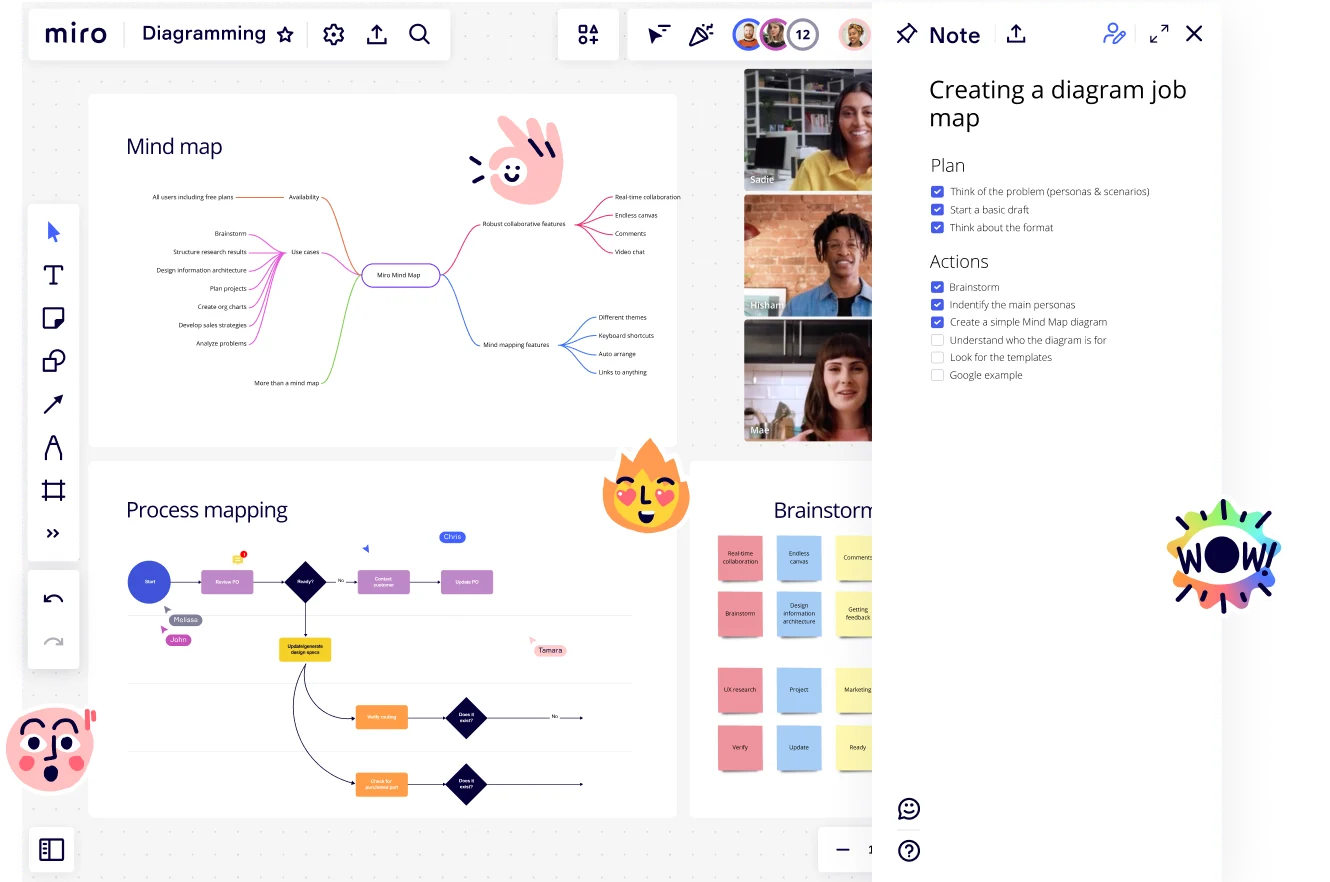
Miro Diagramming board displaying three sections: a Mind Map with branching nodes showing Miro use cases and features, a Process Mapping flowchart with decision diamonds and labeled swimlane participants, and a Brainstorm sticky note grid — alongside an active video call panel with three participants and a Note panel showing a 'Creating a diagram job map' checklist with Plan and Actions tasks.

Expert Insights

  • A good process map outlines inputs, core processes, interactions, outputs and support processes. Though similar in some respects, the process map is not a flowchart and needs to be significantly less detailed.

    Miriam Boudreaux

    author · Mireaux Management Solutions

  • Process mapping the end-to-end processes of an organisation gives employees visibility of where what they do fits into the overall picture.

    Triaster Content Team

    Process Management Experts · Triaster

The research on process mapping

  • 30-50%

    Business Process Management (including process mapping) delivers 30-50% productivity gains

    Source: Forrester

  • 50%

    Process mapping reduced employee onboarding from 10 to 5 days, a 50% reduction

    Source: Systems and Teams

See process mapping in action

Why risk management professionals love mapping processes in Miro

  • From scattered SOPs to one audit-ready source

    Before a compliance review, your SOPs live in three shared drives, two Word docs, and a Confluence page nobody's updated since Q2. That's the moment auditors find the gaps you didn't know existed. Map your control frameworks, exception paths, and approval chains directly in Miro's Diagramming Mode, then export a clean PDF or push a live embed into Confluence - one canvas, one version, zero last-minute scrambles.
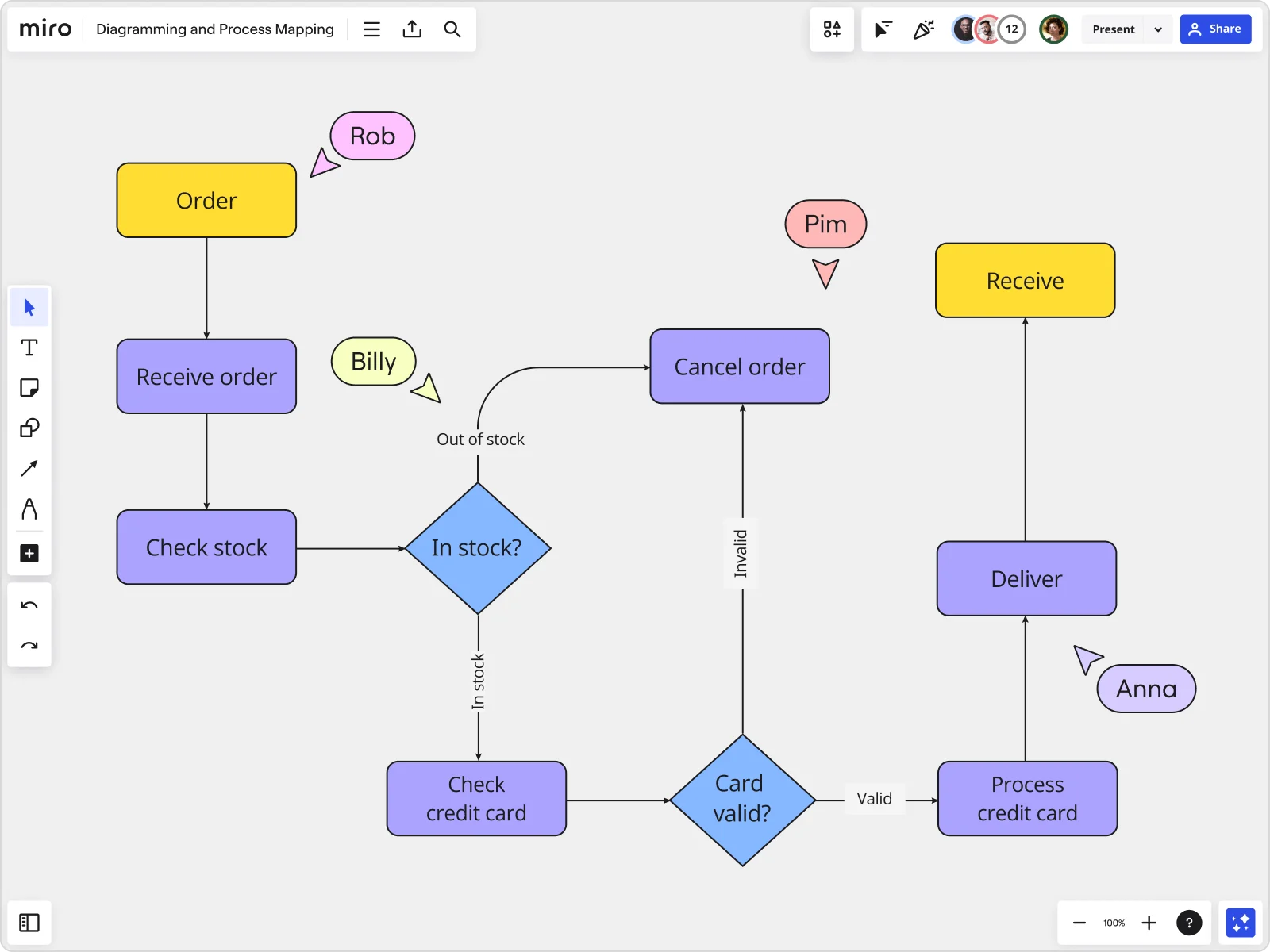
    Miro board displaying a detailed order processing flowchart with colored decision diamonds (blue) for 'In stock?' and 'Card valid?' checks, purple process blocks for steps like 'Receive order', 'Check stock', 'Check credit card', 'Process credit card', 'Deliver', and 'Cancel order', a yellow 'Order' start block and 'Receive' end block, plus named collaborator cursors (Rob, Billy, Pim, Anna) visible on the canvas.
  • When a new regulatory requirement rewrites your control framework

    A regulatory update lands mid-quarter and your current-state process map is already stale. Whether you're a 3-person GRC team or a 300-person risk function spanning compliance, internal audit, and enterprise risk management, Miro's AI instantly drafts a revised BPMN or swimlane diagram from a plain-language description of the new requirement. Your risk team refines it together in real time instead of routing a v7-final-FINAL.vsdx over email.

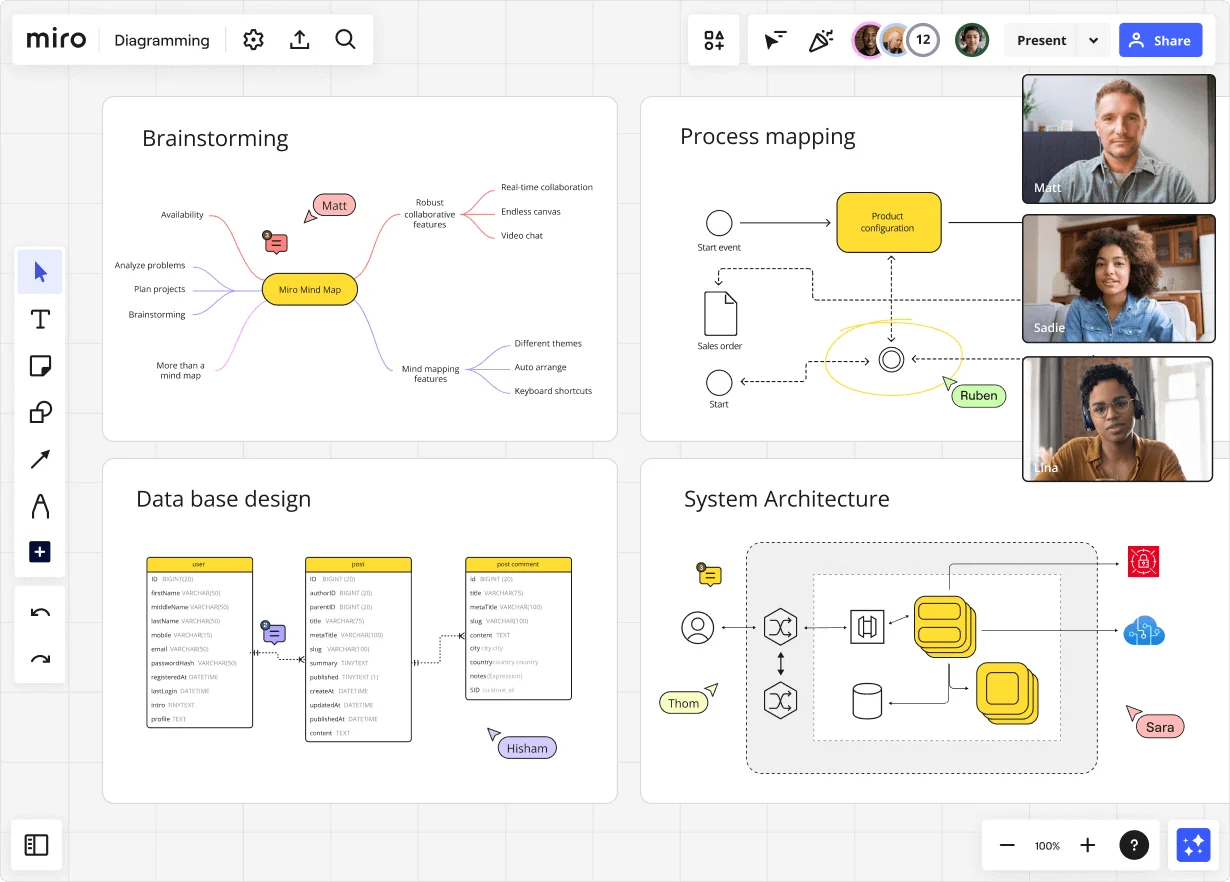
    Miro diagramming board showing four active workspaces: a mind map centered on 'Miro Mind Map' with feature branches, a BPMN-style process mapping flowchart with 'Product configuration' decision node, a database ER diagram with three related tables (user, post, post comment), and a system architecture diagram with interconnected components — all with visible collaborator cursors (Matt, Sadie, Ruben, Lina in video panel, plus Hisham, Thom, Sara as cursor labels).
  • Stop chasing sign-off across legal, compliance, and operations

    Process validation shouldn't take three weeks of email chains. Run your control-review walkthrough directly in Miro's Presentation Mode - step through each process step with your legal counsel, compliance officers, and operations leads, collect their annotations on the map itself, and update the diagram on the spot. Status Labels (Draft, In Review, Published) tell every reviewer exactly where the process stands without a single follow-up Slack message.

    Miro board displaying a BPMN process mapping diagram with two swimlanes (Customer and Online Shop), showing decision gateways, message events, and task boxes for an order/offer workflow including 'Send offer', 'Accept offer', 'Decline offer', 'Send Payment', 'Receive Confirmation', and 'Receive Decline' steps, with the BPMN shapes panel open on the left.
  • Your risk register, connected to the processes that feed it

    A risk register row is meaningless without the process context behind it. Link every identified control gap directly to a Jira ticket so your remediation owners have an assigned action item, a deadline, and a live reference back to the process map that surfaced the issue. Small risk teams get speed; large risk functions get full traceability across the remediation cycle.

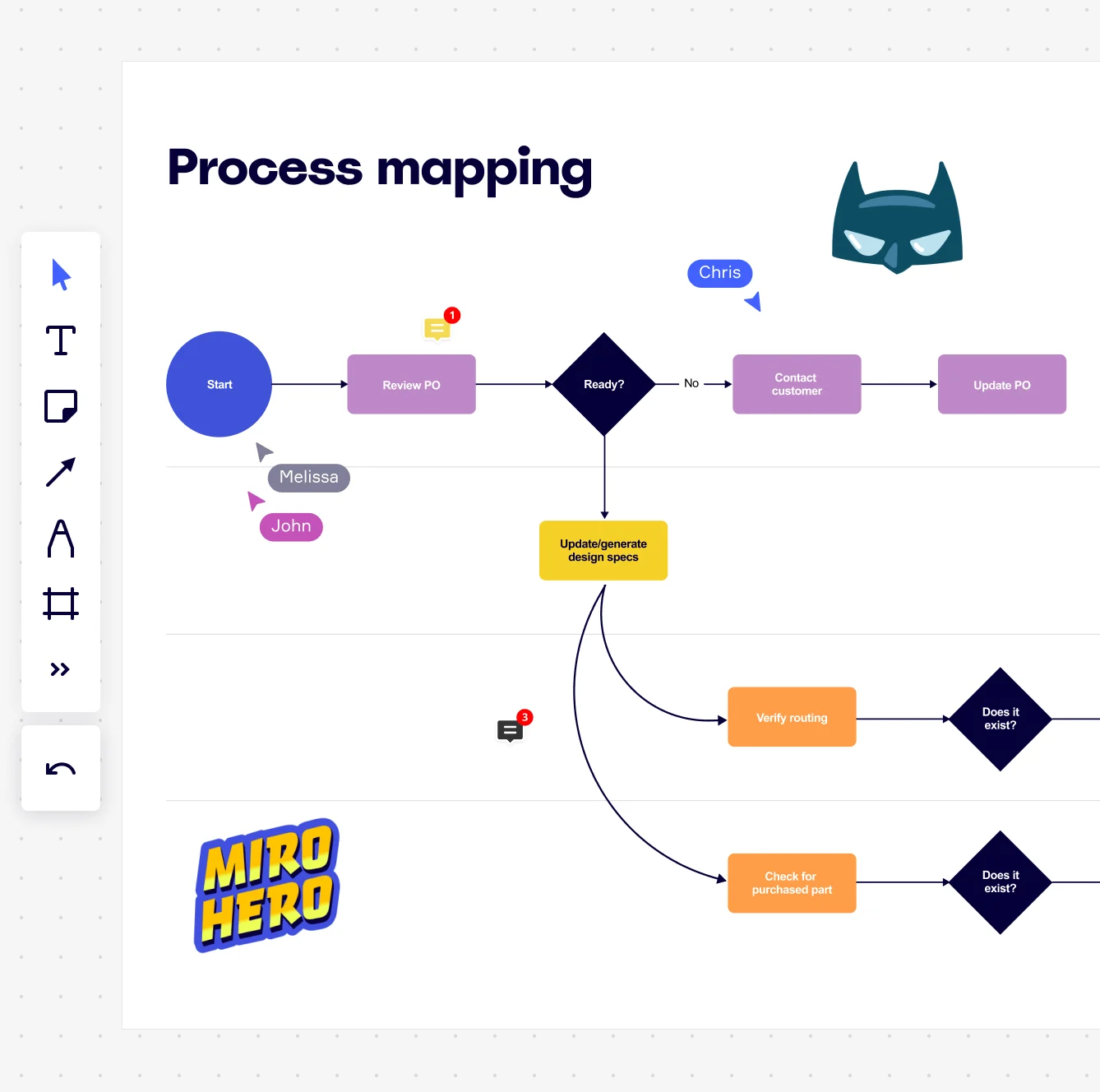
    Miro board displaying a process mapping flowchart with labeled nodes including Start, Review PO, a Ready decision diamond, Contact Customer, Update PO, Update/generate design specs, Verify routing, and Check for purchased part, with collaborative cursors (Chris, Melissa, John), comment badges, and decorative Batman and Miro Hero stickers.
  • Where cross-functional handoffs become visible - not invisible liabilities

    The riskiest moment in any process is the handoff between your third-party procurement review, your legal sign-off, and your operational onboarding teams - and it's almost always undocumented. Miro's swimlane layouts make every cross-functional handoff explicit, showing exactly which function owns each step and where accountability transfers. Your risk team can validate ownership gaps before they become audit findings, whether you're mapping a 10-step vendor approval or a 60-step regulatory reporting cycle.

    Miro process mapping board displaying a cross-functional flowchart with circular process nodes (Process 1.0, 1.1, 2.0), decision paths (Yes/No branches leading to 'Accept offer' and 'Decline offer'), and rectangular action steps including 'Send payment', 'Receive Confirmation', 'Receive Decline', and 'Process', connected by solid and dashed arrows.

How risk management professionals get started with Process Mapping in Miro

  • Map your first compliance workflow

    Open a SIPOC Template from Miro's Template Library and define your process boundaries - the triggering event (say, a new regulatory requirement or audit finding), the end state, and every department or control owner involved - before touching a single shape.

  • Build your risk-annotated process map

    In Diagramming Mode, select the BPMN Shape Pack for notation that survives a master-black-belt or internal audit review, then add Swimlanes to assign each control step to the team, system, or risk owner accountable for it, making handoff gaps and control failures instantly visible.

  • Flag controls and escalate issues

    Use Sticky Notes and Comments to pin risk ratings, exception flags, and compliance observations directly onto the relevant process steps, then turn any identified control gap into a tracked action item with a single click via the Jira Integration.

  • Lock and distribute your validated map

    Run your control validation walkthrough in Presentation Mode with live Voting so risk management professionals across compliance, legal, and operations can prioritize remediation in real time, then set the finalized diagram as the locked Default View so auditors and reviewers land on the approved process, not a work-in-progress.

  • Risk management professionals often map what should happen - use real-time collaborative mapping to pull in the people who actually execute each control step, because the gap between the SOP and reality is usually where the audit findings live.

  • Apply Status Labels (Draft / In Review / Published) inside Diagramming Mode so every risk management professional reviewing the board knows instantly whether they're looking at a working draft or the version submitted for audit sign-off.

  • For large organizations documenting controls across multiple business units, use Synced Copies to push the master process map to each sub-process board automatically, so a control update on the master propagates everywhere within seconds and risk management professionals are never working from a stale version.

Understand how risk management professionals transform their work

  • The real-time and collective nature of the platform is critical. Being able to see people create something together is so important... especially for remote workers. One of our newest uses is for real-time process design. It's a game changer for process collaboration.

    Verified User

    G2
  • There are so many ways to engage with the platform - from mindmapping and prototyping, to process working, to collaboration.

    Verified User

    G2

Process Mapping essential guide for risk management professionals

CategoryKey insights
  • Common mistakes to avoid

    The most common trap risk management professionals fall into is mapping the policy instead of the reality. The process your controls documentation describes and the process your team actually runs are rarely the same thing, and that gap is exactly where risk lives. Whether you're a two-person compliance team or a large enterprise risk function, set a clear scope before anyone draws a single shape, and bring the people who do the work into the session from the start so the informal handoffs and real-world workarounds get captured, not edited out.

  • Key integrations for risk management professionals

    Jira keeps risk management professionals connected between their process maps and the remediation or audit action items that flow from them, so nothing gets lost between discovery and resolution. Confluence and Smartsheet let risk management professionals embed live process documentation directly into the reporting and tracking workflows they already use. For risk management professionals migrating from legacy tools, Miro's Visio, Lucidchart, and Draw.io import means your existing process libraries come with you.

  • When to use it

    Use this when a regulatory deadline, an audit request, or a process failure has risk management professionals scrambling to prove exactly how work flows and who owns what at each step. A practical example: a cross-functional team spanning clinical, administrative, and compliance roles needs to document a patient intake process, validate it with department heads using Presentation Mode, and link every flagged handoff delay to a Jira ticket for remediation tracking. If your process documentation is currently a written SOP that nobody reads, a Miro BPMN or swimlane map gives risk management professionals a shared visual they can actually audit against.

  • Security & Compliance

    Miro is SOC 2 Type II certified and HIPAA compliant, which covers the baseline requirements most risk management professionals will face regardless of sector. For enterprise risk management professionals handling sensitive process data, data residency controls and granular sharing permissions mean you decide where your documentation lives and who can touch it. Private Mode keeps confidential process sessions locked down during workshops, so risk management professionals can work through sensitive control gaps without exposing information before it's ready for a broader audience.

Frequently asked questions for risk management professionals

Last updated: Thursday, June 04, 2026