



Andrey
See collaborative AI in action — straight from the Canvas 26 keynote.
Jeff

Process mapping for internal audit teams

Document audit trails and control flows before the next review. Map every handoff, gap, and sign-off step in one shared workspace.

Miro process mapping board displaying a cross-functional flowchart with circular process nodes (Process 1.0, 1.1, 2.0), decision paths (Yes/No branches leading to 'Accept offer' and 'Decline offer'), and rectangular action steps including 'Send payment', 'Receive Confirmation', 'Receive Decline', and 'Process', connected by solid and dashed arrows.

What experts say

  • Process mapping gives organizations a start-to-finish look at their workflows, making it easier to grasp how everything works behind the scenes.

    ABBYY Content Team

    Marketing and Product Specialists · ABBYY

    Practitioner
  • Process mapping is a method that promotes a better understanding of processes and helps organizations identify areas for improvement

    IBM

    IBM

    Keynote Speaker

The research on process mapping

  • Mapping the entire end-to-end procure-to-pay process enables analysis of inefficiencies and identification of cost reduction opportunities through visual workflow optimization in accounting departments

    Source: IOFM (Institute of Finance & Management)

  • 50%

    Process mapping facilitated reducing paperwork by 50%

    Source: Hospital Material Management Quarterly (Savory & Olson)

See process mapping in action

Related templates for internal audit teams

We have 168 templates in our library for Process Mapping.

Why internal audit teams map processes in Miro

  • From scattered walkthrough notes to one defensible process map

    Every audit cycle, control walkthroughs live in separate Word docs, email threads, and interview notes. Pulling those into a single, reviewable picture before the fieldwork deadline is the job nobody budgets time for. Miro's swimlane layouts let auditors document the end-to-end control flow — from transaction initiation through approval, exception handling, and sign-off — in one shared canvas that everyone can read and challenge.
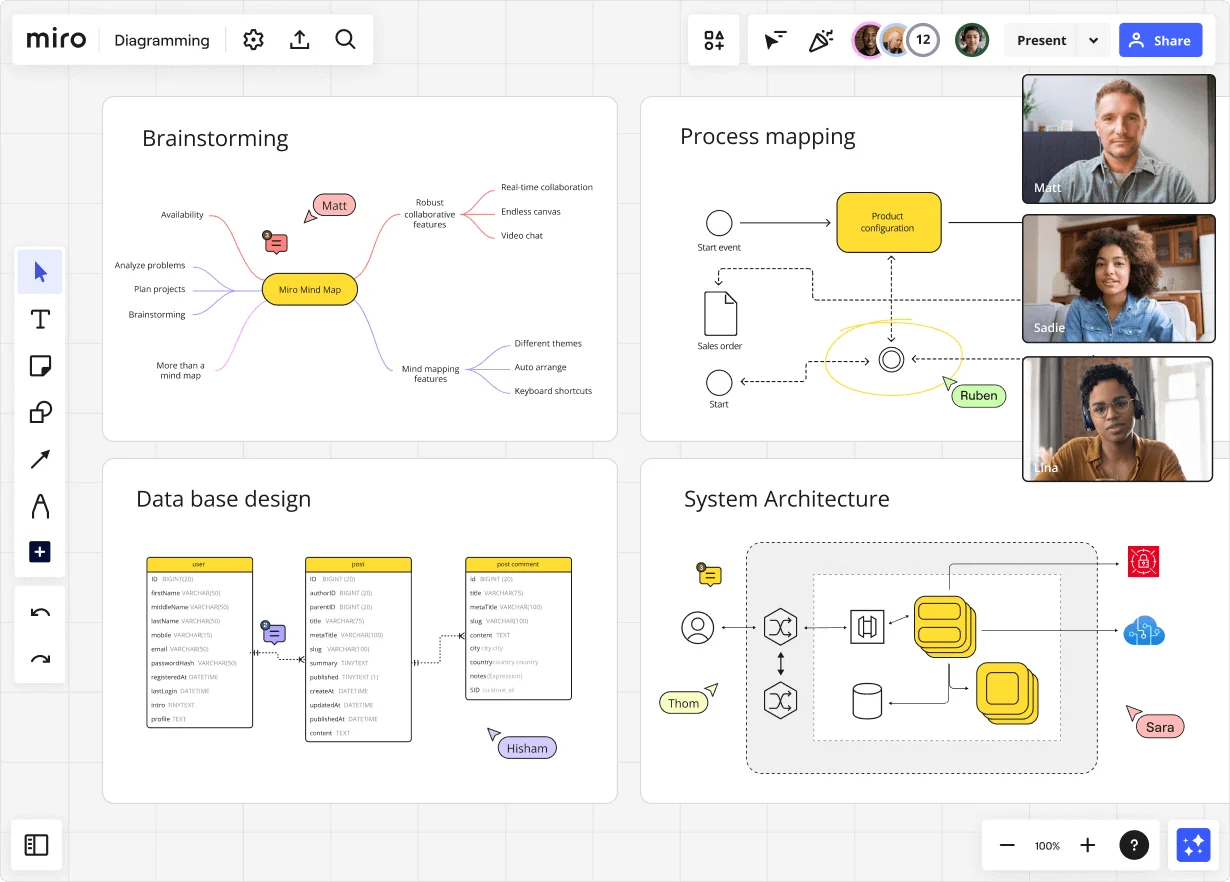
    Miro diagramming board showing four active workspaces: a mind map centered on 'Miro Mind Map' with feature branches, a BPMN-style process mapping flowchart with 'Product configuration' decision node, a database ER diagram with three related tables (user, post, post comment), and a system architecture diagram with interconnected components — all with visible collaborator cursors (Matt, Sadie, Ruben, Lina in video panel, plus Hisham, Thom, Sara as cursor labels).
  • When a regulatory change rewrites your testing scope

    A new SOX requirement lands mid-quarter and your current-state maps no longer reflect how controls actually run. Miro's AI turns a plain-language description of the revised control into a structured BPMN or flowchart draft in seconds, so you're refining, not rebuilding.

    Miro board displaying a BPMN process mapping diagram with two swimlanes (Customer and Online Shop), showing decision gateways, message events, and task boxes for an order/offer workflow including 'Send offer', 'Accept offer', 'Decline offer', 'Send Payment', 'Receive Confirmation', and 'Receive Decline' steps, with the BPMN shapes panel open on the left.
  • Catch exception-handling gaps before they become findings

    Missed exception paths are the most common finding in a process walkthrough. Drop your control steps into Miro's Diagramming Mode, run a Sidekick review, and it flags orphan steps and undocumented decision branches directly on the diagram before your audit committee presentation.

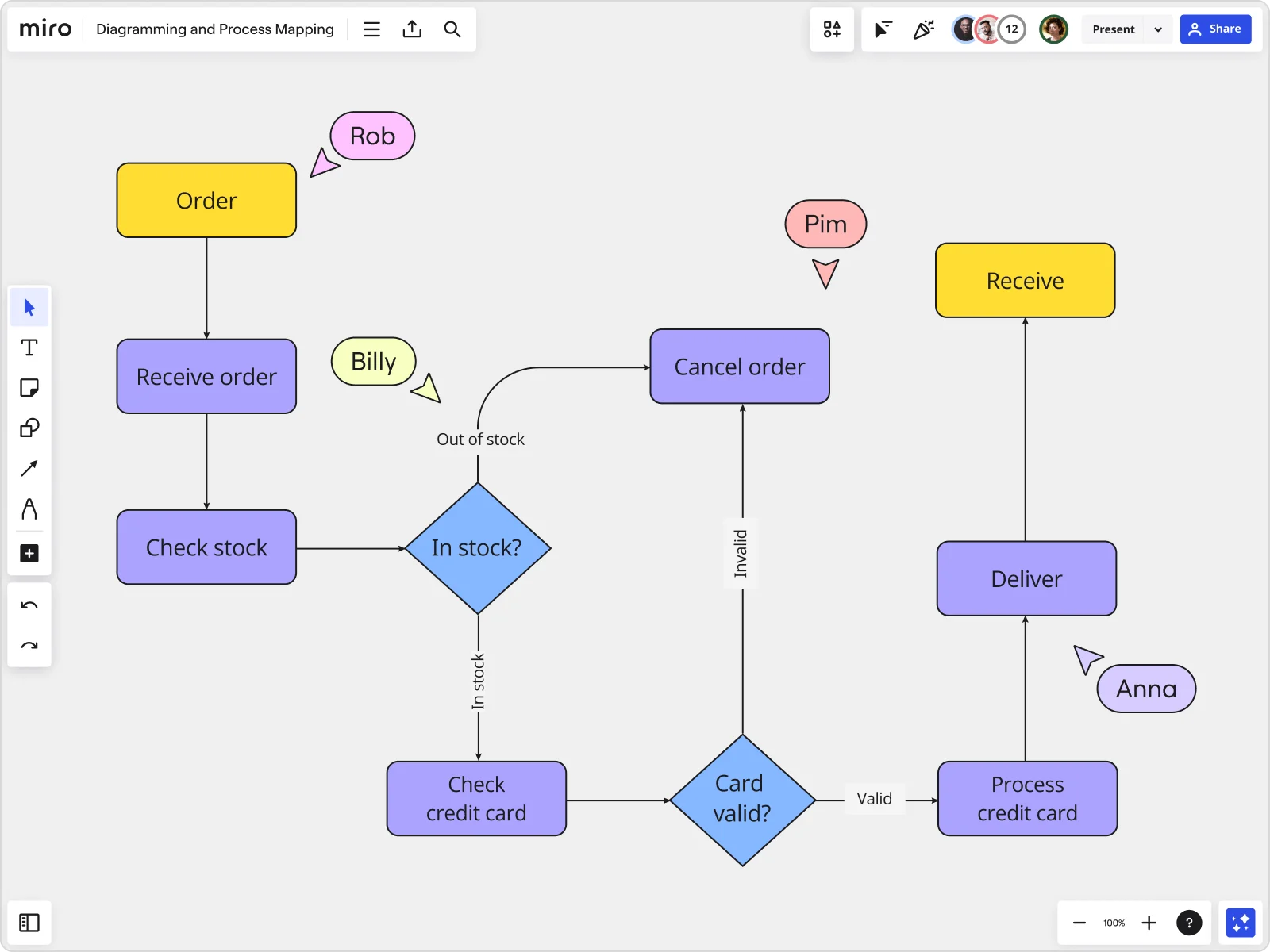
    Miro board displaying a detailed order processing flowchart with colored decision diamonds (blue) for 'In stock?' and 'Card valid?' checks, purple process blocks for steps like 'Receive order', 'Check stock', 'Check credit card', 'Process credit card', 'Deliver', and 'Cancel order', a yellow 'Order' start block and 'Receive' end block, plus named collaborator cursors (Rob, Billy, Pim, Anna) visible on the canvas.
  • Bring existing process documentation with you

    Audit functions running formal BPMN notation have years of existing diagramming artifacts. Import Visio, Lucidchart, and Draw.io files without rebuilding, then add real-time collaboration the moment the file lands.

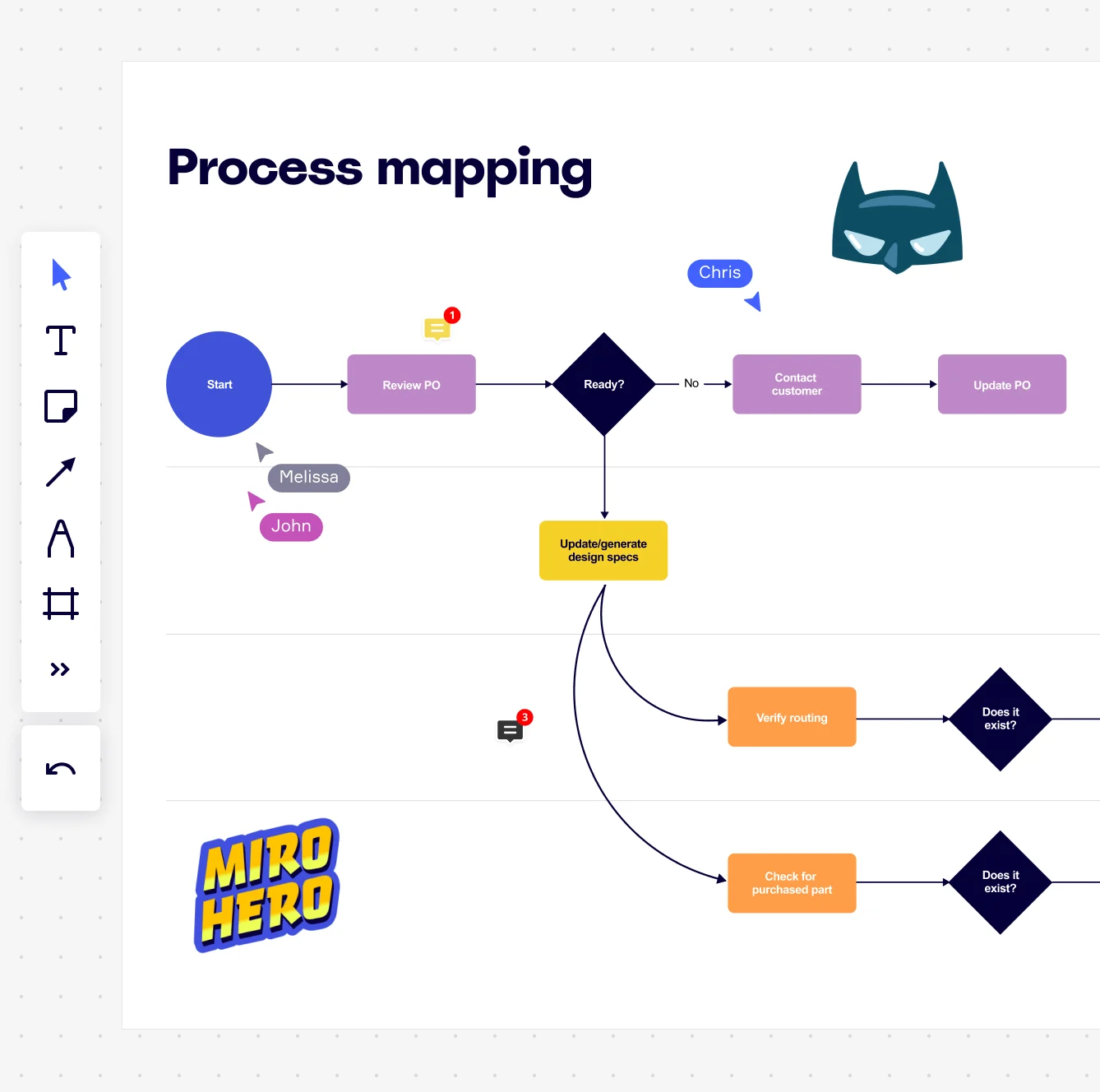
    Miro board displaying a process mapping flowchart with labeled nodes including Start, Review PO, a Ready decision diamond, Contact Customer, Update PO, Update/generate design specs, Verify routing, and Check for purchased part, with collaborative cursors (Chris, Melissa, John), comment badges, and decorative Batman and Miro Hero stickers.
  • From validated control map to leadership readout in one step

    Once the control map is signed off, you still need a findings summary for the audit committee or CFO. Miro's AI Slides generates the readout deck directly from your process-map frames — current state, key gaps, remediation plan — keeping the deck tied to the source-of-truth diagram.

    Miro process mapping board displaying a cross-functional flowchart with circular process nodes (Process 1.0, 1.1, 2.0), decision paths (Yes/No branches leading to 'Accept offer' and 'Decline offer'), and rectangular action steps including 'Send payment', 'Receive Confirmation', 'Receive Decline', and 'Process', connected by solid and dashed arrows.

How internal audit teams get started with Process Mapping in Miro

  • Map the walkthrough before fieldwork starts

    Open a SIPOC Template to define your audit scope in minutes - name the process trigger (say, a purchase requisition or journal entry posting), the systems involved (SAP, Oracle, or your ERP of choice), and the process owner responsible for each stage, so your audit manager sees a defensible scope boundary before a single control has been tested.

  • Trace the transaction end to end

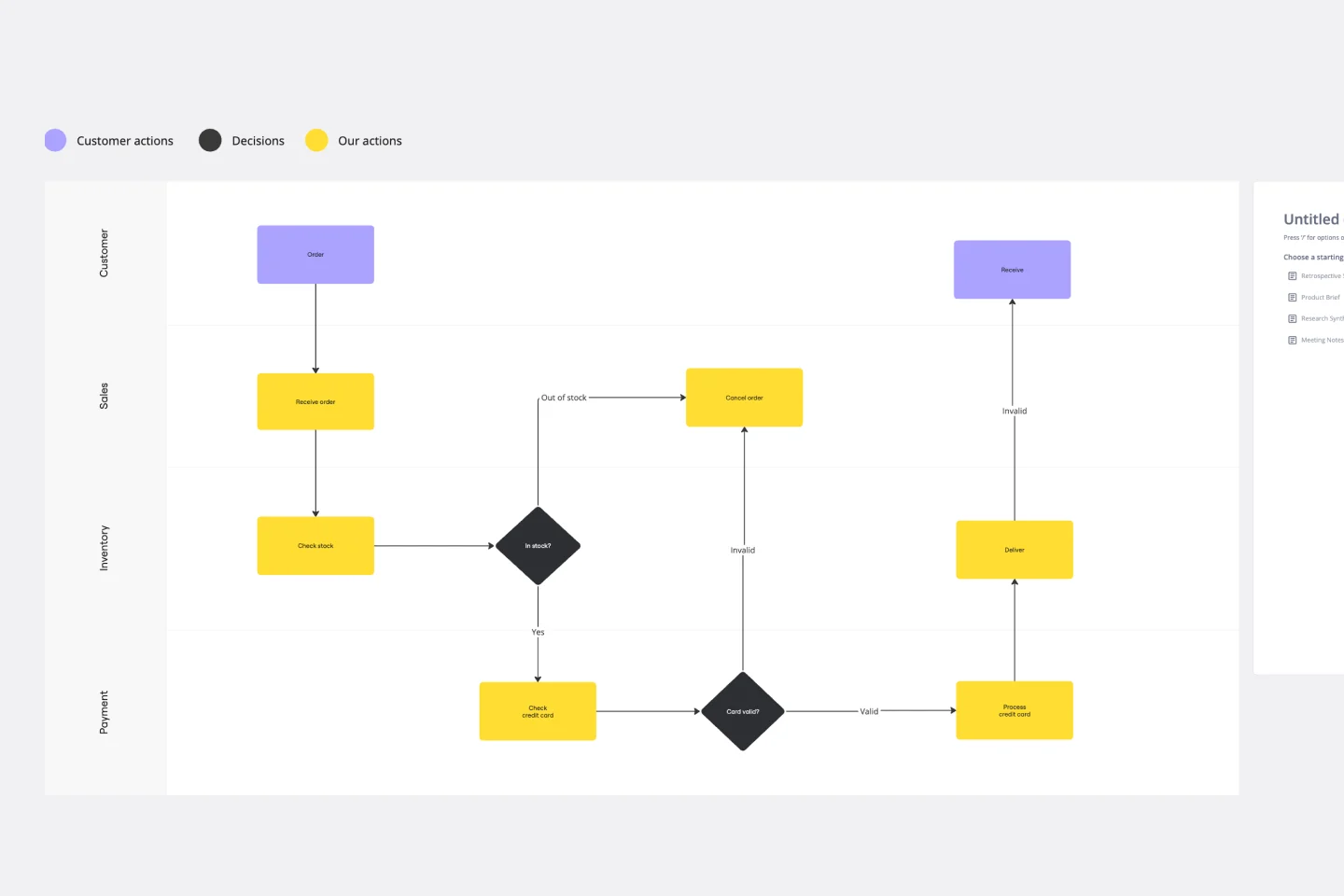
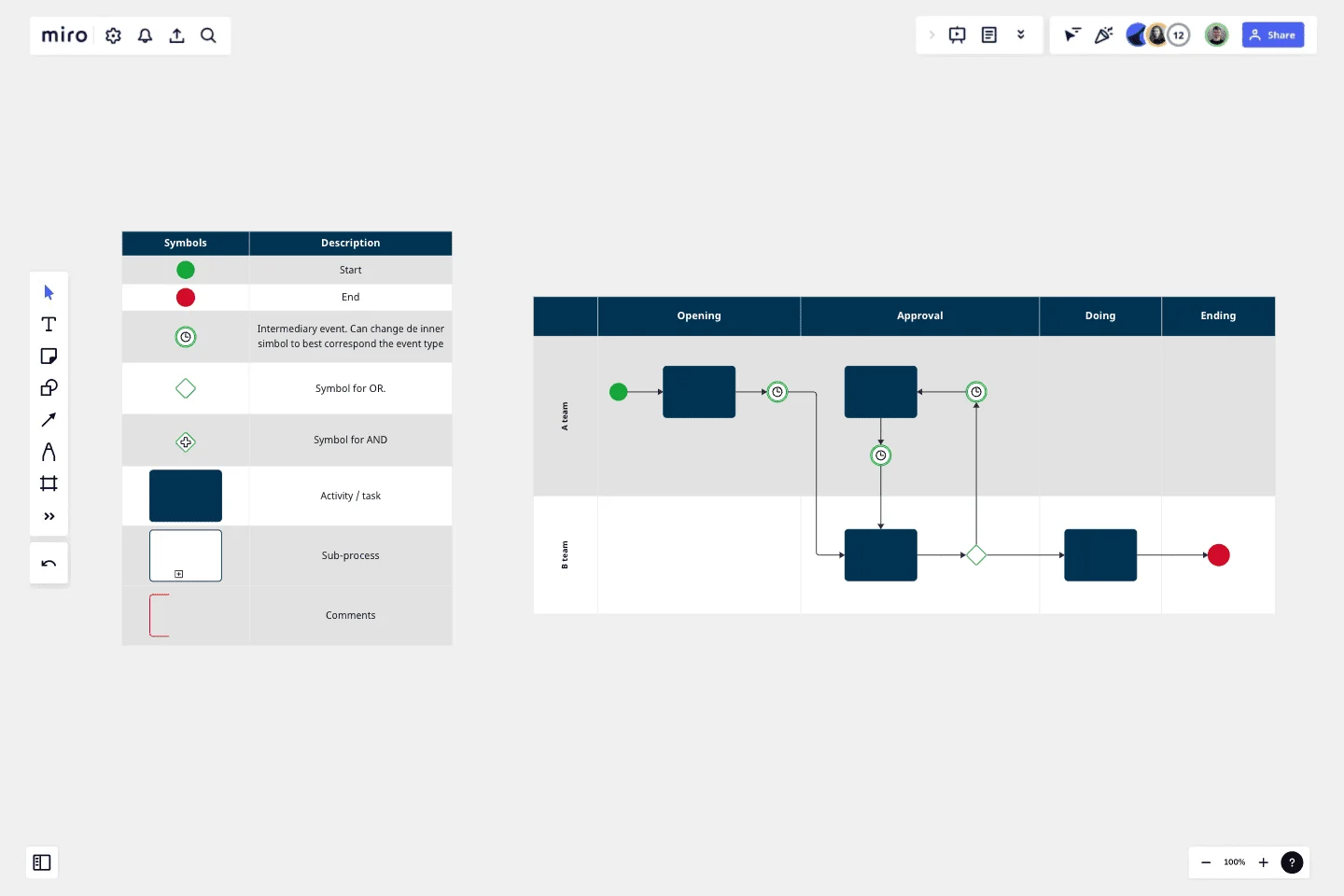
    In Diagramming Mode, use the BPMN Shape Pack and Swimlane lanes to map how a transaction actually moves through initiation, authorization, processing, recording, and reconciliation - one lane per role or department - so segregation of duties gaps and unauthorized access points are visible to you and the process owner before testing begins.

  • Flag control gaps directly on the map

    Drop Comments on every step where a key control is missing, weak, or overlaps with a segregation of duties risk, then use Presentation Mode to walk the process owner through the map frame by frame for sign-off - their validation is on record, the map is defensible, and your audit manager can approve the walkthrough without a separate meeting.

  • Turn your process map into audit-ready documentation

    Use Miro Docs to build the SOP or walkthrough narrative alongside the diagram - drag a synced copy of the process map directly into the Doc, export to PDF for your AuditBoard or TeamMate workpapers, and embed a live version into Confluence so the control matrix and process narrative stay in sync through every iteration of the engagement.

Process Mapping tips for internal audit teams

  • If you're a small audit team running a two-to-four week fieldwork window, use the SIPOC Template as your day-one intake tool - a 30-minute session with the process owner to fill it in will save you two rounds of scope corrections later.

  • For larger internal audit functions running multiple concurrent engagements, apply Status Labels (Draft / In Review / Published) inside Diagramming Mode so every auditor on the team knows instantly whether a process map is still a working draft or has been signed off by the process owner.

  • Before any validation walkthrough, run a quick Comments review to make sure every flagged risk has a linked owner - if you're connected to Jira, convert open control gaps into Jira Cards directly from the board so remediation items have a deadline and don't get lost between fieldwork and the final report.

Understand how internal audit teams transform their work

  • Shareability, ease of use for non-techie colleagues who view new platforms as if they were witnessing witchcraft.

    Verified User

    G2
  • Tempates available for use - not required to start from zero

    Verified User

    G2

Process Mapping essential guide for internal audit teams

CategoryKey insights
  • Common mistakes to avoid

    The most common trap for audit teams is mapping the policy instead of the process - what the ERP procedure says and what the AP clerk actually does on Tuesday morning are often two different things, and that gap is exactly where your findings live. Whether you're a two-person internal audit function or a team of twenty running concurrent engagements, always agree on scope before you open the canvas: without a clear transaction start point and end point, your walkthrough map will keep growing until it's useless. Build the map with the process owner in the room, not from prior workpapers alone - tribal knowledge about informal approval workarounds won't appear in any SharePoint documentation, but it will appear in your risk and control matrix if you ask the right questions.

  • Key integrations for internal audit teams

    Jira and Confluence let audit teams link process maps directly to issue tracking and existing policy documentation, so your walkthrough evidence and remediation actions stay connected instead of scattered across workpapers. For teams already invested in AuditBoard or structured diagramming tools, Miro's Visio and Lucidchart import means prior-period process documentation doesn't get abandoned - it gets brought into a live, collaborative workspace where process owners can validate it in real time. Smartsheet works well for larger audit functions that track fieldwork milestones, letting you tie the process map deliverable to the broader audit plan timeline without leaving your existing project tracking setup behind.

  • When to use it

    Reach for process mapping in Miro the moment you're assigned a new audit engagement and the existing documentation doesn't match what process owners describe in interviews - which is most of the time. Say your team is auditing the procure-to-pay cycle: use a swimlane template to trace the transaction from purchase requisition through authorization, invoice matching, and payment reconciliation, then run a live walkthrough session with the process owner to validate it before control testing begins. That validated map becomes the process narrative that supports your risk and control matrix, gives your audit manager a defensible record of due diligence, and stands up to scrutiny if external auditors review your workpapers.

  • Security & compliance

    Miro is SOC 2 Type II certified, which means the platform meets the audit trail and access control standards that internal audit professionals hold their own organizations to. For enterprise audit functions handling sensitive financial or operational data, data residency controls and granular sharing permissions let IT and legal sign off without a lengthy exception process. Private Mode keeps confidential control gap discussions and pre-report findings off shared boards, so work-in-progress audit content doesn't surface to the wrong stakeholders before it's been reviewed and approved.

Frequently asked questions for internal audit teams

Last updated: Wednesday, July 01, 2026