Table of contents
Table of contents
What is a user persona?
Summary
In this guide, you will learn:
- A clear user persona definition and why it matters for user-centered product, design, and content decisions
- What to include in an effective user persona, from goals and behaviors to context and pain points
- How to create user personas step by step, using real research to define clear, actionable user segments
- Common user persona mistakes to avoid, including relying on assumptions or building generic profiles
- How to build, share, and maintain personas in Miro, so teams stay aligned as products and users evolve
Collaborative AI Workflows
Join thousands of teams using Miro to build the right thing, faster.
Understanding User Personas
A user persona is more than just a basic user biography. It is a dynamic, research-based representation of a key user segment, created to help teams understand who they are designing for and why. Rather than describing a real individual, a persona synthesizes insights from UX research into a clear, relatable profile that reflects users’ goals, behaviors, motivations, and frustrations.
So what is a user persona in UX? It’s a practical way to turn qualitative and quantitative research into a format teams can easily reference when making decisions. This is what makes a user persona dynamic — it captures how users think and behave in context, not just who they are on paper.
While personas are often presented as narrative profiles, their value comes from evidence. A strong UX user persona is grounded in real research and structured to support the product, design, and content decisions through the UX process.
It helps teams move from abstract user data to a shared understanding of the people behind it — keeping user needs front and center as ideas turn into experiences.
Why user personas matter
User personas are an essential tool for user-centric design, helping teams make better decisions faster and turning scattered insights into a shared understanding of their customers.
By giving everyone a clear picture of who they’re designing for, personas reduce ambiguity, prevent misalignment, and keep work grounded in user needs as products evolve and teams scale.
When used well, user personas help teams:
- Focus on research and insight: Personas give research a clear point of reference. They help teams interpret findings, spot patterns across users, and prioritize insights that matter most to the people they’re designing for.
- Guide design and product decisions: By acting as a shared “North Star,” personas support decisions around features, flows, content, and prioritization. They help teams answer, “Does this solve a real problem for this user?” before committing to build.
- Avoid building for the wrong audience: Without personas, it’s easy to design for internal opinions, edge cases, or the loudest stakeholder. Personas anchor decisions in real user insight, reducing the risk of building experiences that don’t resonate or drive adoption.
- Align cross-functional teams: Personas create a common language across product, design, marketing, engineering, and leadership. Instead of debating preferences, teams align around who the user is, what they need, and why it matters.
- Build empathy at scale: Personas make user needs tangible. They help teams move beyond abstract data and understand the human behind the screen— even when teams are distributed or working asynchronously.
What goes into an effective user persona
To be effective, a user persona should capture insights that teams actually need to design and prioritize products and experiences. Rather than listing everything you know about a user, it focuses on the details that explain what they’re trying to achieve, what gets in their way, and how they behave in real contexts.
When creating a user persona profile, include the following core elements:
Goals and motivations
What drives your user, and what are they trying to achieve with your product?
Understanding goals helps teams design features, flows, and content that support real outcomes — not just assumed needs.
Frustrations and pain points
What obstacles prevent the user from achieving their goals?
These might include usability issues, unclear processes, missing information, or emotional friction. Pain points are often the strongest drivers for product improvements.
Behavioral patterns and habits
How does this user actually behave across your product and others in the digital ecosystem?
This includes workflows, decision-making patterns, frequency of use, and behaviors across devices or channels. Behavioral insight helps teams design for reality, not idealized use.
Context and scenarios
When, where, and why does the user engage with your product?
Context matters. A persona should reflect real-life situations, constraints, and triggers — such as time pressure, environment, or competing priorities — that influence behavior.
Psychographics
What attitudes, values, and mindsets shape how this user thinks and decides?
Psychographics add depth beyond demographics, helping teams understand what influences trust, motivation, and perception.
Together, these components turn research into a usable, shared reference that teams can rely on throughout the UX process.
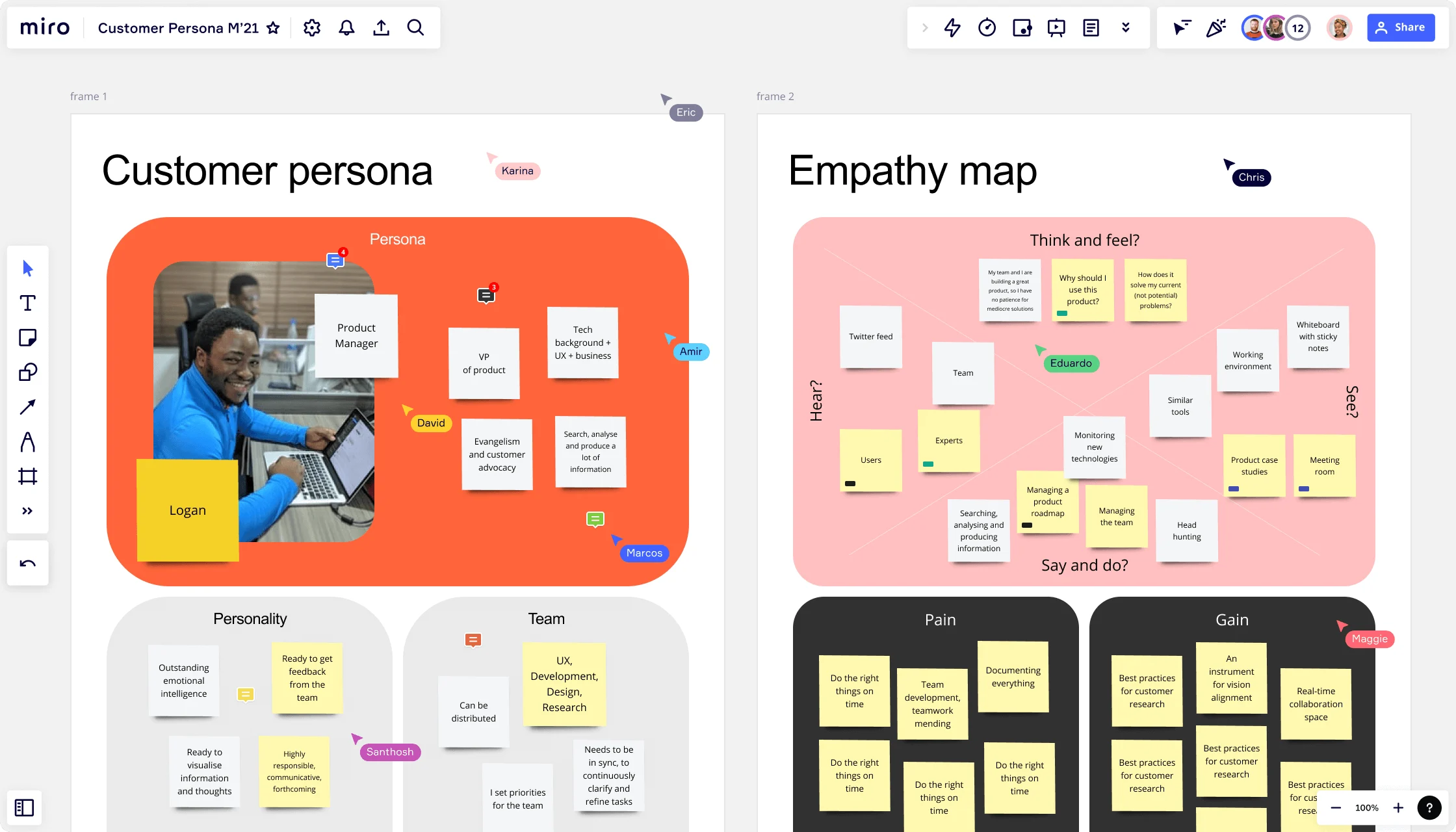
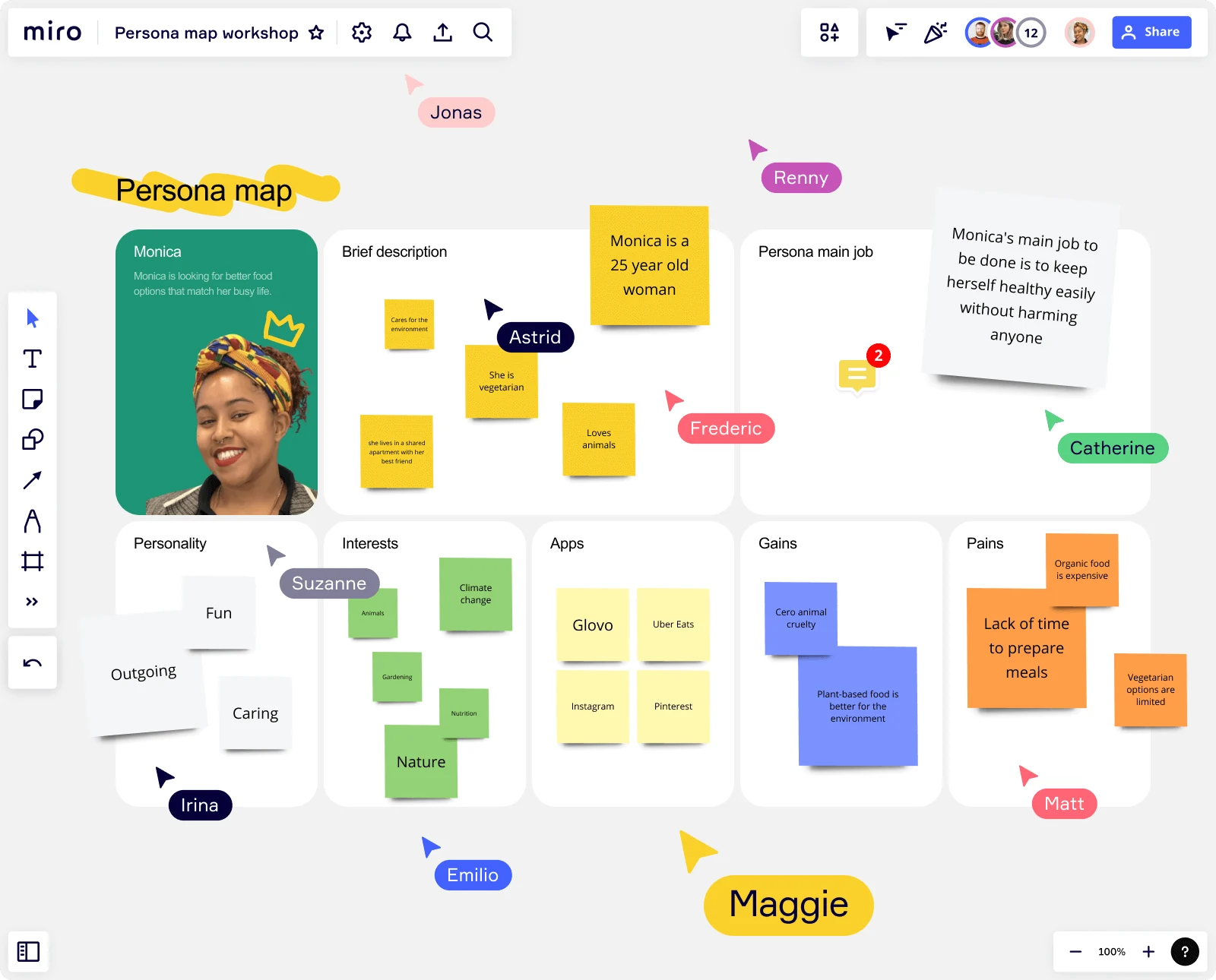
To capture, organize, visualize, and evolve these details collaboratively, you can use Miro’s user persona template as a structured starting point. Making it easier to build personas that stay visible, relevant, and actionable across teams.
From demographics to behaviors and motivations
As products and user expectations have evolved, so has the approach to building user personas. If we rely solely on demographics such as age, gender, and location, we may make assumptions rather than gain insights. While this information can provide useful context, it rarely explains why users behave the way they do or what drives their decisions.
Modern user personas place greater emphasis on behaviors, motivations, and context. By focusing on what users are trying to achieve, how they approach tasks, and what influences their choices, teams gain a far more actionable understanding of their audience.
This shift helps uncover patterns that demographics alone can’t reveal. For example, why two users of the same age might interact with a product in completely different ways.
Looking beyond basic demographics also supports a more inclusive and accurate design. Behavioral and psychographic insights reflect the real complexity of users’ lives, goals, and constraints, helping teams avoid stereotypes and oversimplification. Demographics still have a role to play, but as supporting information — not the foundation of the persona.
How to create user personas (step-by-step)
A successful user persona is a combination of science and art, shaped by real insight. If you’re wondering how to create a user persona, it isn’t just about filling out a template. It’s about turning real user research into a shared understanding that teams can design and build around.
The steps below outline a practical, repeatable process for creating research-backed personas that stay useful beyond a single project. This approach works whether you’re defining personas for the first time or refreshing existing ones as your product and users evolve.
1 - Define your persona goals
Before you create a user persona, clarify the why and how they’ll be used. Personas are most effective when they support specific decisions, not when they exist as standalone artifacts.
Ask questions like:
- What decisions should these personas inform?
- Which teams will use them?
- At what stages of the product or design process will they be referenced?
Common goals include guiding roadmap prioritization, improving onboarding flows, shaping new feature design, aligning marketing and product messaging, or helping teams focus on a particular user segment. Defining this upfront keeps your personas focused, relevant, and actionable.
2 - Collect user data
Authenticity is key. Strong personas are built on a foundation of real-world data and observations. This ensures they truly reflect your users.
Gather insights from multiple sources to build a rounded view of your users, including:
- User interviews and usability tests
- Surveys and polls
- Product analytics and behavioral data
- Support tickets, feedback, and sales insights
- Existing research or discovery work
As you collect data, capture notes, quotes, and observations in one shared space. Using a collaborative board in Miro makes it easier for researchers, designers, and product managers to contribute insights together and maintain context as research evolves.
3 - Look for patterns and segments
Once you have enough data, shift from collection to synthesis. Review your inputs and look for recurring themes across goals, behaviors, motivations, and pain points.
Techniques like affinity mapping help teams cluster related insights and surface meaningful patterns. In Miro, this often means grouping notes visually until clear user segments begin to emerge. The goal is to move from raw data to a small number of distinct user groups that share similar needs and behaviors.
4 - Decide how many personas you need
A common question is: how many personas should we create?
For most teams, three to five personas is the sweet spot.
This is usually enough to represent key user segments without overwhelming teams or diluting focus. Too many personas make it hard to prioritize, while a single catch-all persona tends to be too generic to guide real decisions. Aim for clarity over completeness.
5 - Choose or create your persona template
Select a persona template that fits the insights you’ve gathered. Not the other way around. The structure should reflect the goals, behaviors, and context that matter most to your product.
Miro’s user persona template provides a flexible starting point, allowing teams to organise key attributes while collaborating in real time. You can adapt sections, add custom fields, or connect personas directly to related research, journeys, and flows on the same board.
6 - Turn segments into detailed personas
Once you’ve identified your key segments, turn each one into a clear, human persona your team can design for. Each persona should be a distinct entity, representing a specific segment of your audience. No two personas should feel interchangeable; each should have its own goals, challenges, behaviors, and traits.
With your segments defined, bring each one to life as a persona. This typically includes:
- A name and short summary
- Primary goals and motivations
- Key frustrations and pain points
- Behavioral patterns and habits
- Contextual scenarios of use
Representative quotes or insights The aim isn’t to fictionalize users, but to create a vivid, relatable profile grounded in research that teams can easily reference throughout the UX process.
7 - Prioritize and share your personas
Finally, identify which personas matter most. Many teams designate one or two primary personas that drive the majority of decisions, with others acting as secondary or edge cases.
To be effective, personas need to be shared beyond UX. Make them visible and accessible to product, design, marketing, engineering, and leadership teams by embedding them directly into Miro boards, documents, and presentations.
When personas live alongside roadmaps, designs, and research, they’re far more likely to become part of everyday decision-making — instead of being revisited only during research phases.
Best practices for user personas
The most useful personas are practical tools, not theoretical documents. Following a few core best practices helps ensure your personas stay relevant, credible, and actively used across teams — rather than becoming static profiles that are created once and forgotten.
Base personas on fresh, project-specific data
User personas exist in the present. While projections and future goals are important, they should be grounded in current research, not assumptions or legacy insights. Use interviews, analytics, support data, and recent UX research to reflect how users behave and think today — not how you expect them to behave in the future.
Be context-specific to your product
Context is everything. A persona for a consumer mobile app will look very different from one for an enterprise B2B platform. Tailor personas to the product, platform, and use cases you’re designing for to avoid overly broad or misleading profiles.
Focus on behaviors and motivations over demographics
While demographics have their place, the power of a persona lies in the story: goals, frustrations, hobbies, and the digital environments they inhabit. Prioritize how users approach tasks, what influences their choices, and what success looks like for them.
Keep personas simple and usable across teams
A good persona is easy to scan and easy to remember. Avoid overloading profiles with unnecessary details. Focus on the insights that help teams make better decisions quickly.
Treat templates as structure, not the driver
Templates help organize information, but they shouldn’t dictate what matters. Start with your research, then use a persona template to structure insights in a way that supports collaboration and shared understanding.
Common user persona mistakes to avoid
Relying too heavily on demographics
Age, gender, and location alone rarely explain behavior or decision-making. Over-indexing on demographics can lead to assumptions rather than insight, and personas that fail to guide real design choices.
Creating generic or stereotype personas
Personas that resemble checklists or vague archetypes lack depth. Faceless, interchangeable profiles fail to represent real user segments and don’t provide actionable guidance for design or product decisions.
Basing personas on assumptions instead of research
Subconscious bias can easily creep into persona creation. Personas built from internal opinions instead of being grounded in qualitative and quantitative data often reinforce existing beliefs rather than challenge them.
Making personas too broad or too niche
One-size-fits-all personas try to represent everyone and end up being useful to no one. Conversely, overly narrow personas can fragment focus and make prioritization difficult. Bespoke personas help teams design with focus and make more confident trade-offs when priorities compete.
Creating personas in a silo and never sharing them
Personas lose value when they live in slide decks or documents that teams rarely revisit. Without visibility across product, design, marketing, and engineering, they don’t influence everyday decisions.
Treating personas as static documents
User needs, behaviors, and contexts change over time. Personas that aren’t revisited and updated quickly become outdated, reducing trust in research and limiting their long-term usefulness.
How to use your personas in product and design work
User personas are most valuable when they’re actively used, not stored away as reference material. When integrated into everyday workflows, personas help product and design teams stay grounded in real user needs. They plan, prioritize, and make day-to-day decisions — especially as complexity increases and more stakeholders get involved.
Inform planning and prioritization Product managers and agile teams can use personas to pressure-test roadmaps, feature ideas, and trade-offs. Asking “which persona does this serve?” helps prioritize work that solves meaningful problems and avoid building for edge cases or internal assumptions.
Shape UX flows and content decisions Designers and content teams can reference personas when creating user journeys, interaction flows, and messaging. Personas help teams anticipate where confusion might arise, what information users need at each step, and how different users approach the same task.
Build empathy and align teams Personas provide a shared point of reference during reviews, workshops, and cross-functional discussions. Instead of debating opinions, teams align around how a specific persona would experience a feature — keeping conversations focused on users rather than preferences.
Using Miro to create user personas
When personas live in disconnected tools or static documents, they’re easy to lose sight of and difficult to keep up to date.
Miro helps teams overcome this by bringing personas, research, journeys, and early ideas into a central innovation space. Product, design, research, and marketing teams can run collaborative workshops to co-create personas, surface assumptions, and agree on which user segments matter most — all in one place.
Zendesk is a real-life user persona example of how teams keep complex, global product work aligned. As a distributed UX team designing for a wide range of customer support use cases, Zendesk uses Miro to bring personas, user needs, and early sketches into one shared space.
By aligning around personas in real time, teams can collaborate across regions, iterate on flows together, and ensure user needs remain central as ideas move from concept to delivery.
Start building user personas with Miro
Research-backed user personas help teams stay focused on real user needs as products evolve. When personas are built from evidence and shared across teams, they reduce assumptions, improve alignment, and lead to decisions that genuinely reflect how people think, behave, and use your product.
Miro makes it easier to turn that understanding into something teams actually use. With Miro AI, you can turn research inputs into draft persona profiles, surface patterns, and refine them together over time. This keeps your personas visible and easy to update.
As Luke Pittar, Sustainability Innovation & Design Coach at The Warehouse Group, explains:“Miro allows all our teams to align themselves with certain tools and models: they work independently and create products that really meet our customers' needs.”
Ready to create or refresh your personas? Let Miro be your platform to bring your team together, choose a user persona template, use AI to accelerate the first draft, and then run collaborative persona sessions that keep user understanding at the heart of your design journey.
User Persona FAQS
Are there ready-made persona templates I can use in Miro?
Yes. Miro offers a range of ready-made user persona templates you can use as a starting point, along with community-created templates in Miroverse. These templates help teams structure personas quickly while still leaving room to adapt fields based on your research, product, or team needs.
Can I tailor Miro persona boards to match our team’s research workflow?
Absolutely. Miro persona boards are fully flexible. You can add, remove, or rename sections, link personas directly to research notes, journeys, or designs, and adapt layouts to match how your team works. This makes it easier to fit personas into your existing UX research process rather than forcing a new one.
How many user personas should my team create?
Most teams benefit from creating three to five personas. This usually covers key user segments without overwhelming teams or diluting focus. One persona is often too broad to be useful, while too many personas can make prioritisation harder. Start small and expand only if research clearly supports it.
How often should we update our user personas?
User personas should be reviewed whenever there’s a meaningful change in your product, audience, or goals — such as a major release, new market entry, or fresh research findings. Treat personas as living documents that evolve over time, not one-off deliverables.
What’s the difference between a user persona and a target audience profile?
A target audience profile describes a broad group, often using high-level demographics or market segments. A user persona goes deeper, focusing on behaviours, motivations, pain points, and context. Personas are designed to guide day-to-day product and design decisions, not just define who you’re marketing to.
Author: Miro Team
Last update: February 20, 2026