Table of contents
Table of contents
AI product design: How teams go from idea to validated product faster
Summary
What you’ll find in this article:
- Why AI product design isn’t about AI generating your UI for you: it’s about getting teams to better decisions, faster
- How AI is changing each phase of the product lifecycle: research, ideation, getting everyone on the same page, prototyping, and handoff
- A phase-by-phase workflow walkthrough using Miro as your shared innovation workspace
- How Miro compares to single-phase tools like Figma, Dovetail, and Notion AI
- How to run an AI product design sprint that actually ends with a validated prototype
- Answers to the most common questions about AI in product design
Collaborative AI Workflows
Join thousands of teams using Miro to build the right thing, faster.
AI is getting faster. The real bottleneck is deciding what to build.
Product teams can build faster than ever. What used to take weeks now takes days, sometimes hours, as AI handles more and more of the execution work across product, design, and engineering.
So why do so many product teams still feel stuck?
The trouble is that speed amplifies disagreement. The handoff checkpoints that used to slow everyone down were also the moments where someone would stop and ask: “Wait, is this actually the right thing to build?” Remove those checkpoints without replacing them, and you ship faster in the wrong direction.
Matthias Davidsen, who leads the Miro Prototypes team, put it plainly at Miro’s Canvas event: “The hardest part about building products has never really been the building. It’s been the deciding. It’s a people problem, and that problem doesn’t really go away because tools get smarter and faster.”
AI product design is the practice of using AI to accelerate and connect every phase of the product lifecycle, from early research through prototyping and handoff, inside a shared workspace where the whole team can see and react to the same thing. It’s not about AI replacing product designers. It’s about giving teams a place where AI handles the connective tissue between phases, doing the clustering, summarizing, and scaffolding work so humans can focus on the judgment calls that actually shape what gets built. That’s a very different proposition from using a single AI tool to generate a wireframe, and it’s the difference between going faster on the wrong thing versus getting to the right thing faster, together.
What AI product design actually means (and what it doesn’t)
There’s a misconception worth clearing up: AI product design doesn’t mean you prompt a model and it designs your product for you. That’s AI-assisted UI generation, which is one small part of a much larger picture.
What’s actually changed is how much time teams lose between phases. The work of synthesizing user interviews into clear themes, or turning workshop sticky notes into a prioritized feature list, used to eat days. AI now handles it, which means teams can move from research to a testable prototype in a single session rather than over several weeks.
The old workflow looked like this: user interviews in a research tool, synthesis in a spreadsheet, ideation on a whiteboard, prioritization in a document, prototyping in a design tool, specs in another doc, handoff in a ticketing system. Every step was a context switch, and context switches lose information.
When research, synthesis, ideation, and prototyping all live in the same place, teams spend less time translating between tools and more time making decisions.
How AI changes every phase of product design, from research to handoff
Phase 1: Discovery — turning a flood of research into something the team can act on
The problem most teams run into at the research phase isn’t a shortage of data, it’s too much of it. Interview transcripts, survey responses, and a backlog of NPS comments: synthesizing all of that into something actionable used to take days.
AI changes this by handling affinity mapping and theme extraction at scale. Teams bring raw research inputs into a shared workspace and surface patterns in minutes rather than hours. The insights are visible to the whole team at once, which means everyone is working from the same synthesis rather than each person’s individual interpretation of it.
In Miro’s innovation workspace, AI-assisted clustering happens directly on the canvas, with the output sitting next to the raw research so the team can see the pattern and the evidence side by side, and challenge any synthesis that doesn’t feel right.
Phase 2: Ideation — giving distributed teams something to react to
Async ideation is one of the harder problems in distributed product teams. When ideation is fragmented across tools and time zones, momentum evaporates between sessions. People contribute in isolation, and the team ends up choosing from a narrow range of ideas rather than the full space of what’s possible.
AI-seeded ideation prompts and “how might we” frameworks give the whole team something to push back on and build from, even when they’re not in the same room or timezone. The starting point isn’t a blank canvas but a set of structured provocations the team can shape together.
Phase 3: Getting everyone on the same page — where teams lose the most time, and where AI helps most
This is usually where the most rework originates. PMs and designers often run separate prioritization processes, which produces two different views that then need to be reconciled.
Davidsen described the pattern directly: “Getting stakeholders onto the same page is a massive, massive issue. Even the most AI-forward companies feel this. The bigger the team, the harder it gets to get six people looking at the same thing.”
When AI can synthesize workshop output into a prioritization matrix and surface patterns in how the team voted, the conversation moves faster. But the more significant shift is structural. When research, ideation, and prioritization all live on the same canvas, there’s no translation layer between them, and the whole team can see how their decisions connect back to the evidence that justified them.
Phase 4: Prototyping — closing the gap between what the team agreed to build and what actually gets built
The jump from a shared plan to a prototype is usually where tool fragmentation is most painful. You’ve got a shared understanding of what to build, and then everyone opens a different tool to start building it.
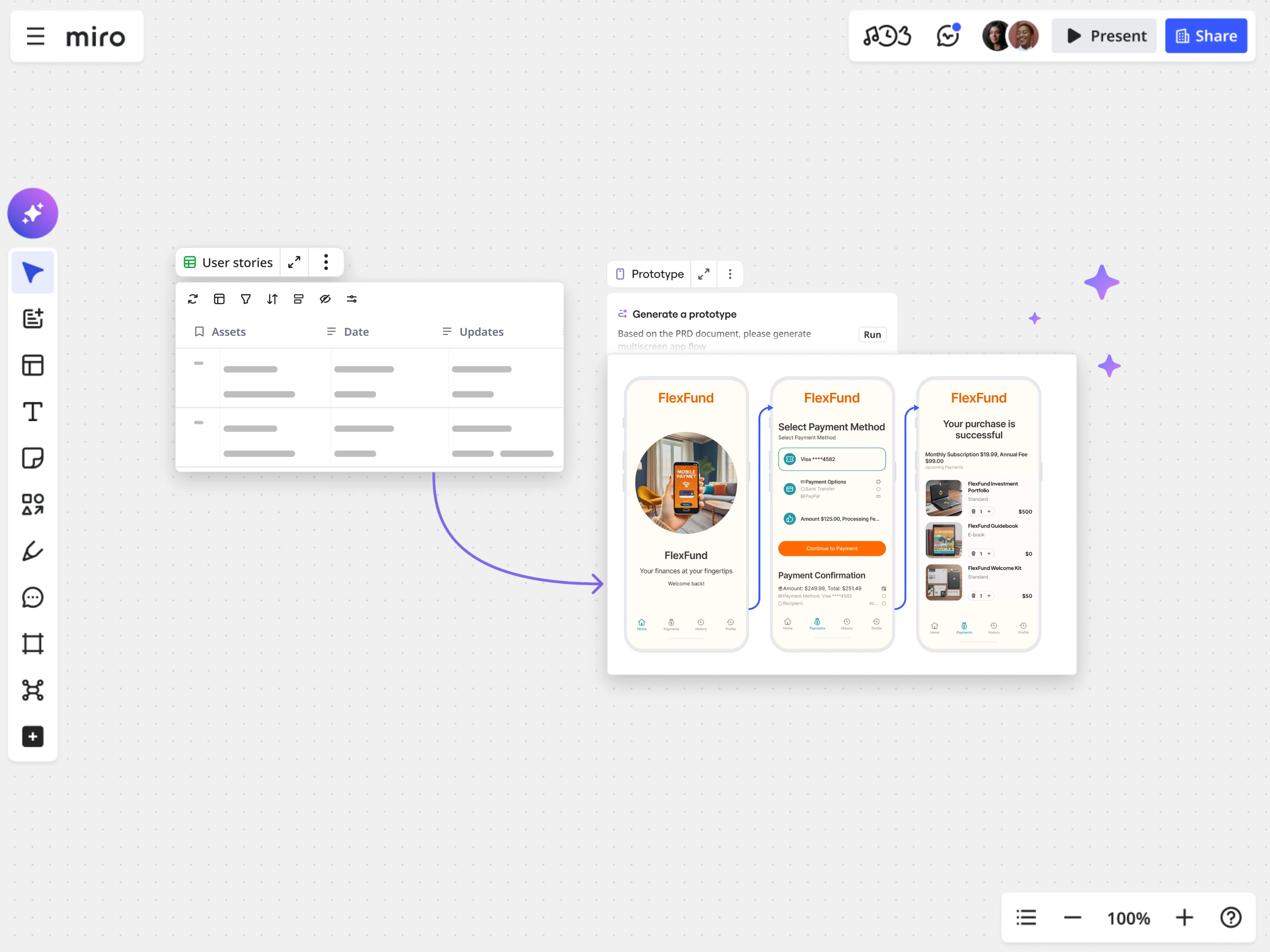
AI-assisted prototyping changes this. Teams build out user flows and interactive prototype screens without leaving the workspace where the strategic context lives, which means the prototype stays adjacent to the research and decisions that shaped it.
Davidsen demonstrated exactly this at Canvas: starting from a design sprint’s worth of sticky notes and how-might-we boards, his team worked through to a full PRD and interactive prototype without once switching tools. “We have everything together,” he said, “not split out in different separate tools.”
One workflow worth understanding: teams can bring in Figma screens via URL, convert them to editable Miro prototypes, and then use Sidekick to implement PRD requirements on the existing screen, pulling context from Confluence directly without switching tabs.
Miro Prototypes also supports variant creation. Instead of presenting one screen and asking “what do you think?”, teams generate two or three layout variants that team members can comment on, vote on, and iterate from. The decision lives on the board alongside the evidence that informed it.
Phase 5: Handoff — giving engineers the reasoning, not just the file
Context loss at handoff is one of the most expensive problems in product development. Engineers get a design file and a ticket, but they don’t have the reasoning behind the design choices. When something comes up during implementation, whether it’s an edge case or a question about intent, there’s no way to trace it back to what the team actually decided.
When the prototype is built on the same canvas as the research and planning work, the board itself becomes the handoff artifact. Engineers can see not just what was decided, but what was considered and rejected along the way.
Miro supports two handoff paths: copy to Figma for teams with a traditional design-to-engineering workflow, and export via MCP to a coding agent. Teams can go from a Miro prototype to a fully coded React app, or bring code back into Miro to gather structured feedback before handing it back to the engineer.
Why most AI product design tools only solve part of the problem
Most AI tools are built for one phase of the product lifecycle, which works fine if you only have one problem. Product teams typically have five.
Why most AI product design tools only solve part of the problem
Phase | Single-phase tools | Miro's role |
Research synthesis | Dovetail, Notion AI | AI clustering directly on the shared canvas, adjacent to raw inputs |
Ideation | ChatGPT, FigJam | AI mind maps and "how might we" scaffolding with the full team in one space |
Alignment & prioritization | Confluence, Mural | AI-generated matrices with research evidence visible in the same workspace |
Prototyping | Figma, Framer, v0 | Interactive prototype flows with strategic context alongside, not in a separate file |
Full lifecycle | (none) | Miro connects all phases in one innovation workspace |
Unlike prototyping-first tools like Figma or dedicated research tools like Dovetail, Miro is where strategy and execution live in the same place. That means AI has access to the full picture when it’s helping your team make decisions, not just the slice that sits in one tool.
How to run an AI product design sprint in Miro: from problem statement to validated prototype in one session
A classic design sprint runs five days. With AI handling the synthesis and scaffolding work, teams are compressing that into a single session. Here’s the exact workflow Matthias Davidsen demonstrated at Canvas, running a full sprint from problem statement to interactive prototype without leaving the board.
Step 1: Build your design sprint on the canvas. Start with the problem you’re trying to solve. Add user context, how-might-we walls, and success metrics, the same assets you’d create in any design sprint, all on one shared board. This is your input layer, and everything that follows flows from it.
Step 2: Use Miro Flows to synthesize the sprint outputs. Once your workshop content is on the board, use AI Flows to summarize the key opportunities from the design sprint. The output lands in a table, scored using a framework like RISE, so you can immediately see which opportunities score highest. The whole team looks at the same table and can agree or push back right there.
Step 3: Generate a PRD from the synthesized outputs. The opportunity table flows automatically into a document where Miro AI generates a full PRD covering problem statement, user stories, feature descriptions, and acceptance criteria. Everything is editable. If the priorities don’t feel right, the team changes them on the canvas before anything gets built.
Step 4: Build the prototype from the PRD. With the PRD in place, Miro generates an interactive prototype drawing on the sprint outputs and any existing product screens you’ve uploaded for visual reference. The prototype isn’t static: add connector lines between screens to make user flows clickable, and pull in components from your library to get it to a testable state. As Davidsen put it: “We need to make it super easy to move from workshop to collaborative interactive prototype before the room clears out.”
Step 5: Bring in your existing product via Figma or Confluence. If your team is iterating on an existing product rather than starting fresh, drop a Figma URL into the canvas and convert it to an editable Miro prototype, then use the Atlassian connector to pull your Confluence PRD directly into the board. From there, Sidekick can implement the PRD requirements onto the existing screen without any copy-pasting between tools.
Step 6: Generate variants and get structured team feedback. Instead of presenting one screen and asking “what do you think?”, prompt Miro to generate two or three variants, each focusing on a different layout or interaction model. Team members drop notes, vote on their preference, and the feedback is visible to everyone. The team converges on a direction together, on the canvas, before any engineering work starts.
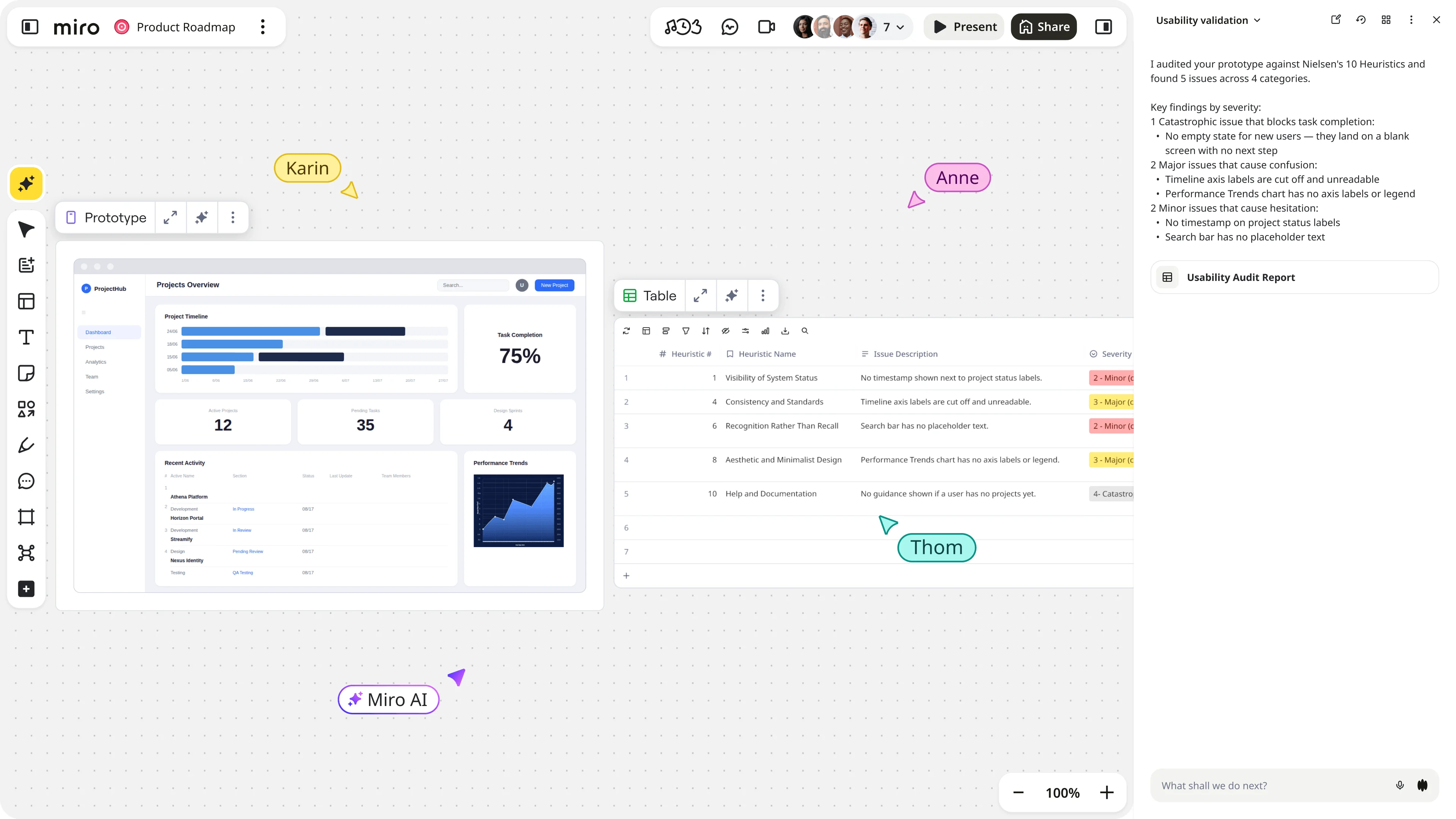
Step 7: Run a usability review with a custom Sidekick. Before sharing with stakeholders, use a custom Sidekick configured with UX heuristics (Nielsen’s ten is a good starting point) to review the prototype and surface improvement points. Each issue gets a severity score and a proposed solution. Implement the high-severity fixes so your stakeholder session focuses on strategic fit, not basic usability problems.
Step 8: Hand off with context, not just a file. Export to Figma for a traditional design-to-engineering workflow, or generate a coded React app via MCP. The board stays as the living record in both cases, so engineers can trace design decisions back to the research and planning work that produced them.
Want to see the full workflow live? Matthias Davidsen walks through every step of this sprint, from design sprint canvas to interactive prototype, in his session from Miro's Canvas event.
Three teams that used AI product design to build the right thing, faster
The sprint workflow above isn’t theoretical. Here’s how three product teams are using it.
Miles & More (Lufthansa Group): from weeks to one day
At Lufthansa Group’s Miles & More loyalty program, product managers faced a familiar constraint: limited design resources and development cycles stretching up to six months, with no way to validate ideas visually before they went into development. Discovering a problem late in a six-month cycle meant expensive rework, both in cost and in opportunity.
Now the Miles & More team uses Miro Prototypes to create, validate, and get everyone agreed on solutions before development starts. They generate mockups directly from website screenshots, gather feedback from end users in real time, and use that validated output to have more grounded conversations with engineers about implementation trade-offs before any code is written. What used to take more than two weeks now takes one day.
“Before using Miro Prototypes, there were no prototypes from the discovery phase. The product team just had ideas. I’m way more confident that the things we are implementing for the product are really the right things. And I’m way more confident to bring that also in front of management.” — Björn Ehrlinspiel, Product Owner at Miles & More
EPAM Systems: 99% reduction in time from concept to reviewable prototype
When Mariana Carril, Director of Product Management at EPAM Systems, needed to build an internal database interface for a global client, she had no UX designers on her engineering team. The traditional route would have meant submitting resource requests, waiting for approvals, sourcing designers, and starting user interviews, with six weeks minimum before design work could begin.
Instead, she used Miro Prototypes. Starting with text prompts and screenshots of the client’s existing interfaces to maintain visual consistency, she generated initial wireframes, iterated by feeding client feedback directly back to the AI on the canvas, and had all the screens she needed in under 30 minutes.
“I have a thousand use cases for Miro Prototypes. I can share my screen and start showing them, ‘you can have this and you can put the buttons here,’ and get feedback instantly.” — Mariana Carril, Director of Product Management at EPAM Systems
Medibank: six weeks, 80+ stakeholders, one shared canvas
The Digital Labs team at Medibank, Australia’s largest health insurer, had six weeks to reimagine Medibank.com.au with more than 80 stakeholders to get on board. Instead of waiting for pixel-perfect design assets, they used early visual prototypes on Miro’s canvas to give stakeholders something concrete to react to while the team explored UX directions together.
Ben Abbott, the product leader on the project, described what made it work: “When everyone’s solving the same problem, in the same space, at the same time.” That, he said, is what made six weeks enough.
The result was a working session rather than a sequence of separate meetings, and a six-week delivery that would have been impossible with a traditional workflow.
The shift has already happened: build the right thing, not just faster
Björn Ehrlinspiel at Miles & More said something worth sitting with: “I’m way more confident that the things we are implementing are really the right things.” That’s the actual value of AI product design: not that teams move faster, but that they move faster toward something they’ve actually validated.
The bottleneck in product development has shifted from “can we build it fast enough?” to “are we building the right thing, and does the whole team agree on what that is?”
AI product design, done well, addresses both. It gives teams a shared workspace where AI handles the translation work between phases, so humans can focus on the decisions that actually move the product forward, with all the context kept in one place so nothing gets lost between tools or handoff moments.
Ready to see this in practice? Explore Miro Prototypes and try going from workshop to validated prototype in a single session.
Frequently asked questions about AI product design
What is AI product design? AI product design is the practice of using AI to accelerate every phase of the product lifecycle, from research synthesis through prototyping and handoff, inside a shared workspace. The key distinction from single-tool AI generation: context stays intact across phases. Teams don’t just move faster; they make better-informed decisions because the research that justifies a design choice lives right next to the design itself.
How does AI help product designers work faster, without creating more rework? The speed gain isn’t just in building, it’s in the translation steps between phases. Synthesizing 40 user interviews used to take days; AI does it in minutes. Converting workshop output into a prioritized feature list used to require a separate sync; AI generates it on the same canvas. The result is fewer handoffs and fewer moments where something important gets lost between tools.
What’s the difference between Miro and Figma for AI product design? Figma is a prototyping-first tool, excellent for high-fidelity design and the design-to-engineering handoff. Miro is a full-lifecycle workspace where discovery, ideation, decision-making, and prototyping happen together, with all the strategic context visible alongside the prototype itself. For teams that want to connect their research directly to what gets built, Miro fills the gap that Figma doesn’t address.
How do I run an AI-assisted design sprint? In four steps: (1) Bring research inputs onto a shared canvas and use AI clustering to surface themes. (2) Run AI-seeded ideation using “how might we” prompts and mind map expansion. (3) Get the team on the same page using AI-generated prioritization matrices, with the evidence visible alongside. (4) Use Create with AI in Miro to build an interactive prototype from the workshop outputs before the session ends. Miroverse has design sprint templates to get you started.
Can Miro Prototypes integrate with other tools in my workflow? Yes. Miro Prototypes integrates with Figma (convert Figma screens to editable prototypes, or export back to Figma), Confluence (pull PRDs into the canvas via the Atlassian connector), and coding agents via MCP (export a prototype to a React app, or import code back into Miro for structured feedback). Miro also connects with Jira, Notion, and 250+ other tools.
Is there a template to get started? Yes — Miroverse has design sprint templates that set up the canvas structure for you. Start there, bring your problem statement, and use AI Flows to move from workshop content to a prioritized PRD in a single session.
Last updated: June 24, 2026
Read more
Join our 100M+ users today


