Table of contents
Table of contents
Explore Miro’s AI Flowchart Generator Community Features
Miro’s AI flowchart generator instantly transforms text into professional diagrams, saving teams hours of manual work. Alongside AI, the Miro Community provides templates, tips, and peer expertise to make flowcharts even stronger.
With support from thousands of makers and experts worldwide, you can access ready-made templates, learn best practices, and share your own ideas. Miro combines the speed of AI with the insight of a vibrant community, making your flowcharts more effective and easier to create.
Find Flowchart Templates in the Miroverse
Miro is more than an AI flowchart generator. Connect with the Miroverse, a community of more than 3,000 users and industry leaders. Together they have crafted over 6,000 intricate flowchart templates, designed to help you start faster and build on proven approaches.
Exploring the Miroverse saves teams time and sparks new ideas. Save your team valuable time with easy access to the knowledge and expertise of the Miro community.
How to Create Flowcharts Quickly
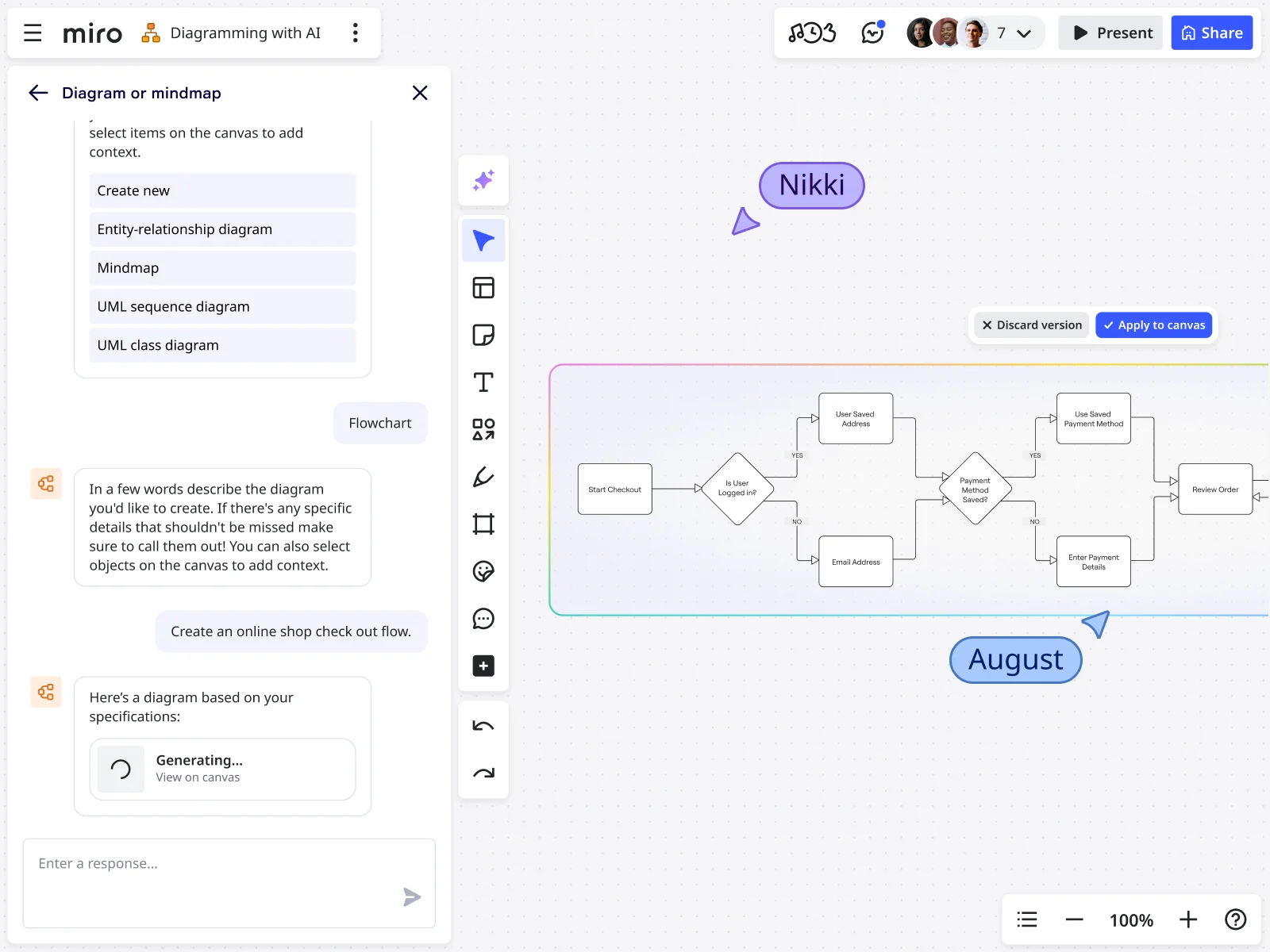
Miro lets you turn ideas into flowcharts fast—use Miro AI to generate from text or start with a template. Flowcharts help teams visualize processes, align on tasks, and spot improvements.
Quick Steps
- Open Miro AI – On a blank board, go to “Create with AI”, select Diagram, and choose Flowchart.
- Enter a Prompt – Provide a text prompt for the AI. Whether you want to visualize a process or outline a customer journey, Miro generates it instantly. Click Generate Diagram when ready.
- Edit & Collaborate – Adjust nodes, branches, colors, and fonts. Apply brand styles and collaborate with teammates in real time.
Read this article for an extensive explanation on how to make a flowchart.
Sharing AI Flowcharts With the Community
Miro makes it easy to share AI-generated flowcharts and build on them with support from the community. This is the place to showcase your creativity, develop your skills, and invite others to contribute their perspectives.
You can request feedback, embed flowcharts in the tools your team already uses, or record a TalkTrack for async sharing. Let the Miro community help bring your ideas to life.
Request Flowchart Feedback
Collaboration isn’t limited to your team. Reach out to creatives across the world through the Miro Community. Invite others to view and comment on your flowcharts. Community members can suggest improvements or offer a fresh perspective.
Feedback helps identify gaps or inefficiencies that may have been overlooked. For example, a developer in the community might spot technical constraints, while a business analyst might identify process improvements.
Embed Flowcharts Into Websites/Tools
Miro connects with the tools your team already uses. Embed your flowchart into your Confluence pages or Jira tickets. We integrate with hundreds of other websites and tools, helping create one unified workspace.
Embedding keeps processes visible and consistent. Integrating your flowcharts helps teams work together better. Teams can access the same up-to-date flowchart within their everyday tools, reducing the needto switch apps.
Record a TalkTrack
Instead of repeating explanations in meetings, record and embed a Talktrack to guide others throguh your flowchart. Talktracks let you explain each step and the reasoning behind it. Viewers watch the recording directly on the board, as if you were presenting live.
This means there’s no confusion, no repetitive meetings and gives everyone the same instructions and explanation.
Strike Up Conversation in the Miro Community Forum
The Miro Community Forum is the place to ask questions, share best practices, and join discussions on flowchart creation. With over 94,000 members and 10,000+ topics, you’ll find support on everything from technical setup to design approaches.Join the conversation to learn from peers, exchange feedback, and discover new ways to improve your flowcharts..
FAQs
Does it cost money to use Miro's AI for flowcharts?
No, it does not cost money to use Miro’s AI for flowcharts. Miro offers a free plan that includes AI features, so you can create flowcharts from text without upgrading.. For larger teams, be sure to check out our different pricing options to explore our advanced features in visualization, collaboration, and more..
How do I find the best flowchart templates in the Miroverse?
You can find the best flowchart templates in the Miroverse by browsing by category, searching for specific keywords, or filtering by popularity and ratings. The most helpful templates usually have detailed descriptions and examples from other users.
Look for templates with high community ratings and recent updates to ensure you’re working with current best practices.
What should I do before sharing my flowchart template with the community?
Before sharing your flowchart template with the community, make sure it’s complete, well-organized, and includes clear instructions or examples for how others can use it. Add helpful descriptions and remove any sensitive company information, and test that it works the way it should.
Consider asking a colleague to review it first. High-quality templates are more likely to be downloaded, reused, and positively rated by the community.
Can multiple people work on AI flowcharts at the same time?
Yes, multiple people can work on AI flowcharts in Miro at the same time.. Teams can build flowcharts together using built-in video calls, voting tools, and timers. They can also split into separate work areas for focused activities.
This makes AI flowcharts ideal for meetings, planning sessions, and group decision-making, whether your team is small or scaling to hundreds of collaborators.
Author: Miro Team Last update: October 6, 2025
Join our 100M+ users today


