SMART Goals Worksheet: Set Measurable Objectives Your Team Can Actually Hit
A SMART Goals Worksheet helps team leads, managers and consultants translate ambiguous priorities into Specific, Measurable, Achievable, Relevant and Time-bound objectives. This template provides a structured framework for aligning individual and team goals with organizational strategy, so nothing gets lost between planning and execution.
What Is a SMART Goals Worksheet for Team Leads and Managers?
A SMART Goals Worksheet is a guided planning tool that breaks goal-setting into five defined criteria. Rather than relying on vague intentions, managers use this worksheet to document each goal's scope, success metrics, resource requirements, strategic relevance and deadline. Consultants use it to facilitate alignment sessions with clients, ensuring every stakeholder leaves with clarity on what "done" looks like.
What Problem Does the SMART Goals Worksheet Solve?
Teams fail to meet objectives not because of lack of effort but because of lack of specificity. This SMART Goals Worksheet solves three common problems:
Goals that sound good in a meeting but have no clear owner or metric.
Misalignment between individual contributors and leadership on what success means.
Quarterly planning cycles that produce activity without measurable outcomes.
For consultants facilitating strategic offsites, this worksheet replaces open-ended brainstorming with a repeatable structure that drives accountability.
How to Use the SMART Goals Worksheet Template
Step 1: Define the goal statement
Write a one-sentence objective. Avoid compound goals; each row in the worksheet addresses one outcome.
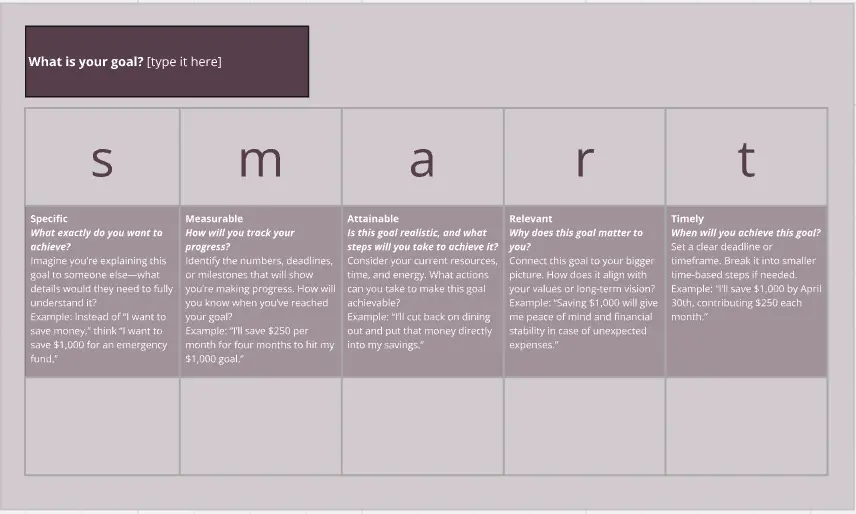
Step 2: Apply each SMART criterion
Work through the five columns:
Specific: Who is responsible? What exactly will be delivered?
Measurable: What metric or evidence confirms completion?
Achievable: What resources, skills or dependencies are required?
Relevant: How does this goal connect to the team's or organization's broader strategy?
Time-bound: What is the deadline or milestone cadence?
Step 3: Identify blockers and dependencies
Use the notes section to flag risks, cross-functional dependencies or approval gates that could delay progress.
Step 4: Review and prioritize
As a team lead, stack-rank goals by impact and feasibility. Revisit the worksheet in weekly check-ins or monthly reviews to track progress and adjust timelines.
SMART Goals Worksheet Best Practices for Workshop Facilitators
Limit each participant to three goals per cycle to maintain focus.
Pair the worksheet with a retrospective at cycle's end to capture what worked.
Use color coding or tags to distinguish individual goals from shared team objectives.
Time-box the initial drafting to 10 minutes per goal to prevent overthinking.
SMART Goals Worksheet FAQs for Managers and Consultants
How often should teams revisit their SMART Goals Worksheet?
Review goals biweekly for fast-moving teams or monthly for longer planning cycles. The worksheet should be a living document, not a one-time exercise.
Can the SMART Goals Worksheet be used for OKRs?
Yes. OKRs and SMART goals are complementary. Use this worksheet to pressure-test whether each key result meets the SMART criteria before committing it to your OKR tracker.
How many goals should a team set per quarter?
Three to five goals per team keeps the worksheet actionable. More than five dilutes focus and makes progress tracking unmanageable.