28likes
181uses
A premium dark-mode mobile chatbot template designed for AI tools, creative assistants, writing apps, productivity products, and smart support experiences. The template helps teams prototype a chat-first AI experience with tool discovery, guided chat setup, message transformation, voice prompts, pinned responses, saved prompts, chat summaries, and branching conversations.
Chatbot prototypes that feel too basic or generic
Lack of structure for AI tool discovery and active chat flows
Missing response actions such as rewrite, summarize, continue, and change tone
Difficulty showing voice-to-chat behavior
No clear way to pin, save, branch, or summarize conversations
Time spent recreating polished dark mobile AI interfaces from scratch
Customize the AI tools, search bar, history list, and premium button.
Update the assistant name, avatar, prompts, and sample conversation.
Connect tool cards to the new chat setup flow.
Add response style options such as concise, detailed, creative, or professional.
Link chat actions for continue, rewrite, change tone, pin, save, and branch.
Connect the voice prompt screen to the active chat.
Test saved prompts, summaries, errors, premium upsell, and chat history flows.
Show available tools, recent sessions, search, menu access, and premium upgrade entry.
Let users choose tone, format, and response style before starting a chat.
Display the main conversation with gradient user bubbles, assistant response cards, typing states, and a fixed composer.
Let users shorten, rewrite, clarify, turn into bullets, continue, or change tone directly inside the chat.
Allow users to create an alternate version of the conversation from any assistant response.
Let users pin useful assistant responses and access them later from the chat menu.
Provide a premium voice-first prompt screen with a glowing mic and AI visual object.
Store reusable prompts, favorites, and tool-specific starting points.
Summarize the current chat with key points, open tasks, and suggested next questions.
Show failed generation, retry, edit prompt, and premium upgrade flows.
Making the home screen too separate from the chat flow
Adding AI tools without a clear path into conversation
Forgetting inline response transformation actions
Treating voice input as a separate feature instead of part of chat
Missing saved prompts or pinned response behavior
Creating only one conversation path
Leaving out retry, edit prompt, and premium states
Keep the chat screen as the main experience
Use dark styling, neon accents, and rounded shapes consistently
Make user messages feel active with gradient bubbles
Keep assistant responses readable inside dark cards
Add quick actions directly under assistant replies
Give users ways to continue, branch, save, and summarize
Test both typed and voice prompt paths
Frames for home, setup, chat, voice, saved prompts, and summary states
Prototype links for tool cards, message actions, branch tabs, and voice handoff
Shapes for chat bubbles, assistant cards, modals, sheets, and chips
Icons for microphone, copy, like, listen, regenerate, pin, save, and branches
Comments for team feedback
Sticky notes for conversation logic and prompt behavior
Connection lines to map chat paths and branch flows
Image placeholders for assistant visuals, avatars, and generated content
Q: Who can benefit from this template? A: Product managers, UX designers, UI designers, AI app teams, writing tool builders, startup teams, and teams creating premium chatbot experiences.
Q: How is this different from a standard chatbot template? A: It focuses on chat creation, response transformation, branching conversations, pinned messages, saved prompts, voice input, and conversation summaries.
Q: Does this template include voice input? A: Yes. It includes a dedicated voice prompt screen that sends captured prompts directly into the active chat.
Q: Can users save or reuse prompts? A: Yes. The template includes saved prompts, favorites, pinned responses, and reusable chat setup presets.
Q: What will participants leave with? A: A polished dark-mode mobile AI chatbot prototype with tool discovery, guided chat setup, active conversation, response actions, voice prompts, chat branching, pinned messages, saved prompts, summaries, error states, and premium upsell flows.

Deanne Watt
Product Strategy @ MiNDPOPGroup.com
My approach to product is to get to the heart of what drives a company. I am passionate about the entire end-to-end process and making it more efficient, collaborative as well as aligning teams and improving communication. We have built about 200 Miro boards so far that cover ideation, strategy, design, engineering, and even marketing promotion.
AI Accelerated
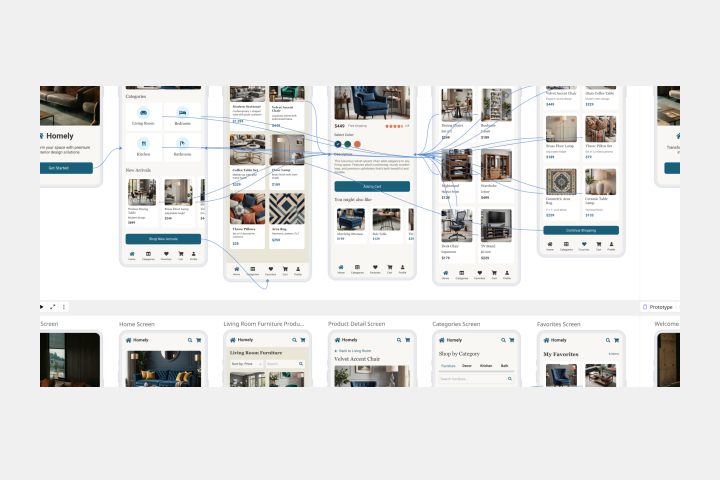
Mobile App Prototype AI Template
Miro's mobile app prototype template is your go-to solution for quickly and efficiently designing mobile apps, offering a collaborative and flexible framework to bring your ideas to life.
AI Accelerated
Mobile App Prototype AI Template
Miro's mobile app prototype template is your go-to solution for quickly and efficiently designing mobile apps, offering a collaborative and flexible framework to bring your ideas to life.