3likes
54uses

Map repeated actions, handle errors, and define clear exit paths.
What happens when a product action fails or needs to be repeated?
The Loops and Error Handling Algorithm Flowchart Workshop helps teams visualize how systems handle retries, errors, and repeated actions. Using simple flowchart shapes, participants can map an action, define success and failure conditions, and create loops with clear exit points.
I designed this template to help product managers, designers, developers, QA testers, and startup teams identify gaps in system logic before development begins. No programming experience is required.
Duration: 25 minutes Format: Individual or collaborative, virtual or in person Best For: Product development, process mapping, software design, and QA planning
Choose a simple product feature where an action might fail or need to be repeated.
Place a rounded Start shape on the board and connect it to an action rectangle. Identify the action that might need to repeat.
Insert a decision diamond that evaluates whether the action succeeded. Create Yes and No branches leading to the appropriate outcomes.
Add an action for handling the failure. Connect an arrow back to the action that needs repeating. Include a retry limit or cancellation option to define when the loop should stop.
Follow every path from Start to End. Check that successful actions complete correctly, failures have appropriate responses, and every loop has a clear exit condition.
AI Tip: Ask AI to review your flowchart for missing error paths, unnecessary repetition, and loops that could continue indefinitely.
A completed algorithm flowchart showing repeated actions, error handling, retry conditions, and exit paths. Use the results to communicate product requirements, guide development, and identify testing scenarios.
1. What is a loop in an algorithm flowchart?
A loop represents an action or sequence that repeats until a defined condition is met or the process ends.
2. What is an exit condition?
An exit condition determines when a loop should stop. Examples include completing an action, reaching a retry limit, or canceling a process.
3. How is this different from a decision-based flowchart?
Decision-based flowcharts show different paths through a process. Loop flowcharts introduce paths that return to earlier actions, allowing a process to repeat.
4. How many loops should I include?
Start with one. Add more when your feature requires additional repeated actions.
5. What happens if a loop never ends?
An infinite loop can create unexpected behavior. Every loop should include a condition that allows the process to finish.
6. Should every error trigger a retry?
No. Some errors require user intervention, an error message, or ending the process. Select the response that matches the product requirements.
7. Can AI help create or validate my flowchart?
Yes. AI can suggest retry logic, identify missing exit conditions, and review error paths. Validate its suggestions against your product requirements.
8. Can I complete this workshop individually?
Yes. Create the flowchart independently and share the results with your team for feedback.
9. What can I do with the completed flowchart?
Use it to document system behavior, clarify requirements, guide development, and prepare QA test scenarios.
Keep your flowchart focused on one repeated action with clear success, failure, and exit conditions. The simpler the visual, the easier it is for your team to understand and validate the logic.

Deanne Watt
Product Strategy @ MiNDPOPGroup.com
My approach to product is to get to the heart of what drives a company. I am passionate about the entire end-to-end process and making it more efficient, collaborative as well as aligning teams and improving communication. We have built about 200 Miro boards so far that cover ideation, strategy, design, engineering, and even marketing promotion.
Algorithm Flowchart Template
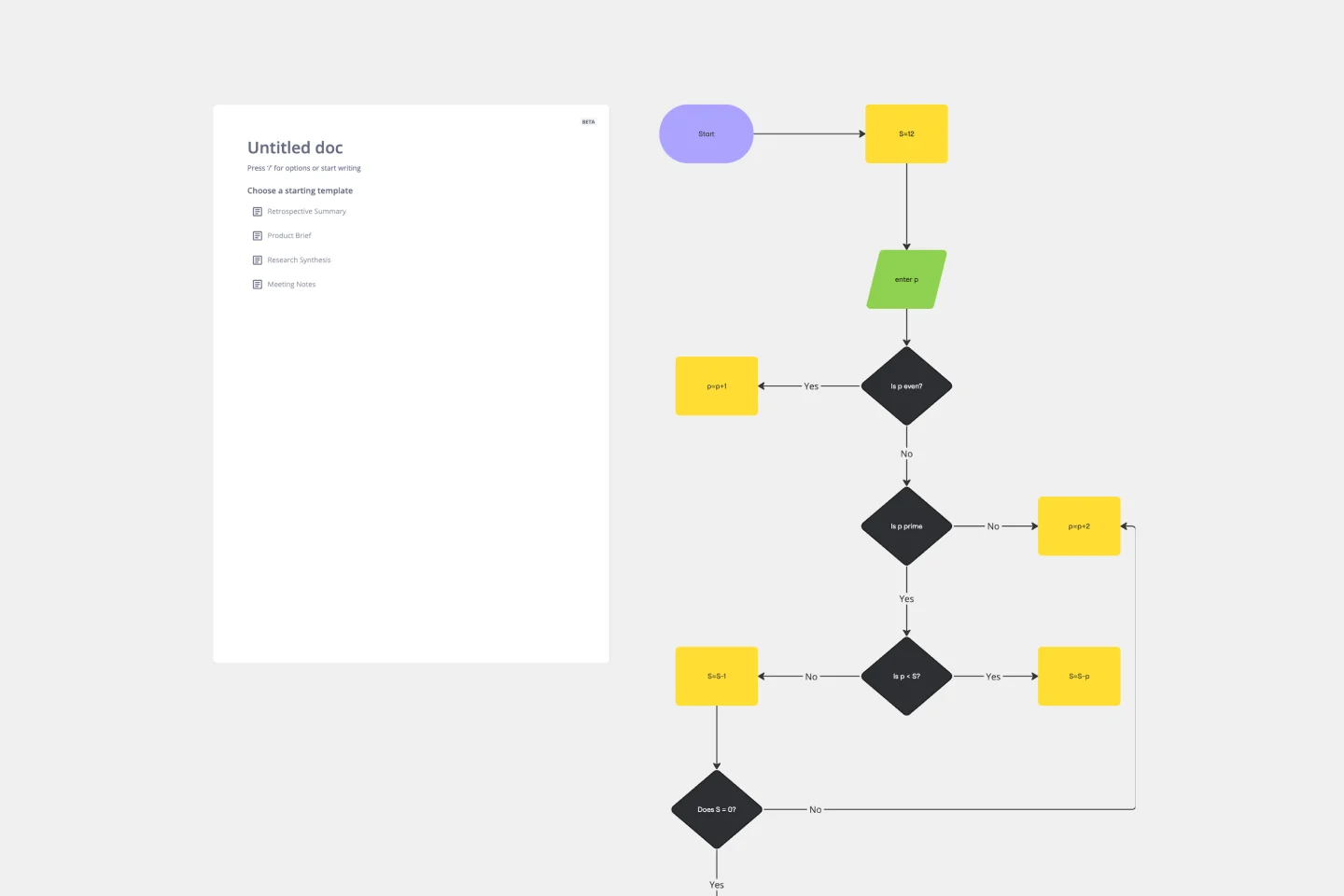
The Algorithm Flowchart Template is a useful tool for simplifying the process of creating and understanding complex algorithms. Its pre-structured format makes it easy to lay out each operation and decision point in a clear and easily understandable visual format. This is particularly helpful for explaining intricate processes to team members who may not be as technically proficient in the subject matter. With each step clearly defined within its designated shape, the flowchart promotes clarity and makes it easy to identify the logical flow at a glance. This clarity is the template's most significant advantage, reducing cognitive load and enabling a more inclusive and straightforward approach to discussing and refining algorithmic solutions.
Algorithm Flowchart Template
The Algorithm Flowchart Template is a useful tool for simplifying the process of creating and understanding complex algorithms. Its pre-structured format makes it easy to lay out each operation and decision point in a clear and easily understandable visual format. This is particularly helpful for explaining intricate processes to team members who may not be as technically proficient in the subject matter. With each step clearly defined within its designated shape, the flowchart promotes clarity and makes it easy to identify the logical flow at a glance. This clarity is the template's most significant advantage, reducing cognitive load and enabling a more inclusive and straightforward approach to discussing and refining algorithmic solutions.