By signing up, you agree to Miro's Terms of Service and Privacy Policy.
Model Context Protocol: What is and how to make the most of it
Summary
In this guide, you’ll learn:
- What Model Context Protocol is
- How to set up MCP with your Miro board
- How to use MCP with Miro to create new diagrams, apps, and landing pages
Collaborative AI Workflows
Join thousands of teams using Miro to build the right thing, faster.
The rise of the Model Context Protocol (MCP) reflects a shift across the AI landscape, where tools are increasingly designed to connect, share context, and act directly on real project data rather than rely on isolated prompts. As more platforms adopt MCP to power interoperability and agent-driven workflows, AI is moving from generic outputs to context-aware execution. By connecting MCP-enabled tools to your Miro board, you unlock this new model in practice, generating assets that are not only relevant, but built directly from your team’s current work, decisions, and evolving context.
Plug Miro MCP into your AI workflows
What is MCP?
Model Context Protocol (MCP) is an open standard that connects AI applications - like Gemini or ChatGPT - with other repositories and tools. This means that, instead of working solely from a prompt, it builds assets using the information you’ve connected it to.
It has simplified tailoring generative tools and plugging them into different systems, as you no longer have to build a custom integration each time you want them to work together.
How MCPs are changing the way professionals work
Across tools like Product development and Engineering, new AI-powered tools are reshaping how work gets done by embedding deep context into everyday workflows. Tools like Cursor and Claude Code act less like copilots and more like collaborators, understanding entire codebases to help refactor, debug, and navigate systems through conversation. At the same time, platforms such as GitHub Copilot Workspace and Notion AI are enabling teams to move from describing tasks to seeing them executed, turning both code and documentation into more dynamic, interactive systems.
What makes these tools powerful is their ability to remove the gap between intent and execution. Engineers spend less time on manual work, while product teams can engage more directly in building and iteration. As context becomes centralized and actionable, teams shift from executing tasks to orchestrating systems that can reason and build alongside them.
How you can use MCP with Miro
Using Miro’s MCP server, you can connect AI agents and enable them to read from and write onto your boards - providing new assets taken from your data, documentation, and context. In simple terms, this means that all the work on your Miro board can become the complete input into your AI assistant, so you don’t have to manually provide a prompt with the information it needs.
Below, we’ll cover the three outputs you can use with our MCP server - diagrams, working apps, and landing pages - and what you need to start generating these right onto your board.
Generate diagrams
Claude Code + Miro MCP
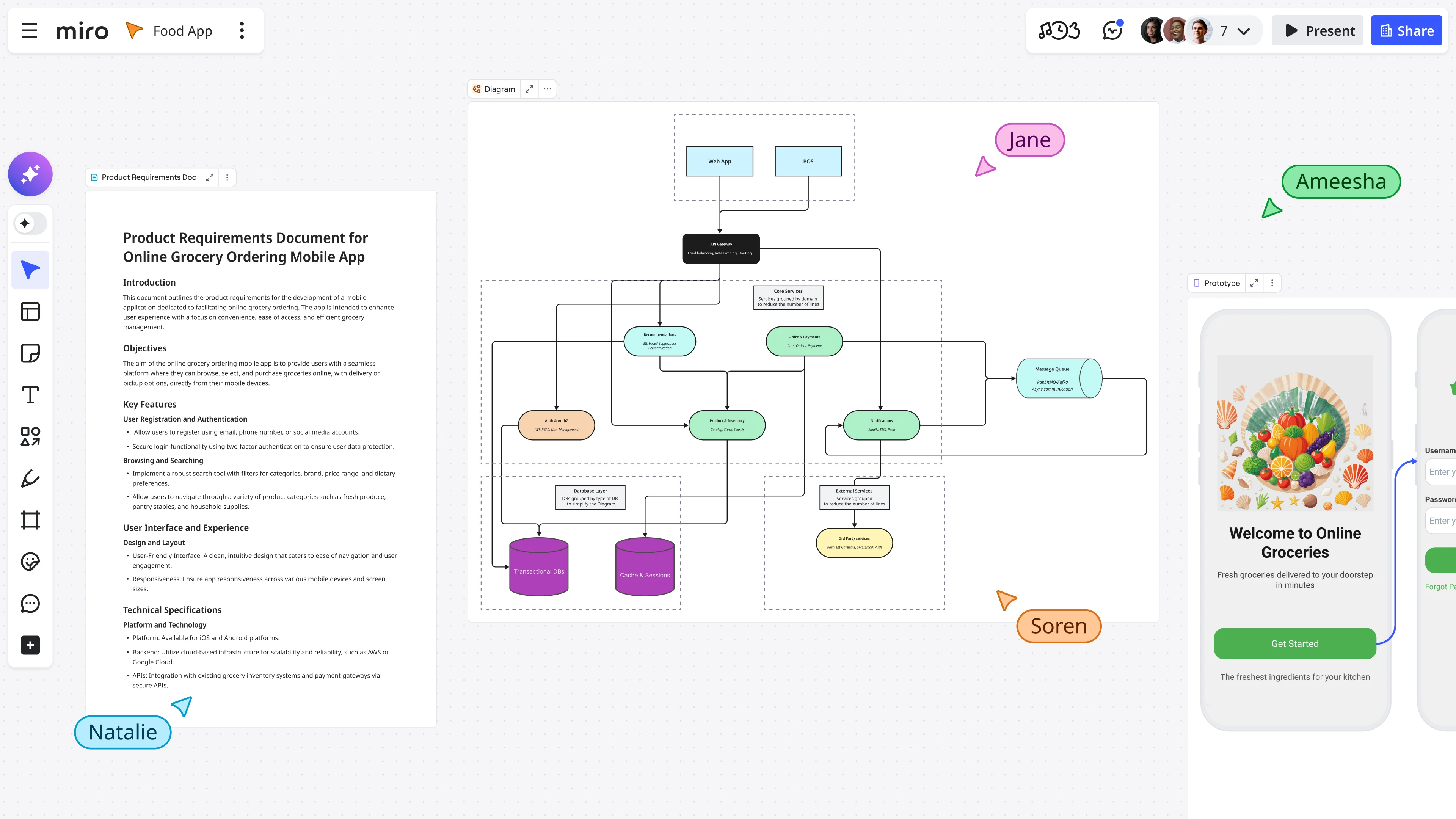
This is a simple workflow to generate diagrams directly from your codebase onto your Miro board. All you need to do is point Claude Code towards your code repository as the input, and then provide the URL to your Miro board for the output. Running through our MCP server, Claude Code will translate your codebase into an editable diagram generated directly onto your board.
You can use this workflow to generate high-level architecture views, key request flows, or even component maps to help new additions to your team find their bearings more quickly. Then, as the output is a Miro asset - as opposed to a static image - you’ll be free to edit it. Rearrange it, refine it, and update it as your system changes.
Find out more about generating diagrams with Claude Code here.
GitHub Copilot + Miro MCP
You can also create these styles of diagrams without having to leave VS Code. Using GitHub Copilot, you can have it pull from a repository or your current workspace, then use Miro’s MCP server to generate a diagram on your chosen Miro board. It can easily produce quick, shareable diagrams of your code for onboarding, design reviews, or lightweight documentation.
Then, again, once it’s available, you can make any edits to the layout or styling that you need.
Find out more about generating diagrams with GitHub Copilot here.
Generate a working app
Lovable + Miro MCP
This workflow starts with a Miro board that’s already captured your product direction, whether that’s a brief or PRD, key user flows, and any of your early UI or layout ideas. Then paste your Miro board URL into Lovable, and via Miro’s MCP server, it will then draw upon all that context to outline a build plan and generate a functional app from the spec.
The output is a functional app that you can embed back into the same Miro workspace for stakeholder review. Then, as you make any changes in Lovable, your embedded app in Miro will automatically update to incorporate these revisions.
Find out more about generating apps with Lovable here.
Miro AI template + Claude Code + Miro MCP
This workflow starts from an idea and uses a Miro template - like our AI Playground template - to transform that idea into a fully working asset on your board. This idea could be anything from a problem statement or product overview, to a value position or a prioritized user story.
With Claude Code connected to Miro through the MCP server, it can then pull all the context from your board to generate a runnable local Node.js app. All powered by everything that’s been outlined and detailed on your Miro board.
This makes it an invaluable workflow for those looking to generate rapid prototypes, perhaps during spikes, internal demos, or hackathons. These events demand a quick turnaround, but still require your build to reflect the troves of data and documentation you’ve compiled.
Find out more about generating apps with Claude Code here.
Cursor + Miro MCP
This workflow works best when your Miro board is engineering-heavy, featuring a PRD alongside some system architecture documentation and diagrams. Then Cursor, connected through our MCP server, will list the available boards before pulling all the relevant context. It can even delve deeper and get items to tease out more content - such as HTMLs from PRDs - to gather all the information it needs to start building.
With all that data in hand, Cursor can generate a local Node.js prototype that captures your available product requirements and constraints. It’ll typically furnish you with a working project scaffold - complete with package.json, frontend assets, and server and app files - to run in npm. It’s a powerful tool if you want a build that will strictly follow the spec and architecture.
Find out more about generating apps with Cursor here.
Generate landing pages
Lovable AI + Miro MCP
Lovable isn’t just limited to generating prototype apps - through Miro MCP, it can also generate a landing page for your site. This can be done without any comprehensive and perfectly documented PRDs, as your Miro board is often enough. A few notes on the problem, a value proposition, a handful of visual references, a couple of slides - any cues that can offer a rough view of what the page should look like.
After pasting your Miro board URL into Lovable, you can then prompt it to build a landing page taken from the context available on your board. Through MCP, Lovable takes all this raw information and translates it into a landing page - complete with draft-ready copy, a clear page structure, and visual direction.
This is an invaluable tool for teams that need to pull a feature or a product onto a sellable page that can impress stakeholders and potential customers.
Find out more about generating landing pages with Lovable here.
Our customer’s story
At Culture Amp, teams use Miro to keep AI work grounded in real organizational context - not generic prompts. As they rolled out AI across the company, Miro became the shared workspace for asynchronous collaboration, synthesizing ideas, and faster decision-making across global time zones.
After running a company-wide “HackAIathon” with 350+ employees and scaling enablement programs, Culture Amp built confidence in applying AI across teams. They eventually established a structured framework for evaluating AI use cases, and accelerated alignment on decisions while maintaining delivery commitments.
“I love all the new features in Miro, but for us, the real value it provides — and has always provided — is enabling faster decision-making. With offices around the world in different time zones, staying aligned asynchronously is really important for us at Culture Amp.”
Rhiannon Gaskell, Director of Delivery Systems & Capability at Culture Amp
Read the full Culture Amp case study
Run MCP workflows in Miro
Your boards already hold the context - PRDs, user flows, architecture diagrams, early UI layouts, messy notes. Pulling it all together into a usable product, on the other hand, can take time.
Use Miro’s MCP server, and that context becomes usable by the AI tools you rely on. Generate diagrams from code. Turn specs into working apps. Draft landing pages grounded in real inputs. Then review and iterate - all on the same board.
Less copying. Less guesswork. More build-ready output.
Frequently asked questions
Do I need to change my existing AI tools to use MCP?
No. MCP is designed as an open standard that connects AI tools to external systems.
If your AI tool supports MCP, you can connect it to your Miro board without building a custom integration from scratch. The core workflow of your AI tool stays the same - MCP simply provides richer context.
What kind of data can MCP access from a Miro board?
MCP can access the content available on the board, such as text, diagrams, structured documentation, and linked assets. The AI tool then uses that information as structured input, instead of relying only on a manually written prompt.
The output it generates can also be written back to the board as editable assets.
Is MCP replacing prompts entirely?
No. Prompts still play a role.
The difference is that prompts are no longer the only source of information. With MCP, the AI tool can combine your instructions with the full context from your board, reducing the need to restate project details each time.
When should I use MCP instead of a regular AI prompt?
Use MCP when the output depends heavily on your project’s existing documentation, code, diagrams, or product specs. This could be to:
- Generate architecture diagrams from a codebase
- Turning a PRD into a working prototype
- Drafting a landing page from workshop notes
If the task requires deep project context, MCP is more reliable than a standalone prompt.
Is MCP secure to use with project documentation?
Security depends on the AI tool and configuration you’re using. When using Miro, your documentation will be kept entirely secure by our multilayered security framework, with your information safeguarded by the strictest security standards across both physical technology assets and cloud resources.
Author: Danielle Caldas, Organic Growth Manager @ Miro Last updated: April 15, 2026
Read more
Join our 100M+ users today


