
Table of contents
Table of contents
Find clarity in complexity: How to build a useful agile work breakdown structure for your team
Summary
In this guide, you will learn:
- What a WBS is and how it helps break complex projects into manageable tasks for clarity and tracking.
- How to create a WBS step-by-step: define scope, break work into phases and tasks, and assign owners and dependencies.
- Benefits of Miro’s WBS tools: templates, automated diagramming, and real-time collaboration.
- How Miro integrates with project management tools like Jira, Asana, and Trello.
- Ways to visualize your WBS using Miro’s infinite canvas, presentation mode, and timeline widgets.
- Best practices for keeping your WBS dynamic and up-to-date for team alignment.
Collaborative AI Workflows
Join thousands of teams using Miro to build the right thing, faster.
Let's talk about bringing clarity to Agile projects, especially when they start feeling complex. You know how it goes – you're moving fast and delivering value iteratively, but sometimes visualizing the entire scope or explaining how different pieces fit together can be a challenge. What if there was a structured way to map things out without sacrificing Agile flexibility?
That's where adapting the Work Breakdown Structure (WBS) concept can be really helpful for teams using Agile methodologies. It’s not about adding cumbersome processes; it’s about creating a shared visual understanding of the project's scope, ensuring everyone sees how their work contributes to the larger objectives. We’ll explore how the WBS concept applies in Agile, how it complements your backlog, and how you can use it effectively – particularly with Miro.
So, how does the Work Breakdown Structure (WBS) concept fit into the Agile world?
Have you ever needed a clear, high-level view of your project's scope while still focusing on sprint-level details? That's the fundamental value a WBS brings. A Work Breakdown Structure is essentially a visual, hierarchical decomposition of the total scope of work to be carried out by a project team. When applied within an agile methodology, work breakdown structure principles are adapted for flexibility. Instead of mapping out every task from the start, the focus shifts to breaking down the project into major value-driven deliverables or outcomes – the features and capabilities that matter most to users and stakeholders. It provides a structure that can evolve as the project progresses and you learn more.
What might the key components look like when using a WBS in Agile?
When Agile teams adapt the WBS concept, they often structure the breakdown in a way that aligns naturally with how they already think about their work. Imagine starting broad and progressively getting more specific:
- Level 1: The Overall Goal: This sits at the top – the main Product Vision, Project Goal, or Initiative the team is working towards.
- Level 2: Major Value Areas (Epics/Themes): Below the main goal, you break down the work into significant chunks of value or key feature areas, often corresponding to Epics or Themes.
- Level 3: Key Features or Capabilities: Each Epic or Theme is then decomposed into more concrete features or capabilities that will deliver specific value. These often align with larger user stories or feature sets.
- (Sometimes) Level 4: User Stories: Some teams might break features down into specific user stories within the WBS structure, marking a clear connection point to the Product Backlog.
The power lies in visualizing this hierarchy, typically as a tree diagram or chart. It transforms an abstract scope into a tangible map everyone can reference.
How is this different from a product backlog?
It's a common question! While they might seem similar at first glance, a WBS (even when used in Agile) and a Product Backlog serve distinct, yet complementary, roles. Think of it as the difference between a map of the territory and a prioritized route plan.
- The WBS provides the MAP: It focuses on scope decomposition and the overall structure of the work. It visually breaks down the entire goal into its constituent parts (Goal -> Epics -> Features), helping everyone understand the composition of the project.
- The Product Backlog provides the ROUTE PLAN: It’s a prioritized list of all the specific work items (stories, tasks, bugs) needed. It dictates the flow of work, showing the team what to build next based on current priorities. It's dynamic and constantly refined.
They work best together. The WBS can provide the foundational structure (Epics, Features) that helps organize and populate the backlog initially. The WBS offers the high-level context, while the backlog drives the day-to-day development work.
Okay, really – how can work breakdown structure help agile teams?
This is where adapting the WBS concept truly shines for teams practicing Agile. Understanding how can work breakdown structure help agile workflows reveals several practical benefits:
- Improves Clarity and Shared Understanding: A visual WBS serves as a single source of truth for the project's scope, making it easier for team members and stakeholders to understand the big picture.
- Supports Scope Management: Visualizing the breakdown helps define project boundaries more clearly and facilitates more informed conversations about scope changes or trade-offs.
- Aids High-Level Estimation: Breaking down large Epics into smaller Features within the WBS often makes initial estimation efforts feel more manageable and grounded.
- Creates a Foundation for the Backlog: It provides a logical structure for grouping backlog items, ensuring user stories roll up meaningfully to larger features and epics.
- Enhances Communication: It offers a common visual reference point for discussions about the project structure and progress.
- Helps Identify Dependencies: Seeing the major components laid out visually can help spot high-level dependencies between different workstreams early on.
Let's map it out: Creating a WBS for your Agile project in Miro
Ready to bring this visual structure to your team? Here’s how you can use Miro's versatile Work Breakdown Structure template and adapt it for your Agile needs within our innovation workspace:
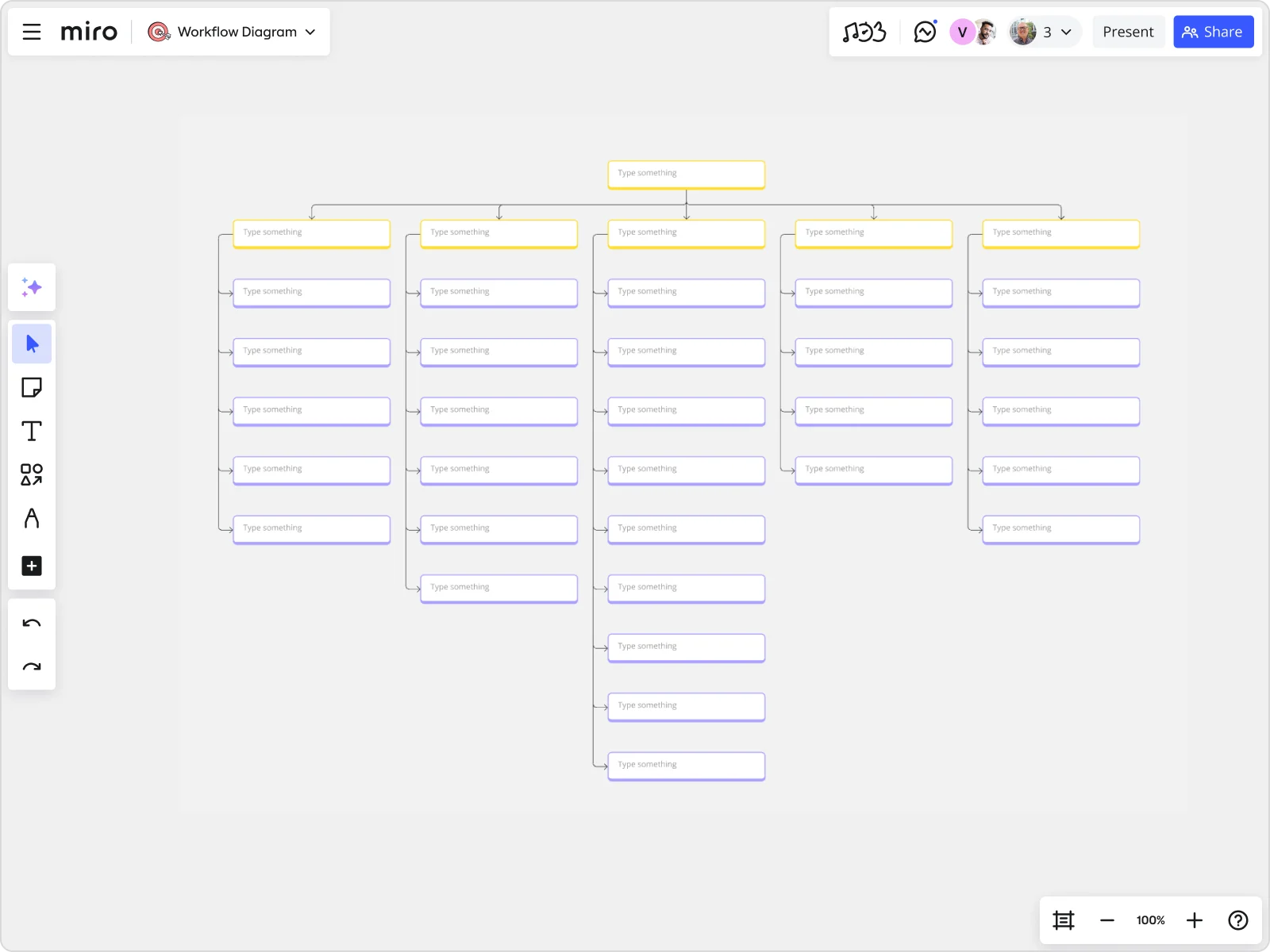
- Set Your Destination (Level 1): Open a Miro board and select the Work Breakdown Structure template. At the top level of the template, clearly define your main Project Goal or Product Vision.
- Identify the Main Routes (Level 2 - Epics): Think about the major areas of value or key stages needed to reach that goal. Use the template's shapes (or add your own cards/rectangles) below the top level to represent these Epics or Themes. Connect them using Miro's connector lines to show the hierarchy. Feel free to expand anywhere on our infinite canvas.
- Detail the Landmarks (Level 3 - Features): Break down each Epic into smaller, deliverable Features or Capabilities. Add more shapes below each Epic and connect them. This is where you define the tangible pieces of functionality. Miro makes it easy to drag, drop, and rearrange elements as you refine the structure.
- Note Key Stops (Level 4 - Stories/Backlog Links): If helpful, you can list key User Stories under each Feature. Consider using Miro cards, which you can even link to specific items in external tools (like Jira or Asana via our integrations) to bridge the gap between your high-level WBS and your detailed backlog.
- Collaborate and Adapt: This is crucial for Agile teams. Invite everyone to the Miro board. Use it as a focal point for planning sessions (live or async). Team members can add comments, ask questions using @mentions, and collaboratively refine the WBS in real-time or on their own schedule. The visual nature keeps everyone aligned.
Miro's flexibility makes the template easy to adapt – change colors, add icons, embed documents – tailor it to precisely how your Agile team works best.
Some friendly advice for using WBS in Agile
To get the most out of applying the WBS concept in your Agile process, keep these tips in mind:
- Build it Together: Involve the whole team in creating and refining the WBS. This collaboration builds shared understanding and ownership.
- Focus on Value: Emphasize breaking down work into meaningful deliverables (features, capabilities) rather than getting lost in granular tasks too early.
- Keep it Iterative: Don't expect the WBS to be perfect or static from day one. Adapt and update it as you learn more throughout the project. Visual tools make this easy.
- Leverage Visual Tools (Like Miro!): The clarity gained from a visual representation is a core benefit. Use a collaborative platform that supports this.
- Be Consistent: Use clear and understandable naming for your WBS elements.
- Connect to Your Backlog: Ensure the WBS provides context for your backlog items, but let the backlog manage the detailed prioritization and workflow.
Finding structure in your Agile flow
Using the Work Breakdown Structure concept within Agile isn't about adding rigid constraints; it's about leveraging a proven method for visualizing scope and bringing clarity to complexity. When adapted thoughtfully, the WBS becomes a valuable tool for Agile teams, enhancing communication, supporting planning, and providing essential context for the iterative work managed in the backlog.
Ready to give your team a clearer view of the path ahead? Try adapting Miro's Work Breakdown Structure Template for your next Agile project and experience the clarity it brings!
Author: Miro Team
Last update: October 16, 2025
Read more
Join our 100M+ users today


