Why This Template Exists
Most AI consultants start with the tool. They open Make.com or Zapier, pick a trigger, and start connecting apps, before they've ever mapped what the client's workflow actually looks like. The result? Automated chaos. This template exists to prevent that.
What You'll Accomplish
By the end of this 45–60 minute excercise, you will have:
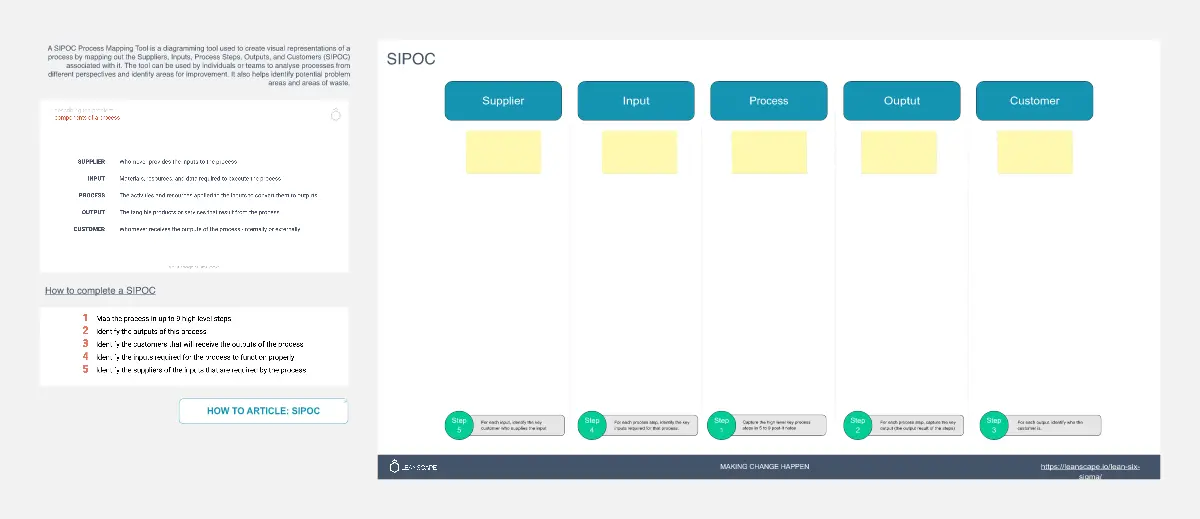
A complete SIPOC map of your client's current delivery process
A clear list of which steps are automation candidates vs. human-touch required
Each step plotted on an Automation Decision Matrix with prioritization
Confidence to recommend the right automation tools for the right steps
Who It's For
Solo AI consultants beginning their first client automation engagement
Boutique agency founders without a technical background
Business consultants exploring AI and automation for the first time
Anyone using Make.com, n8n, or Airtable for client workflows
When to Use It
Use this template before you design or build any automation. Ideal for:
The pre-engagement discovery phase with a new automation client
Internal process audits before recommending tools
Workshop facilitation with client stakeholders
How to Use It - Step-by-Step
Start in Frame 2 to understand the Zero-Cognitive-Load Principle
Study Frame 3 (Mia's worked example) to see a completed SIPOC in action
Open Frame 4 and map your client's real process in the empty SIPOC table
Use the color key to flag each step: coral (automate) or grey (keep human)
Move to Frame 5 and drag each step onto the Automation Decision Matrix
Check Frame 6 for recommended tools and next steps
Framework Credit
Built on the SIPOC Workflow Mapping and Zero-Cognitive-Load Principle frameworks by BlackCube Labs, an AI-native consultancy ecosystem. Learn more at blackcubelabs.com.