Making technical diagrams easy: usability in Miro’s workspace
Visualizing data makes it easier for teams to understand market trends and make informed decisions. As such, technical diagramming is critical to designing systems and workflows in most industries. However, developing cohesive diagrams can be intimidating for new users. Especially given the variety of diagrams that may need to be created and the complexity they often involve.
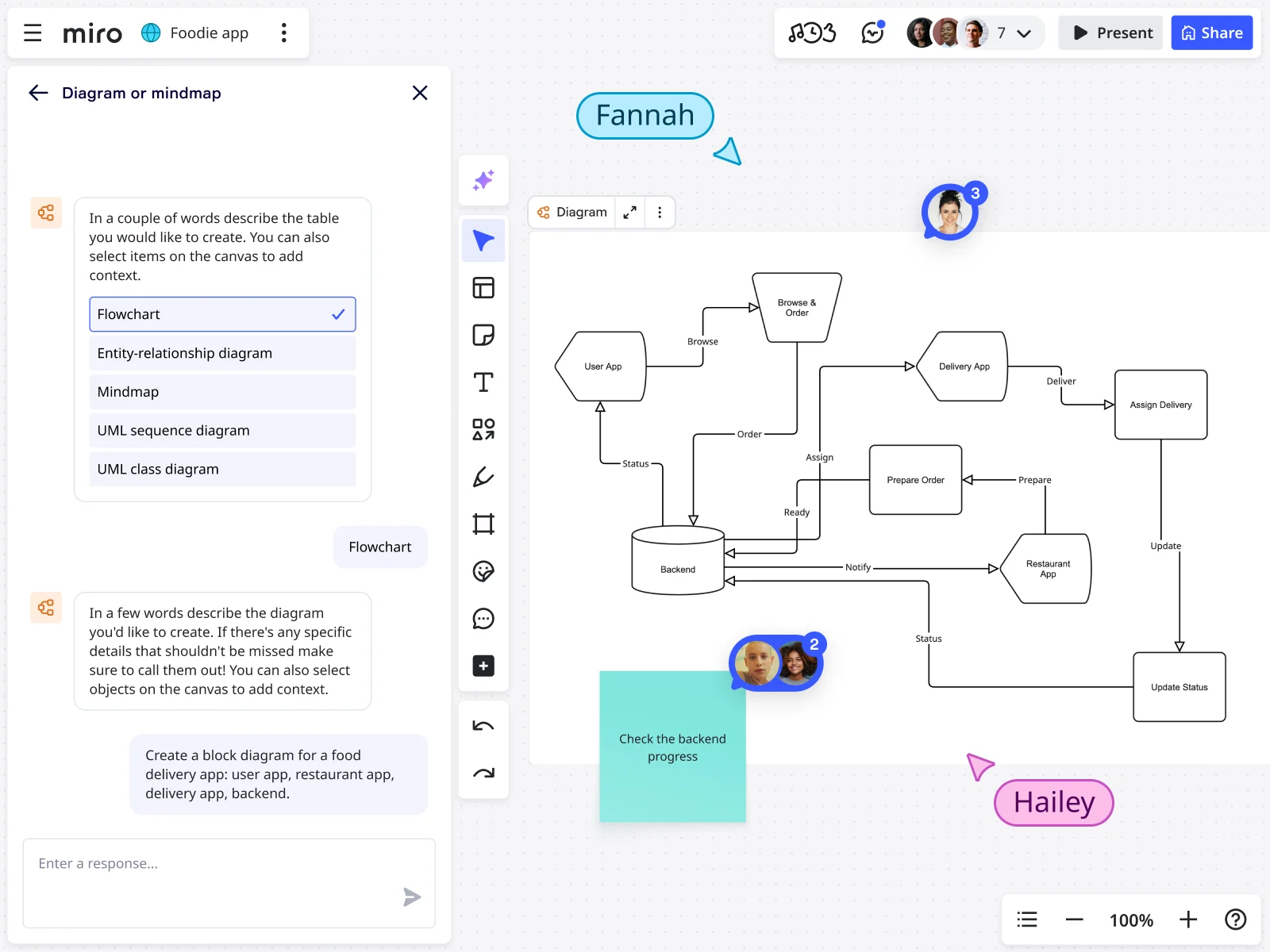
Miro lowers barriers to creating technical diagrams and makes it easier for teams to develop these together. Whether you’re an architect, engineer, or project manager, Miro makes diagramming approachable. Miro has advanced capabilities including apps to advance professionals. You don’t have to come from a technical background. Anyone can use Miro’s templates or build diagrams from scratch on the platform. With Miro AI, creation becomes even easier.
Key aspects of technical diagram usability
Miro doesn’t just make technical diagramming simple. The platform also enables teams to collaborate on diagrams in real time.
Leaving comments and recording Talktracks helps users communicate clearly about diagram developments. These seamless communication features also enable accuracy at scale so that teams can get the most out of their diagrams.
Key features that contribute to Miro’s impressive technical diagramming usability include:
- Start with Miro AI: Using Miro's AI diagram generator teams can create faster diagrams that are easy to interpret for all relevant audiences.
- Standardized shapes and templates: Teams can use these shapes and templates to reduce confusion. This standardization also ensures consistency across all resources, upholding a professional, credible image.
- Accessible diagrams: Teams can create diagrams that support all users. Role, technical ability, and working environment don’t matter. Everyone can access the diagrams.
- Scalability: Teams can create simple diagrams that scale into complex, multi-layered system diagrams.
- Collaboration: Teams can add, edit, and refine diagrams together, even if they live in different areas or even time zones.
Thanks to these features, teams can create meaningful, reliable, and actionable diagrams. In Miro, even when boards grow to thousands of objects, our enterprise-grade foundation keeps everything fast and stable.
Why usability drives better technical diagrams
A technical diagram is only valuable if teams can use and benefit from it. Complex, siloed tools slow adoption and limit collaboration to a few experts. Non-technical teams are unlikely to use these tools.
Meanwhile, Miro’s usability democratizes technical diagramming. The simple build system encourages cross-functional input. This can lead to faster, more informed decision-making.
Usability improves technical diagrams by:
- Boosting teams’ understanding of complex systems and processes through clear, accessible visuals
- Increasing productivity by helping teams perform tasks more quickly and efficiently
- Enhancing user satisfaction via intuitive tools that promote positive experiences for everyone involved
- Reducing errors through easy-to-follow diagrams that help avoid design, communication, and execution mistakes
Miro’s simple yet cohesive technical diagramming function promotes usability in each of these four areas. This means several teams can get involved in the meaningful creation and use of technical diagrams. It also reduces the need to jump between multiple tools for diagramming, whiteboarding, and collaboration.
How Miro makes technical diagramming user-friendly
Miro’s usability features make it quick and easy to create, share, export, and present diagrams. These features range from drag-and-drop functions to templates, learning resources, and workshop tools.
Start fast with drag-and-drop functions
Miro’s canvas makes it easy to create diagrams in seconds. The drag-and-drop interface allows users to add shapes, connectors, UML symbols, and sticky notes right away. The intuitive workspace and templates help new team members contribute from day one without training.
Jumpstart with templates
Creating technical diagrams doesn’t have to be time-consuming or overwhelming. Teams can access thousands of community and technical templates. Whether you need cloud architecture or UML diagrams, experts have already created blueprints from which you can work. No more starting from scratch and spending precious time building manually.
Learn as you go
Teams can learn a lot from templates that experts have created using Miroverse. However, they can also develop their learning with Miro Academy and the Help Center.
The Academy and Help Center’s tutorials and guides help users develop their technical diagramming skills as they work. This means they can upskill while staying productive - no downtime required. As an example, the Technical Diagramming in Miro course helps teams build mastery with a step-by-step approach.
Collaborate and integrate
Miro makes real-time, asynchronous collaboration on the canvas easy. Teams can create diagrams and embed them into tools like Confluence, Slack, and more. They can also share boards and export diagrams when needed to enjoy a unified diagramming workflow. The system is simple and hassle-free, from drafts to documentation and stakeholder sharing.
Run workshops
Teams may find it helpful to discuss technical diagrams in workshops. However, the days of static talks are over. Miro’s features make workshops interactive and thought-provoking.
These features include timers, voting, presentation mode, and private mode. Each helps facilitators run productive, outcome-driven sessions and technical reviews without leaving Miro. The platform has built advanced facilitation tools into every board so teams can run dynamic, inclusive sessions.
Enjoy accessibility across plans and devices
Miro works across web, desktop, and tablet. It’s easy for all team members to contribute to diagram creation, regardless of their device.
What’s more, all user tiers (Free, Business, Enterprise, and Education) have access to Miro’s core diagramming tools. You don’t need a high-end subscription to start using these features. Everyone, from first-time users to power diagrammers, can contribute effectively.
Basic tools are universally available. Advanced features, such as specialized shape packs, are unlockable on paid plans. Even as your needs grow, Miro’s infinite canvas scales seamlessly to provide the same intuitive experience.
Considerations for designing usable diagrams
A tool designed for usability, like Miro, is essential to the development of valuable technical diagrams. However, the way that teams use the tool is also important. Used well, Miro enables teams to communicate through diagrams. These visuals are easy to interact with and support collaboration without causing confusion.
When creating technical diagrams, it can be helpful for teams to consider:
- Audience awareness: Match diagram complexity and notation to your audience’s knowledge level.
- Visual clarity: Use consistent shapes, spacing, and color coding to make diagrams easy to scan and interpret.
- Simplicity first: Avoid overloading diagrams by starting at a high level and adding details gradually.
- Consistency in standards: Use industry-standard notations, such as UML, AWS icons, and ERD symbols. This way, you can ensure shared understanding.
- Accessibility: Ensure diagrams are legible across devices and inclusive for all users.
- Collaboration: Design diagrams that leave space for comments, feedback, and iteration.
By following these practices, teams can design usable, accurate, and impactful diagrams. While a tool like Miro is easy to use, the application will have the most effect on usability.
Turn complex systems into clear diagrams with Miro
Creating technical diagrams doesn’t have to be complex. With Miro, diagramming becomes an accessible, collaborative process. Teams can produce diagrams that are easy to build, share, and understand for teams of all sizes. Get started by learning how to create AI technical diagrams in Miro.
FAQs
Can I import diagrams from other tools?
Yes. Miro supports importing content from other tools and platforms. This content includes images, PDFs, and files from tools like Lucidchart or Microsoft Visio. Once imported, you can edit, annotate, and build on these diagrams directly in Miro—so your team doesn’t need to start from scratch.
Does Miro work with the tools we already use?
Miro integrates with over 160 apps and tools, including Jira, Azure DevOps, and Confluence, making it easy to align your workspace to your existing processes. Use Miro’s ROI Estimator to calculate how much money your organization could save by consolidating tools with Miro.
Can Miro be used for hybrid or remote workshops?
Yes. Miro is built for distributed teams. It offers real-time collaboration features that integrate with tools like Zoom, Teams, and Slack. As a result, it’s ideal for hybrid workshops and asynchronous collaboration.
Can Miro handle large or complex technical diagrams?
Miro’s infinite canvas supports collaborators to keep growing their diagrams without impacting performance and usability.
Is Miro accessible for all team members?
Yes. Miro follows accessibility standards to make collaboration more inclusive. Screen reader support and accessible color contrasts ensure everyone can participate fully. See more in Miro’s Accessibility Statement.
Read more
Read more
Join our 100M+ users today


