Table of contents
Table of contents
By signing up, you agree to Miro's Terms of Service and Privacy Policy.
Building consensus through collaborative design project management
Key takeaways
- Getting stakeholders to agree on a design is one of the hardest parts of any product project, and AI can’t automate it
- Most alignment problems aren’t about the design itself; they’re about shared context arriving too late in the process
- Collaborative design project management means structuring the process so alignment happens during discovery, not after delivery
- Prototyping early, at concept fidelity rather than pixel perfection, gives stakeholders something real to react to and produces better feedback faster
- Lufthansa Group’s Miles & More program aligned on the right product direction in less than one day using Miro Prototypes
- Miro’s AI-powered visual canvas brings research, prototypes, and stakeholder feedback into one shared space, supporting both real-time and async collaboration
Collaborative AI Workflows
Join thousands of teams using Miro to build the right thing, faster.
Most design and product teams have been in this situation: you’ve done the research, run the workshops, built out several solid directions, and put together a clear presentation. And then you get into the review, and the room can’t agree on a path forward. It’s a frustrating pattern, and it plays out more often than anyone wants to admit.
The reason it keeps happening isn’t usually a skills gap or a flaw in the design itself. It’s a communication problem rooted in how most design project management processes are structured. By the time a team reaches a formal review, stakeholders have been forming opinions in isolation, based on fragments of information shared at different moments. They arrive at the meeting with different assumptions, different levels of context, and different ideas about what’s actually being decided.
Getting stakeholders to agree on a design takes more than a good design. It takes a shared understanding of the problem, a common language for evaluating solutions, and the right artifacts at the right moments. When any of those are missing, even strong design work can stall in review. Alignment isn’t something you achieve at the end of a project. It’s something you build throughout it, and the teams that approach it that way ship better products faster, with less rework and fewer revision cycles.
The real reason stakeholder alignment breaks down
Before you can fix the alignment problem, it helps to understand where it actually comes from.
Most teams treat stakeholder reviews as a checkpoint: you do the work, then you present it, then you wait for feedback. The trouble is that by the time you reach that checkpoint, everyone in the room has been forming opinions based on different fragments of information: a Slack message here, a Notion doc nobody finished reading, a screenshot shared out of context two weeks ago.
The result is a room full of people reacting to different things at different levels of understanding. One stakeholder is worried about scope. Another is questioning the problem framing. A third has a completely different mental model of what the product is supposed to do. None of them are responding to the design in front of them; they’re responding to their own assumptions about it.
This is the alignment gap. And it doesn’t close by presenting a better deck. It closes by creating more shared context, earlier, in a format that everyone can engage with directly.
Shipra Kayan, Design Evangelist at Miro, framed it clearly in a recent Miro webinar on AI prototyping and collaborative design: “The one part of product and design work that AI can’t automate is getting six people in a room to agree.”
That’s worth sitting with. AI can accelerate a huge amount of the production work now, from generating prototypes to synthesizing research and drafting PRDs. What it can’t do is build the human understanding that makes a team confident it’s building the right thing. That part is still yours to design, and it’s the most important design challenge in any project.

Designing for alignment, not just for delivery
Here’s a shift in thinking that changes how you approach design project management: instead of asking “how do I design the best solution?” ask “how do I design something that helps my team make the right decision?”
These two questions lead to very different kinds of artifacts.
When you design for delivery, you’re optimizing for completeness and handoff-readiness. Every pixel is considered. Every edge case is covered. The design is ready to be built.
When you design for alignment, you’re optimizing for shared understanding at a specific moment in the process. You’re asking: what does this team need to see, right now, to make a confident decision and move forward together?
The answer almost never requires a pixel-perfect comp. It requires something concrete enough to anchor a conversation, something stakeholders can actually engage with rather than just look at.
This is where the fidelity of your prototype matters more than most teams realize. The goal in early-stage design project management isn’t to get to high fidelity fast. It’s to get to the right fidelity for the decision you’re trying to make.
Why prototyping belongs at the start of your process, not the end
For most of design history, prototyping was expensive in time, in skill, and in coordination. You needed a developer, a polished Figma file, or at minimum a dedicated sprint to build something interactive enough to put in front of stakeholders.
That constraint shaped how teams managed design projects. Prototypes came near the end of the process, when teams were close to confident. They were used to validate decisions, not to make them.
That dynamic has shifted completely, and it changes the entire logic of design project management.
Kayan, is direct about what that shift should look like in practice: "We wanna be thinking about visual prototypes as aids and tools for discovery and definition, early stage in the process, for decision making, things that are throwaway."
That reframe matters. It gives teams permission to prototype before they're confident, rather than waiting until they are. And it changes what a prototype is actually for: not a polished deliverable, but a low-cost artifact for making better decisions faster.
Matthias Davidsen, who leads the Miro Prototypes team, explains how the best design teams are putting this into practice: rather than jumping straight to high-fidelity code or polished comps from the first session, they're using early-stage prototypes as decision-making artifacts, things that are meant to be thrown away, revised, or replaced as the team's understanding develops. The goal isn’t a production-ready design. It’s a concrete enough representation of an idea that stakeholders can say yes, no, or “not quite, try this instead.”
That’s a fundamentally different quality of signal than what you get from a static slide deck. And it’s one you can get much earlier in the process when you treat prototyping as an alignment tool rather than a delivery milestone.
In practice, this means a design team can run a workshop in the morning, synthesize the outputs into a clickable prototype by the afternoon, and share a testable flow with stakeholders before the day is out. The conversation shifts from “here’s what we’re thinking” to “here’s something you can actually try: does this solve the problem we talked about?”
That shift accelerates everything downstream.
How to structure a more collaborative design project
Getting stakeholders to agree on a product design vision isn’t something you can engineer in a single review meeting. It’s a function of how you structure the entire project from the start. Here’s a framework that works across teams and project types:
Align on the problem before you generate any solutions
This sounds obvious, but it’s remarkably easy to skip, especially when tools make it so fast to produce something that looks polished. Before anyone starts designing, make sure every stakeholder can articulate the problem in the same terms. A shared problem framing exercise on a collaborative canvas, using sticky notes, “how might we” prompts, or a structured synthesis, gets everyone working from the same foundation. When people disagree about the design later, you can trace it back to this stage and realign.
Explore multiple directions before you commit to one
The research on this is consistent: the more ideas a team explores, the more likely they are to land on a winning one. When prototyping was slow, this was hard to justify. Now it’s not. Creating two or three concept-level prototypes in a single session is realistic, and it gives stakeholders something to compare and contrast rather than a single direction to evaluate in isolation. Comparison is a much more productive conversation than approval.
Match your artifact to the decision you’re making
Early alignment conversations need early-stage artifacts: quick, rough, and good enough to communicate the idea. Later decisions about interaction detail or visual direction warrant higher fidelity. The mistake most teams make is defaulting to high fidelity too early, which signals “this is done” when it isn’t, and makes stakeholders reluctant to give honest feedback.
Share something interactive, not just something visual
Static screens create passive feedback. Clickable prototypes create active engagement. When a stakeholder can navigate through a flow themselves, tapping through screens, experiencing the sequence of decisions, and encountering the edge cases you’ve thought through, they give you more specific, more useful responses. They also feel more ownership over the outcome.
Make your reasoning visible
One of the biggest trust-builders in cross-functional design work is showing your thinking, not just your output. When your prototype lives on the same canvas as the user research that informed it, the problem statement it’s trying to solve, and the workshop synthesis that generated the ideas, stakeholders can trace the logic. That context makes it much easier for them to say yes, and much easier to have a productive conversation when they don’t.
Enable iteration in the session itself
Nothing kills design review momentum faster than “let me take this feedback back and come back next week.” When you can make targeted changes to a prototype during a session, adjusting a layout, swapping a section, or exploring a different flow, feedback becomes a dialogue. Teams that can do this move faster and build more stakeholder trust than teams that treat every piece of feedback as a homework assignment.
What this looks like in practice: Lufthansa Group’s Miles & More
The Miles & More program, Lufthansa Group’s loyalty platform, faced a challenge common to most large product organizations: aligning a cross-functional team on the right product direction, quickly enough to actually matter.
Using Miro Prototypes, their team created, validated, and aligned on the right solution in less than one day, a timeline that would have been weeks in a traditional design project management workflow.
Björn Ehrlinspiel, Product Owner at Miles & More, put it this way: “I’m way more confident that the things we are implementing for the product are the right things. And I’m way more confident to bring that also in front of management. Miro Prototypes helps me show my vision to the management team of the product.”
That second sentence matters. Getting your team aligned is one challenge. Communicating that direction upward, to leadership, executives, and stakeholders who weren’t in the workshop, is another. Interactive prototypes bridge both gaps. They give your immediate team something to converge around, and they give you something credible to carry into every room after that.
The canvas as a shared source of truth
The hardest part of collaborative design project management isn’t generating ideas. It’s keeping everyone connected to the same evolving understanding of the problem and the solution as it develops.
This is what a shared visual canvas makes possible. When your research, your workshop outputs, your prototypes, and your stakeholder feedback all live in the same space, the project develops a memory. New contributors can get oriented quickly. Decisions can be traced back to the evidence that drove them. And when someone raises a concern that was already addressed three weeks ago, you have a place to point to.
Davidsen describes why this matters so much for AI-assisted design work in particular: "Having all of these connected on a canvas means we can get a full feel for what the output is and why we got that. This really helps to create transparency into why the different steps in the process look like they do, instead of just a black box."
That transparency is what makes AI outputs usable in a collaborative setting. Without it, a generated prototype is just another artifact that landed in a Slack channel with no context. With it, every stakeholder can understand the reasoning behind the design, which is the foundation for genuine alignment.
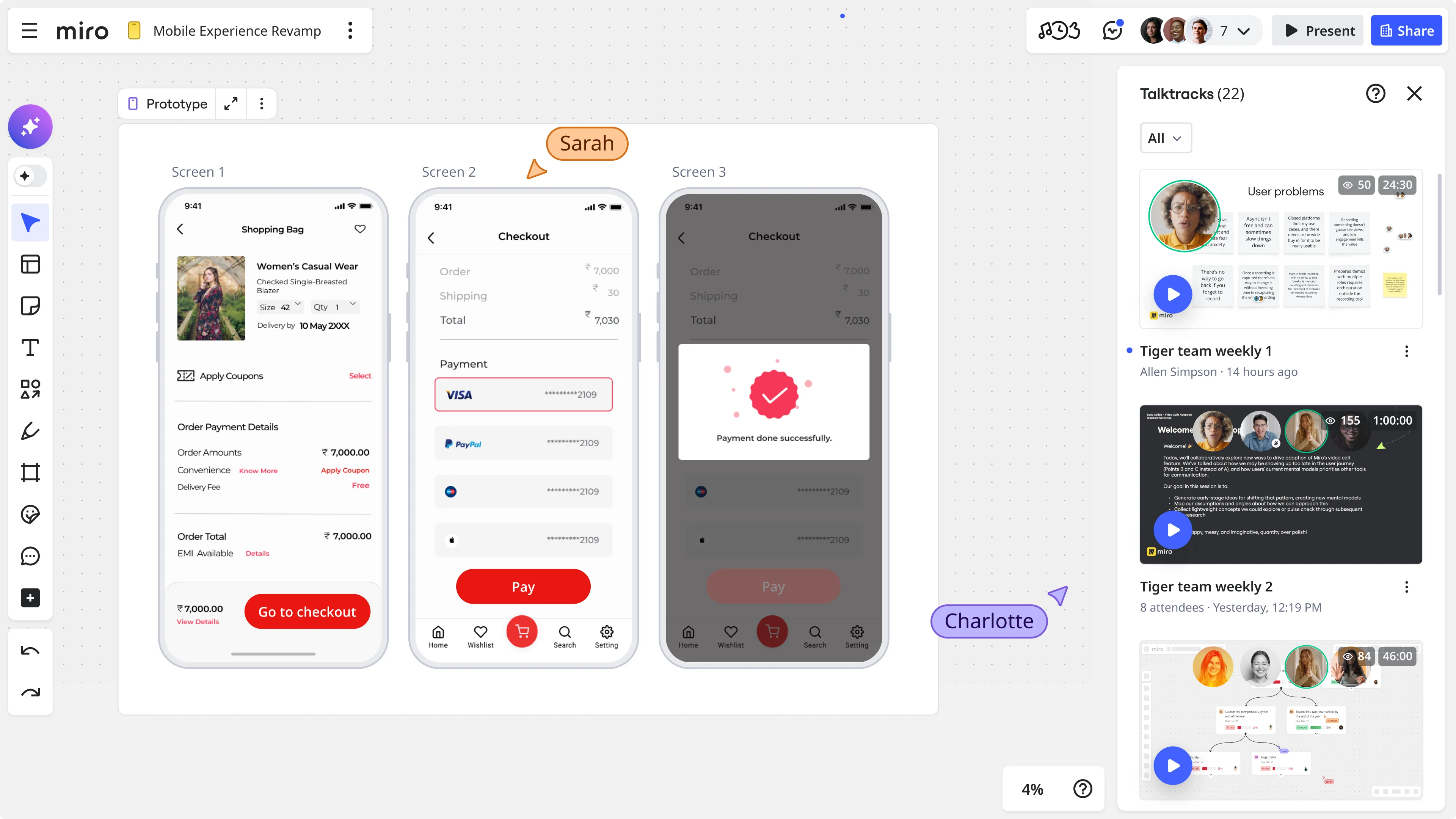
Miro’s AI-powered visual canvas is built for exactly this kind of work. Teams can run design sprints, generate prototypes with Miro Prototypes, collect async feedback, and bring stakeholders into the process in real time, all without switching between tools or losing the thread of the work.
Because Miro supports both real-time and async collaboration, cross-functional teams can contribute and align regardless of where they are or when they work. Stakeholders can review a prototype, leave comments on specific screens, and navigate flows on their own schedule, then join a focused decision-making session prepared to move forward.
That’s not just a workflow improvement. It’s a fundamentally different way of managing design projects, one where alignment isn’t a gate you pass through at the end, but a quality you build into the work from the start.
Watch it in action
Shipra Kayan and Mathias Davidsen went deep on all of this in a live Miro webinar, including a real-time demonstration of how teams can take a design sprint from sticky notes to a clickable, stakeholder-ready prototype within a single session.
If you want to see the approach in action and get concrete prompting tips for working with Miro Prototypes in your own design project management process, [watch the full webinar here].
FAQ
What is collaborative design project management?
Collaborative design project management is the practice of structuring design work as a shared, cross-functional process where stakeholders contribute to decision-making throughout the project, not just at the end. It involves creating shared context early, through workshops, collaborative synthesis, and interactive prototypes, so that alignment develops naturally rather than being forced at a final review.
How do you get stakeholders to agree on a design?
The most effective way to get stakeholders to agree on a design is to give them something interactive and concrete to engage with early in the process, before significant time and resources have been committed to a direction. Interactive prototypes produce more specific, more useful feedback than static screens or slide decks. Pairing prototypes with visible reasoning, including the research, problem framing, and design decisions that led to them, helps stakeholders understand why a direction was chosen, which makes alignment much easier to reach.
How do you get stakeholders to agree on a product design vision?
Start by aligning on the problem, not the solution. Before presenting any design direction, make sure every stakeholder can articulate the core problem in the same terms. From there, showing multiple early-stage concept directions rather than a single polished option gives stakeholders a basis for comparison and surfaces assumptions before they become obstacles. Interactive prototypes are particularly effective because they let stakeholders experience a vision rather than evaluate it abstractly.
Why does prototyping help with stakeholder alignment?
Prototyping bridges the gap between an idea and a shared understanding of it. When stakeholders can navigate through a clickable flow themselves, they engage with the design actively rather than reacting to it passively. This produces more specific feedback, surfaces misalignments earlier, and builds a sense of shared ownership over the direction. Early-stage prototypes, at concept fidelity rather than pixel perfection, are especially valuable for alignment because they signal that decisions are still being made, which makes stakeholders more willing to give honest input.
What’s the difference between designing for alignment and designing for delivery?
Designing for delivery means optimizing for a finished, handoff-ready artifact: every edge case considered, every pixel refined. Designing for alignment means matching the fidelity and format of your artifact to the specific decision your team needs to make right now. Early in a project, that might mean a rough clickable prototype. Later, it might mean a detailed interaction spec. The key is not defaulting to high fidelity before it’s needed, which can signal completion prematurely and discourage honest stakeholder feedback.
How does Miro support collaborative design project management?
Miro’s AI-powered visual canvas brings together user research, workshop outputs, prototypes, and stakeholder feedback in one shared space, so the project maintains a continuous, traceable history of decisions and the evidence behind them. Miro Prototypes lets design teams generate interactive flows directly from their canvas, without switching tools. Because Miro supports both real-time and async collaboration, cross-functional teams can contribute and align regardless of location or time zone.
What is Miro Prototypes and how does it work?
Miro Prototypes is an AI-powered prototyping tool built into Miro’s innovation workspace. It lets teams generate interactive, medium-fidelity prototypes from design sprint outputs, PRDs, existing screenshots, or prompts, without requiring a developer or a polished Figma file. Teams can create clickable flows, share them with stakeholders via URL, and iterate on them directly within the canvas. Miro Prototypes is available as an add-on on all Miro plans.
Last updated: May 7, 2026
Read more
Join our 100M+ users today


