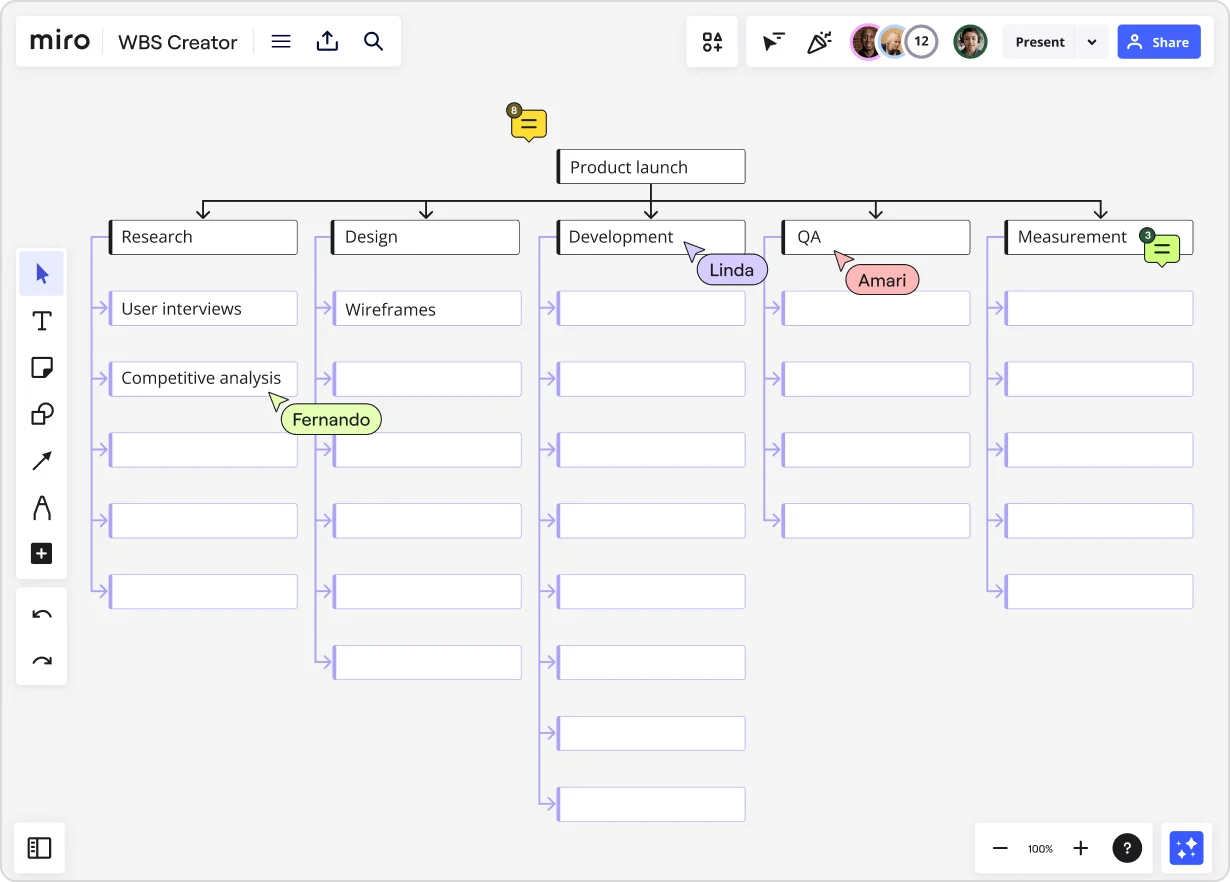
Feeling lost in your project? Let's chat about the benefits of Work Breakdown Structure (WBS)
Summary
In this guide, you will learn:
- What a Work Breakdown Structure (WBS) is and how it visually breaks down project deliverables into manageable tasks.
- The key benefits of using a WBS, including improved organization, clearer communication, and enhanced project control.
- How Miro’s WBS creator facilitates collaboration with real-time editing, sharing, and integration with project management tools.
- The step-by-step process to create a WBS: setting goals, identifying deliverables, and breaking them into smaller tasks.
- Differences between a WBS and project schedules, and how combining WBS with tools like Gantt charts in Miro improves planning and execution.
- Available WBS templates in Miro designed to streamline project planning, tracking, and team alignment.
Collaborative AI Workflows
Join thousands of teams using Miro to build the right thing, faster.
Is your project getting a bit tangled? The goals may seem fuzzy, tasks keep piling up unexpectedly, or your team isn't clear on who's doing what. It happens to the best of us, and it can feel like you're trying to find your way through a maze without a map. Good news – there's a simple, visual tool that acts like that map, helping you see the path from start to finish: the Work Breakdown Structure (WBS).
Now, "Work Breakdown Structure" might sound a bit formal, but trust me, the idea behind it is super practical. Think of it as creating a clear blueprint or an organized to-do list for your entire project. Getting comfortable with using a WBS is one of the best things you can do for your projects, your team, and even your own peace of mind.
Today, we'll walk through the benefits work breakdown structure brings to the table. We'll look at how this simple approach helps cut down on confusion, makes things much clearer, and sets your projects up for success. Plus, we'll touch on why doing this visually, especially where everyone can collaborate, really makes it shine. Ready to untangle those project knots? Let's jump in!
So, what exactly is a Work Breakdown Structure (WBS)?
Before we dive into why a WBS is so helpful, let's quickly cover what it is. Basically, it's all about taking your big project and breaking it down into smaller, bite-sized pieces that are easier to handle.
Imagine your project is a giant jigsaw puzzle. Trying to figure out the whole picture at once is tough. A WBS helps you sort the pieces into logical groups first, making it much easier to see how everything fits together.
In more standard terms, a WBS organizes and defines the total scope of a project by breaking it down into smaller, more manageable parts.
Let's unpack that a bit:
Organizes: It uses a hierarchy, like an organizational chart or a family tree. The main project goal sits at the top,
and it branches out below into bigger phases or parts, which then branch out further into smaller tasks.
- Breaking it down: This just means dividing things up step-by-step. You keep asking, "What smaller tasks make up this bigger piece?" until you get to a level that feels clear and doable.
- Total scope: This is super important. A good WBS shows everything the project needs to deliver – the whole puzzle. This is often called the 100% Rule. If a task isn't on the WBS, it's technically not part of the project (which is great for preventing extra work from sneaking in!).
- Deliverables (the "What" ): The WBS mainly focuses on the results or the actual things the project will produce (e.g., "User Manual," "Website Design Mockup"). It's less about the actions needed to get there (like "Write Content" or "Design Mockup") and more about the finished items.
- Work Packages (the smallest pieces): These are the items at the very bottom of your WBS branches. They're the actual chunks of work that are small enough for your team to tackle effectively. You should be able to estimate how long a work package will take, assign it to someone, and track when it's done.
A common question: Do requirements come before or after the WBS?
Usually, you need your main project goals and key requirements before you start building the WBS. Think of these as defining the edges of the puzzle. The WBS then helps you figure out all the pieces inside those edges – the specific deliverables and work packages needed to meet the requirements. Sometimes, building the WBS actually helps you uncover more detailed requirements you hadn't thought of, so it can be a back-and-forth process.
Try thinking of the WBS less like a boring list and more like a visual map that shows how every task connects to achieve the final project goal. It turns a big idea into a clear plan everyone can follow.
Why use a WBS? The real advantages for your projects
Okay, let's get to the good part. Why bother creating this structure? Because it seriously pays off by making your job easier and your projects run smoother. Understanding the advantages of creating WBS helps you see why it's worth the effort upfront. Here are the key benefits:
1. Get super clear on project scope (and stop scope creep!)
This is a huge win. Scope creep – when extra tasks or features get added unexpectedly – can totally throw off your timelines and budget. Here's how a WBS helps:
- Forces clarity: Making a WBS pushes you and your stakeholders to agree on exactly what's part of the project. Breaking it down leaves less room for guesswork or misunderstandings.
- Draws a clear line: The WBS visually shows the project's boundaries. If someone suggests adding something new later, you can easily look at the WBS together and ask, "Where does this fit?" or "Is this really part of what we agreed on?"
- Makes changes intentional: It doesn't mean the scope can't change. But with a WBS, changes become deliberate decisions that get discussed and approved, not just random additions that sneak in.
2. Plan and schedule projects more easily
Ever feel stuck trying to create a realistic project timeline? A WBS makes planning much less overwhelming.
- It's your planning foundation: The small work packages in your WBS are the perfect building blocks for your schedule. It's way easier to figure out how long small, clear tasks will take than giant, vague phases.
- Shows you dependencies: When you break down the work, you naturally see which tasks need to finish before others can start. This is essential for building a schedule that actually works.
- Makes milestones obvious: The bigger chunks (major deliverables or phases) in your WBS become natural checkpoints or milestones. This helps you track progress and celebrate achievements along the way.
3. Estimate time and costs way more accurately
Let's face it, guessing how long a big project will take or cost is really hard. It often feels like throwing darts in the dark.
- Smaller pieces = better estimates: It's much easier to accurately estimate the time or cost for a small, specific work package (like "Create homepage wireframe") than for the entire "Build website" phase.
- Add them up for realistic totals: You estimate each small piece, then simply add those estimates together ("roll them up") to get a much more realistic total project estimate for both time and budget.
- Helps plan your resources: Knowing the specific work packages helps you figure out who you need on the team and when. This makes wbs allocation – assigning the right people to the right tasks – much more effective.
4. Help your team understand their roles and be accountable
Ever hear, "Oh, I thought they were handling that?" A WBS brings clarity to who's doing what.
- Gets everyone on the same page: The visual WBS helps the whole team see the big picture and understand how their work contributes. No more feeling like you're working in isolation!
Makes assignments clear: Work packages are perfect for assigning ownership. You can clearly put someone's name next to each piece of work, making it obvious who is responsible for getting it done. Good wbs allocation
is also about clear ownership.
- Less confusion: When everyone can easily see the breakdown of tasks, there's much less confusion about what needs to be done.
5. Track progress easily and know if you're on schedule
How do you really know if your project is on track? A WBS gives you clear things to measure.
- Track actual finished work: Instead of vague guesses like "we're 50% done," you can track progress based on how many specific work packages or deliverables are actually completed.
- Spot problems earlier: If certain parts of the WBS start falling behind, you can see it much sooner. This gives you time to figure out why and make adjustments before the whole project goes off track.
- Report progress clearly: It gives you a simple, factual way to report progress to stakeholders. Saying "We've completed 25 out of 60 work packages" is much clearer than a fuzzy percentage.
6. Communicate better with everyone involved
Getting your team, clients, and bosses all aligned is often a challenge.
- Speaks a common language: The WBS is a visual tool that most people can easily understand, whether they're technical or not. It helps bridge communication gaps.
- Sets clear expectations: It clearly shows stakeholders what the project plans to deliver, helping manage their expectations right from the start.
- Makes discussions easier: When talking about progress or potential changes, having the WBS right there gives everyone a shared picture to look at, making conversations more focused and productive. A collaborative tool makes this even smoother.
7. Spot potential risks early on
Thinking through the project in detail often helps you see potential roadblocks you might have missed otherwise.
Uncovers tricky spots: Breaking down the work forces you to think about the specifics. You might realize some
tasks depend on others you hadn't considered, need special skills, or have some technical challenges.
- Plan for risks better: Identifying risks tied to specific work packages lets you come up with more targeted plans to deal with them if they happen.
These benefits work breakdown structure offers are real game-changers. They lead to smoother projects, less stress, and a much better chance of hitting your goals. The advantages of creating wbs early in your project are definitely worth the effort.
Ready to make your own WBS? Here's how (especially with Miro)
Feeling good about the WBS? Great! Making one isn't complicated, and doing it visually where your team can jump in makes it even better. Forget static lists tucked away in folders. Let's talk about building a living, breathing WBS in an innovation workspace like Miro.
Here's a simple step-by-step approach:
Step 1: Start at the Top – Name Your Project Goal
What's the main thing this project is trying to achieve? This is Level 1, the very top of your WBS. It might be "Launch New Product," "Redesign Company Website," or "Run Fall Marketing Campaign."
In Miro: Pop a shape (like a rectangle) onto your board and label it clearly with this main goal.
Step 2: Identify the Big Pieces (Level 2)
What are the major chunks of work or key results needed to reach that main goal? Think big categories like "Product Development," "Marketing Plan," "Sales Strategy," or "Website Content."
Don't worry about the order just yet; just get the main phases down. Aim for maybe 3-7 big pieces here.
In Miro: Add shapes below your main goal for these big pieces. Use connector lines to link them up to the top level, starting your tree structure.
Step 3: Break It Down Further (Level 3 and beyond)
Now, take each of those Level 2 pieces and break them down. Ask yourself, "What smaller steps or deliverables make up this phase?"
For example, "Product Development" might break down into "Research," "Design," "Prototyping," and "Testing."
Keep breaking down each piece into smaller ones until you get to the work package level. How do you know you're there? A work package should be:
- Small enough that it's easy to understand and manage.
- Something you can assign to one person or a small team.
- Something you can reasonably estimate the time/effort for.
- Something with a clear start and end, or a specific thing to deliver.
- Often something that takes between a day and a couple of weeks to complete (just a guideline!).
Think Nouns (Deliverables): Try to name your WBS items based on the thing you'll have when it's done (e.g., "User Survey Results," "Homepage Mockup") instead of the action (e.g., "Survey Users," "Design Homepage").
In Miro: This is where the visual fun begins!
- Keep adding shapes for each smaller piece, connecting them to the level above.
- Friendly Tip: Miro's org chart widget works really well for this! It helps you quickly build out the levels and branches, and it's easy to move things around.
- You can use colors or sticky notes to make different phases or types of work stand out.
Step 4: Check It Over (Does it cover everything?)
Look at your whole WBS. Does it include all the work needed for the project (and nothing extra)? Does everything logically connect back up to the main goal? (Remember the 100% Rule!)
Are the work packages clear and separate? Or is there overlap?
Is it detailed enough, but not too detailed? You want enough detail to manage the work, but not so much that it's overwhelming.
Get your team involved! This is key. Share your draft WBS with the people who will actually do the work. They often know best what's involved and can help make it more accurate.
In Miro: Sharing and collaborating is easy. Just send your team a link to the board. They can add comments, suggest changes, or even build it out with you in real-time or whenever they have time. Everyone sees the same plan, which prevents confusion.
Step 5: (Optional, but helpful) Add More Detail with a WBS Dictionary
For bigger projects, you might want a "WBS Dictionary." This isn't as scary as it sounds!
It's just a way to add more detail for each work package, maybe in notes or a separate list. You could include things like: a short description, who's assigned, how long it might take, or how you'll know it's done right.
In Miro: You can easily add these details using Miro cards connected to your WBS shapes or just by adding text notes right on the board, keeping everything organized in one place.
Want a Shortcut? Use a Template!
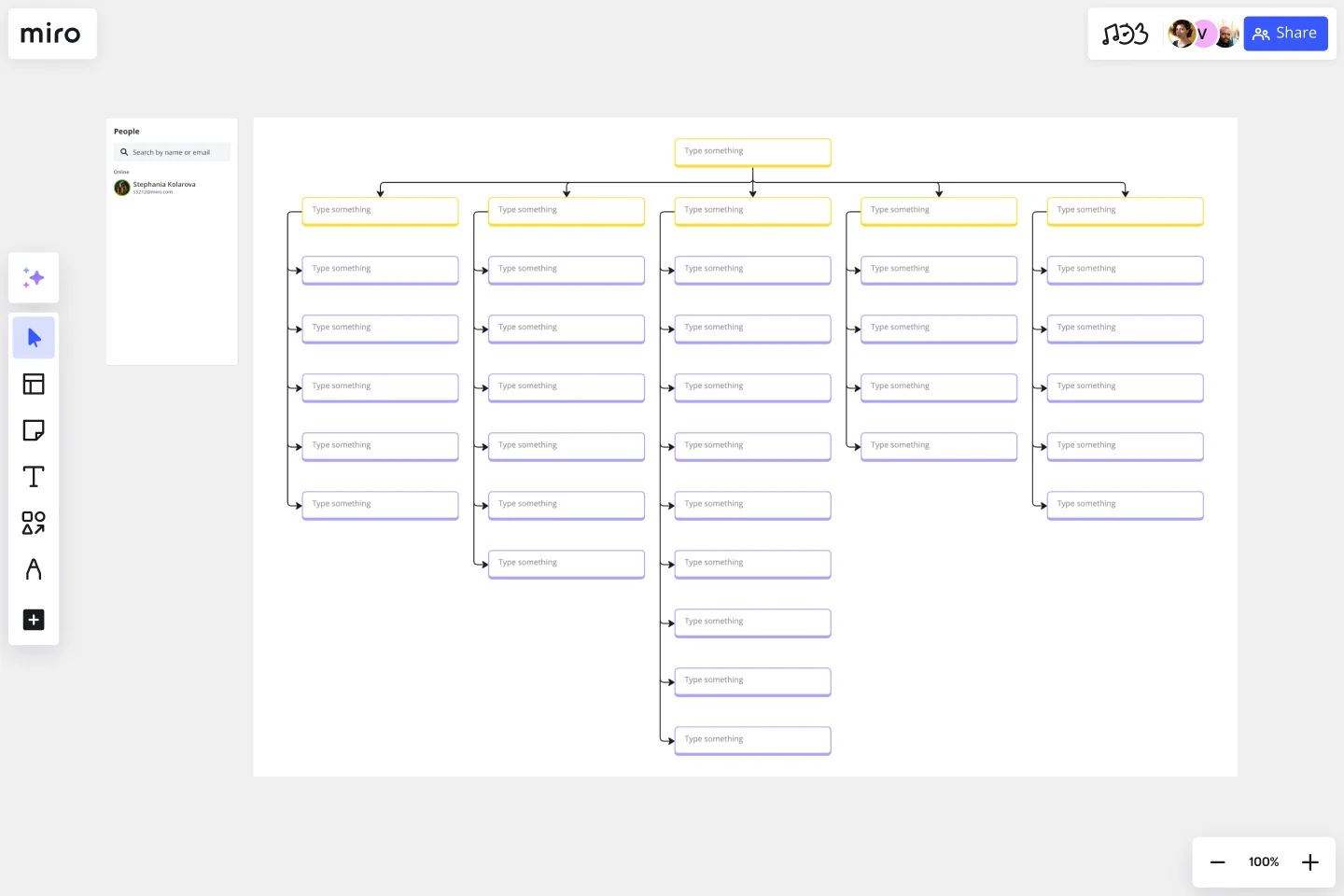
No need to start with a blank page if you don't want to. Miro has handy WBS templates ready to go. They give you a starting structure you can easily customize for your project.
Building your WBS visually in a collaborative tool like Miro turns it from just a document into a dynamic plan your whole team can understand and use.
Quick tips for making a great WBS
Creating a WBS that really works well involves a few helpful practices:
- Bring your team in: Don't try to create the WBS all by yourself. The people actually doing the tasks usually have the best insights. Working together gets better results and helps everyone feel ownership. Miro's innovation workspace is perfect for this kind of teamwork, whether you're in the same room or working remotely.
- Focus on the 'What' (nouns),not the 'How' (verbs): Build your WBS around the results or things you'll deliver (like "Customer Personas"), not just the actions (like "Research Customers"). This keeps everyone focused on the goals.
- Stick to the 100% Rule: Make sure your WBS covers all the work needed for the project, but only the work in scope. Everything should add up neatly.
- Find the 'Just Right' level of detail: Break things down enough so you can estimate, assign, and track work effectively, but not so much that you're listing every tiny step. That "day to couple of weeks" guideline for work packages often helps find the right balance.
Keep it visual and easy to find: A visual WBS is much easier for people to grasp quickly than a long list.
Use a tool (like Miro!) that makes it simple to create, share, and update, so everyone can always see the latest plan.
- Think about using ID numbers (optional): For bigger projects, giving each WBS item a unique number (like 1.1, 1.1.1, 1.1.2) can make it easier to refer to specific tasks, especially if you're linking it to other project tools.
Wrapping up: Your WBS is a project super-helper!
So, that's the scoop on the Work Breakdown Structure! It's not just another project management term; it's a really practical way to bring order and clarity to your work. By taking that time upfront to break down your project visually, you get so many great benefits work breakdown structure offers – clear scope, better estimates, smoother teamwork, and much more predictable results. The advantages of creating wbs are pretty clear: less stress, fewer nasty surprises, and a much better shot at delivering projects successfully.
Stop trying to guess your way through complex projects. Start breaking them down into clear, manageable steps.
Ready to bring this clarity to your own projects? Give the WBS a try! And if you want to make it visual, collaborative, and maybe even a little bit fun, map it out with your team in Miro. Grab a template, invite your colleagues, and see how visual planning in our innovation workspace can make a difference. Happy planning!
Author: Miro Team
Last update: October 16, 2025
Read more
Join our 100M+ users today


