Table of contents
Table of contents
By signing up, you agree to Miro's Terms of Service and Privacy Policy.
The PMF shortcut: Using rapid prototypes to validate your big idea without the burn rate
Summary:
In this article, you'll learn:
- Product-market fit validation doesn’t have to take months or cost a fortune
- The biggest risk in product development isn’t building the wrong thing slowly — it’s building it fast
- Visual prototypes let teams align on what to build before committing engineering time
- Task-based user testing with prototypes surfaces real feedback, not polite guesses
- Bringing backend engineers into early prototype reviews prevents costly late-stage surprises
- Miro Prototypes lets teams go from workshop sketch to clickable prototype in a single session
- Lufthansa’s Miles & More program cut their alignment process from weeks to hours
Collaborative AI Workflows
Join thousands of teams using Miro to build the right thing, faster.
You have a big idea, the team is excited, and someone’s already written the PRD. And yet, somewhere between “this is going to be huge” and “why aren’t users adopting it?” something goes wrong. It almost always goes wrong in the same place: you built the thing before you knew if anyone actually wanted it that way. The frustrating part is that this isn’t a resourcing problem or a talent problem. It’s a sequencing problem. Teams rush past the validation phase because they’re under pressure to ship, and the cost of that shortcut usually doesn’t show up until months later, when the sprint is done and the metrics are flat.
Product-market fit validation is exactly what gets deprioritized in those moments. But the cost of skipping it is almost always higher than the cost of slowing down to do it right. The good news is that you don’t need a six-month research program or a full engineering sprint to find out if your idea holds up. You just need the right process to test it cheaply, visually, and fast.
Why “build fast and see” is no longer good enough
For years, the dominant advice in product development was to ship quickly and iterate based on real user behavior. That works when the cost of being wrong is low. But as AI accelerates how fast teams can generate code, the calculus has changed.
Shipra Kayan, product evangelist at Miro, put it plainly during a recent webinar on early-stage prototyping: “Teams can now build the wrong thing even faster than before.” AI can write code at speed, but speed doesn’t fix misalignment. If a cross-functional team disagrees about what to build, or if the product direction hasn’t been validated with real users, shipping faster just compounds the problem.
Here’s the number that should give every product manager pause: research suggests only 6% of shipped features are responsible for 80% of the value customers actually get from a product. The other 94%? Built, maintained, and defended in roadmap meetings, but delivering almost nothing.
The root cause isn’t laziness or bad engineering. It’s that most teams spend too little time in the discovery and definition phases, where the actual decision about what to build gets made. And the tools most commonly used in those phases, including written PRDs and text-heavy documentation, don’t help teams see the same thing.
The alignment gap that’s killing your product ideas
Here’s a scenario that will feel familiar: a product manager writes a detailed PRD. The designer reads it and imagines one interface. The backend engineer reads it and imagines another. The stakeholder reads it and pictures something else entirely. Everyone nods in the planning meeting. Three weeks later, when the first design review happens, the room realizes they’ve been building different products in their heads.
Shipra calls this the “alignment gap,” and it’s one of the most expensive problems in product development. “Written PRDs often cause stakeholders to imagine completely different products,” she says. The solution isn’t a longer document. It’s a shared visual that everyone can actually see, react to, and iterate on together.
That’s what rapid prototyping does for product-market fit validation. Instead of asking your team to align on words, you give them something to look at, click through, and critique. The conversation becomes concrete immediately, disagreements surface early when they’re cheap to resolve, and users can test real interactions instead of reacting to hypothetical descriptions.
Low-cost ways to validate product-market fit before you build
The goal of early-stage validation isn’t pixel-perfect design. It’s getting enough signal, from your team and from real users, to know you’re building in the right direction before you commit engineering resources. Here are the approaches that actually work.
Run workshop sessions with competing prototypes
Shipra’s team uses Miro boards to run collaborative sessions where multiple team members can create different user flows and prototype directions simultaneously. Instead of one designer going away for three weeks to produce a single direction, the team explores multiple approaches in a single workshop and puts them head-to-head. “Designers rarely have time to manually explore multiple directions,” Shipra explains. “Now we can finally do things like explore multiple directions, run workshops, and have everyone on the team contribute ideas.”
The output of these sessions isn’t a document. It’s a shared visual that the team has already debated, refined, and aligned on before a single line of code gets written.
Use what you already have as a starting point
One of the fastest ways to kill momentum in early-stage validation is the blank canvas problem. You don’t need to start from scratch. Shipra demonstrated how teams can import a screenshot of their live app and convert it into an editable, AI-generated prototype in minutes. Björn Ehrlinspiel’s team at Miles & More did exactly this: they used sketches, screenshots of their current app, and references from competitor products as raw material for rapid prototyping, bypassing the cold start entirely.
Starting from something real, rather than something imagined, gets you to useful feedback faster.
Ask task-based questions during user testing, not hypothetical ones
There’s a well-documented problem with user research: people want to make you feel good. Ask someone “would you use this?” and they’ll almost always say yes, and that answer tells you nothing about whether they’d actually use it, or whether it solves their problem.
Björn’s approach cuts through this directly. During user testing at Miles & More, his team gave users specific tasks to complete with the prototype, then observed whether the prototype made it easier to accomplish them. “We really had a proper user interview,” Björn explains. “We gave them tasks and checked if they were doing it better or easier with the prototype.”
Shipra reinforces the principle: the question isn’t “will you use this?” It’s “can you achieve your goal using this?” That shift, from hypothetical to behavioral, is what separates useful validation from reassuring noise.
Bring backend engineers into the room early
This one sounds obvious, but almost nobody does it consistently. Shipra shared a formative experience from her own design career: she spent three weeks building pixel-perfect designs, walked into a design review proud of the result, and had a backend engineer immediately point out that the database architecture couldn’t support displaying all that information on a single screen. Three weeks of work, back to square one.
Björn’s team solved this by using prototypes as a shared language between product, design, and engineering. “For backend developers or systems that are very far away from the users, we could really show them: this is the goal, this is what we’re doing. How can we achieve that? How can we design the endpoints? How can we design the database?” The prototype becomes the brief, not the PRD.
Want to see these techniques in action? Watch the full on-demand webinar, Prototyping earlier to build the right thing, featuring Björn Ehrlinspiel and Shipra Kayan.
How Miro Prototypes makes this practical
Understanding why rapid prototyping matters is the easy part. The harder part, historically, has been doing it without a dedicated designer, a full design tool, and three weeks of runway.
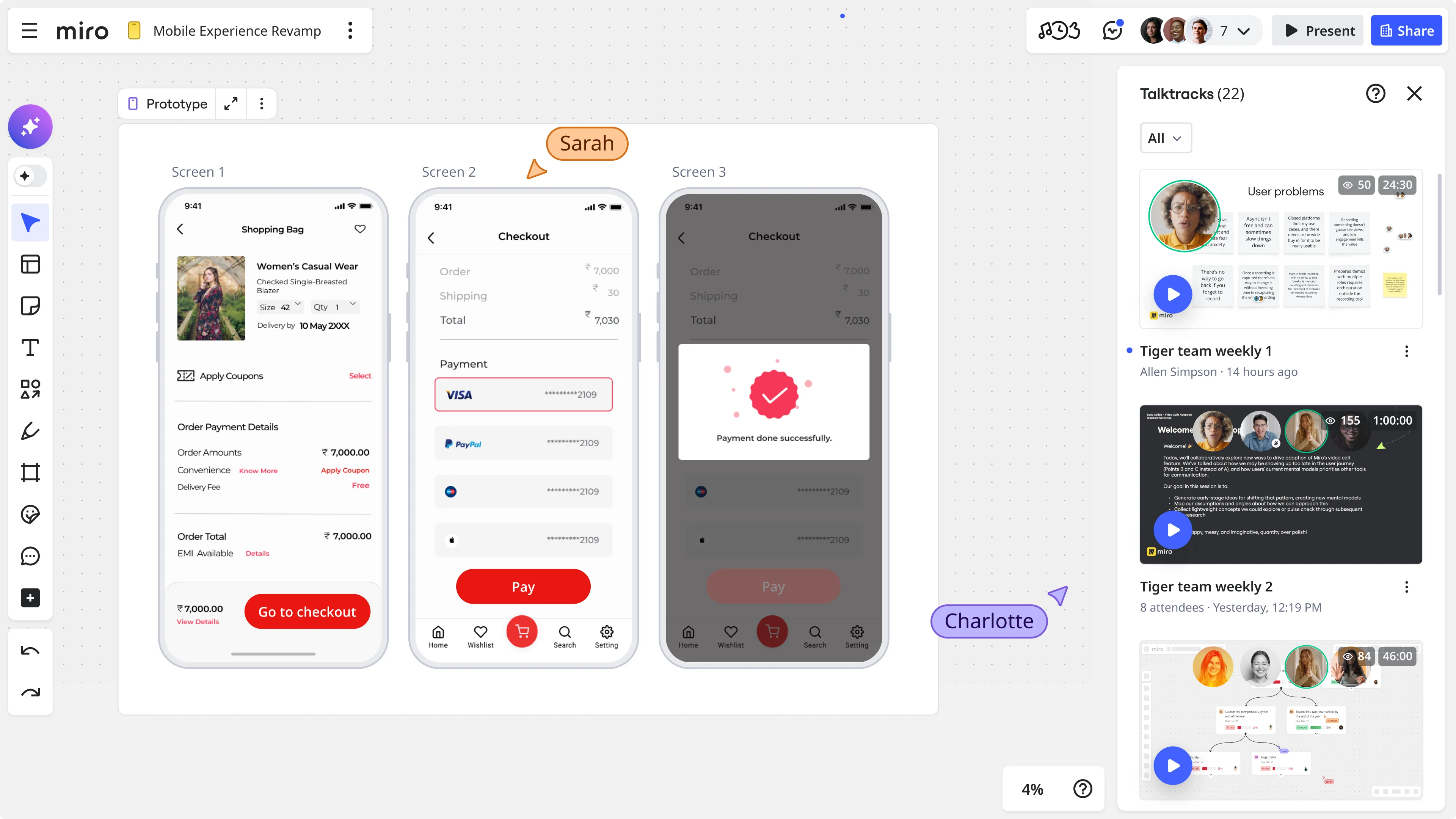
Miro Prototypes changes that. It’s built directly into Miro, which means teams who are already running workshops and brainstorms in Miro can generate, edit, and share clickable prototypes in the same session, without switching tools.
Here’s what the workflow actually looks like in practice.
From screenshot to editable prototype in minutes
Drop a screenshot of your live app onto a Miro board. Ask Miro AI to convert it into a mobile or desktop prototype. The result is a fully editable interface, with every element adjustable by any team member in real time. You can prompt Miro AI to iterate on the design (“make this in dark mode,” “redesign this screen for families traveling with kids”), use existing screenshots as inspiration, or generate entirely new screens based on a simple prompt.
Because Miro is multiplayer, everyone on the team can jump into the same board and start editing simultaneously. No handoff required, and no waiting for the one designer who owns the file.
From user flow to multi-screen prototype with one prompt
During her live demo, Shipra showed how a simple shape-based user flow, the kind any product manager or engineer can draw in five minutes, can serve as the context for a full multi-screen prototype. Select the user flow, select the PRD you’ve already created, write a short prompt, and Miro AI generates a clickable, connected prototype that follows the flow exactly: screen to screen, with connector lines linking the interactions.
The whole process, from blank board to shareable prototype, takes under ten minutes.
From prototype to user stories, automatically
Once your team has aligned on a direction, Shipra demonstrated how a Miro AI sidekick can read the prototype and generate a set of user stories to implement it, without any additional prompting about what the product does. Select the prototype, ask for 20 user stories, and get a structured table your engineering team can start working from immediately.
There’s also a purpose-built accessibility sidekick that audits prototypes against established accessibility guidelines, identifying issues before they become expensive engineering fixes.
From Miro to Figma or your AI coding tool
Miro Prototypes is explicitly designed as an early-stage tool. When you’re ready to move to high-fidelity design, you copy the prototype directly into Figma, where individual elements paste as editable components. When you’re ready to start building, you paste the Miro board URL into your AI coding tool via MCP connector and ask it to generate code based on the prototype. The prototype becomes the spec, richer, clearer, and less ambiguous than any written description.
What this looked like in practice: Lufthansa’s Miles & More
Björn Ehrlinspiel is a product owner at Lufthansa’s Miles & More program, a loyalty platform with over 36 million members and more than 100 international partners. The program operates in a high-paced, highly competitive market, with long development cycles and significant dependencies across teams, systems, and backend infrastructure. Building the wrong thing isn’t just wasteful. It’s expensive to undo.
When Björn joined, his team faced three compounding problems: limited design resources, no prototyping tools, and development cycles too long and costly to absorb late-stage changes in direction. Alignment happened through lengthy documentation and a lot of back-and-forth, a slow, fragile process in a market where speed matters.
The team started using Miro Prototypes within their existing Miro-based workshop process. The change wasn’t a new workflow. It was an extension of how they were already working.
“We did a lot of workshops,” Björn explained. “We had different ideas, different solutions for problems we wanted to solve, but we first needed to align on a direction. With Miro Prototypes, we could create a little AI prototype within minutes, something everyone could click through. It was super helpful to show: this is my idea. And then we aligned on one final prototype that came out of the workshop.”
That prototype didn’t just stay inside the team. Björn’s team used it for user interviews, for management presentations, and to brief backend engineers, replacing the documentation cycle that used to take weeks. “Before, we were running from one person to the other with long documentation. Now we did a workshop and had a visual solution that everyone was aligned on immediately.”
The outcome Björn cares most about: “I’m way more confident that the things we are implementing are the right things.”
Traditional validation vs. rapid prototyping: what actually changes
Traditional validation vs. rapid prototyping
Traditional approach | Rapid prototyping | |
Time to first user feedback | Weeks to months | Hours to days |
Alignment tool | Written PRD, slide decks | Clickable visual prototype |
Who can contribute ideas | Usually one designer | Whole cross-functional team |
Engineering involvement | Late in the process | From the first workshop |
Cost of being wrong | High, caught late | Low, caught early |
User testing quality | Hypothetical reactions | Task-based behavioral feedback |
Handoff to development | Design files and docs | Prototype URL or Figma export |
The question worth asking before your next sprint
Before your team commits to a sprint, it’s worth pausing on one question: does everyone in the room, across product, design, engineering, and stakeholders, see the same product in their heads?
If the answer is anything other than a confident yes, that’s your signal. Not to slow down indefinitely, but to spend a few hours getting visually aligned before you spend weeks building. The teams that validate early aren’t the ones who move slowly. They’re the ones who move confidently, because they already know that what they’re building is the right thing to build.
Ready to start prototyping? Try Miro Prototypes.
FAQs
What is product-market fit validation and why does it matter? Product-market fit validation is the process of confirming that a product or feature solves a real problem for a real audience before investing significant development resources in it. It matters because the cost of building the wrong thing, in time, engineering effort, and opportunity cost, is almost always higher than the cost of validating first. Most teams that skip validation end up maintaining features that deliver little actual value.
What are the cheapest ways to validate product-market fit? The most cost-effective approaches involve showing users something visual before you build it. Low-fidelity prototypes, clickable multi-screen flows, and AI-generated mockups all give users something concrete to react to. Pair these with task-based user interviews rather than hypothetical questions, and you get real behavioral feedback at a fraction of the cost of a full build.
How is rapid prototyping different from wireframing? Wireframing typically produces static, low-fidelity sketches of individual screens. Rapid prototyping goes further: it connects screens into clickable flows, incorporates visual design elements, and produces something users can actually interact with. Modern tools like Miro Prototypes let teams generate multi-screen prototypes from user flows and existing screenshots in minutes, making the distinction between wireframing and prototyping almost irrelevant at the early stage.
Do you need a designer to create early-stage prototypes? Not anymore. AI-assisted tools like Miro Prototypes allow product managers, engineers, and anyone on a cross-functional team to generate editable, clickable interfaces from simple text prompts, existing screenshots, or shape-based user flows. The goal at the early stage isn’t pixel-perfect design. It’s alignment and directional validation, and anyone on the team can contribute to that.
How do you avoid getting false positives in prototype user testing? The key is asking task-based questions rather than hypothetical ones. Instead of “would you use this feature?”, give users a specific task to complete using the prototype and observe whether they can do it, and how easily. This behavioral approach surfaces real friction and usability issues rather than polite enthusiasm. Nielsen Norman Group has extensive guidance on running effective prototype user interviews using this method.
When should a team move from a Miro prototype to Figma or code? The right moment to move to high-fidelity design in Figma is when your team has aligned on a clear direction and you’re ready to think through edge cases, final visual design, and component-level details. The right moment to start coding is when that design is stable. Miro Prototypes supports both transitions: prototypes export directly to Figma as editable components, and the Miro board URL can be passed to AI coding tools via MCP connectors to generate a working codebase from the prototype.
Last updated: April 22, 2026
Read more
Join our 100M+ users today


