



Andrey
See collaborative AI in action — straight from the Canvas 26 keynote.
Jeff

Process mapping for engineering teams

Turn incident postmortems and deploy pipelines into clear, shared diagrams. Skip the blank canvas - build your first process map in seconds.

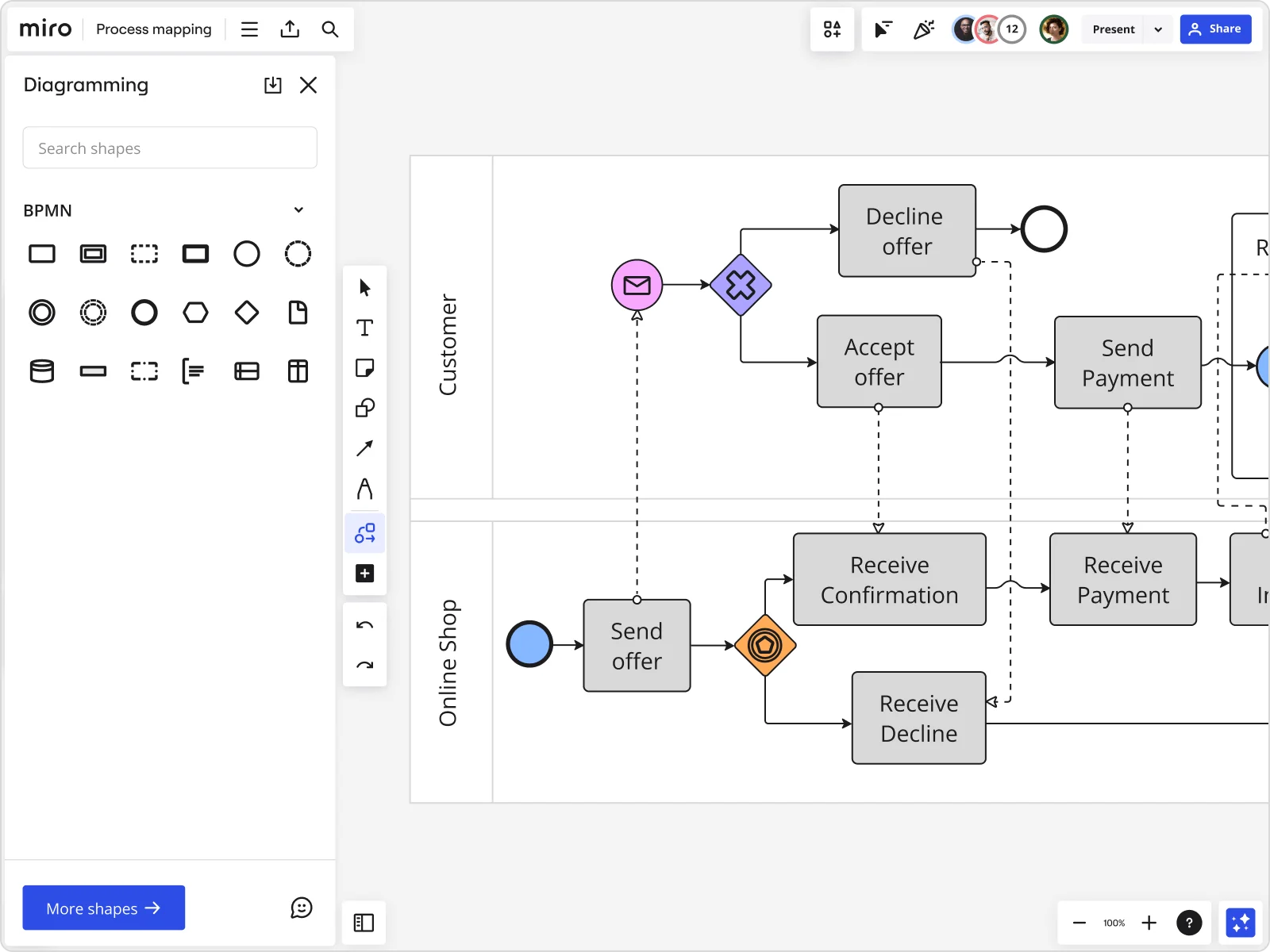
Miro board displaying a BPMN process mapping diagram with two swimlanes (Customer and Online Shop), showing decision gateways, message events, and task boxes including 'Send offer', 'Accept offer', 'Decline offer', 'Send Payment', 'Receive Confirmation', 'Receive Payment', and 'Receive Decline', alongside the BPMN diagramming shapes panel on the left.
  • Developing a process map, or a visual depiction of a process, can help clarify workflow, identify bottlenecks and outline dependencies.

    National Learning Consortium

    Health IT implementation knowledge network · HealthIT.gov

  • Process mapping shows what is actually happening, who is involved, where information, data, and materials are flowing, and most importantly, handoffs between processes, departments, and supply chains.

    iSixSigma

    Lean Six Sigma education publisher · iSixSigma

The research on process mapping

  • 40%

    Technology company reduced customer response times by 40% through Lean Six Sigma process mapping

    Source: Systems and Teams

  • 30-50%

    Business Process Management (including process mapping) delivers 30-50% productivity gains

    Source: Forrester

See process mapping in action

Related templates for engineering teams

We have 88 templates in our library for Process Mapping.

Bpm
Use template
Workflow Diagram
Use template
Flowchart Template Ai
Use template
Technical Diagrams
Use template
Swimlanes Diagram
Use template

Why engineering teams love mapping processes in Miro

  • From scattered Jira tickets to one accountable flow

    Release cycles break down when platform, infra, and feature teams each track handoffs in their own Jira boards. Map the full deploy pipeline in one shared swimlane diagram - ownership gaps surface immediately, not two sprints later.
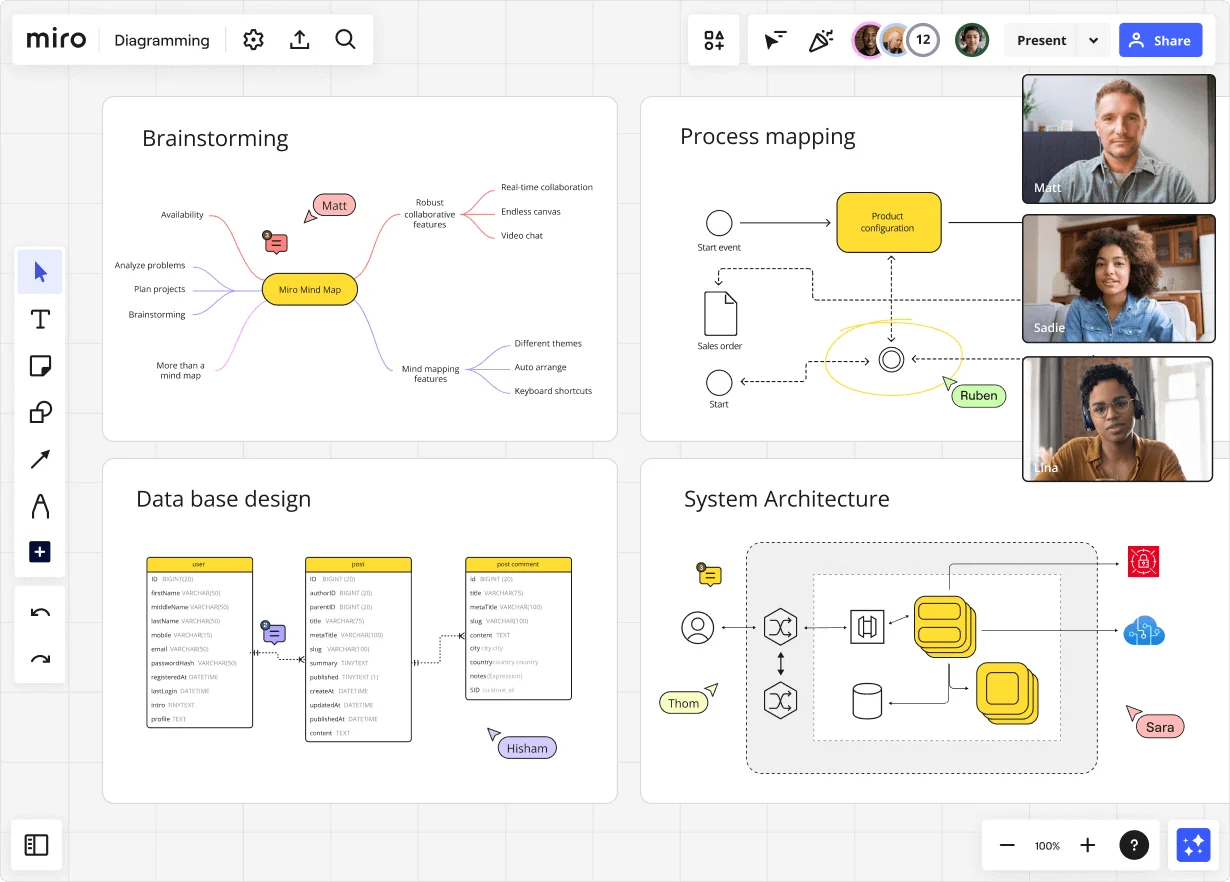
    Miro diagramming board showing four active workspaces: a mind map centered on 'Miro Mind Map' with feature branches, a BPMN-style process mapping flowchart with 'Product configuration' decision node, a database ER diagram with three related tables (user, post, post comment), and a system architecture diagram with interconnected components — all with visible collaborator cursors (Matt, Sadie, Ruben, Lina in video panel, plus Hisham, Thom, Sara as cursor labels).
  • Are your postmortems actually changing anything?

    Your on-call rotation catches the incident, but the fixes rarely make it into a shared process. Use Miro's BPMN shape pack to document the response flow step by step, then link each corrective action directly to a Jira ticket so nothing stays tribal knowledge.

    Miro board displaying a BPMN process mapping diagram with two swimlanes (Customer and Online Shop), showing decision gateways, message events, and task boxes for an order/offer workflow including 'Send offer', 'Accept offer', 'Decline offer', 'Send Payment', 'Receive Confirmation', and 'Receive Decline' steps, with the BPMN shapes panel open on the left.
  • When an architecture review needs more than a whiteboard photo

    A 5-person platform team can sketch a system diagram in minutes. A 500-person org needs that same diagram version-controlled and readable by every squad. Write your flow in Mermaid syntax - it renders visually on the Miro board and stays diff-friendly in GitHub.

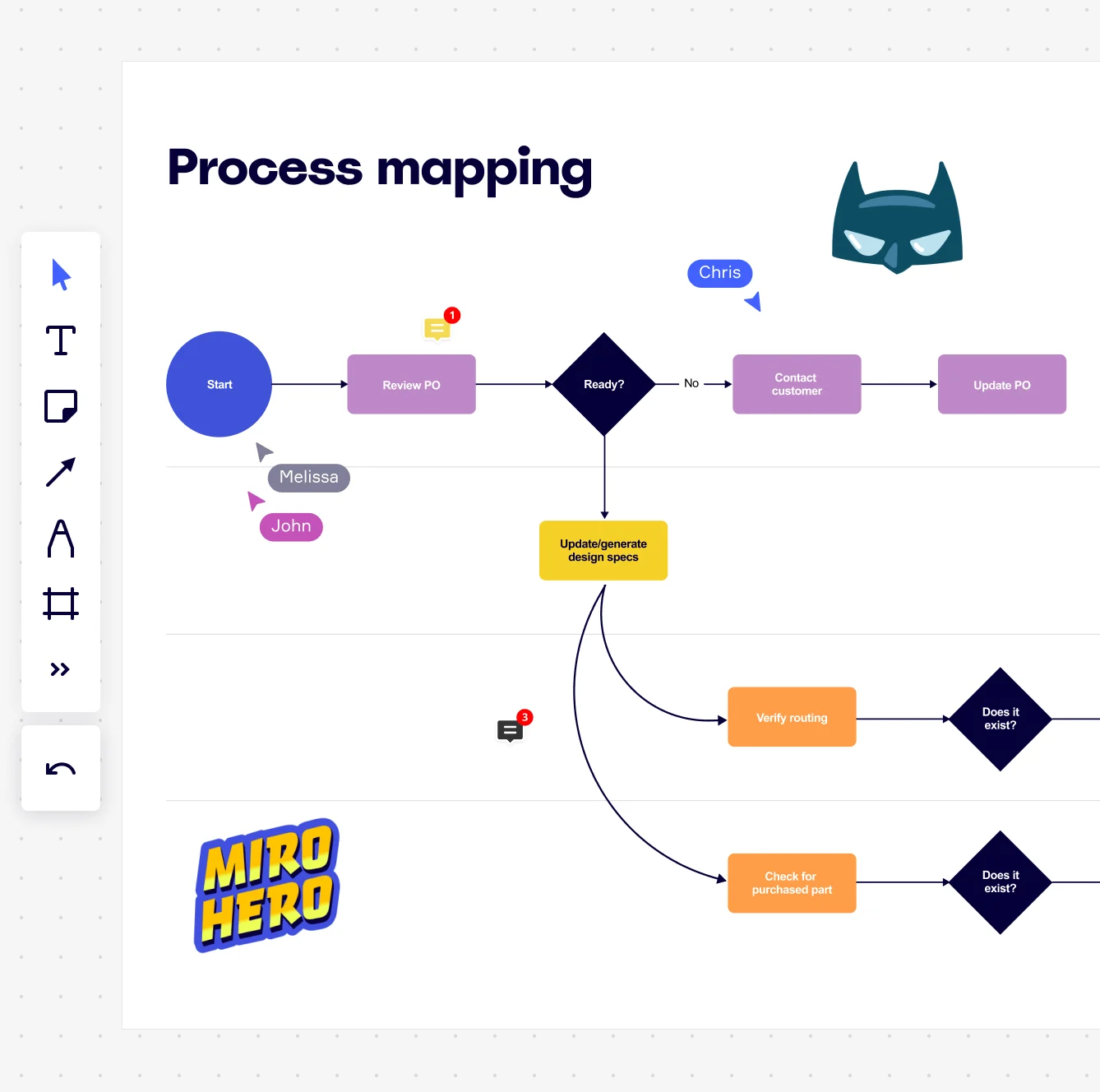
    Miro board displaying a process mapping flowchart with labeled nodes including Start, Review PO, a Ready decision diamond, Contact Customer, Update PO, Update/generate design specs, Verify routing, and Check for purchased part, with collaborative cursors (Chris, Melissa, John), comment badges, and decorative Batman and Miro Hero stickers.
  • Your tech debt backlog, mapped to the processes that create it

    Technical debt rarely has a clear owner because the process that generates it is invisible. Pull Looker or Power BI dashboards directly onto the canvas alongside your process map, so sprint leads see cycle-time data next to the workflow steps that slow it down.

    Miro process mapping board displaying a cross-functional flowchart with circular process nodes (Process 1.0, 1.1, 2.0), decision paths (Yes/No branches leading to 'Accept offer' and 'Decline offer'), and rectangular action steps including 'Send payment', 'Receive Confirmation', 'Receive Decline', and 'Process', connected by solid and dashed arrows.
  • Stop rebuilding the architecture doc from scratch every quarter

    Small engineering teams lose hours duplicating last quarter's board. Larger orgs end up with five divergent copies no one trusts. Miro's Synced Copies propagate every master update to each sub-process board in seconds, so your documentation wiki and your Confluence runbook always read from one live source.

    Miro board displaying a BPMN process mapping diagram with two swimlanes (Customer and Online Shop), showing decision gateways, message events, and task boxes including 'Send offer', 'Accept offer', 'Decline offer', 'Send Payment', 'Receive Confirmation', 'Receive Payment', and 'Receive Decline', alongside the BPMN diagramming shapes panel on the left.

How engineering teams get started with Process Mapping in Miro

  • Draft your first process map with AI

    Paste a plain-text description of a deployment pipeline, incident response flow, or API integration sequence into AI Generate Diagram and get a structured first draft in seconds - something concrete for the team to pull apart, not a blank canvas to stare at.

  • Build it out in Diagramming Mode

    Open Diagramming Mode and switch to the BPMN or Swimlane shape pack to map system ownership across engineering roles - smart connectors auto-route around shapes so your CI/CD workflow doesn't turn into spaghetti as it grows.

  • Link bottlenecks straight to Jira

    When sprint owners flag a broken handoff or orphaned approval step using comments and sticky notes, convert it to a Jira Card directly from the board - every process gap gets an owner, a ticket, and a deadline without leaving Miro.

  • Embed living diagrams in Confluence

    Use the Confluence Integration to drop your finalized architecture or runbook process map into the team wiki, so engineers reading the doc always see the current version - not a screenshot taken three sprints ago.

  • If your engineering org already authors docs in Mermaid or PlantUML, use Mermaid Diagrams or PlantUML to generate process diagrams from code - they version-control alongside your repo and render visually on the board.

  • Bring existing Visio or draw.io architecture diagrams into Miro via Diagram Import rather than rebuilding them; use Bulk Import if you're migrating a full library of legacy process docs at once.

  • Before a postmortem or architecture review, run the SIPOC Template first to align on scope - agreeing on system boundaries upfront stops the mapping session from sprawling into every adjacent service your team has ever touched.

Understand how engineering teams transform their work

  • I truly appreciate how Miro simplifies my workflow, especially in visualizing development work, which makes it easier for my team to plan and collaborate. The ability to maintain an array of topics on the same board without disrupting other sections is incredibly beneficial.

    Verified User

    G2
  • Great way to collaborate with people in my team and company, on different projects. There's flexibility to create different things depending on what the project requires, which allows it to be successfull.

    Verified User

    G2

Process Mapping essential guide for engineering teams

CategoryKey insights
  • Common mistakes to avoid

    The biggest trap engineers fall into is mapping the textbook version of a process instead of how it actually runs in production, missing the workarounds and undocumented handoffs that cause real incidents. For smaller teams, scope creep kills momentum fast, so agree on your start and end points before anyone draws a single shape. At scale, inconsistency compounds quickly, so pick one notation standard, whether that's BPMN or standard flowchart, and stick with the matching Miro shape pack across every diagram your org produces.

  • Key integrations for engineering teams

    Connect Miro to Jira so every process improvement your developers identify links directly to a ticket, keeping the gap between "we found the bottleneck" and "we're fixing it" as small as possible. Confluence embeds let engineers publish living process maps where their documentation already lives, so diagrams stay current instead of rotting in a forgotten folder. If your org is already running diagrams in Visio, Lucidchart, or Draw.io, Miro's import tools mean you don't have to start from scratch.

  • When to use it

    Reach for Process Mapping in Miro when your engineering team is staring down a recurring incident and can't agree on where the deployment pipeline actually breaks, or when a post-mortem keeps circling the same unowned handoff between dev and ops. It's also the right tool when new engineers are joining a complex codebase and written runbooks just aren't cutting it as onboarding documentation. Picture a backend team using a BPMN template to map their release process across five squads, spotting two redundant approval gates, linking each fix to Jira tickets, and cutting release cycle time in the process.

  • Security & Compliance

    Miro is SOC 2 Type II certified, which covers the baseline that engineering organizations at any size need before IT will approve a new platform. For larger organizations building on regulated infrastructure, data residency controls let admins keep sensitive architecture diagrams within specific geographic boundaries, and granular sharing permissions mean you control exactly who can view or edit a process map containing proprietary system designs. Private Mode adds another layer for sensitive sessions, like mapping a security incident response workflow, where you don't want half-baked process steps visible to the whole company mid-session.

Frequently asked questions for engineering teams

Last updated: Monday, June 15, 2026