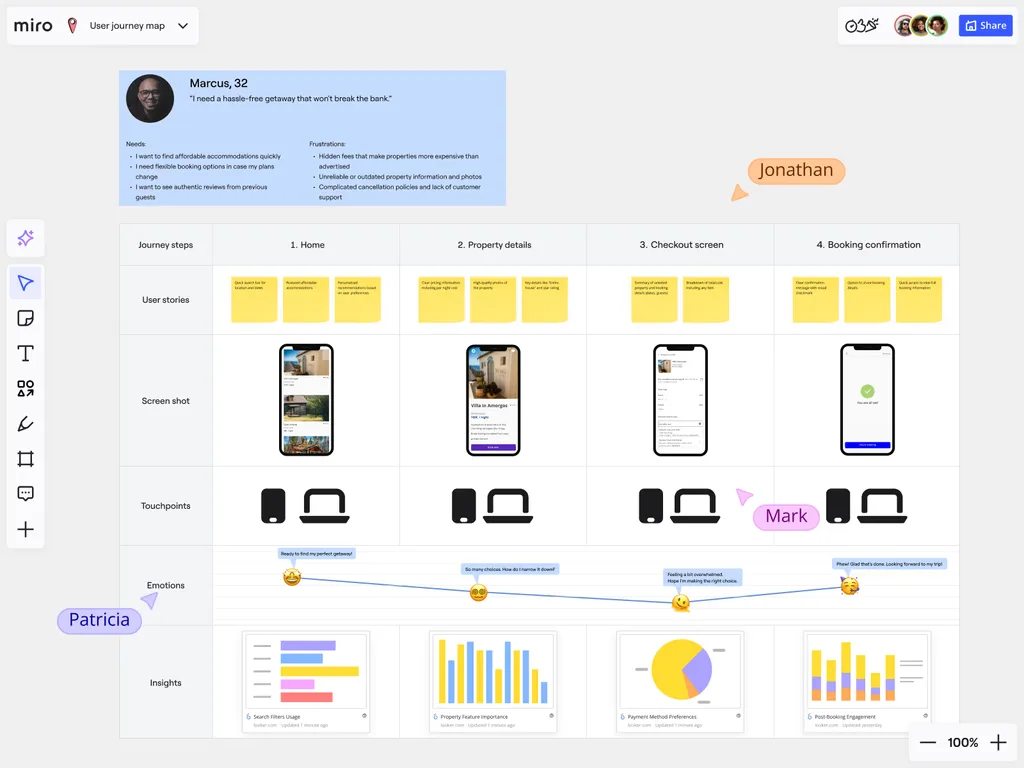
A comprehensive look at analytics and reporting for Customer Journey Mapping
Understanding your customer’s journey is only the first step. Turning insights into action is where you can make the most impact. Miro’s customer journey analysis maps out the entire customer experience, serving as a central hub to consolidate your workflow and data insights.
From there, you can visualise key information, identify patterns, and inform smarter decisions. Streamline reporting for your team by integrating Miro with your preferred analytics tools. Track engagement metrics over time and deliver clear insights that showcase the impact of your journey improvements. With Miro’s intuitive, drag-and-drop interface, anyone can start mapping and analysing journeys quickly, without a steep learning curve.
Measure Journey Map Impact on Business Outcomes
A customer journey map is only as valuable as the results it delivers. With Miro, teams can connect the customer journey map process to real business metrics. By making data-driven improvements, improve customer satisfaction and increase conversion rates.
1. Define Clear Objectives and KPIs
Set measurable goals for your journey mapping process. Whether you’re looking to increase customer satisfaction or reduce churn, define your objectives. This is a key step to customer journey analysis. Once you’ve identified KPIs that align with your business needs, you can use Miro templates to standardize your approach and ensure consistency across projects. You can also explore Miroverse, a community library of over 6,000 user-created templates - including customer journey frameworks - to jumpstart your analysis with tried and tested approaches.
2. Establish a Baseline
Before you can measure the impact of your customer journey map process, you need to collect the right data. Gather baseline data for the KPIs you’ve established, so you know where to start. Use Miro to conduct your research and capture real experience and pain points that your customers face.
By setting a strong baseline, you can see the tangible improvements driven by your journey mapping efforts.
3. Execute and Track Improvements
Use your customer journey mapping analysis to put insights into action. Address pain points and design better workflows to improve processes. For an enhanced overview, use Miro’s integrations to sync live project data, track KPIs in real-time, and gather ongoing customer feedback in one place.
Updates to key metrics or touchpoints flow automatically across boards, keeping every team aligned without extra effort.
4. Analyze and Report Results
Use Miro to visualize your customer journey and centralize your workflow and data insights. This makes it easier to identify gaps, highlight necessary improvements, and align your findings with business strategy.
Produce Executive-Ready Insight Reports
Miro helps transform complex customer journey diagrams into clear, actionable visuals. These visuals highlight key findings, recommended actions, and strategic priorities, making it easier to review insights and inform decisions.
Teams can use custom templates to standardize reporting, ensuring every deck or presentation is consistent, on-brand, and quick to prepare. And with over 160 integrations, reports can also pull in live data from tools like Jira or Amplitude, keeping insights current and grounded in real metrics.
When sharing results, Miro’s presentation mode lets you easily guide stakeholders through this data. Communicate the customer’s journey and their impact on satisfaction, retention, and growth.
Export Journey Data for Advanced Analysis
Plug your data into your apps for one universal truth. Extract customer journey analysis and insights from your Miro boards. They extract in formats that are compatible with a range of business intelligence tools.
Combine journey insights with sales performance, link it to operational data, or feed in tools like Google Analytics. By moving beyond static maps, organizations gain the ability to dig deeper. Track ROI and spot emerging patterns in customer behaviour with customer journey analysis.
When connecting maps with business data, you begin anticipating your customers' journeys. Start by exporting your Miro boards into your analytics tools. And give your teams the visibility they need to make smarter, faster decisions.
FAQs
How can you analyze a customer journey map with Miro?
You can analyze a customer journey map with Miro by building your own visual workspace, connecting it to your data and metrics. Use features like charts, tables, and integrations to track key performance indicators (KPIs) directly on your board. Then, you can gather a more complete understanding of the impact of your journey mapping initiatives.
Can you track business outcomes using a Miro customer journey map?
Yes, you can link specific stages and touchpoints like business outcomes on your customer journey process map. Link it to increased customer satisfaction, reduced support tickets, or higher conversion rates. This allows you to visualize and show how improvements in the customer journey affect your business goals.
What kind of reports can you generate from a customer journey map in Miro?
You can generate executive-ready reports and presentations straight from your Miro board. Use tools like frames and presentation mode to highlight key insights. You can then explore strategic recommendations and data visualizations to share with stakeholders.
Reports can also be customized with your organization’s branding to ensure presentations are polished and tailored for executive review.
How do you share a journey map and its insights with a team and stakeholders?
You can share your journey map and insights by inviting team members to your board to view, comment on, or edit the customer journey map. For sharing with a wider audience, you can use presentation mode, export the board as a PDF or image, or share a view-only link.
Teams working across time zones can also use Talktrack to record a walkthrough of the board. This ensures everyone can get all the context and insights, even when they can’t join live.
Can you export data from a Miro customer journey map?
Yes, you can export your Miro board in different ways. Use Miro Slides to build your report and export it as a PDF or choose to export specific elements—like tables, charts, or diagrams—as images or CSV files. Read more about exporting boards.
What is the best way to present journey map insights to executives?
The best way to present journey map insights to executives in Miro is by using presentation mode to guide them through frames in sequence. This allows you to show how customer journey improvements lead to measurable outcomes. From increased revenue and reduced costs to improved customer loyalty.
For added engagement, interactive presentation features like live reactions or voting can capture stakeholder feedback in real time.
Can you use Miro’s analytics features for different types of journey maps?
Yes, the analytical and reporting capabilities in Miro are flexible. Map the customer experience, an employee journey, or a user flow. You can then apply these features to track progress, measure outcomes, and report on the effectiveness of your initiatives. For dynamic data and real-time reporting, Miro can be integrated with your preferred analytics tools.
Read More
Author: Miro Team Last update: October 6, 2025
Join our 100M+ users today


