Table of contents
Table of contents
By signing up, you agree to Miro's Terms of Service and Privacy Policy.
The lifecycle gate: Alpha vs. beta prototyping (and why testing earlier changes everything)
Key takeaways
- Alpha and beta prototypes serve fundamentally different purposes, and confusing the two is one of the most common (and costly) mistakes product teams make.
- Early-stage concept validation, done right, prevents teams from engineering their way into the wrong solution.
- Prototype evaluation isn’t a single event. It’s an ongoing discipline that runs from rough sketches to near-final builds.
- Miro Prototypes and Miro Flows give cross-functional teams the tools to test ideas early, iterate fast, and ship with confidence.
Collaborative AI Workflows
Join thousands of teams using Miro to build the right thing, faster.
Here’s a situation most product teams know too well. Your engineers have spent six weeks building something technically impressive. It hits user testing and the feedback is brutal, not because the code is bad, but because the concept was wrong from the start.
The problem usually isn’t execution. It’s that the team waited too long to test. They skipped early concept validation and went straight to building. By the time anyone asked users whether this was actually what they needed, the cost of changing course was enormous.
This is exactly what alpha and beta prototyping exist to prevent, and understanding the difference between them isn’t just an academic exercise. It’s one of the most practical decisions a product team can make.
What is an alpha prototype?
An alpha prototype is an early, rough representation of a concept. It doesn’t need to be pixel-perfect or handle every edge case. It just needs to make an idea visible enough for your team, and ideally your users, to react to it.
Think sketches, simple click-through flows, AI-generated screens, or a rough user flow on a shared canvas. The whole point is speed. You’re not building for quality yet; you’re building for conversation. Can your back-end engineer look at this and understand what the API needs to support? Can a stakeholder see the flow and immediately grasp what you’re proposing? Can a user try to complete a task and tell you where they get stuck?
Alpha prototypes live in the discovery and definition phase of product development, the phase where organizations lose the most momentum. Getting this phase right is the single biggest lever teams have for reducing rework downstream.
What is a beta prototype?
A beta prototype is more refined, more representative of the final product, and built to answer more specific questions. Where an alpha asks “is this the right concept?”, a beta asks “does this specific implementation work?”
Beta prototypes typically have real interactions, higher visual fidelity, and more complete user flows. They’re what you share with a wider group of users for structured usability testing, or what you take to management to secure final sign-off before committing engineering resources.
The lifecycle gate between alpha and beta is significant. It’s the point at which your team has validated the concept well enough to invest more, and the moment you shift from “should we build this?” to “how do we build this well?”
Why the gate matters, and why most teams get it wrong
Most teams rush through the alpha phase. They treat it as a formality rather than a genuine checkpoint. They skip concept validation, produce a basic wireframe, call it done, and move straight to high-fidelity design or even development.
When that happens, teams build the wrong thing. Shipra Kayan, product evangelist at Miro, makes this point plainly: AI can now accelerate writing code significantly, which means teams can build the wrong thing even faster than before. The gap isn’t in delivery. It’s in discovery.
Research backs this up. According to Forrester Consulting research commissioned by Miro, 38% of projects lose momentum during the discovery phase and 35% stall during definition — the two earliest stages of product development, long before a single line of code is written. Those aren’t minor inefficiencies. They’re the phases where misalignment compounds quietly, and where a concept that was never properly validated gets carried forward into engineering at full cost.
The alpha-to-beta lifecycle gate forces a real decision point. Before you refine, before you spec, before you allocate a sprint, you need to answer one question: Did you actually validate this concept?
What are the objectives of testing a prototype?
Testing a prototype isn’t one thing. The objectives shift depending on where you are in the lifecycle.
At the alpha stage, you’re testing for concept validity. The core questions are whether the idea makes sense to users, whether they understand what they’re supposed to do, and whether this approach actually solves the problem you identified in discovery. You’re also testing for internal alignment: do your engineers, designers, and product managers all share the same mental model of what’s being built?
At the beta stage, your objectives become more precise. You’re testing usability, task completion, and readiness. Can users complete the core flows? Where do they hesitate, backtrack, or drop off? Is the information hierarchy working? Are there accessibility issues you haven’t caught?
The shift in objectives is why the gate matters. You can’t answer beta-stage questions with an alpha prototype, and you definitely shouldn’t be spending beta-stage resources on something that hasn’t passed alpha validation.
Prototype testing methods that work at each stage
The right prototype testing method depends on your stage and your team’s access to users. The table below maps the most effective methods to the right moment in the lifecycle.
Prototype testing methods that work at each stage
Method | Stage | What you're testing | How it works |
Hallway testing | Alpha | Concept clarity | Show the prototype to a colleague outside your immediate team. You're checking whether the concept communicates clearly, not whether it's polished. |
Workshop-based review | Alpha | Internal alignment | Bring your cross-functional team together and have everyone walk through the prototype simultaneously. Back-end engineers, front-end developers, designers, and product managers often surface misalignments that written documents never would. |
Stakeholder walk-through | Alpha | Leadership alignment | Use the alpha prototype to align leadership before any significant resources are committed. It's much easier to get sign-off on a direction than to explain a pivot. |
Moderated usability testing | Beta | Usability and task completion | Sit with users (in person or remotely) and give them tasks to complete without assistance. Note where they hesitate, what they click first, and where they ask for help. |
Task-based testing | Beta | Real-world behavior | Give users specific tasks and observe whether they can complete them. The right question isn't "do you like this?" — it's "can you do this?" Asking whether someone "would use" a feature almost always produces an optimistic yes that tells you very little. |
Comparative testing | Beta | Direction validation | If you developed multiple directions in the alpha phase, bring two or three beta-level variants to users and let them react to concrete differences. This is far more useful than asking users to imagine alternatives they haven't seen. |
Prototyping tools for early concept validation
The biggest practical barrier to early concept validation is time. Teams skip the alpha phase not because they don't believe in it, but because pulling together even a rough prototype used to take days.
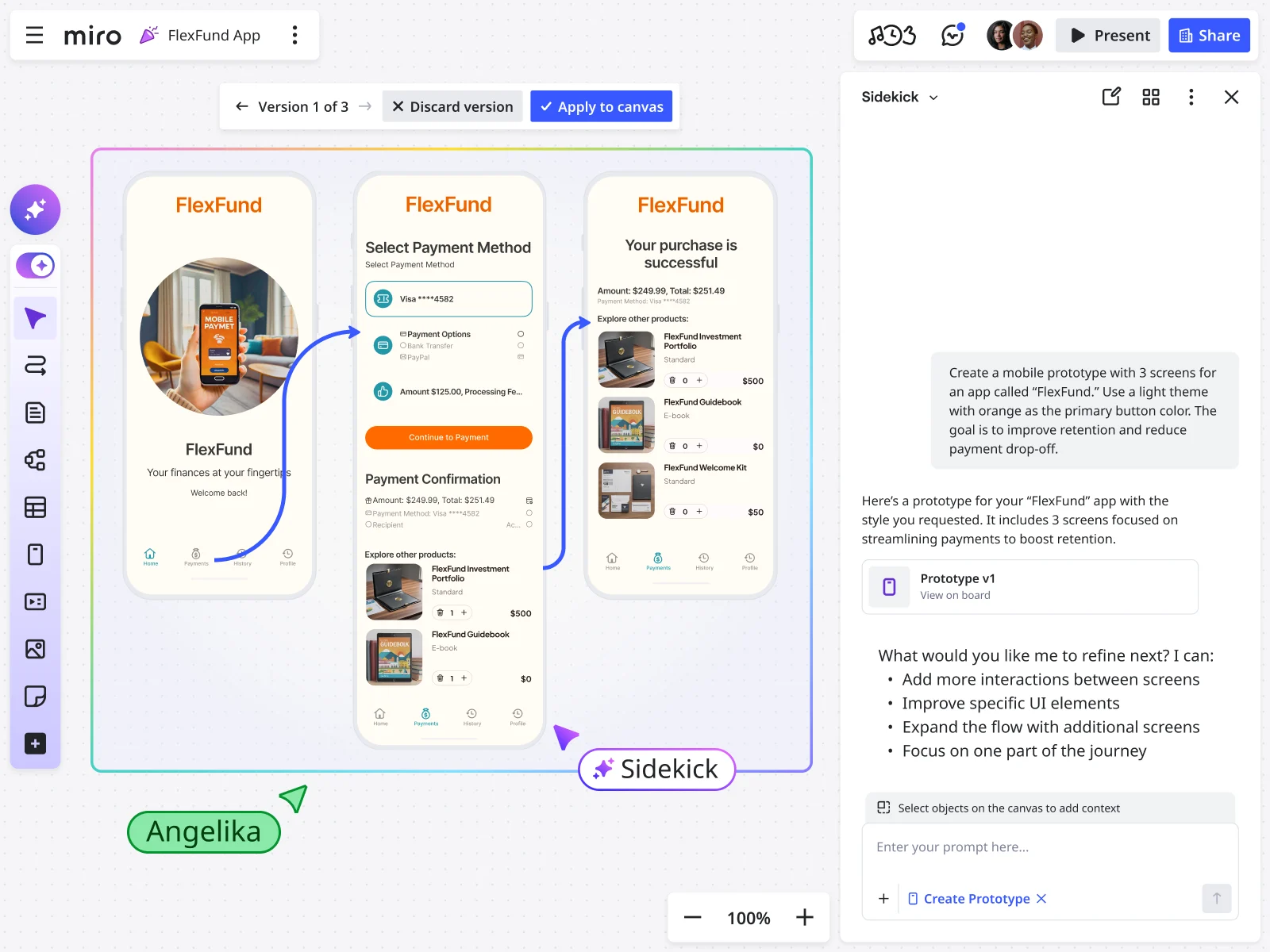
That's changed significantly. Miro Prototypes lets anyone on a cross-functional team, including product managers, designers, engineers, and marketers, turn existing board content into a clickable, interactive prototype in minutes. Here's how it works in practice:
- Convert screenshots into editable prototypes. Upload a screenshot of your current product, and Miro AI turns it into a fully editable mockup your whole team can modify together, no Figma file hunting required.
- Generate multi-screen flows from a user flow diagram. Sketch out a user flow using basic shapes on the canvas, select it as context, and Miro Prototypes generates a complete multi-screen mobile or desktop flow from it.
- Iterate with AI. Once you have a prototype, use the "Edit with AI" option to make broad changes quickly, like switching to dark mode or restyling to match your brand, without manually editing every element.
- Preview and share for feedback. Switch to preview mode to get a click-through experience you can share directly with stakeholders or use in user interviews, no export or third-party tool needed.
- Work multiplayer, in real time. Because everything lives on a shared Miro board, your whole team edits and reacts to the same prototype simultaneously. A back-end engineer can flag a database constraint in the same session a designer is refining the layout.
For teams that want to build repeatable discovery workflows, Miro Flows adds AI-powered, multi-step processes directly onto the canvas. Rather than treating each artifact as a one-off output, Flows chains them together so that the work builds continuously:
- Chain formats across the full discovery workflow. Connect sticky notes, docs, tables, diagrams, and prototypes so each step feeds into the next without manual copying.
- Keep context on the canvas. Raw user research flows into a structured insights summary, which flows into a requirements table, which informs the prototype, all in one shared space.
- Run the same workflow repeatedly. Once a flow is set up, your team can reuse it across projects, so discovery doesn't start from scratch every sprint.
The Miles & More example: From workshop to validated direction in a day
Björn Ehrlinspiel, a product owner at Lufthansa Group's Miles & More program, described exactly this kind of acceleration in the Miro webinar Prototyping earlier to build the right thing. His team had limited design resources, long development cycles due to the complexity of the Lufthansa Group infrastructure, and significant pressure to make sure every decision was right before committing to the build.
Their previous approach involved long documentation cycles, running between stakeholders, and hoping that different people reading the same PRD would arrive at the same mental picture. They rarely did.
With Miro Prototypes, the team ran a workshop where designers, developers, and product stakeholders could all generate and refine prototypes directly from the board. What had previously taken weeks of alignment happened in a single session. The team left with a shared, validated prototype that Ehrlinspiel could take to management with confidence.
"I'm way more confident that the things we are implementing for the product are the right things," he said.
That confidence is what prototype evaluation, done at the right stage with the right methods, is supposed to produce. Want to see the full workflow in action? Watch the on-demand recording to see how Ehrlinspiel's team went from workshop to validated direction in less than a day.
What comes after prototype?
Once a prototype has cleared the lifecycle gate, validated at alpha and refined and user-tested at beta, the next step depends on your team’s workflow.
For design teams, the path typically runs from Miro to Figma. Miro Prototypes includes a copy-to-Figma feature that exports your prototype as individual editable elements, ready for the high-fidelity design phase. For engineering teams, Miro’s Model Context Protocol (MCP) support means you can feed a validated prototype directly into AI coding tools like Cursor, GitHub Copilot, or Claude Code, giving the AI the full visual and structural context of what needs to be built.
What comes after prototype isn’t just development. It’s a handoff that’s clear, agreed upon, and grounded in validated user evidence, rather than a document that ten different people interpreted ten different ways.
Want to see the full handoff workflow in action? Watch how a Yauhen Ivashkevich, Miro developer, takes a validated Miro prototype, a product brief, and a set of design guidelines, feeds them into an AI coding agent via Miro's MCP integration, and generates a working kids banking app, complete with screens, components, and architecture diagrams, all without leaving the board.
Prototype evaluation: a team sport, not a designer’s job
One of the most persistent myths about prototyping is that it belongs to designers. In practice, early prototype evaluation is most valuable when it’s cross-functional. Engineers who see an alpha prototype early can flag technical constraints before they become expensive surprises. Product managers who walk through a prototype with real users before writing a detailed spec tend to write much better specs. Stakeholders who react to a visual flow instead of a written document give more useful, more specific feedback.
The teams that get this right don’t treat prototyping as a step in the design process. They treat it as a shared tool for decision-making, one that anyone can pick up, contribute to, and learn from.
Start validating earlier
If your team is still moving straight from a PRD to high-fidelity design or development without ever putting something clickable in front of a user, now is a good time to change that.
Miro Prototypes is available as an add-on for Starter, Business, and Enterprise plans. Sign up free and start turning your next workshop into a validated direction before the meeting ends.
Sign up for free and try Miro Prototypes!
Frequently asked questions
What is the difference between alpha and beta prototype testing? Alpha prototype testing focuses on concept validation, checking whether the core idea makes sense to users and whether the team shares the same mental model of what’s being built. Beta prototype testing focuses on usability, checking whether specific interactions, flows, and design decisions work for real users trying to complete real tasks. Alpha tests tend to be informal and exploratory; beta tests are more structured and evaluative.
What are the main objectives of testing a prototype? The objectives of prototype testing depend on the stage. At the alpha stage, the main objective is to validate that the concept solves the right problem and that stakeholders and users understand the proposed approach. At the beta stage, the objectives include assessing task completion, identifying usability issues, evaluating accessibility, and determining whether the product is ready to move into development. Throughout both stages, a core objective is reducing the cost and risk of building the wrong thing.
What prototype testing methods work best for early concept validation? For early concept validation, the most effective methods are hallway testing (quick, informal feedback from colleagues outside the immediate team), workshop-based review (bringing cross-functional teams together to walk through a prototype simultaneously), and stakeholder walk-throughs (using a prototype to align leadership before committing engineering resources). Task-based testing, which means asking users to complete specific tasks rather than offering opinions, is also valuable at both alpha and beta stages, as it produces more reliable feedback than direct questions about whether users “like” a design.
What comes after prototype in the product development process? After a prototype has been validated through testing, the typical next steps are high-fidelity design and engineering handoff. For design-led teams, this often means exporting the prototype to a tool like Figma for detailed UI work. For engineering teams, the validated prototype serves as a specification that informs development. With Miro’s MCP integration, a Miro prototype can feed directly into AI coding tools, giving engineers and AI code-generation tools the visual and structural context they need to build accurately.
What are the best prototyping tools for early concept validation? The best prototyping tools for early concept validation prioritize speed, collaboration, and accessibility, so that the whole cross-functional team, not just designers, can participate. Miro Prototypes allows product managers, engineers, designers, and other stakeholders to generate clickable, interactive prototypes directly from a shared canvas in minutes, using existing board content, screenshots, or AI-generated screens as a starting point. For teams that want to automate multi-step workflows, going from raw user research to a structured prototype brief to an interactive prototype, Miro Flows chains these steps together on the canvas, removing the need to copy context between tools.
How does prototype evaluation fit into agile product development? In agile environments, prototype evaluation supports sprint planning and backlog prioritization by providing validated evidence about what users need before stories are written and pointed. Alpha prototype reviews can happen during discovery sprints or in dedicated ideation sessions. Beta prototype testing typically informs the sprint in which the feature is handed off for production development. Teams that integrate regular prototype evaluation into their agile rhythm tend to write better acceptance criteria, reduce mid-sprint scope changes, and deliver features with higher adoption rates. Last updated: April 30, 2026
Read more
Join our 100M+ users today


