Table of contents
Table of contents
Design handoff: The missing logic layer between prototypes and code
Summary
Design handoff breaks down when teams treat it as a file transfer instead of a conversation about logic and behavior. This guide shows senior designers and engineering leads how to use Miro as the "logic layer" between visual design tools and code—documenting not just what designs look like, but how they behave.
What you'll learn:
- Why handoff fails: 71% of leaders report tool-switching friction, but the real problem is missing behavioral documentation—developers need to know what happens when users are logged out, when APIs fail, and when data is empty
- The 5 breaking points: Context switching, unanswered "what if" questions, static mockups that don't show behavior, async communication loops, and late developer involvement
- How to fix it: Build interactive, annotated prototypes in Miro that map user flows, document all states (empty, loading, error, success), and answer edge cases before developers ask
- Real results: Moladin doubled their story points and achieved zero critical bugs in two years by documenting end-to-end flows and logic in Miro, giving developers full context without constant interruptions
- Practical tools: A complete handoff checklist, reusable templates, and specific techniques for documenting logic alongside pixels. And, guidance on how design handoff tools and design-to-code tools fit into a modern product workflow.
Bottom line: A pretty prototype isn't enough—it needs to be buildable. This guide focuses on using Miro to annotate behavior, not just pixels, so developers can implement confidently without guessing what you meant.
Collaborative AI Workflows
Join thousands of teams using Miro to build the right thing, faster.
Here’s the truth about design handoff: a pretty prototype isn’t enough. It never was.
You can create pixel-perfect mockups in Figma. You can nail the visual hierarchy, choose the exact shade of blue, and animate every micro-interaction. But when a developer looks at your prototype and asks, “What happens if I click this when the user is logged out?”—and you haven’t thought about it—that’s where handoff breaks down.
71% of leaders say switching between tools causes workflow interruptions during design-to-development transitions. But the bigger problem isn’t the tool switching. It’s that we’ve treated design handoff as a file transfer when it should be a conversation about logic, states, and behavior.
This guide is about fixing that. It’s about using Miro as the logic layer between your visual design tool and the code—where you map out what happens, not just what it looks like.
What design handoff actually is (and why it keeps failing)
Design handoff is the moment when designers transfer specifications, assets, and intent to developers for implementation. In theory, it’s straightforward. In practice, it’s where most projects hit their first major slowdown.
The handoff includes design specifications like layouts and typography, visual assets, interaction patterns, design rationale, and details about responsive breakpoints and edge cases. But here’s what usually happens instead: designers hand over static screens, developers build exactly what they see (not what you meant), and three rounds of revisions later, everyone’s frustrated.
The gap isn’t about the quality of your designs. It’s about the gap between visual representation and behavioral logic.
Here’s the moment it breaks: A developer opens your prototype. It looks great. They start building. Then they hit the first question: “What happens when this field is empty? What if the API call fails? What’s the mobile layout at 375px versus 768px? Does this button disabled state change based on form validation or something else?”
If those answers aren’t in your handoff, you’ve created work for both of you. The developer stops, sends a Slack message, waits for your response, and implements their best guess in the meantime. You review it later and say, “That’s not what I designed.” They reply, correctly, “That’s exactly what you showed me.”
This is the pattern that 75% of leaders recognize: most AI tools focus on individual productivity, but design handoff suffers when teams work in silos. Your beautiful Figma file accelerated your work. But it didn’t accelerate team work.
The 5 breaking points in design-to-development handoff
Let’s get specific about where handoff falls apart. These aren’t edge cases. These are the daily friction points that slow down every product team.
1. The context switching tax
Designers work in Figma. Developers work in IDEs. Product managers work in Jira. Stakeholders work in Google Docs. Everyone’s context lives in a different tool, and when you need to explain why you designed something a certain way, that explanation lives nowhere.
A developer sees your checkout flow prototype. It looks clean. But they don’t see the user research that showed customers abandon checkout when presented with too many fields at once. They don’t see the A/B test results that informed the single-column layout. They don’t see the technical constraint discussion you had with the backend team about payment gateway limitations.
That context matters. Without it, developers implement what they see, but they can’t make informed decisions when they hit the inevitable edge cases you didn’t design for.
2. The “what if” questions you didn’t answer
This is the conversation that happens at least once per feature:
Developer: “What happens when the user hasn’t uploaded a profile photo yet?”
Designer: “Oh. Um. Show a placeholder, I guess?”
Developer: “What kind of placeholder? Initials? Generic avatar? Empty state with upload prompt?”
Designer: “Let me think about that and get back to you.”
Every unanswered “what if” is a delay. And there are hundreds of them in any given feature: empty states, error states, loading states, offline states, states when permissions are denied, states when data is stale, states when the user is on a slow connection.
You didn’t design these because you were focused on the happy path—the ideal scenario where everything works perfectly. But developers build for every path, and they need specifications for all of them.
3. The static mockup problem
A static screen shows what something looks like. It doesn’t show how it behaves.
Does that modal slide up from the bottom or fade in? Does the transition take 200ms or 400ms? Does the form validate on blur or on submit? Do error messages appear inline or at the top of the form? Does the navigation collapse at 768px or 1024px?
These aren’t small details. They’re the difference between an interface that feels responsive and one that feels janky. But if your handoff is a collection of static screens, developers are guessing at all of this.
4. The async communication loop
Developer question in Slack. You’re in a design review meeting, so you see it two hours later. You answer. They’ve context-switched to another task. They see your answer the next morning. They have a follow-up question. You’re heads-down on another project. This cycle repeats.
Each round-trip adds hours or days to implementation. And with every delay, the developer makes assumptions to keep moving. Some of those assumptions will be wrong, which means rework later.
5. The “too late” feedback
Developers get involved when designs are “final.” By then, you’ve already made decisions about interaction patterns, component architecture, and data requirements. Then the developer says, “This would be way easier to build if we used a drawer instead of a modal” or “The API doesn’t return data in this structure, so we’d need to add a new endpoint.”
Now you’re redesigning. Or worse, you’re not redesigning, and you’re shipping a suboptimal solution because changing course would take too long.
This happens because developers weren’t in the room when you were exploring options. They couldn’t give technical input early enough to influence the direction. By the time they see your work, changing course is expensive.
How to fix design handoff: 6 practical changes
The solution isn’t more documentation. It’s different collaboration. Here’s how to fix each breaking point:
1. Build the logic layer alongside your visual designs
Think of your handoff in three layers:
- Visual layer: What it looks like (Figma, Sketch)
- Logic layer: How it behaves and why (Miro)
- Code layer: How it’s built (developer’s IDE)
Most designers nail the visual layer. Most skip the logic layer and wonder why handoff is painful.
The logic layer is where you document:
- User flows that show every branch, not just the happy path
- State diagrams that map out empty, loading, error, and success states
- Conditional logic that explains what triggers what
- Edge case documentation that answers “what if” questions before they’re asked
- Technical constraints that inform what’s feasible
Use Miro to map this out collaboratively. Start with your user journey on the canvas. Then build out each state, each decision point, each error condition. Annotate directly on the flow with behavior notes. Link to your Figma designs so developers can see the visual and the logic in one place.
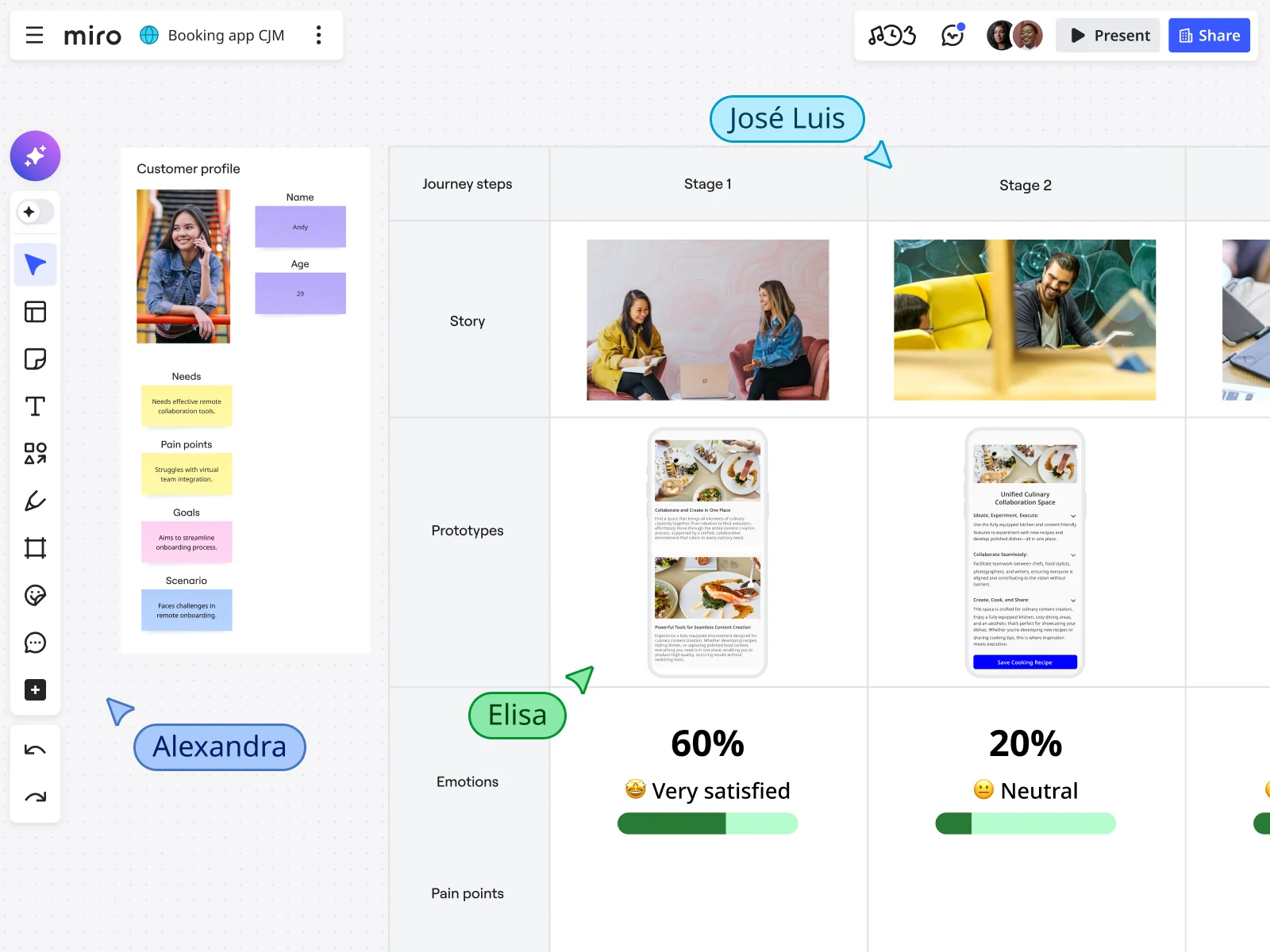
When Moladin adopted this approach—mapping end-to-end flows and documenting all touchpoints in Miro—they doubled their story points. Teams delivered twice the work because developers had the context they needed to build confidently without constant interruptions.
2. Answer the “what if” questions with visual documentation
Create a handoff board in Miro that includes:
- Empty state designs: What users see when there’s no data yet
- Error state designs: What happens when something goes wrong (API failure, validation error, network timeout)
- Loading state designs: What users see while waiting (skeleton screens, spinners, progress indicators)
- Permission denied states: What happens when users can’t access something
- Offline states: How the interface behaves without connectivity
- Success confirmations: What feedback users get when actions complete
Don’t design these in isolation. Put them in context on your user flow. Show developers exactly where each state appears and what triggers it.
3. Make your prototypes interactive and annotated
Static screens show what. Interactive prototypes show how.
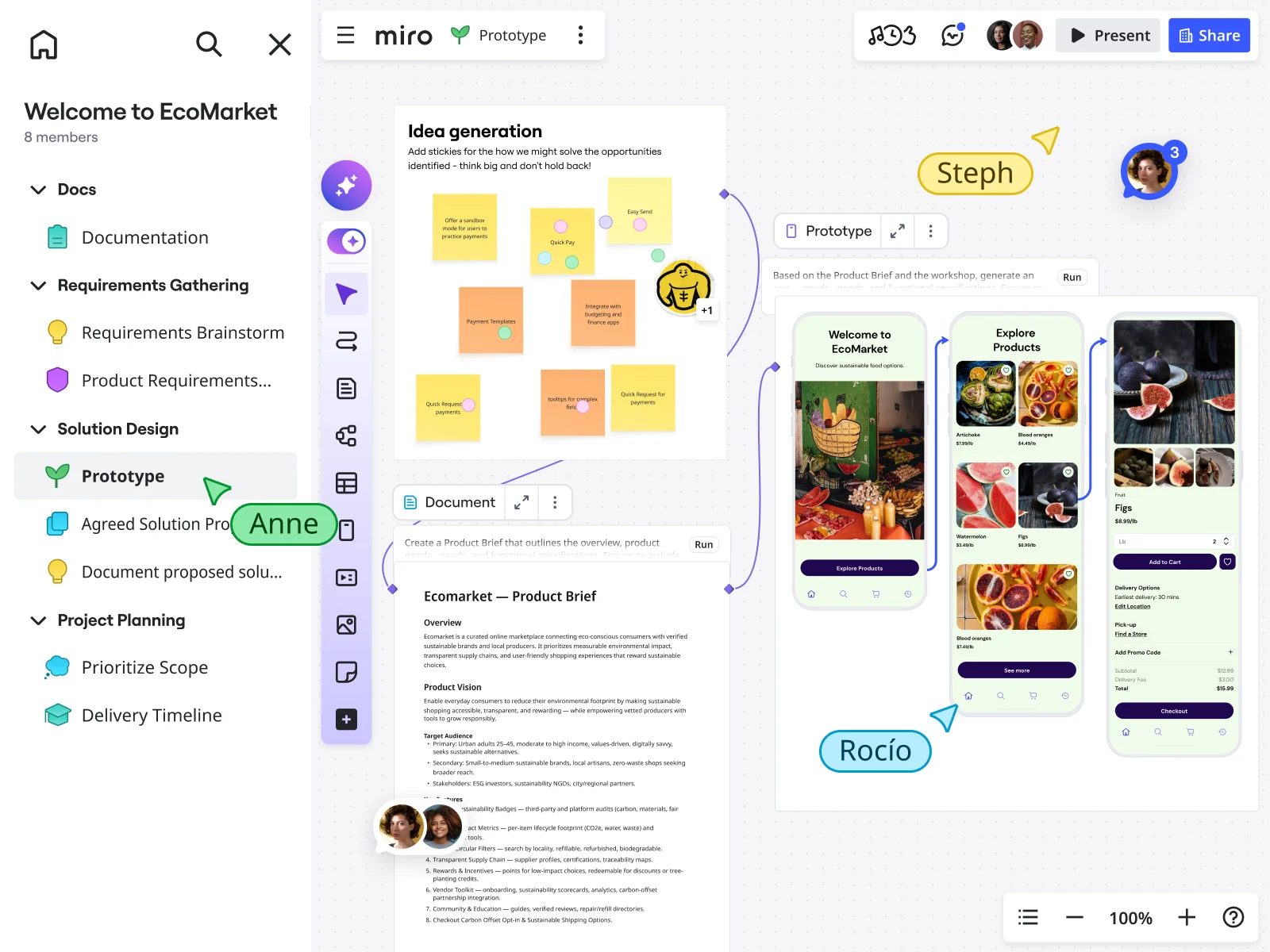
Use Miro Prototypes to turn your flows into clickable experiences. Generate screens from your early sticky notes and diagrams using AI. Then add connector lines between screens to show navigation. Annotate each interaction with behavior notes:
- “This button is disabled until all required fields are filled”
- “Error message appears inline below the field, not at the top of form”
- “Modal closes on outside click or ESC key”
- “Transition uses 300ms ease-out animation”
When you share this with developers, they’re not guessing. They’re implementing exactly what you specified.
4. Stop handing off—start collaborating
The best handoff isn’t a handoff at all. It’s continuous collaboration.
Invite developers to your canvas while you’re still exploring. Share work-in-progress prototypes. Ask for technical feasibility feedback early. Let them see your thinking develop, not just your final decisions.
Here’s what this looks like in practice:
You’re designing a new dashboard feature. Instead of spending two weeks polishing mockups in isolation, you:
- Sketch the initial concept in Miro with sticky notes
- Generate a quick prototype using AI to visualize the flow
- Tag your engineering lead directly on the canvas: “Does this data structure match what the API returns?”
- Iterate based on their feedback before building high-fidelity designs
- Once the logic is solid, create detailed visuals in Figma
- Link your Figma frames back into your Miro board so everything lives in one place
This approach eliminates the “too late” problem. Developers give input when it’s cheap to change course, not when changing course means scrapping a week of work.
5. Document logic, not just pixels
When you annotate your designs, focus on the logic that isn’t visually obvious:
Instead of: “Blue button” Write: “Primary CTA disabled until form validation passes. On click, trigger POST request to /api/checkout. Show loading state for minimum 200ms to prevent flash. On success, redirect to confirmation page. On error, display inline error message and log to Sentry.”
This is the information developers need. It’s not about the color of the button—they can extract that from your design file. It’s about the behavior, the conditions, the integrations, the error handling.
Put this documentation directly on your Miro board, linked to the specific screens it applies to. Developers shouldn’t have to hunt through separate docs. The logic should live next to the flow.
6. Create reusable handoff templates
Every project has the same core questions:
- What are all the states?
- What are all the error conditions?
- What are the responsive breakpoints?
- What are the accessibility requirements?
- What are the animation specifications?
- What are the API dependencies?
Create a handoff checklist template in Miro that you duplicate for every feature. Walking through the checklist forces you to think through edge cases before developers do. It makes your handoff complete, not aspirational.
How Moladin eliminated critical bugs with better handoff
Moladin, Indonesia’s leading automotive marketplace and financial services provider, faced a challenge familiar to fast-growing product teams: their operational workflows were constantly evolving. Multiple teams—especially in underwriting—needed to stay aligned on shifting processes, but tracking changes across platforms created bottlenecks, delayed releases, and quality issues.
The product team needed a way to document, visualize, and iterate on complex workflows in real time. That’s when they adopted Miro as their single source of truth for the entire product development process.
Praz Perkasa, Chief Product Officer at Moladin, explains the shift: “In an environment where our flows evolve quickly to meet business needs and we manage multiple platforms, Miro gives us the flexibility to visualize complex processes instantly and collaborate in real time.”
Moladin’s approach focuses on three key practices:
- Research synthesis: The research team consolidates market insights and qualitative findings in Miro, making it easier to distill key takeaways that inform product decisions.
- End-to-end flow documentation: Product and design teams map out entire customer journeys—from mobile apps to internal dashboards to manual processes. Every touchpoint is visible on the canvas, annotated with logic and behavior notes.
- Continuous retrospectives: Teams conduct regular retrospectives at the end of sprints, months, and quarters to identify bottlenecks and optimize workflows.
The impact was immediate. By visualizing complete workflows in Miro, product managers could instantly identify all touchpoints affected by proposed changes. This gave them the ability to provide stakeholders with quick, accurate effort estimates—accelerating decision-making and eliminating the back-and-forth that previously slowed everything down.
Miro’s real-time collaboration meant teams could make updates during meetings and get stakeholder approval on the spot. No more multiple follow-up sessions. No more waiting days for feedback.
The results:
- Zero critical bugs in post-release deployments for the past two years
- Doubled story points since adopting Miro in 2021, meaning teams deliver twice as much value per sprint
- Eliminated miscommunication between designers and developers by giving everyone a shared view of how their work connects to the bigger picture
“Miro has become the backbone of our product development process,” says Perkasa. “Everyone now has a clear view of how their work connects to the bigger picture. It’s more than just a tool; it’s an essential part of how we innovate and deliver with confidence.”
What made the difference wasn’t adding more documentation. It was centralizing logic and behavior specifications in a collaborative space where designers, developers, and product managers could work together from the start.
Your design handoff checklist
Use this as a starting template. Duplicate it in Miro for every feature you ship.
Before handoff
☐ All user flows mapped and clickable in Miro ☐ Empty states designed and documented ☐ Loading states designed and documented ☐ Error states designed and documented ☐ Success confirmations designed and documented ☐ Responsive breakpoints specified (mobile, tablet, desktop) ☐ Accessibility requirements documented (WCAG level, keyboard navigation, screen reader labels) ☐ Animation and transition specs noted (duration, easing, trigger conditions) ☐ API dependencies identified and confirmed with backend team ☐ Design rationale documented (why you made key decisions) ☐ Edge cases identified and designed (offline mode, slow connection, permission denied, etc.) ☐ Component library updated with any new patterns
During handoff
☐ Interactive prototype shared with developers and stakeholders ☐ Walkthrough meeting scheduled with full cross-functional team ☐ Q&A channel established (Slack, Miro comments, etc.) ☐ Implementation priorities aligned (what ships in MVP vs. future iterations) ☐ Timeline expectations set and realistic ☐ Definition of done agreed upon by design and engineering
After handoff
☐ Designer available for questions during implementation ☐ Regular check-ins scheduled (daily standups or async updates) ☐ QA sessions planned before release ☐ Feedback loops established for post-launch improvements ☐ Retrospective scheduled to improve next handoff
Common mistakes that make handoff painful
Let’s talk about what not to do. These mistakes show up on almost every team, and they’re all fixable.
Mistake 1: Treating handoff as a one-time event
You finish designs. You hand them to developers. You move to the next project. Then developers have questions, and you’re already context-switched to something else.
Fix: Build continuous collaboration into your process. Handoff isn’t a moment—it’s a relationship. Stay engaged through implementation. Developers shouldn’t feel like they’re bothering you with questions. Questions mean they care about getting it right.
Mistake 2: Handing off only static mockups
Beautiful Figma screens are great. But they don’t show behavior, logic, or state changes.
Fix: Always pair visual designs with interactive flows and behavior documentation. Use Miro to show how screens connect, what triggers what, and what happens in each scenario.
Mistake 3: Forgetting edge cases
You design the happy path. Developers build for every path.
Fix: Before calling designs “done,” walk through every edge case. Use the checklist above. If you haven’t designed a state, developers will make it up, and you probably won’t love their interpretation.
Mistake 4: Excluding developers until designs are final
By the time developers see your work, it’s too expensive to change course.
Fix: Involve developers during exploration. They’re not just implementers—they’re problem solvers. Their technical input early saves rework later.
Mistake 5: Explaining features in designer language, not business language
“This uses a card-based layout with a 16px grid system” doesn’t explain why it matters.
Fix: Frame design decisions in terms of user outcomes and business value. “This layout reduces cognitive load by showing one task at a time, which user testing showed increases completion rates by 23%.” That’s a reason to build it right.
Mistake 6: Disappearing after handoff
Developers are building your designs. Questions come up. You’re unavailable or slow to respond. They make guesses. You’re unhappy with the result.
Fix: Block time during implementation sprints for developer support. Make yourself available. Treat their questions as opportunities to ensure quality, not interruptions to your workflow.
What’s next: The future is collaborative, not individual
AI is accelerating individual productivity. Designers can generate mockups from prompts. Developers can generate code from designs. But the gap between the two—the logic layer where teams align on what to build and how it should behave—still requires human collaboration.
This won’t change. AI can speed up execution, but it can’t replace the conversation where a designer explains user research insights, a developer raises technical constraints, and a product manager clarifies business priorities. That conversation is where great products come from.
82% of leaders are interested in AI solutions that drive collaboration and teamwork. The future isn’t about individual tools getting smarter. It’s about teams working together on a shared canvas where context is visible to everyone.
Miro becomes that shared canvas where discovery insights, prototypes, logic documentation, and developer feedback all live together. The place where you don’t hand off work; you build it together. And that connection between design and code is getting even tighter. Our AI-powered innovation workspace now supports Model Context Protocol (MCP), which means teams can bridge design decisions directly to the tools engineers already use.
As Jeff Chow, Miro's Chief Product and Technology Officer, puts it: "Teams can also connect design decisions directly to code through Model Context Protocol (MCP) integration with tools like Cursor and GitHub Copilot." For teams evaluating design-to-code tools, this is a meaningful shift where design intent doesn't just inform code anymore; it travels with it.
Start shipping with confidence
Here’s what changes when you treat design handoff as a logic layer, not a file transfer:
Developers stop guessing what you meant. They build exactly what you specified because you specified behavior, not just visuals. Revisions drop because edge cases were designed, not discovered. Implementation accelerates because developers have the context they need to make smart decisions without constant interruptions. And your team ships higher-quality products because everyone was aligned from the start.
The fix isn’t more documentation. It’s better collaboration. Start mapping your next feature in Miro before you touch Figma. Bring developers into the canvas while you’re still figuring things out. Document logic alongside visuals. Answer “what if” questions before they’re asked.
Do that, and handoff stops being a bottleneck. It becomes the natural next step in work you’re already doing together.
FAQ: Design handoff questions, answered
What should be included in a design handoff?
Design specifications, visual assets, interactive prototypes, behavior documentation, edge case designs, responsive breakpoints, accessibility requirements, animation specs, API dependencies, and design rationale. If a developer might ask “what if?” about it, document it.
When should design handoff happen?
Continuously, not as a single event. Share work-in-progress prototypes early. Get developer input during exploration. Make handoff an ongoing collaboration, not a file drop.
How do you ensure developers understand design intent?
Use interactive prototypes to show flows, document the logic behind each decision, and annotate behavior directly on your designs. Most importantly, maintain open communication. Developers should feel comfortable asking clarifying questions, and you should be available to answer them.
What’s the difference between design handoff and design delivery?
Design handoff is transferring files and specs. Design delivery is the full collaborative process that ensures the shipped product matches design intent. Handoff is a moment. Delivery is a partnership.
How can AI help with design handoff?
AI can generate prototype variations quickly, convert screenshots to editable mockups, and provide usability feedback—but it can’t replace the conversation between designers and developers about logic and behavior. Use AI to speed up execution, not to skip collaboration. Learn more about Miro’s AI-powered prototyping capabilities.
How do you handle handoff in agile workflows?
Do incremental handoffs at the end of each sprint. Focus on what developers need for the next iteration. Keep prototypes and documentation in a shared space (like Miro) so developers always have access to the latest context without waiting for a formal handoff meeting.
What’s the best way to document edge cases?
Design each state visually (empty, loading, error, success), include them in your interactive prototype, and annotate with specific behavior specifications. Don’t just list them in a doc—show them in context within the user flow.
Should designers and developers use the same tools?
Not necessarily. Designers need design tools optimized for visual work. Developers need IDEs optimized for code. But both need access to a shared collaboration space where logic, context, and conversation live together. The best design handoff tools aren't the ones that replace your existing stack — they're the ones that connect it. That's where Miro fits: as the logic layer between your visual design tools and your code, keeping everyone working from the same source of truth.
Note: All Forrester data points reference Forrester Consulting’s “Collaboration is AI’s Biggest Opportunity,” Q3 2025 study, which surveyed 518 engineering, product, design, IT, and LOB leaders across USA, EMEA, and APAC who are currently integrating or planning to integrate AI into workflows.
Author: Miro team
Last update: March 11, 2026
Read more
Join our 100M+ users today


