Connect 160+ Customer Journey Map Software Integrations in Miro
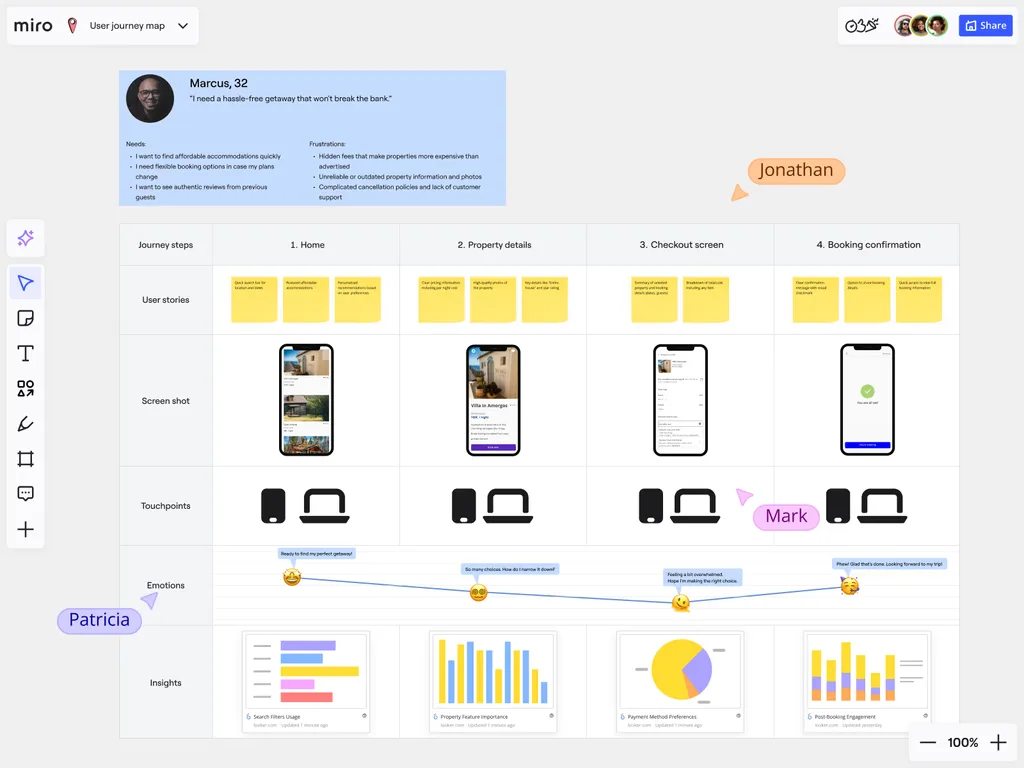
Bring your customer journey mapping into one connected ecosystem. With over 160 business tool integrations, convert your journey insights directly into the same platforms your teams are already using.
No more manual updates or isolated info, just every touchpoint in your journey map with links to live, accurate data. Integrations ensure your maps stay current, drive real action, and feed into the business as a whole.
Connect Customer Data Sources
Link your customer journey maps to a number of CRM platforms, analytics dashboards, and feedback systems. Whether it’s integrating Miro with Salesforce or Google Analytics, Miro feeds their data straight into your maps. Very useful stuff.
This way, your teams can base their journey maps on reliable information about your customers. Touchpoints aren't just theoretical, they’re populated with real customer behaviors. Real data.
Miro’s infinite canvas allows you to layer CRM and analytics data side-by-side with personas, emotions, and touchpoints too, creating a complete picture without tool-switching.
Link Journey Maps to Project Management Tools
Turn pain points into actions items. With integrations for Asana, Jira and other project management software, you can convert your journey map findings into trackable tasks.
Your mapping sessions don’t end as a static board. Instead, they generate clear tasks with owners and timelines, ensuring everyone on the project is in the loop. Miro also supports two-way sync, so when Jira tickets or Asana tasks are updated, those changes reflect back in your journey map automatically.
Embed Journey Maps in Communication Platforms
Keep customer insights at the forefront of daily collaboration. By embedding interactive journey maps in Slack, Microsoft Teams, and other similar tools, your team can access them without leaving their usual workflows. This helps to keep teams consistently customer-focused. In sight, in mind.
Sync With Customer Feedback Platforms
Connect to support tools like Typeform, SurveyMonkey, and Zendesk to keep your customer journey maps evolving with every new bit of customer feedback. Whether it’s pain points or praise, the voice of your customers is embedded automatically, meaning your journey maps stay fresh and relevant.
Connect to Business Intelligence Tools
Connect your journey mapping data with analytics platforms for advanced reporting, forecasting, and live dashboards.
This allows your leadership teams to get a full view of customer journey data alongside core business metrics, connecting insights with broader strategic planning. They can link it to the big picture and see its value.
Explore Miro’s Pricing for Customer Journey Mapping
Miro’s 160+ integrations turn customer journey maps into actionable insights. By connecting data and feedback, your maps stay accurate. This helps your teams collaborate, spot pain points, and take action in real time. Discover Miro’s pricing plans and find the option that best supports your customer journey mapping plans.
FAQs
What is the Miro Marketplace?
The Miro Marketplace is where you can find over 160 integrations to connect Miro with the tools your team already uses.
These integrations allow you to link your customer journey maps with other business platforms, streamlining your workflow and avoiding manual data entry. No-one wants too much of that.
Can you use integrations to add customer feedback to your customer journey map?
Yes, you can connect Miro to customer feedback platforms.
For instance, by integrating Miro with SurveyMonkey, you can insert real-time customer feedback directly into your CJM. This keeps your map current and ensures your insights are based on real customer voices. Real people.
Do you need to be a developer to use Miro’s integrations?
You don’t. Most of Miro’s integrations don’t require any kind of coding or developer expertise. Just connect to popular platforms by following simple setup instructions.
Miro has been designed so that any team member can easily start linking their customer journey maps with other tools (regardless of their coding experience).
Read more
How to create a customer journey map
Customer journey map templates
What are the benefits of customer journey mapping?
Customer journey mapping vs customer experience
Buyer journey vs customer journey
Guide to customer decision making process
What is product life cycle management?
What are the product life cycle stages?
Author: Miro Team Last update: October 6, 2025
Join our 100M+ users today


