Table of contents
Table of contents
A Miro PMM’s guide to faster decision making with Miro Prototypes
Summary
In this article:
- Why fast-moving marketing cycles break down without something tangible to react to
- How Kristin Leitch, Product Marketing Manager at Miro, uses Miro Prototypes to cut through ambiguity and move faster without a dedicated design team
- The four use cases she built her prototyping templates around, and how any team can use them to make faster decisions
- How teams like Lufthansa’s Miles & More program went from idea to aligned prototype in less than a day
- The two Miro templates Kristin created to help any team get started
Collaborative AI Workflows
Join thousands of teams using Miro to build the right thing, faster.
The case for a prototyping culture in fast-moving teams
Product marketing moves fast. Campaign windows are short, stakeholder calendars are full, and the window between “we have an idea” and “we need to ship this” is rarely as wide as you’d like.
For Kristin Leitch, Product Marketing Manager at Miro, the bottleneck was almost never the idea itself. It was getting everyone to align on how to move forward, do so at the same time, and get there without a dedicated design team or a 2-week turnaround on every mockup request.
Miro Prototypes changed how she works. And the approach she developed along the way turns out to be just as useful for product managers, designers, and cross-functional teams trying to make faster decisions throughout the product development process.
The PMM problem: Moving fast without a design team
Product marketing sits at the intersection of product, marketing, and go-to-market. That means PMMs are constantly producing assets, aligning stakeholders, and communicating ideas across teams, often on tight timelines and without direct access to design resources.
“In marketing, we don’t always have dedicated design resources,” Kristin says. “Product teams understandably prioritize shipping product, and brand support often requires budget and lead time. But marketing work moves quickly.”
Before Miro Prototypes, communicating a campaign concept or landing page idea meant one of two things: a sticky note sketch that left too much to interpretation, or a long Google Doc that raised more questions than it answered.
The questions that came back were always the same:
- Where does this image go?
- How much copy actually fits here?
- What does this actually look like?
Each question triggered another round of back-and-forth. Another meeting. Another delay. “Teams would execute slower because they were responding to something abstract, not something real,” Kristin says.
For a PMM running multiple campaigns at once, that back-and-forth isn’t just frustrating. It’s a real cost to delivery speed.
What changed with Miro Prototypes
Miro Prototypes let Kristin build directly within real constraints, on the same canvas where the rest of her work already lives, without waiting for design support.
Now, she takes a screenshot of an existing email or landing page, converts it into an editable mockup, and iterates from there. She can see exactly how much copy fits. She can duplicate flows to test multiple creative directions side by side. And she can hand off a brief that’s specific enough that the team can execute without a follow-up call.
“It’s not production-ready design and it’s not meant to be,” she says. “But it eliminates unnecessary meetings and guesswork. Teams can execute faster because they’re responding to something tangible, not abstract.”
The result is a tighter end-to-end PMM cycle: from initial brief to stakeholder sign-off to handoff, with fewer rounds of clarification at every stage.
How it works: three ways to build a prototype in Miro
Miro Prototypes is a feature inside Miro’s innovation workspace that lets you create interactive, clickable mockups directly on your collaborative canvas, without switching tools and without needing design skills.
There are three ways to get started:
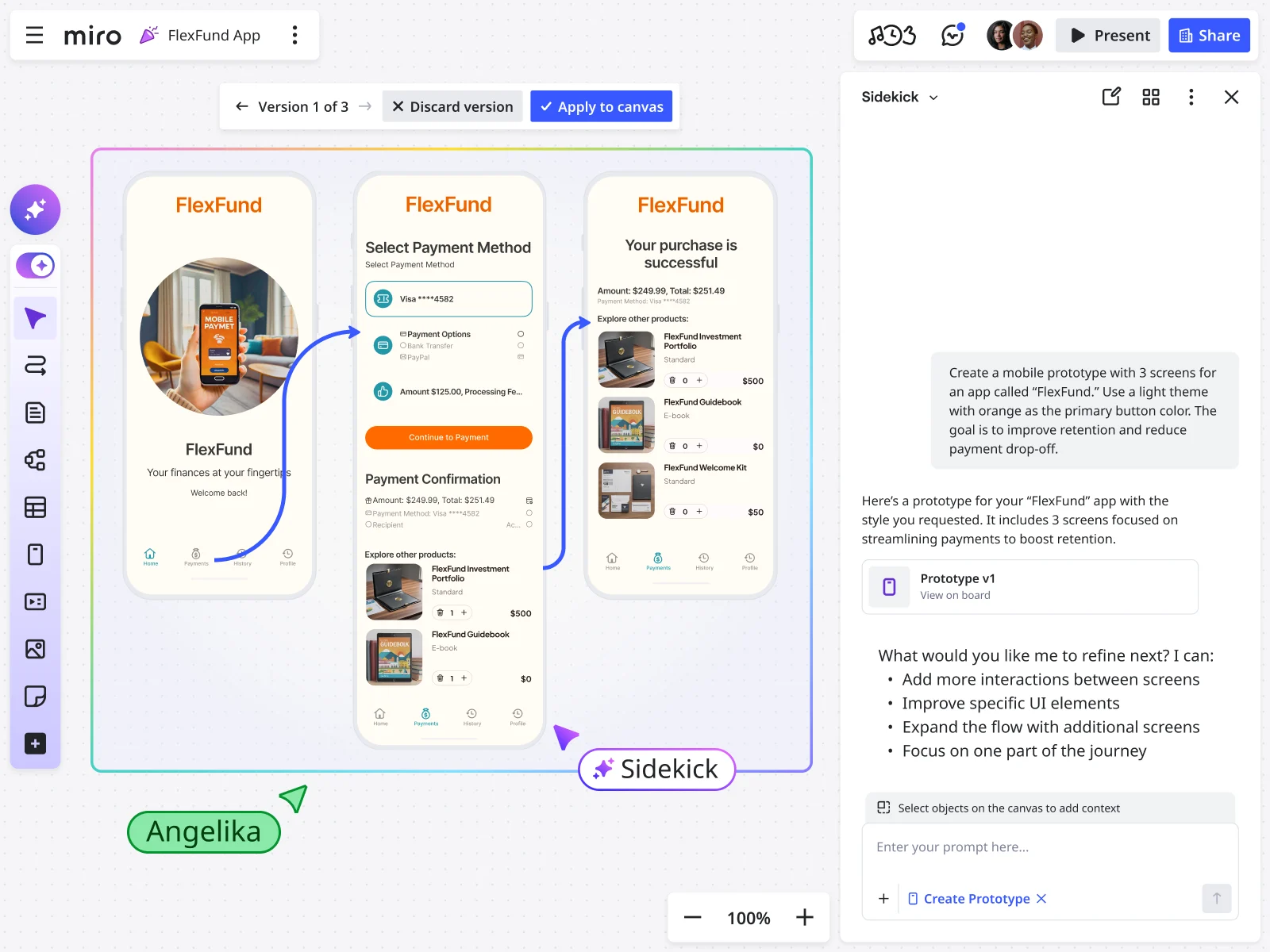
- Prompt it into existence. Describe the experience you want to explore and let Miro AI generate editable screens. Want to test a new landing page layout or onboarding flow? Type it out, see what comes back, and refine from there.
- Turn screenshots into editable mockups. Upload a screenshot of an existing page, a competitor reference, or a rough sketch and convert it into something you can edit and iterate on within real layout constraints.
- Build from your canvas content. If you’ve already been brainstorming in Miro, with sticky notes, diagrams, or user flows, select that content and use it as context to generate prototype screens. Your ideation work feeds directly into the next step.
Once you have screens, connect them into clickable flows, preview the experience, and share it with your team for feedback, all without leaving the board where your work already lives.
Four use cases, built by a PMM, useful for any team
When Kristin built her prototyping templates, she started with a question she kept hearing from people across product, design, and marketing alike: “Where do I begin?”
“Miro Prototypes is powerful, but it’s horizontal,” she explains. “Product managers, designers, marketers, consultants can all use it differently. That flexibility is a strength, but it can also feel open-ended at first.”
She mapped out the four activities she saw people returning to most and built her templates around them. Whether you’re a PMM running a campaign or a product team aligning on a new feature, these use cases apply.
1. Explore new ideas before committing to a direction

This is the starting point whether you’re developing a campaign concept or kicking off product discovery: you have a “what if” worth exploring, but nothing concrete to show yet.
The Getting started with prototyping in Miro template walks you through turning a rough idea into an interactive prototype using natural language prompts. Describe the experience you want to explore, the more specific the better, and let Miro AI generate editable screens. From there, adjust layouts, swap components, and tweak copy directly on the canvas.
The goal isn’t a polished result. It’s a shared starting point that gets your team reacting to something real instead of filling in the gaps themselves.
2. Iterate on something that already exists
Already have a product page, email template, or existing flow? This is one of the quickest ways to explore improvements without starting from scratch.
Take a screenshot of any existing screen, upload it into Miro, and convert it into an editable mockup. Modify layouts, swap components, and explore variations side by side. For Kristin, this is the most direct path from “here’s what we have” to “here’s what we could try.”
“That means I know exactly how much copy fits,” she says. “I can show layout and hierarchy visually. I can duplicate flows to test out multiple different ideas and approaches.”
For product teams, this works just as well for iterating on existing product screens or exploring new directions before committing to high-fidelity design.
3. Co-create and compare options in workshops
Whether it’s a campaign planning session or a product design sprint, workshops produce better outcomes when there’s something concrete to build on together.
The Create prototypes with Miro AI template is built for this. Teams start from content already on the board, sticky notes, user journey steps, rough flows, select it as context, and generate prototype screens that reflect the group’s thinking. Multiple variations can sit side by side on the canvas, making it easy to compare approaches and land on a direction before the session ends.
Because everything stays on the Miro board, the work doesn’t disappear when the meeting does. The prototype sits next to the research, the brief, and the decisions that shaped it.
4. Get stakeholder sign-off without another meeting
A concept no one has reacted to is just an assumption with good visuals. Getting fast, clear feedback from stakeholders is where a lot of cycles get lost, for PMMs and product teams alike.
Connect your screens into a clickable flow, share the board, and turn on preview mode. Stakeholders can click through the experience as if it were real and leave comments, sticky notes, or questions in context, all without scheduling a call.
“Copy it to your board and play with it,” Kristin says. “Use the dummy content to experiment. Try generating from a screenshot. Ask AI to iterate on a concept twice. Connect screens and click through. Change icon colors. Break it.”
The feedback loop stays tied to the thinking behind the prototype, which makes it easier to act on and easier to trace back to the original brief.
What faster decision making looks like in practice
For Kristin, the shift was immediate. Less time waiting for design support. Fewer rounds of clarification on briefs. Stakeholder feedback that was specific and actionable rather than vague and abstract. A tighter loop from initial concept to final sign-off.
The same pattern holds for product teams. Lufthansa Group’s Miles & More program used Miro Prototypes to create, validate, and align on the right solution in less than one day. As Björn Ehrlinspiel, Product Owner at Miles & More, put it: “I’m way more confident that the things we are implementing for the product are the right things. And I’m way more confident to bring that also in front of management. Miro Prototypes helps me show my vision to the management team of the product.”
Going from idea to stakeholder-ready prototype in a single day changes how teams make decisions, regardless of what their job titles say.
The bigger picture: keeping your whole process on one canvas
The value of Miro Prototypes isn’t just speed in isolation. It’s that prototyping happens on the same canvas as everything else: research, briefs, roadmaps, retrospectives. Context doesn’t get lost in translation between tools.
For PMMs, that means a campaign concept can live next to the positioning brief and the competitive research that informed it. For product teams, it means a prototype can sit right next to the user journey map and the problem statement that shaped it.
In most organizations, that context lives in three or four different places. Research in Notion. Designs in Figma. Roadmaps in Jira. Somewhere in the handoffs between tools, the original thinking gets diluted, and decisions get made without the full picture.
Miro’s innovation workspace keeps it all connected, from early brainstorming through prototyping, feedback, and planning. That shared context is what helps teams move from early idea to confident decision, faster.
One last thing from Kristin: “Revisit it. We’re improving Miro Prototypes constantly. If something didn’t work for you a month ago, it might today. And if it still doesn’t, tell us. Feedback genuinely shapes what we build next.”
Ready to try it?
Start with one of Kristin’s templates:
- Getting started with prototyping in Miro — practical examples, step-by-step walkthroughs, and expert prompting tips across the four core use cases. Best for anyone new to Miro Prototypes, regardless of role.
- Create prototypes with Miro AI — focused on the AI-powered workflow: generating screens from prompts, converting screenshots, and building clickable flows fast.
Copy either template to your Miro board, start with the dummy content, and bring your own context: your brief, your research, your “what ifs.” See how fast you can get from idea to something your team can actually make a decision on.
Miro Prototypes is available as a paid add-on for Starter, Business, and Enterprise plans.
Author: Sarah Luisa Santos, Content & Growth
Read more
Join our 100M+ users today


