
Table of contents
Table of contents
What is root cause analysis?
Summary
Quick Summary: Root cause analysis (RCA) helps teams identify the fundamental causes of problems rather than just treating symptoms. This comprehensive guide covers everything from basic RCA techniques to AI-powered analysis and remote team collaboration strategies.
What you'll learn:
- Different RCA types (reactive vs. proactive, event-based vs. process-based) and when to use each
- Proven RCA techniques including 5 Whys, Fishbone diagrams, FMEA, DMAIC, Fault Tree Analysis, and Barrier Analysis
- How to conduct effective RCA sessions in Miro using templates and AI-powered features
- Strategies for running RCA with distributed teams across time zones
- Industry-specific applications for software, manufacturing, healthcare, customer service, and project management
- How to facilitate productive RCA meetings (before, during, and after)
- Common mistakes that derail RCA efforts and how to avoid them
- Metrics to measure whether your RCA actually prevents recurring problems
Collaborative AI Workflows
Join thousands of teams using Miro to build the right thing, faster.
Root cause analysis: The complete guide to finding and fixing problems at their source
Root cause analysis (RCA) helps teams dig past surface-level symptoms to find what's actually causing problems in your processes, products, or projects. Instead of applying temporary fixes that let issues keep popping up, RCA gets to the heart of what went wrong — so you can prevent it from happening again.
This guide walks through everything you need to know about conducting effective root cause analysis, from understanding different RCA types and techniques to leveraging AI and managing RCA across distributed teams.
What is root cause analysis?
Root cause analysis is a structured problem-solving method that identifies the fundamental cause of an issue rather than just addressing its symptoms. When a problem occurs, the instinct is often to fix what's immediately visible. RCA takes a different approach — it asks "why" repeatedly until you reach the underlying cause.
Think of it like treating a leak in your house. You could keep mopping up water (treating the symptom), or you could find and repair the broken pipe (fixing the root cause). RCA helps teams find that broken pipe in their workflows, products, or processes.
The goal isn't to assign blame — it's to understand what went wrong in your systems or processes so you can prevent similar problems in the future. This makes RCA particularly valuable for:
- Product teams investigating bugs, user complaints, or failed features
- Engineering teams troubleshooting system outages or performance issues
- Operations teams analyzing process breakdowns or quality problems
- Customer service teams addressing recurring customer pain points
- Project managers understanding why projects miss deadlines or go over budget
Root cause analysis types
Not all root cause analyses look the same. Understanding different RCA approaches helps you choose the right method for your situation.
Reactive vs. proactive RCA
Reactive RCA happens after a problem occurs. Your system crashed, a customer complained, or a deadline was missed — now you're investigating why. This is the most common type of root cause analysis, focusing on learning from failures to prevent recurrence.
Proactive RCA identifies potential problems before they happen. Teams analyze processes, review near-misses, or examine warning signs to catch issues early. For example, if your deployment process has been getting slower each sprint, proactive RCA investigates before it causes a critical delay.
Event-based vs. process-based RCA
Event-based RCA investigates specific incidents — that server outage last Tuesday, the product defect discovered in testing, or the missed project milestone. You're analyzing what happened during a particular event.
Process-based RCA examines ongoing patterns and systemic issues. Instead of investigating a single customer complaint, you're looking at why complaint volume increased by 30% this quarter. Process-based RCA often reveals opportunities to improve workflows at scale.
Systems-based RCA
Systems-based RCA takes a holistic view, examining how different parts of your organization interact. Rather than isolating problems to individual teams or processes, this approach recognizes that issues often stem from gaps between departments, conflicting incentives, or misaligned workflows.
This type works particularly well for complex problems that span multiple teams — like why product launches consistently miss deadlines despite individual teams meeting their commitments.
Comparative RCA
Comparative RCA analyzes why something worked in one context but failed in another. Why did Feature A launch smoothly while Feature B faced constant delays? Why does the Berlin office have fewer customer complaints than the New York office?
By comparing successful and unsuccessful outcomes, teams identify the differentiating factors that matter most.
Why root cause analysis matters
Organizations that master root cause analysis spend less time firefighting and more time moving forward. Instead of the same problems surfacing repeatedly, teams build more resilient systems and processes.
Prevents recurring problems
Without RCA, teams often apply quick fixes that don't address underlying issues. That bug you patched last week? It shows up again in a different form. The process bottleneck you worked around? It slows down the next project too.
Root cause analysis breaks this cycle by identifying and eliminating the source of problems rather than just their symptoms.
Saves time and resources
Every time an issue recurs, your team spends time responding to it again. Customer complaints need investigation, bugs need patching, delayed projects need recovery plans. These repeated efforts drain resources that could drive innovation instead.
By fixing root causes, you eliminate these recurring costs. One thorough RCA saves dozens of future firefighting sessions.
Improves decision-making
The insights from root cause analysis inform better decisions across your organization. When you understand what causes quality issues, you can design better processes. When you know why projects run over budget, you can estimate more accurately.
Medibank's Digital Labs team used systematic problem-solving approaches to compress their innovation cycles from six months to six weeks — a 75% reduction. By understanding the root causes of their delays (scattered stakeholders, complex alignment processes, inefficient feedback loops), they redesigned their approach to eliminate these friction points.
Builds organizational learning
Each root cause analysis becomes a learning opportunity for your entire team. The findings from investigating one problem often reveal insights that improve other areas of your work. Teams develop stronger problem-solving skills and better intuition for anticipating issues.
This accumulated knowledge compounds over time, making your organization more resilient and effective.
Root cause analysis techniques
Different RCA techniques suit different situations. Here's how to use the most effective methods — and when each one works best.
5 Whys technique
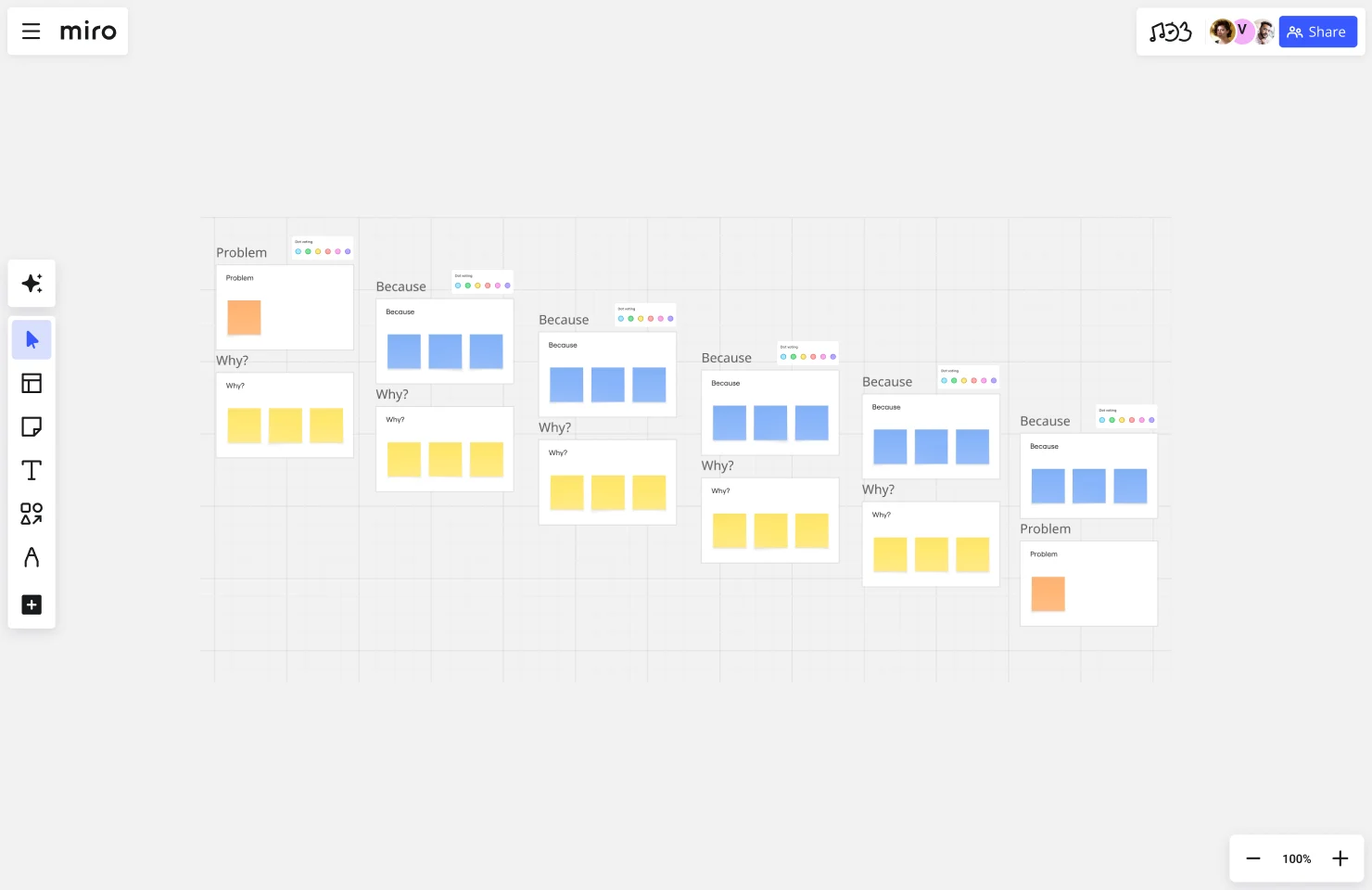
The 5 Whys is the simplest root cause analysis method. Start with a problem, ask "why" it happened, then ask "why" about that answer. Repeat this process five times (or until you reach a root cause).
Example:
- Problem: The product launch was delayed
Why?
The marketing materials weren't ready on time
Why?
The design team didn't have final product specs
Why?
Product requirements changed late in the cycle
Why?
Stakeholder feedback came in after the requirements freeze
Why?
Stakeholders weren't involved early enough in planning
Root cause: Insufficient early stakeholder engagement in the planning process.
When to use it: The 5 Whys works well for straightforward problems with a likely single root cause. It's quick, requires no special tools, and gets teams thinking causally.
Limitations: This technique can oversimplify complex problems. If multiple factors contributed to an issue, focusing on one causal chain might miss important insights.
Fishbone diagram (Ishikawa diagram)
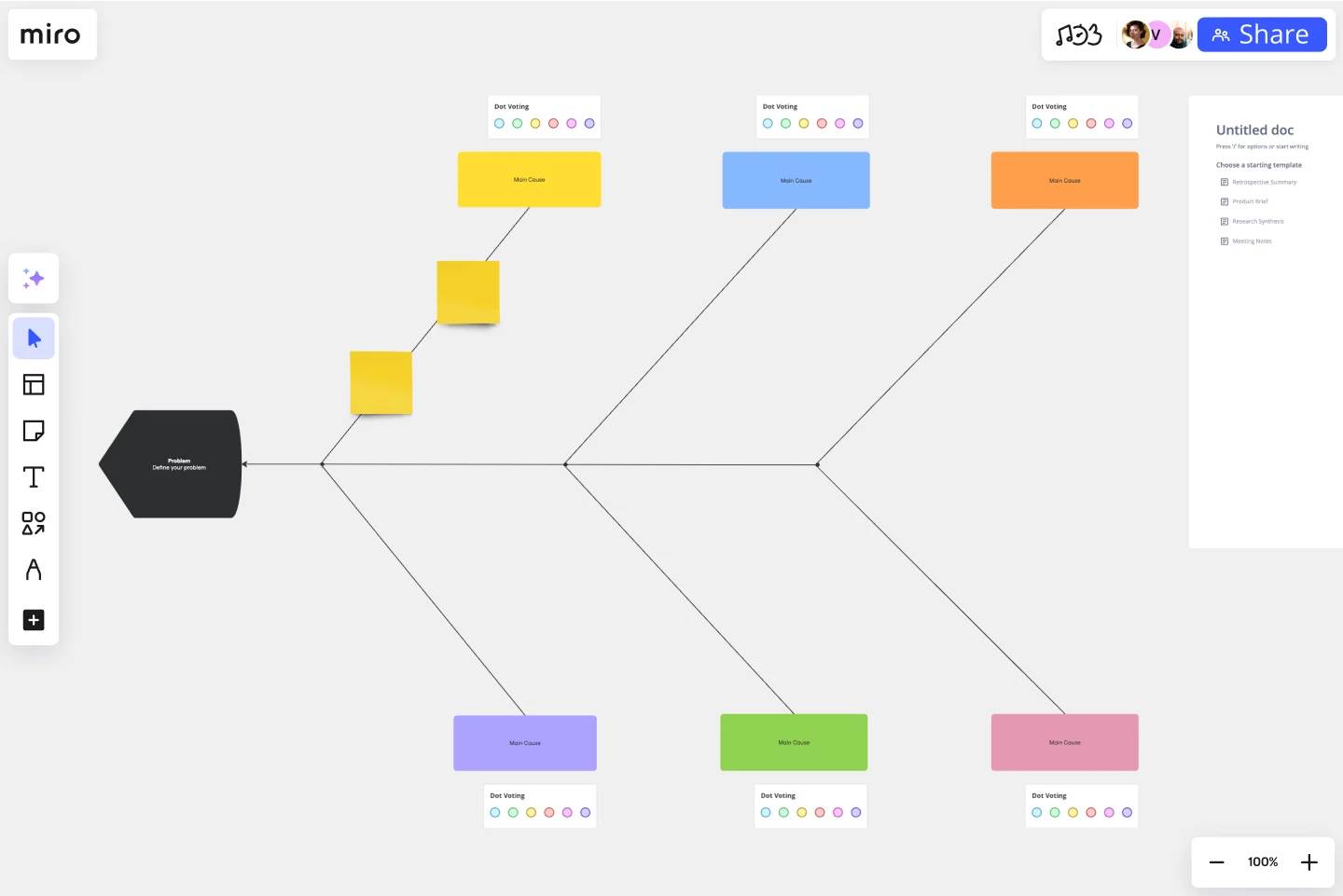
The Fishbone diagram, also called an Ishikawa diagram or cause-and-effect diagram, organizes potential causes into categories. The "fish head" represents the problem, while "bones" branching off show different categories of potential causes.
Common categories include:
- People: Human factors, training, communication
- Process: Workflows, procedures, policies
- Technology: Tools, systems, infrastructure
- Environment: External factors, physical workspace
- Materials: Resources, inputs, dependencies
- Measurement: Data, metrics, feedback mechanisms
Teams brainstorm potential causes within each category, then investigate the most likely culprits.
When to use it: Fishbone diagrams excel at uncovering multiple contributing factors and getting diverse perspectives on a problem. They're particularly valuable when cross-functional teams need to analyze complex issues together.
Use Miro's Fishbone Diagram template to collaborate visually with your team, whether you're working in the same room or distributed globally.
Failure Mode and Effects Analysis (FMEA)
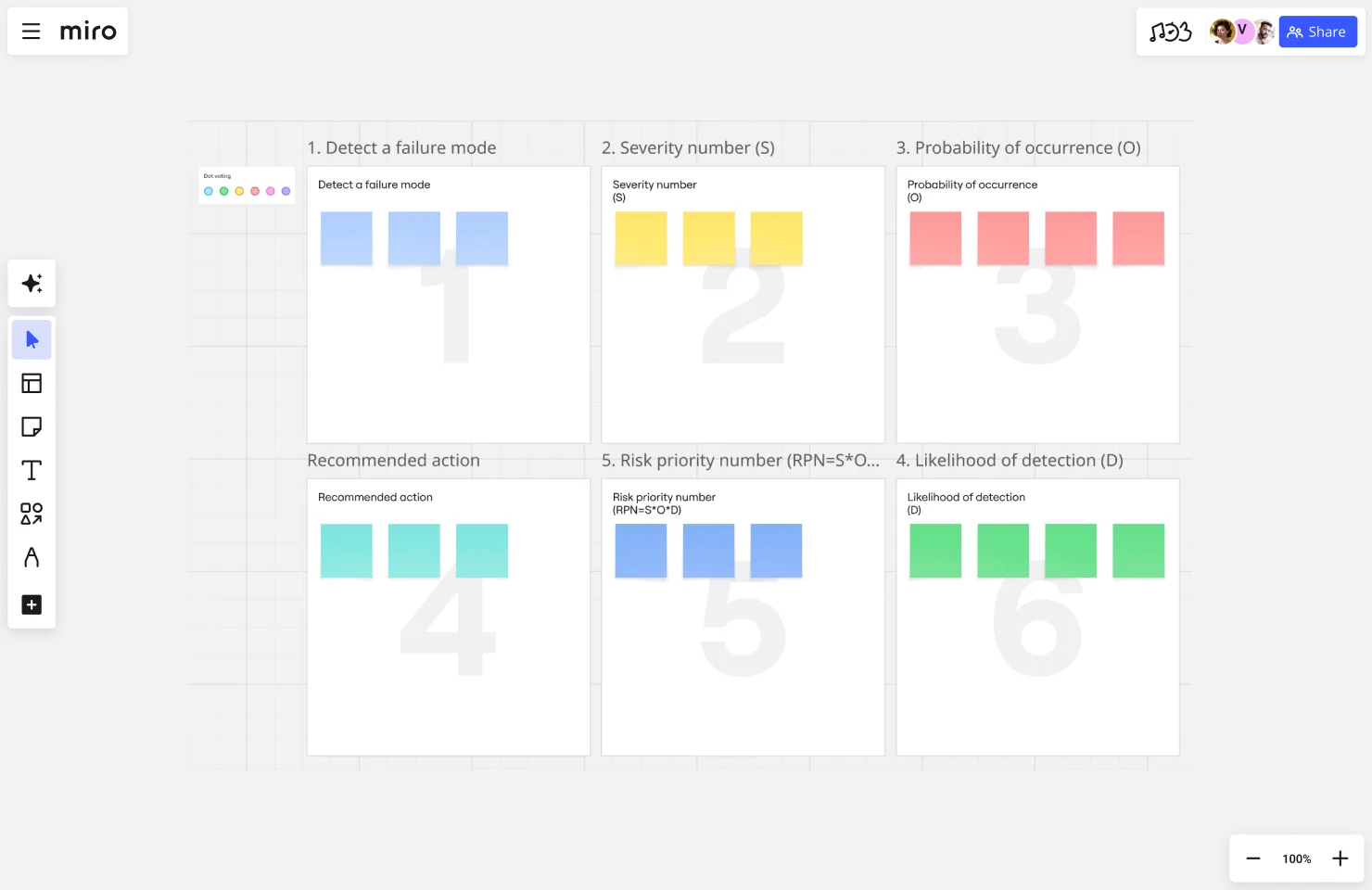
FMEA takes a proactive approach to root cause analysis, identifying potential failures before they occur. Teams assess each possible failure mode by rating:
- Severity: How bad would this failure be?
- Occurrence: How likely is this to happen?
- Detection: How easily can we catch it before it causes problems?
Multiplying these ratings creates a Risk Priority Number (RPN) that helps teams focus on the highest-risk issues first.
When to use it: FMEA shines in manufacturing, engineering, and product development where you can systematically evaluate potential failure points. It's especially valuable during the design phase when preventing problems is easier than fixing them later.
Example: A software team might use FMEA to evaluate risks in their deployment pipeline — assessing things like database migration failures, API breaking changes, or configuration errors.
DMAIC (Define, Measure, Analyze, Improve, Control)
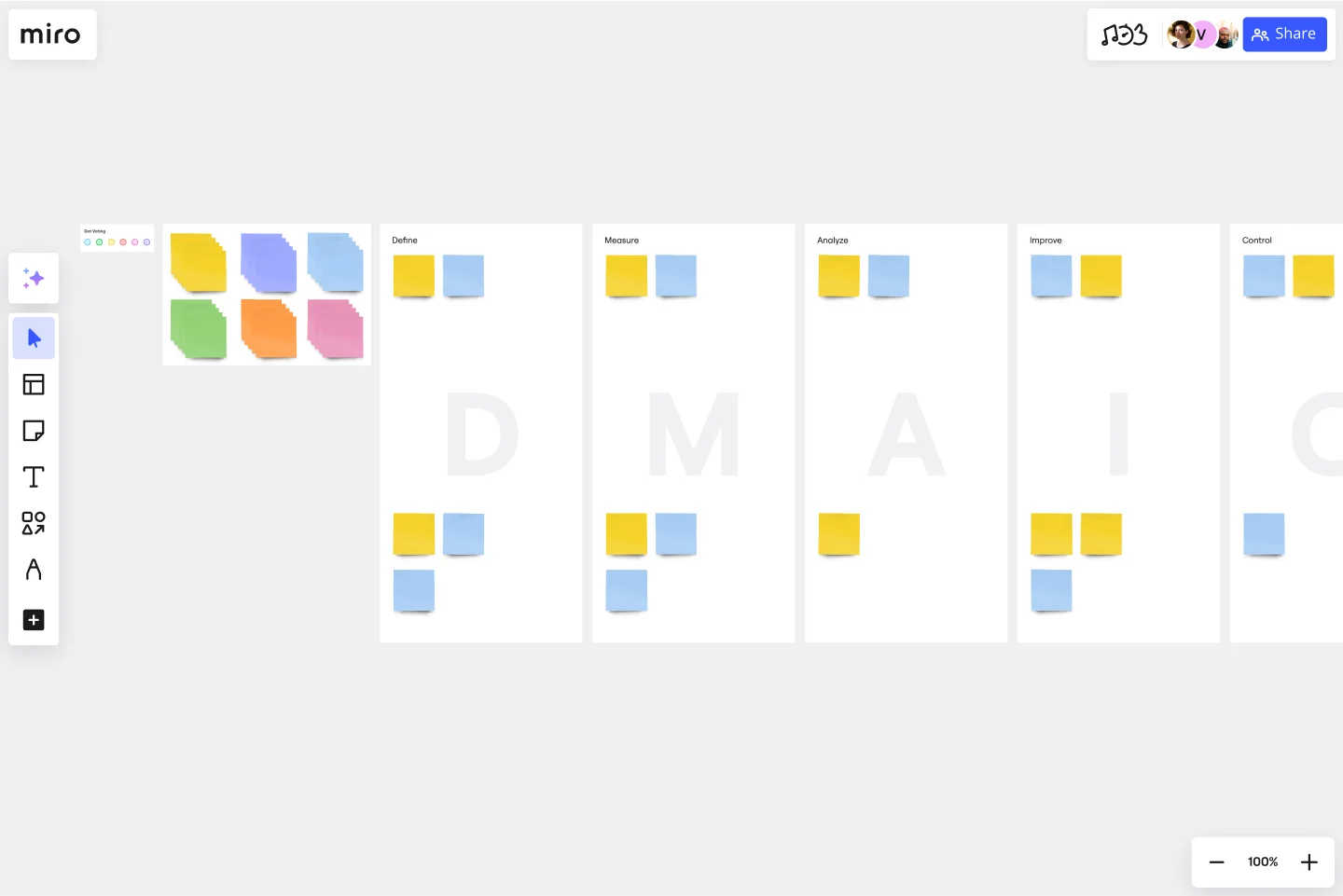
DMAIC is a structured Six Sigma methodology that takes teams through five phases:
- Define: Clearly articulate the problem and its impact
- Measure: Gather data about the current state
- Analyze: Identify root causes using data and analysis tools
- Improve: Develop and implement solutions
- Control: Monitor results and sustain improvements
When to use it: DMAIC works best for process improvement initiatives where you have access to quantitative data. It's particularly effective in operations, manufacturing, and service delivery contexts.
The structure keeps teams disciplined and data-driven, reducing the risk of jumping to solutions before understanding the problem.
Fault Tree Analysis (FTA)
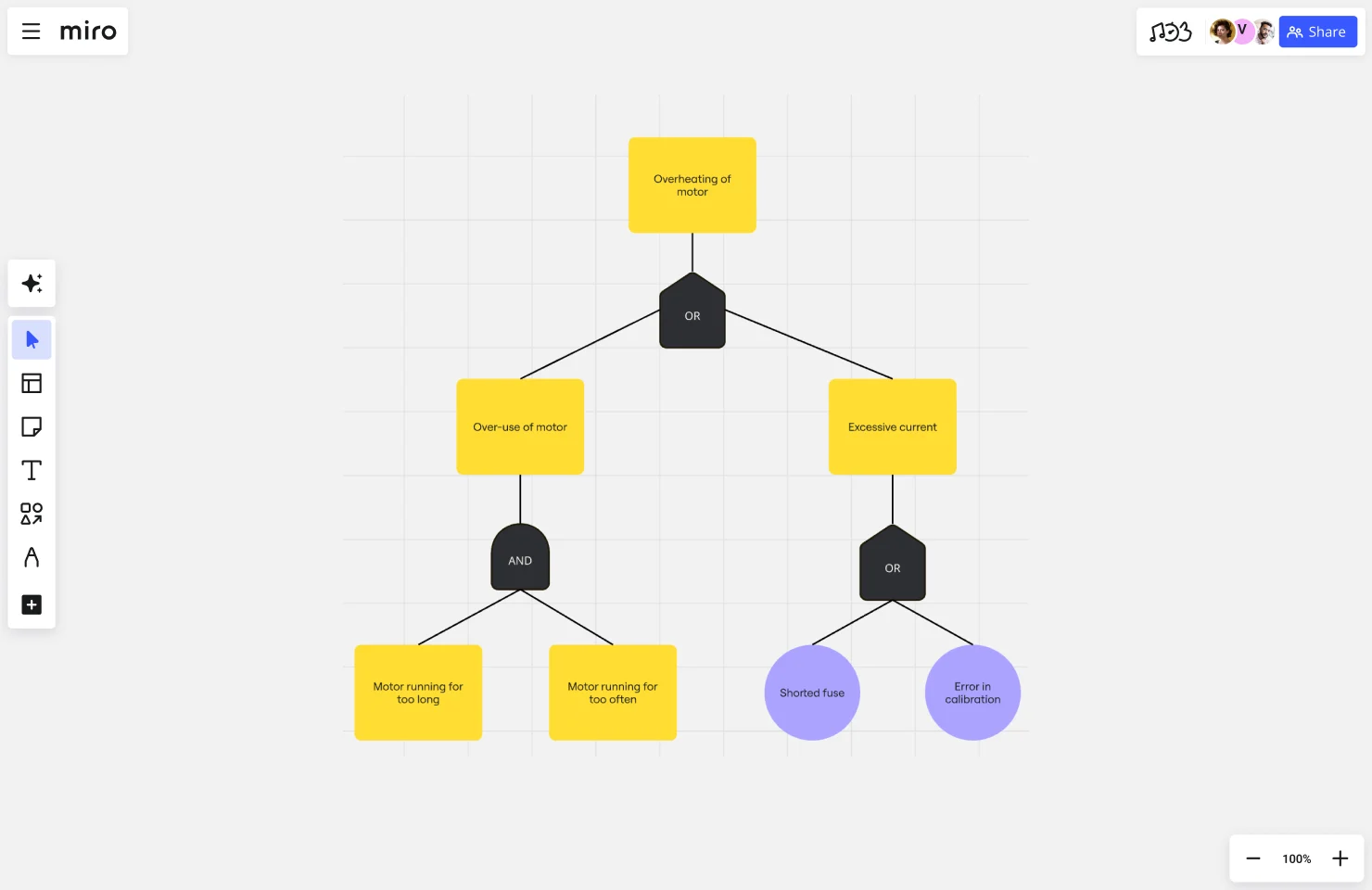
Fault Tree Analysis uses logic diagrams to map how different events combine to cause a top-level failure. Starting with an undesired event, you work backwards to identify all the combinations of failures that could lead to that outcome.
FTA uses Boolean logic gates (AND, OR) to show relationships:
- AND gate: All conditions must occur for the failure to happen
- OR gate: Any single condition can cause the failure
When to use it: FTA excels at analyzing complex systems with multiple potential failure paths, particularly in safety-critical industries like aerospace, nuclear power, or healthcare. It helps teams understand not just what failed, but what combination of factors led to failure.
Barrier Analysis
Barrier Analysis identifies what controls or safeguards should have prevented a problem — then investigates why those barriers failed. Every process should have multiple layers of protection against failure. When something goes wrong, analyzing which barriers failed and why reveals root causes.
Example: If sensitive data was accidentally shared publicly, barriers might include:
- Access controls (who can see the data)
- Review processes (approval before sharing)
- Technical safeguards (systems that prevent public sharing)
- Training (team understanding of data handling)
Investigating which barriers failed (and why) uncovers the root causes.
When to use it: Barrier Analysis works particularly well for security incidents, safety issues, or compliance violations where multiple safeguards should exist.
Comparative Timeline Analysis
Comparative Timeline Analysis maps events leading up to a problem, then compares this timeline against what should have happened or what happened during successful outcomes.
By visualizing both timelines side-by-side, teams identify critical divergence points — the moments when things deviated from the expected or successful path.
When to use it: This technique shines when investigating why a usually-reliable process failed in a specific instance, or when comparing successful and unsuccessful project outcomes.
How to conduct a root cause analysis in Miro
Miro's visual workspace transforms root cause analysis from a tedious documentation exercise into a collaborative investigation that actually gets to the heart of problems. Here's how to run effective RCA sessions using Miro's templates and AI-powered features.
1. Choose your template and set up your workspace
Start by selecting the RCA framework that fits your situation. Miro offers purpose-built templates that provide structure without constraining your thinking:
5 Whys Template - Best for straightforward problems where you need to drill down through layers of causation. The template guides your team through iterative "why" questions until you reach the root cause.
Fishbone Diagram Template - Ideal for complex issues with multiple contributing factors. The template organizes potential causes into categories (People, Process, Technology, Environment, Materials, Measurement) making it easier to explore all angles systematically.
Root Cause Analysis Template - Provides a comprehensive framework that combines multiple RCA techniques in one workspace. Use this when you need flexibility to adapt your approach as the investigation unfolds.
Once you've selected your template, customize it before your team joins. Add the problem statement, pre-populate any known information, and set up frames for different investigation phases.
2. Use AI to generate your investigation framework
Don't want to start from a template? Let Miro's AI build a custom framework for your specific problem.
Click on the Sidekicks menu and describe your situation: "Create a root cause analysis framework for investigating why our mobile app release was delayed by two weeks." The AI generates a tailored structure with relevant categories, guiding questions, and investigation areas specific to your problem.
This AI-generated framework gives you a starting point that's immediately relevant rather than generic. You can then customize it further as your investigation progresses.
3. Gather your team and define the problem clearly
Invite stakeholders to your Miro board. Because Miro works in real-time and async, team members can contribute regardless of their location or schedule.
Start by clearly articulating the problem using sticky notes or a text box at the top of your board:
- What happened (the specific issue)
- When it happened (timeline and context)
- What the impact was (business consequences)
- What the expected outcome was (for comparison)
Use Private Mode during this initial problem definition phase. This allows each team member to write their own problem statement independently before revealing them. Comparing different perspectives on "what the problem is" often reveals important differences in understanding.
4. Map what happened visually
Create a visual timeline or process map showing events leading up to the problem. Miro's infinite canvas lets you spread out chronologically or organize by system component — whatever makes the relationships clearest.
Use different colored sticky notes to distinguish between:
- Facts (what definitely happened)
- Assumptions (what we think happened)
- Impacts (consequences of the problem)
- Context (relevant background information)
Add arrows to show cause-and-effect relationships. Visual connections make dependencies obvious in ways that text lists never can.
Upload relevant screenshots, logs, or data directly to the board. Having everything in one place means you're not constantly switching between tools to reference information.
5. Brainstorm potential causes with AI-assisted clustering
This is where your RCA technique comes into play. Have team members add sticky notes with potential causes anywhere on the board.
For 5 Whys: Start with "Why did [problem] happen?" and add sticky notes with answers. For each answer, add a connected sticky note asking "Why did that happen?" Continue until you reach root causes.
For Fishbone diagrams: Team members add causes to the appropriate category branches. Don't worry about organization yet — just capture all possibilities.
Once you've gathered potential causes, use Miro AI's intelligent clustering to automatically group related ideas. The AI analyzes the content of your sticky notes and organizes them into logical themes, revealing patterns you might miss manually.
This is particularly powerful when you have dozens of potential causes from a large team. Instead of spending 20 minutes manually sorting ideas, AI does it instantly — and often identifies connections that aren't immediately obvious.
6. Use AI Sidekicks to expand your investigation
Feeling stuck? Miro's AI Sidekicks can help your team think more expansively about root causes.
Select a cluster of potential causes and ask a Sidekick to:
- "Suggest additional questions we should investigate"
- "What are we potentially overlooking here?"
- "Generate alternative perspectives on this problem"
- "What patterns exist across these causes?"
Sidekicks analyze your board content and suggest directions you haven't considered, helping teams break through groupthink or blind spots.
7. Determine root causes through collaborative analysis
Use Miro's voting feature to have team members indicate which potential causes they think are most likely to be true root causes. This creates visible consensus and focuses discussion on the most promising areas.
Add comment threads to specific causes for detailed discussion. Unlike verbal conversations that get lost, these threaded comments preserve the reasoning behind decisions.
Test each potential root cause by asking:
- If we eliminate this cause, will the problem go away?
- Has this cause led to similar problems before?
- Is this cause within our control to address?
Use tags to mark causes as "root cause," "contributing factor," or "symptom." This visual categorization helps teams maintain clarity as discussions get complex.
8. Generate solutions and action plans with Miro AI
Once you've identified root causes, it's time to develop solutions. Use Miro AI to accelerate this process:
Select your identified root causes and prompt: "Generate solution ideas to address these root causes." The AI suggests potential fixes, which your team can then evaluate, refine, and prioritize.
Create with AI can also transform your visual analysis into structured documentation:
- Generate project briefs outlining the problem, root causes, and recommended solutions
- Create action plans with specific tasks to implement fixes
- Draft stakeholder communications explaining what went wrong and how you're addressing it
- Produce documentation for your team wiki or knowledge base
This means your RCA session ends with not just insights, but immediately actionable next steps and sharable documentation.
9. Assign ownership and track implementation
Use Miro's task assignment features to give each solution a clear owner. Add due dates and link solutions to your project management tools through Miro's integrations (Jira, Asana, Monday.com, etc.).
Create a separate frame on your board for tracking solution implementation. Update status as fixes are deployed, and use tags or colored indicators to show progress.
10. Create a follow-up board to monitor results
Don't let your RCA end when the meeting does. Create a linked Miro board for tracking whether solutions actually prevent problem recurrence.
Set up a simple monitoring framework:
- What metrics indicate the problem is solved?
- When will we check these metrics?
- Who's responsible for monitoring?
- What triggers another RCA if the problem returns?
Link this monitoring board back to your original RCA board so you maintain the complete history and context.
Tips for maximizing Miro's RCA capabilities
Use Talktrack for async contributions. Remote team members can record video explanations next to their sticky notes, preserving context and tone that text alone misses.
Use frames for organization. Create separate frames for each phase of your RCA (Problem Definition, Cause Analysis, Solutions, Action Items). This keeps large investigations organized and makes it easy to navigate.
Enable board templates for consistency. If your team conducts frequent RCAs, create a custom template from your best board. This standardizes your approach and captures organizational learning about what works.
Take advantage of presentation mode. When sharing RCA findings with stakeholders, use Miro's presentation mode to walk through your analysis frame-by-frame, telling the story clearly without overwhelming viewers.
Connect multiple RCA boards. Use Miro's linking features to connect related RCA investigations. If similar problems keep appearing, these connections reveal systemic issues that need organizational-level solutions.
Root cause analysis example
Let's walk through a real root cause analysis using the 5 Whys technique.
Scenario: An e-commerce company's website experienced a two-hour outage during their biggest sale day of the year, resulting in $500,000 in lost revenue.
The 5 Whys analysis
Problem: The website went down during the peak shopping period.
Why #1: Why did the website go down? → The database server ran out of memory and crashed.
Why #2: Why did the database server run out of memory? → An inefficient query was consuming excessive resources.
Why #3: Why was an inefficient query running in production? → The query wasn't tested under realistic load conditions before deployment.
Why #4: Why wasn't the query tested under realistic load? → The staging environment doesn't simulate production traffic volumes.
Why #5: Why doesn't the staging environment simulate production traffic? → Budget constraints limited infrastructure for the staging environment, and leadership didn't prioritize load testing investments.
Root causes identified
This analysis revealed two root causes:
- Inadequate staging environment infrastructure
- Missing load testing requirements in the deployment process
Solutions implemented
Based on this RCA, the team implemented:
- Upgraded staging environment to handle production-level load testing
- Added mandatory load testing gates to the deployment checklist
- Implemented query performance monitoring with automated alerts
- Created a performance testing training program for developers
Results
After implementing these solutions, the company successfully handled their next major sale event with no performance issues, and similar database problems didn't recur.
How leading teams use Miro for root cause analysis
Medibank's Digital Labs team shows what's possible when you combine systematic root cause analysis with the right collaborative tools. Their challenge was familiar: complex digital health initiatives required six-month cycles to identify problems, investigate root causes, align stakeholders, and validate solutions.
The breakthrough came from restructuring their entire approach to problem investigation in Miro. By bringing all stakeholders into the same visual workspace, they eliminated the sequential back-and-forth that typically slowed root cause analysis. Instead of one team investigating, documenting, then presenting findings to another team for input, everyone analyzed problems together in real time.
Miro's AI capabilities accelerated their RCA process even further. Solution opportunity trees — visual frameworks for exploring root causes and potential solutions — could be generated and refined with AI assistance, helping teams surface blind spots they'd otherwise miss. When converting stakeholder feedback into actionable product briefs, AI-powered workflows compressed what used to take a full day into minutes.
The result: A problem-solving process that stakeholders initially estimated would take six months achieved complete alignment and clear direction in just six weeks — a 75% reduction in time from problem identification to validated solution.
Root cause analysis for remote and hybrid teams
Distributed teams face unique challenges when conducting root cause analysis. Time zones scatter your team across the globe. Communication happens async. Context gets lost between messages. Here's how to make RCA work when your team isn't in the same room.
Async RCA workflows
Traditional RCA often happens in a single meeting where everyone gathers to investigate. For remote teams, this synchronous approach creates problems. Finding a time when your San Francisco engineer, London designer, and Singapore product manager can all meet? Nearly impossible.
Async workflows solve this. Start by documenting the problem clearly in a shared workspace. Team members add their observations, data, and analysis when they're available. Use video recordings to explain complex technical details without requiring live meetings.
The key is creating clear structure. Without it, async collaboration becomes confusing. Use templates that guide team members through the RCA process step-by-step. Miro's visual workspace lets distributed teams build fishbone diagrams, add timeline annotations, and contribute to 5 Whys analysis — all without needing to be online simultaneously.
Managing time zone challenges
When your team spans 12 time zones, you need strategies beyond "let's find a time that works for everyone."
Anchor analysis in artifacts, not meetings. Create a central board where the RCA lives. Team members contribute when they're working, building on what others added during their hours. The analysis develops continuously rather than only during scheduled calls.
Use time zones strategically. Hand off investigation tasks between regions like a relay race. The London team investigates during their hours, documents findings, and flags questions. When San Francisco starts their day, they pick up where London left off.
Record everything. When synchronous meetings do happen, record them. Add timestamps for key moments. Team members who couldn't attend watch at 1.5x speed and comment directly on the recording.
WebMD's Medscape team transformed their product development through centralized visual collaboration. By bringing research, analysis, and decision-making into a single workspace, they enabled seamless async collaboration between product managers, designers, and developers across different schedules.
Why visual collaboration tools excel for distributed teams
Text-based tools like docs or spreadsheets struggle with complex problem analysis. They force linear thinking when problems are multi-dimensional. They hide context that's obvious in visual formats.
Visual workspaces change this. A fishbone diagram on a shared canvas shows cause-and-effect relationships immediately. Color-coded sticky notes group related issues without lengthy explanations. Arrows connecting timeline events make dependencies obvious.
Miro takes this further with features designed for distributed teamwork:
- Talktrack lets team members record video explanations next to their work, preserving context
- Commenting enables threaded discussions tied to specific elements
- Sticky notes make brainstorming feel natural even when you're async
- Templates provide structure so everyone knows how to contribute
The result? Remote teams conduct root cause analysis as effectively as co-located ones — sometimes better, because the visual artifact preserves all the thinking for future reference.
AI-powered root cause analysis
AI is transforming how teams conduct root cause analysis, but not all AI applications are created equal. Understanding the difference between AI-assisted and AI-driven approaches helps you choose the right tool for your needs.
AI-assisted vs. AI-driven RCA
AI-assisted RCA puts humans in the driver's seat with AI as a collaborator. You're still doing the thinking — identifying problems, asking questions, determining root causes. AI helps by speeding up manual tasks, generating frameworks to organize your analysis, or suggesting possibilities you might not have considered.
This is where tools like Miro with AI capabilities shine. Miro AI can generate starting point diagrams, organize sticky notes into themes, or create documentation from your analysis — but your team drives the investigation.
AI-driven RCA flips this relationship. The AI independently analyzes data, identifies anomalies, and surfaces likely root causes without much human guidance. These systems work well for technical infrastructure problems where patterns in log files or metrics reveal causes.
Think of automated monitoring tools that analyze thousands of events per second to pinpoint why your servers are slow, or quality control systems that review manufacturing data to flag process deviations.
When to use each approach
Choose AI-assisted RCA when:
- Problems involve human judgment, organizational dynamics, or qualitative factors
- You need cross-functional team alignment on causes and solutions
- The problem-solving process itself builds valuable shared understanding
- Root causes might be non-obvious and require creative thinking
- You're investigating one-off incidents or novel situations
Choose AI-driven RCA when:
- You're dealing with high-volume, technical problems (system performance, network issues)
- Patterns are buried in large datasets humans can't efficiently analyze
- Speed matters more than explanation (incident response, real-time monitoring)
- Problems recur frequently with similar characteristics
- You have structured, quantitative data the AI can analyze
Miro's AI capabilities for RCA
Miro's AI features streamline root cause analysis without taking teams out of the process:
Miro AI generates frameworks quickly. Instead of starting from a blank canvas, ask AI to create a fishbone diagram structure or a 5 Whys template tailored to your problem. You fill in the specifics, but AI handles the scaffolding.
Intelligent clustering organizes brainstorming. When your team generates dozens of potential causes, Miro AI can automatically group related ideas, revealing themes you might miss manually. This works particularly well during the "identify possible causes" phase.
Generate documentation from analysis. After completing your RCA, use Create with AI to transform the visual analysis into a written report, project brief, or action plan. The AI synthesizes your board content into structured documentation.
Sidekicks expand thinking. Stuck on why something happened? Miro AI Sidekicks can suggest additional questions to explore, alternative perspectives to consider, or patterns from similar problems.
The key advantage? These AI capabilities work within your team's collaborative workspace. Unlike standalone AI tools that separate analysis from teamwork, Miro keeps everything together — brainstorming, AI assistance, documentation, and follow-up actions all on the same canvas.
Industry-specific root cause analysis
Different industries adapt RCA to their unique needs and constraints. Here's how teams across sectors apply root cause analysis effectively.
Software and IT teams
Software teams use RCA constantly — debugging production incidents, investigating performance degradation, analyzing why features fail.
Common RCA applications:
- Post-incident reviews: After outages or service degradations, teams conduct blameless post-mortems to understand what failed and why
- Bug investigation: Moving beyond "this code is broken" to understand why the bug existed (missed edge case? unclear requirements? inadequate testing?)
- Deployment failures: Analyzing why releases go wrong to improve CI/CD pipelines
Industry-specific techniques: Software teams often combine traditional RCA methods with technical investigation tools. They might use the 5 Whys to understand process breakdowns while simultaneously examining log files and stack traces to identify technical causes.
Manufacturing and quality control
Manufacturing pioneered many RCA techniques. When defects happen at scale, finding root causes quickly prevents massive waste.
Common RCA applications:
- Defect analysis: Investigating quality issues on production lines
- Equipment failures: Understanding machine breakdowns to prevent unplanned downtime
- Process variations: Analyzing why production output varies despite consistent inputs
Industry-specific techniques: Manufacturing teams heavily favor DMAIC and FMEA because they're data-driven and proactive. Fishbone diagrams also see extensive use because they naturally map to manufacturing categories (Materials, Methods, Machines, Manpower, Measurement, Environment).
Statistical process control data feeds directly into RCA, making it easier to spot when processes deviate from normal and investigate why.
Healthcare and patient safety
In healthcare, root cause analysis directly impacts patient outcomes. Medical errors, near-misses, and adverse events all require thorough investigation.
Common RCA applications:
- Adverse event analysis: Investigating medical errors or unexpected patient outcomes
- Protocol violations: Understanding why safety procedures weren't followed
- System failures: Analyzing breakdowns in care coordination between departments
Industry-specific techniques: Healthcare RCA emphasizes systems thinking over individual blame. The focus is on understanding how organizational factors, communication patterns, and environmental conditions contribute to errors.
Barrier Analysis is particularly popular in healthcare because it maps well to the multiple safeguards (checks, verifications, protocols) built into medical processes.
Customer service and support
Customer-facing teams use RCA to address recurring complaints and improve service quality.
Common RCA applications:
- Complaint pattern analysis: Investigating why certain issues keep generating customer contacts
- Process breakdowns: Understanding where customer journeys break down
- SLA violations: Analyzing why response times or resolution times miss targets
Industry-specific techniques: Customer service RCA often involves journey mapping combined with traditional techniques like 5 Whys. Teams trace the customer's path through their experience, identifying failure points and asking why those failures occurred.
Voice of Customer data feeds into RCA, providing qualitative insights about pain points.
Project management
Project managers conduct RCA to understand why projects miss deadlines, exceed budgets, or fail to deliver expected outcomes.
Common RCA applications:
- Schedule delays: Investigating why project timelines slip
- Budget overruns: Understanding why costs exceed estimates
- Scope creep: Analyzing how projects expand beyond original plans
- Failed deliverables: Understanding why outcomes didn't meet requirements
Industry-specific techniques: Project RCA often uses timeline-based methods combined with Fishbone diagrams. Project managers map the sequence of events leading to problems, then categorize contributing factors by project management knowledge areas (scope, time, cost, quality, resources, communications, risk, procurement, stakeholders).
This structured approach helps identify whether problems stem from planning, execution, monitoring, or external factors.
How to facilitate an RCA meeting
Running an effective root cause analysis meeting requires more than just gathering people in a room (virtual or physical). Good facilitation keeps teams focused, encourages honest discussion, and drives toward actionable insights.
Before the meeting
Define the scope and purpose. Be crystal clear about what problem you're investigating. Share this with participants in advance so they come prepared with relevant context.
Gather preliminary data. Collect incident reports, relevant metrics, timeline information, and any other documentation before the meeting. Pre-populate a Miro board with this information so the team doesn't spend meeting time gathering basic facts.
Choose your RCA technique. Decide whether you'll use 5 Whys, Fishbone diagrams, or another method. Set up the appropriate template so you can jump straight into analysis.
Invite the right people. Include those with firsthand knowledge of the problem, subject matter experts who understand the systems involved, and representatives from any affected teams. Avoid inviting unnecessary stakeholders who will slow down the discussion.
Set the tone. If you're using a blameless RCA approach (recommended), communicate this explicitly. People share more honestly when they know the goal is learning, not finger-pointing.
During the meeting
Start with facts, not opinions. Begin by establishing what actually happened — the timeline, the observable symptoms, the measurable impact. Get everyone aligned on the facts before moving to interpretation.
Use visual collaboration actively. Don't just talk — capture thinking visually as you go. Add sticky notes for potential causes, draw connections between related factors, color-code by category or priority.
When facilitating in Miro:
- Use Private Mode during brainstorming so people generate ideas without groupthink
- Add timers to keep discussions focused and moving
- Use voting to prioritize which causes to investigate first
- Use frames to organize different sections of your analysis
Ask "why" relentlessly. When someone identifies a cause, keep probing. "The database crashed" isn't a root cause. Why did it crash? Why wasn't there redundancy? Why didn't monitoring catch it earlier?
Document dissenting views. If team members disagree about root causes, capture both perspectives. Sometimes the disagreement itself reveals important insights.
Watch the clock. RCA meetings can easily exceed their time. Assign a timekeeper and be willing to schedule follow-up sessions if you need more investigation time.
Clarify action items before ending. Don't leave an RCA meeting with great analysis but no plan. Identify specific solutions, assign owners, and set deadlines.
After the meeting
Share the analysis broadly. Even teams not directly involved can learn from your RCA. Publish findings to your team wiki, knowledge base, or internal blog.
Track solution implementation. Root cause analysis only matters if you actually fix the problems you found. Follow up on action items and verify solutions are implemented.
Measure effectiveness. Track whether the problem recurs after your solutions are in place. If it does, you may need another RCA to find causes you missed.
Iterate your process. After running several RCAs, reflect on what's working and what isn't in your facilitation approach. Adjust your templates, techniques, or meeting structure accordingly.
Virtual meeting best practices
When facilitating remote RCA sessions, adapt your approach:
Test technology beforehand. Make sure everyone can access the Miro board and knows how to use basic features before the meeting starts.
Use video. Face-to-face communication (even virtual) builds trust and helps you read the room.
Build in breaks. Virtual meetings are more tiring than in-person ones. For sessions longer than 90 minutes, schedule explicit breaks.
Manage speaking time intentionally. In virtual settings, it's easier for vocal participants to dominate. Actively invite quieter team members to contribute.
Use async follow-ups. If time zones make scheduling difficult, do some RCA work asynchronously. One meeting can focus on problem definition and data gathering, then team members contribute analysis async, followed by another meeting to align on solutions.
Common root cause analysis mistakes to avoid
Even experienced teams fall into these RCA traps. Recognizing the most common ones helps you navigate around them.
Stopping at symptoms instead of root causes
The mistake: Identifying surface-level causes and calling it done.
Example: "The project was late because the developer was on vacation." That's not a root cause — that's a symptom. Why did one person's vacation derail the timeline? Was there no backup? Why weren't dependencies identified earlier?
How to avoid it: Keep asking "why" until you reach causes within your control. If your answer is "bad luck" or points entirely to external factors, you haven't gone deep enough.
Blaming people instead of examining systems
The mistake: Concluding that human error is the root cause without investigating why that error happened.
Example: "The outage happened because the engineer made a mistake." Why did the engineer make that mistake? Was the documentation unclear? Were they rushed? Was training inadequate? Did the deployment process lack safeguards?
How to avoid it: Use blameless RCA approaches that focus on systemic factors. When human error appears, treat it as a symptom and investigate the systems that allowed it to happen.
Analysis paralysis
The mistake: Spending so much time analyzing that you never implement solutions.
Example: Your team has had five meetings about the same problem, created elaborate diagrams, and identified dozens of potential causes — but hasn't actually fixed anything.
How to avoid it: Set clear timeboxes for RCA activities. Not every problem needs exhaustive analysis. For smaller issues, a quick 5 Whys might be sufficient. Save deep dives for critical problems with major impact.
Poor follow-through on solutions
The mistake: Conducting thorough RCA but failing to implement solutions or verify they work.
Example: Your team identifies that inadequate code review causes bugs. You agree to improve the review process. Six months later, nothing has changed because no one was actually responsible for implementation.
How to avoid it: Treat RCA solutions like any other project work. Assign clear owners, set deadlines, track progress, and measure results. Schedule follow-up reviews to verify solutions are working.
Measuring root cause analysis effectiveness
How do you know if your RCA efforts actually improve things? Track these metrics to measure RCA effectiveness.
Recurrence rate
What it measures: How often the same or similar problems happen after you've conducted RCA and implemented solutions.
How to track it: Monitor incidents, bugs, complaints, or issues by category. If you conducted RCA on database performance problems, track whether database-related incidents decrease after implementing your solutions.
What success looks like: Zero recurrence of the specific problem you analyzed, and reduced frequency of similar problems in the same category.
Mean time to resolution (MTTR)
What it measures: How quickly your team resolves problems when they do occur.
How to track it: Calculate the average time from problem detection to resolution across all incidents in a given period.
Why RCA impacts this: Effective root cause analysis teaches teams to recognize problem patterns faster and know where to look for causes. This accumulated knowledge reduces investigation time when issues occur.
What success looks like: Decreasing MTTR over time as your team gets better at problem-solving through repeated RCA practice.
Solution implementation rate
What it measures: What percentage of RCA-identified solutions actually get implemented.
How to track it: Count solutions identified in RCA sessions versus solutions actually deployed to production or implemented in processes.
Why it matters: Root cause analysis has no value if solutions never get implemented. Low implementation rates indicate either poor prioritization or lack of organizational commitment to improvement.
What success looks like: 80%+ implementation rate for high-priority solutions within agreed-upon timeframes.
Cost savings and efficiency gains
What it measures: Tangible business impact from preventing recurring problems.
How to track it: Estimate the cost of problems before RCA (time spent responding, revenue lost, customer churn) and compare to costs after solutions are implemented.
Example: If customer support spent 40 hours per month handling a specific complaint type, and your RCA eliminated that complaint, you saved 480 hours per year.
What success looks like: Demonstrable ROI where the time invested in RCA and solution implementation is less than the time saved by preventing future problems.
Organizational learning indicators
What it measures: Whether RCA insights spread beyond the immediate team and influence broader practices.
How to track it: Monitor qualitative indicators like:
- Are RCA findings referenced in decision-making?
- Do teams proactively apply lessons from others' RCAs?
- Are similar problems decreasing across the organization?
- Do teams report feeling more confident in problem-solving?
What success looks like: RCA becomes part of your organizational culture, with teams naturally gravitating toward root cause thinking rather than surface-level fixes.
Root cause analysis best practices
These principles separate effective RCA from time-wasting exercises that don't improve anything.
Make it blameless
Focus on systems and processes, not individual mistakes. When people fear blame, they hide information. When they trust the process is about learning, they share honestly.
Frame questions around "what" and "why" rather than "who." Instead of "Who made this mistake?" ask "What in our process allowed this to happen?"
Involve diverse perspectives
The best root cause analysis includes people with different viewpoints. Engineers see technical factors, product managers see user needs, customer support sees complaint patterns. Each perspective reveals causes others might miss.
Actively invite quieter team members to contribute. The person who hasn't spoken often has the key insight.
Use data, not just opinions
Support your analysis with evidence. Check logs, review metrics, examine customer feedback, look at process documentation. Assumptions without data lead to solutions that don't work.
When data isn't available, acknowledge you're making educated guesses. This honesty prevents teams from treating assumptions as facts.
Document thoroughly
Capture your analysis process and findings. Future teams facing similar problems need to learn from your work. Documentation also helps verify whether your solutions actually prevent recurrence.
Use visual tools like Miro to create documentation that's easy to scan. A well-organized RCA board tells the story better than pages of text.
Follow through on solutions
The best analysis means nothing without implementation. Assign clear owners for each solution, set deadlines, and track progress. Schedule follow-up reviews to verify solutions are working.
Build it into your culture
Don't treat RCA as something you do only after major failures. Make it a regular practice for continuous improvement. Quick 5 Whys sessions for minor issues build the habit, making teams better at handling bigger problems.
Keep it proportional
Not every problem needs exhaustive analysis. Match the depth of your RCA to the severity and impact of the problem. A typo in documentation might need a quick 5 Whys. A system outage affecting thousands of customers deserves deeper investigation.
Learn from patterns, not just individual incidents
Review past RCAs periodically to identify themes. If multiple analyses reveal similar root causes, you need organizational-level solutions rather than one-off fixes.
Update your processes based on findings
RCA should drive process improvements. When you discover that unclear requirements cause problems, improve how requirements are gathered. When testing gaps lead to bugs, strengthen your testing process.
Make findings accessible
Share RCA results beyond the immediate team. Published findings help other teams avoid similar problems and contribute to organizational learning.
Frequently asked questions about root cause analysis
What's the difference between root cause and contributing factors?
A root cause is a fundamental reason the problem occurred — if you eliminate it, the problem won't recur. Contributing factors increase the likelihood or severity of problems but aren't sufficient to cause them alone.
Example: A project missed its deadline. Contributing factors might include sick team members, unclear requirements, and underestimated complexity. The root cause might be inadequate project scoping process that consistently leads to underestimates.
How long should root cause analysis take?
It depends on problem complexity and impact. Simple issues might need just 30 minutes with a quick 5 Whys. Complex systemic problems could require multiple sessions over weeks, with data gathering between meetings.
As a rough guide:
- Minor issues: 30 minutes to 2 hours
- Moderate problems: 2-4 hours across 1-2 sessions
- Major incidents: 4-8 hours across multiple sessions with investigation time
- Systemic organizational issues: Ongoing analysis over weeks or months
Can you do root cause analysis alone or does it require a team?
You can conduct RCA alone, but team-based analysis is usually more effective. Different perspectives help identify causes you might miss individually, and group participation builds shared understanding of both problems and solutions.
For technical problems with clear data, individual analysis works well. For complex issues involving multiple systems or teams, collaborate.
When should you conduct root cause analysis?
Conduct RCA when:
- A significant problem occurs that could recur
- The same type of problem keeps happening
- A failure has major impact on customers, revenue, or operations
- You need to understand why something succeeded (to replicate it)
- You're implementing preventive measures and want to target the highest-risk areas
Don't conduct RCA for:
- Every tiny issue (it's not worth the time)
- One-off events unlikely to recur
- Problems with obvious, already-understood causes
- Situations where the cause is outside your control and you can't prevent recurrence
What's the difference between root cause analysis and troubleshooting?
Troubleshooting focuses on fixing immediate problems to restore normal operations. Root cause analysis investigates why problems happened to prevent future recurrence.
Think of troubleshooting as "stop the bleeding" and RCA as "understand what caused the injury so we can prevent it next time." You often troubleshoot first (fix it), then conduct RCA (understand and prevent it).
Get started with root cause analysis in Miro
Stop firefighting the same problems repeatedly. Use Miro's visual collaboration workspace to conduct thorough root cause analysis that actually fixes issues at their source.
Start with proven templates:
- 5 Whys Template for straightforward problems
- Fishbone Diagram Template for complex multi-factor issues
- Root Cause Analysis Template for comprehensive investigation
Collaborate seamlessly:
- Bring distributed teams together in one visual workspace
- Work in real-time or async across time zones
- Use Talktrack to explain complex thinking
- Use Private Mode for unbiased brainstorming
Accelerate analysis with AI:
- Generate RCA frameworks instantly with Create with AI
- Organize brainstormed causes automatically
- Transform visual analysis into documentation
Ready to move from reactive firefighting to proactive problem-solving? Sign up for Miro and start conducting more effective root cause analysis with your team today.
Author: Miro Team
Last update: December 11, 2025