Alicia Calderon is Design Strategy Lead at Miyagami, a software agency in Amsterdam, where she oversees discovery and design for client projects. In collaboration with their Sales, PM, Design and Delivery teams, she built a Miro template that turns raw discovery sessions into a scoped PRD and product diagram, keeping one source of truth across an AI-heavy product development lifecycle workflow. Here’s how it works, and a template you can clone.
Not long ago, we ran a project with an especially complex level of context: very particular use cases, unique user flows, a lot of specific content.
We prepared for the handover from Discovery to Design in detail, or so we thought. We documented what felt at the time like the complete set of project context and requirements.
A couple of weeks in, the gaps started showing.
Our colleagues had to go back to the client for details about the platform’s flows and content that should have been clear from Discovery. Not the most professional look, and not one we wanted to repeat. To make it worse, part of development had already started before the final design was delivered. So we had two processes running in parallel, drifting further from each other every week, creating diverging sources of truth between the design file and the development documentation.
That project made something we’d been feeling for a while impossible to ignore: the handovers between discovery, design and development were where we kept losing context, and it was getting worse as we introduced more AI tools into the process (Granola for note-taking, Claude for prototyping, Miro and Figma connected via MCP, and so on).
AI models only know what you feed them, and they’re sometimes good at “forgetting” important information to optimize memory. Without a shared home for context, we were quietly off-loading our source of truth onto a handful of disconnected synthetic memories instead of keeping it ourselves.
We were already testing Miro’s AI tools at the time, and the fix was in front of us: we’ve been using Miro boards to run Discovery sessions and capture context for a while. So why not make Miro our single source of truth for the whole PDLC, and use Miro AI Flows to speed up our more manual processes?
That kicked off a collaboration between our Sales, PM, Design and Delivery teams to build an AI-assisted PDLC workflow into one Miro board.
What we needed the board to do
Before getting into how the board works, it’s worth being specific about what we needed it to do, because that shaped every part of it. We needed it to do three things, mainly:
- Be the single source of truth: Our information was scattered across different tools and platforms: notes in one app, the brief in another, tickets somewhere else. We needed one place we could point a new team member or a client to, and say “this is the project.” We wanted to align the team and stakeholders around a single shared visual artifact, and that seemed harder than it needed to be.
- Work remotely: Discovery has largely moved online – and even in-person sessions still need a place to document feedback and insights afterward.
- Hold up under AI: AI only knows what you give them, so we needed a source of truth that AI models could understand and pull the full depth of context from – one that doesn’t leak between the handovers across discovery, design and delivery.
Miro as our context layer
To solve this, we built a Miro template that does two things at once: it visualises our process (both for us internally and for clients), and it’s the practical canvas itself, where our sticky notes and docs live – and where Miro AI Flows carry information from one step of Discovery to the next.
Instead of PMs, designers or devs manually syncing documentation across tools, Miro acts as our evolving visual canvas and the single source of truth. It becomes the context layer that ties all our workflows together.
How the board is laid out
The board is structured by the phases of our product development lifecycle (PDLC) when we’re working with clients: discovery, design and delivery, plus a preparation phase for project setup and onboarding (Miro AI can speed some of that up too).
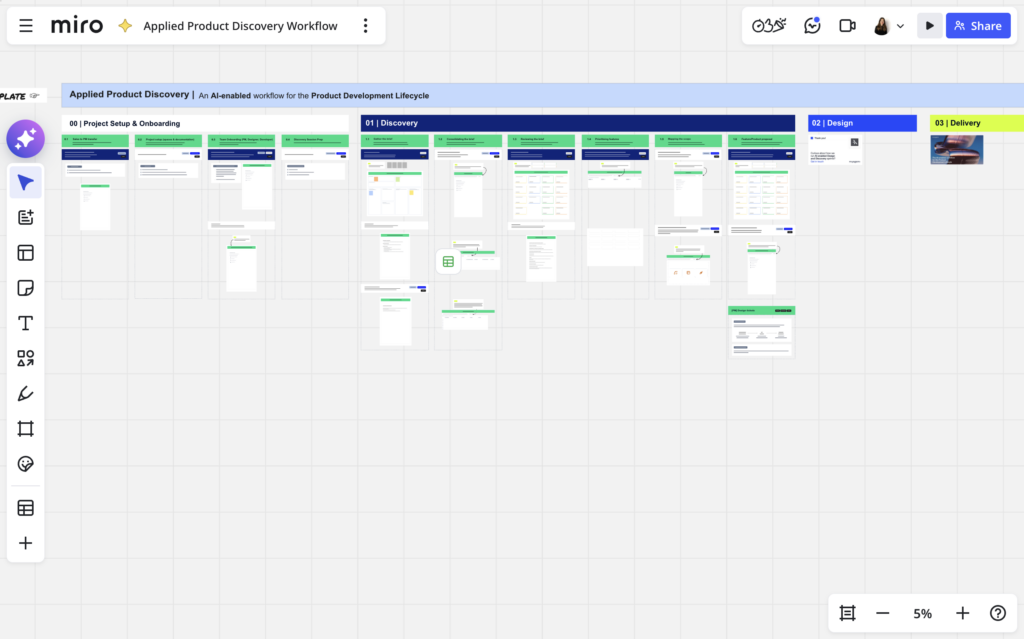
This post focuses on Discovery, since that’s where we lean on Miro AI Flows most, and where this template is likely most useful to other teams.
The discovery flow, step by step
Each step gathers context and client feedback to feed the next, with Miro AI doing most of the translation between them.
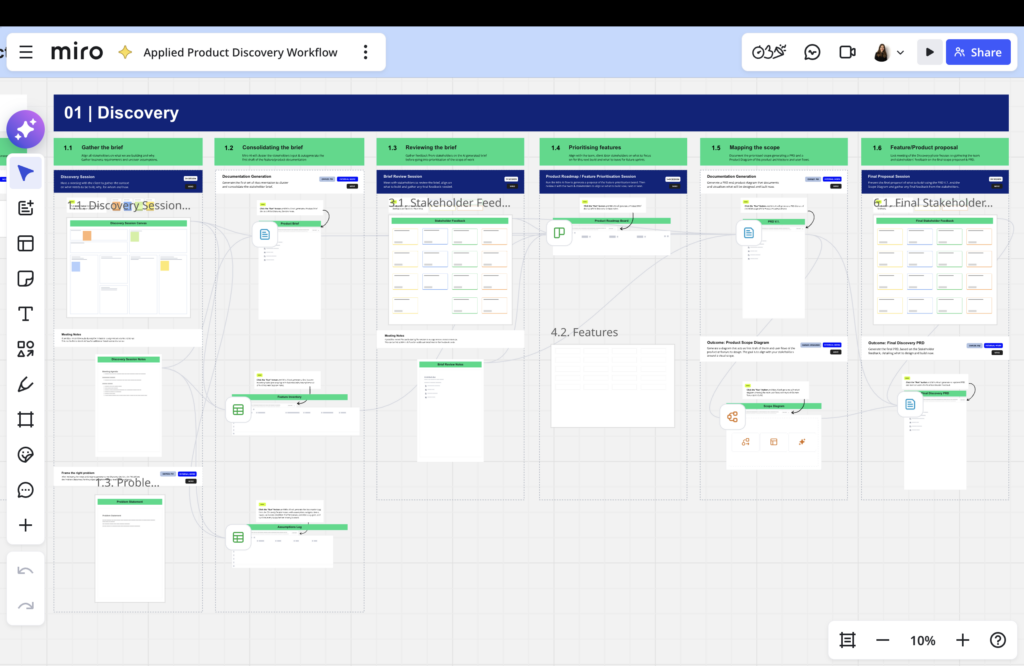
Step 1 — Gather the brief
Align the client and stakeholders on what we’re building and why, before any work begins.
Session: Discovery workshop
Run it with the client and any stakeholders, capture everything as it comes, and record the audio if you can. What you leave with:
- The Discovery Canvas, filled with raw sticky notes
- A transcript or AI-generated meeting notes, if the session was recorded
We find it helpful to record whenever possible, because the transcript holds detail the stickies tend to miss, and it becomes an input to the flow in the next step.
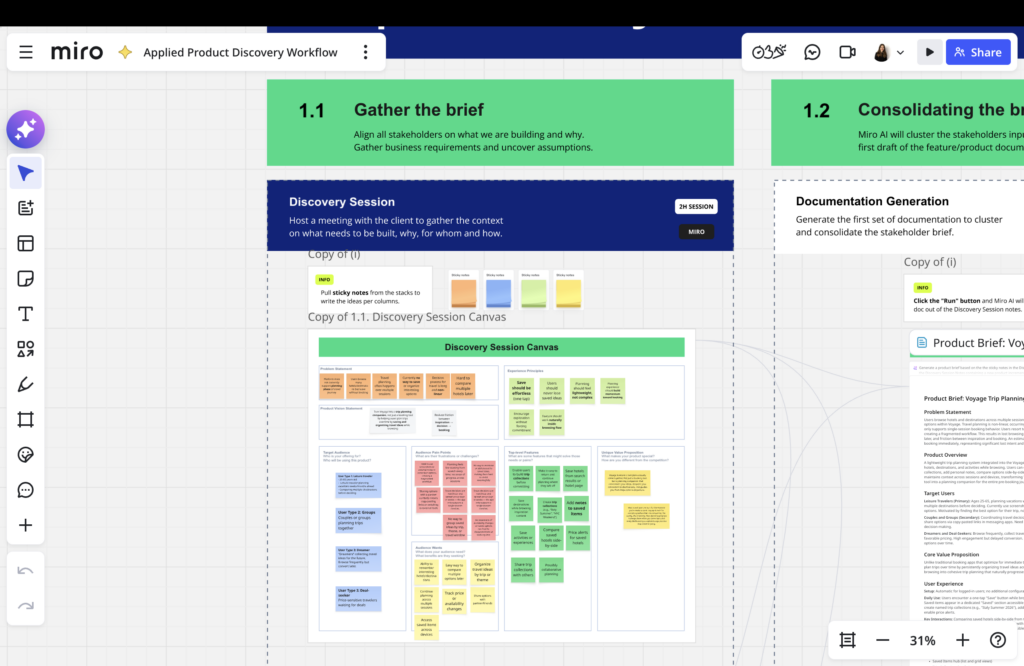
Step 2 — Consolidate the brief
Cluster the stakeholder input and draft the product documentation.
Miro AI flow
- Feed in: the Discovery Canvas + the meeting notes
- Generate: an early Product Brief, a Feature Inventory, and an Assumptions Log
This is the step that used to cost us the most manual admin, and it’s where Miro AI helps most. What comes out might not be final, but it’s a structured draft that you can review and update to prepare for the next step.
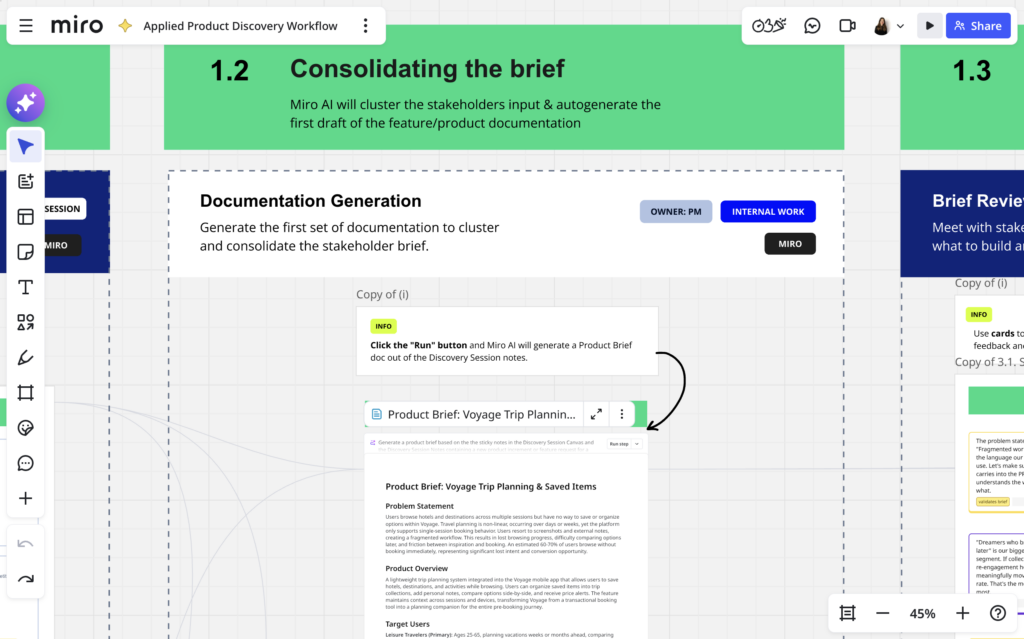
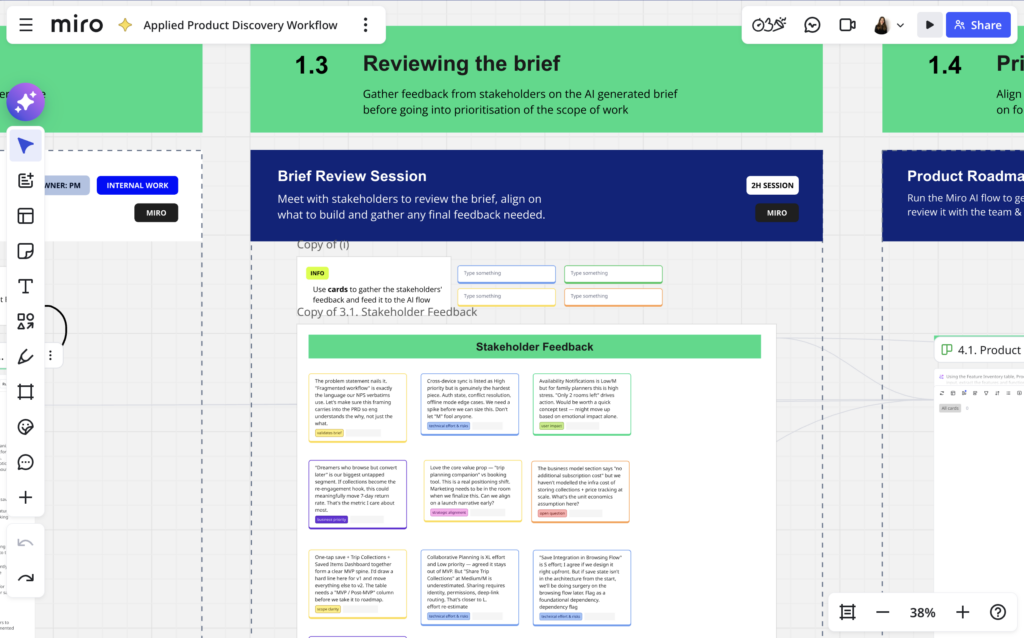
Step 3 — Review the brief
Time to bring that Product Brief, Feature Inventory and Assumptions Log back to the client and stakeholders and see if you are all still aligned on the goal for the project and what has to be built. Gather any feedback and reviews of the brief needed before moving onto prioritising the scope.
Session: Proposal review
Take the brief back to the client and stakeholders. Gather the feedback the same way as before:
- Sticky notes
- AI-generated meeting notes
That keeps it ready to feed into the next flow.
Step 4 — Prioritise the features
Chances are the initial product or feature brief is too large. The process of prioritising features or functionalities helps not only in understanding what the most important aspects of the new build are, but also continues detailing and aligning around what everything means.
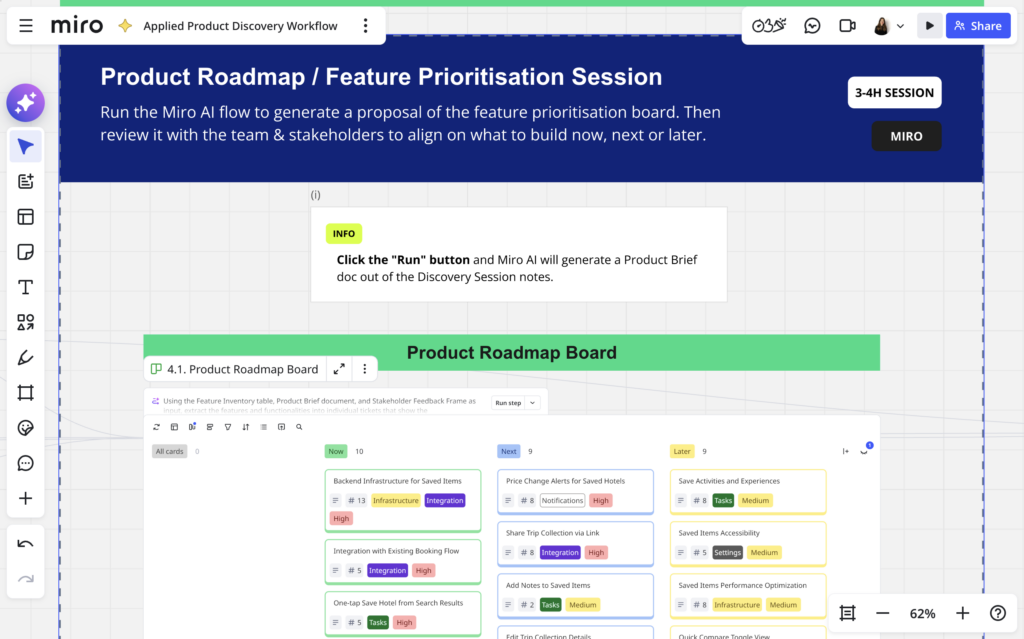
Prepare for the session with a Miro AI flow
- Feed in: the Product Brief + the Feature Inventory + the feedback from the proposal review (e.g. sticky notes + Meeting notes)
- Generate: a first draft of a Features Prioritisation Board
Session: Feature prioritisation
Sit down with the client, team, and stakeholders to align on what to build now, next, or later, updating the draft board by hand as you go. The version we generated with the AI flow gives us a starting point to react to, but the decision itself stays with the people in the room.
Step 5 — Map the scope
Based on the prioritisation session outcomes, document and visualise the prioritised scope for “now”.
Miro AI flow (two passes)
- First pass — Feed in: the Features Prioritisation Board (+ the session notes, if you have them) → Generate: the first version of the PRD (PRD v.1)
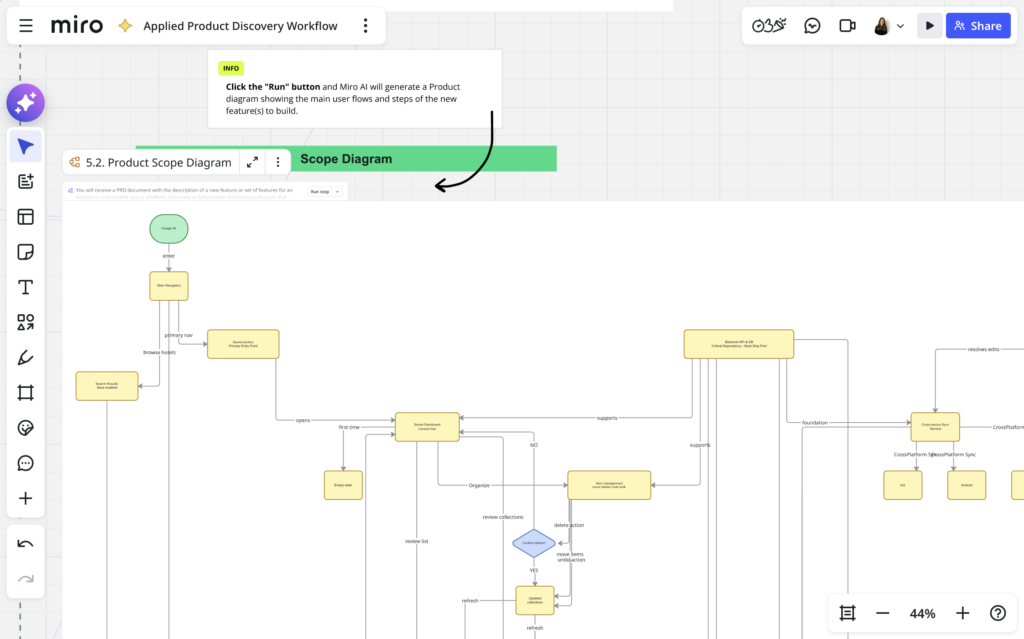
- Second pass — Feed in: PRD v.1 → Generate: a Scope Diagram of the product architecture and another one with the main user flows
By the end of this Flow you have both the written scope and a visual of it, generated from the same source, rather than drawn up separately.
The Scope Diagrams will probably need some work; as much as I have tried tailoring the prompt, AI is not great at laying out a diagram that looks coherent at first glance. The content should be correct, but you will probably need to redistribute it visually. I show you what I mean in the following image.
Step 6 — Present the final proposal
Present the scope back to stakeholders and gather final feedback before discovery closes.
Session: Final proposal
Present the PRD and the Scope Diagram to the stakeholders involved, and gather any final feedback in sticky notes and meeting notes.
Miro AI flow
- Feed in: PRD v.1 + the final stakeholder feedback
- Generate: the Final Discovery PRD
That’s the document that says what we’re designing and building now, and it’s what the design phase picks up from.
The value isn’t in any single step – you could run this scoping phase a dozen different ways. It’s that anyone can open the board at the end and trace a decision all the way back to the sticky note it came from, without rebuilding that trail by hand.
What it does well, and where we still step in
I’ll be honest, it’s still definitely not a magic button or a silver bullet.
Miro AI is genuinely good at the grind: turning a wall of unstructured sticky notes or messy meeting notes into organised documentation, a first-draft brief, or a starting feature list. That takes a real chunk of manual admin off our plate. It’s a strong first draft, but not a finished one.
The Product Brief and PRD still need a human pass, and feature extraction sometimes surfaces things we decide aren’t a priority, or aren’t in scope at all. That editing step is the point – we need to go through the AI output in detail because that’s where we actually decide what we’re building. Input quality matters too: a vague or contradictory session tends to produce a vague draft.
To put a number on it: our Discovery phase usually runs about two weeks, and we used to spend two to three of those days on pure processing – typing up stickies, clustering them, turning a transcript into a first brief, building the feature list by hand, then redrawing the agreed scope as a diagram.
With the AI Flows in place, that same work is a few hours of reviewing and editing what Miro hands back. We’re recovering close to a fifth of the phase.
What matters more is where those hours go instead: testing assumptions, working through flows we already know will be hard to build, pushing on vague answers, doing more thorough research. And because the documentation lives in the same board where the sessions happen, nobody downstream has to reconstruct a decision that was never written down.
Three things to take with you
Even if your PDLC looks different from ours, or nothing like it, here’s what we’d want you to take from this:
- Avoid context loss by keeping one centralised source of truth, at least through discovery – and ideally across the whole workflow. Miro is well suited to that.
- Use AI to reduce the time you spend on manual admin (like updating documentation), not judgment. Miro AI Flows are good at turning raw notes into structured documentation, tickets and diagrams – the decisions still belong to the people in the room.
- Collaboration improves drastically when everyone is looking at the same thing, because that’s how you align around what you’re building.
Try it yourself
We have just published this template so that you can clone and adapt it to your own process. Use it as a starting point, change the prompts to fit your team, and keep the parts that map to how you already work.
If you do try it, I’d love to hear what held up and what broke. Find me on LinkedIn and let me know.
Alicia Calderon is Design Strategy Lead at Miyagami.