In Gartner’s evaluation framework for enterprise AI assistants, Microsoft Copilot sits in the “Foundational Capability” tier. It drafts, summarizes, generates, and searches across Microsoft 365, making individuals faster at a scale few tools can match.
Foundational is exactly right — it’s the layer everything else builds on. What unlocks the next level is turning that individual speed into organizational alignment.
Copilot is at its best when it has the right context to work from. With Work IQ, announced at Microsoft Build, Microsoft is giving Copilot exactly that: Real-time, personalized context from across an organization’s emails, chats, meetings, and documents. But one kind of context has always been hardest to capture — the visual thinking teams do together, like architecture diagrams, strategy maps, workshops, and prototypes.
What enterprises are missing is a way to connect the dots between individual productivity and the organizational alignment that actually delivers ROI. Our CEO, Andrey Khusid, calls it the “Collaboration Fracture”: AI is accelerating individuals without that speed ever reaching the organization. And they’re increasingly realizing this isn’t the job of a single tool.
This was never a choice between Microsoft AI and everything else. It’s Microsoft AI plus the visual context layer that makes it collaborative and actionable — the shared canvas where AI-generated work becomes visible to the whole organization. That’s what Miro brings to the Microsoft ecosystem.
How Miro integrates with Microsoft Copilot, Work IQ, and GitHub Copilot
Bring corporate context to the canvas
The Miro Agent for Microsoft Copilot transforms conversations into collaborative visual experiences without leaving the Microsoft environment. From within Microsoft Teams or Office 365, teams can search and surface Miro boards using natural language, create new boards from conversations and prompts, and synthesize discussion outcomes into structured Miro documents.
And for teams already working in Microsoft 365 Copilot Cowork, the Miro plugin lets Cowork build boards, frames, and stickies directly from a Cowork session, live in Microsoft 365 Copilot on the web today.
Connect the canvas to Work IQ’s intelligence
Miro is also building on Microsoft Work IQ, the new intelligence layer behind how work gets done and the brain for Copilot and AI agents. Through the Work IQ API, Copilot becomes a knowledge source within Miro’s Sidekicks and Flows — bringing Microsoft 365 context (emails, documents, chats, and meeting activity) directly into the canvas where planning, ideation, and design work happens. The result is a two-way bridge: Conversations become canvases, and canvases fuel AI. The thinking on the canvas stays connected to the work everywhere else.
Turn complex code into visual context
Launched last week at Microsoft Build 2026, the Miro Agent App for GitHub addresses a challenge that’s acute for any engineering or product team working with complex codebases: The gap between code and context.
Codebases, architecture decisions, and pull request discussions are inherently visual problems — think dependencies, system boundaries, decision rationales — but they’re stored in ways that are hard for AI to reason about without structure.
The Miro Agent App turns that complexity into visual context: Architecture diagrams, decision maps, and system documentation that teams can understand, and that GitHub Copilot can use to accelerate implementation. It’s the connection between where thinking happens and where building happens.
“Our partners are pushing the boundaries of what’s possible through Agent apps that integrate directly into GitHub. These agents are super-powering developers at every step of the SDLC and showing up where they need them most: issues, pull requests, and repositories. Together, we’re delivering on the vision of GitHub as the place where agents and humans collaborate to build great software.” — Luis Bitencourt-Emilio, SVP of Product, GitHub
Use Miro to strengthen Microsoft 365 Copilot governance
There’s another important way that Miro brings out the best in Microsoft. Copilot is extraordinarily good at surfacing content stored across Microsoft 365. But the quality of what it surfaces depends heavily on how well that content is classified and governed to begin with.
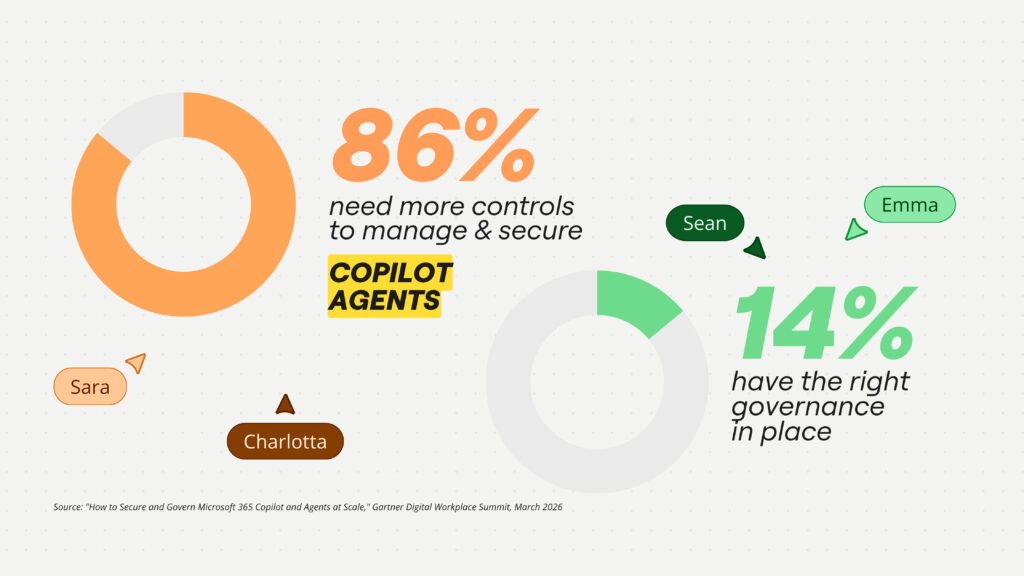
This is a blind spot for many organizations, which is why a 2025 Gartner survey of companies that had piloted or rolled out Copilot found that 86% needed additional controls to manage and secure agents, while only 14% felt they had the right governance structures in place.
The easy answer for nervous leaders is to scale back their Copilot rollout. This limits risk, but it also caps the return on the entire AI investment. The smarter play? Give IT leaders a governed surface that makes expanding AI adoption safe – the canvas.
Miro’s integration with Microsoft Purview, launched in partnership with Microsoft and built specifically for Microsoft environments, applies the same classification, sensitivity labeling, and compliance policies organizations already use across M365. Admins control which AI models are approved, log every AI interaction, switch off AI on sensitive boards, and maintain data residency compliance.
For organizations that need comprehensive security visibility across their collaboration stack, the Miro integration with Microsoft Sentinel brings Miro collaboration data (authentication events, administrative actions, board activity) directly into the SIEM alongside other enterprise applications, giving CISOs the complete picture.
Miro also integrates with Microsoft Defender for Cloud Apps, bringing user activity and threat correlation into the security tooling teams already operate, with anomaly detection and compliance monitoring built in.
Getting full ROI from Microsoft Copilot
The organizations getting real AI ROI from their Microsoft investment aren’t adding more tools – they’re adding the right layer. Miro doesn’t replace your Microsoft investment – it multiplies it. Copilot owns individual productivity: Drafting, summarizing, searching, generating first versions. Miro owns the decisioning layer: Bringing those outputs onto a shared canvas, structuring the decision, capturing the reasoning, and producing the context that the next team and the next agent can act on.
It keeps strategic context visible across the lifecycle from planning to execution, making AI output something the whole organization can see and act from, and giving IT the governance infrastructure to expand AI adoption with confidence.
Even better, Miro is now available through the Microsoft Marketplace, which means enterprise IT teams can procure Miro through the same commercial channels, with the same billing and procurement infrastructure – and the same Azure consumption commitments (MACC) – they already use for the rest of the Microsoft stack. So it’s easier than ever to turn individual productivity into organizational efficiency.