Table of contents
Table of contents
The Quick Guide to Team Charters (+Examples)
Summary
In this guide, you will learn:
- What a team charter is: a document outlining a team’s purpose, goals, roles, and working agreements.
- Key benefits: improved clarity, alignment, accountability, collaboration, productivity, and conflict resolution.
- How it fosters culture: establishes shared values for motivation and engagement.
- When and how to use: typically at project start, revisited as the team evolves.
- Essential components: team goals, roles, communication, decision-making, and conflict resolution.
- Best practices: collaborative creation for buy-in and clear understanding.
Regardless of your organization’s size, working as part of a team is both tricky and rewarding. Everyone on the team brings their own skill sets, experiences, strengths, and challenges — which can foster collaboration or introduce obstacles. You’re expected to juggle numerous projects together, progress quickly, and move with agility. And while you all share the same goals, your individual objectives might differ. How does everyone stay on the same page?
Collaborative AI Workflows

Make org charts easily with Miro's free templates or custom tools.
It’s especially challenging in today’s workplace, where teams made up of employees working remotely or partially remotely, in different time zones, and across different office hubs need to stay aligned. Your team may be working asynchronously, but you want to make sure you’re producing synchronously. It’s not easy!
A team charter can help bring everyone together and concretize your goals. In this guide, we’ll walk you through the basics: what a team charter is, how to create one, and some examples to motivate and inspire you.
What is a team charter?
A team charter is a living document that serves as a North Star for a team or project. It articulates your team’s mission, scope of operation, objectives, and commitment. For a project, it can also spell out a timeframe and its consequences. The most effective team charters detail a team’s focus, direction, and boundaries. It reduces confusion, duplication, and repetition.
When to make a team charter
If you’ve been working together for a while, you might think you don’t need a team charter. After all, you already know your team goals. But what if your perception of those goals is slightly different from your teammates'? How can you capture everyone’s idea of what the team can — and should — strive to be? The defining feature of a team charter is that everyone contributes to its creation. Having a team charter ensures that every member of the team buys into the contents of the charter.
A top-down team charter created by management or by a few members simply isn’t going to work. The purpose of the charter is to get everyone aligned and committed. Without everyone’s input, that isn’t possible.
One of the great things about a team charter is that you can define “team” however you want. Let’s say you’re a content writer on the marketing team. You can create a team charter with the content team, the broader marketing team, or the entire org. It all depends on what you need and what you want to achieve.
As employees join and leave the company, it’s important to revisit the team charter periodically. Remember, it’s a living document. That means you should let it grow and change organically with your organization.
How to make a team charter
Making a charter for your team is a fun, collaborative process. Start by using the Team Charter Templates as a canvas on which to create your own.
Once you have a place to collaborate with your team on your charter, here’s how to move through the exercise in five easy steps:
1) Start with the context. Who is the team leader? What should key stakeholders expect from this team? What does each contributor bring to the team? What are their individual expectations? Have everyone on the team write out their answers to these questions.
2) Define your vision and objectives. What does success look like for your team? In an ideal world, what would you accomplish? How are you working to support the rest of the org? Create a succinct mission statement that outlines what you hope to achieve.
3) Create deadlines, goals, and milestones that map back to the mission statement. Define roles and responsibilities. Who is doing what? For whom? What does each team member need to achieve their goal?
4) Lay out your checks and balances. To create an effective team charter, you have to balance the aspirational with the tangible. The aspirational part of the charter is the mission statement and the vision. But it’s just as crucial to measure your progress toward your goals. Your charter should lay out the internal checks and balances that will ensure you’re reviewing everyone’s progress. How will you check in? When or how often? How will you measure success?
5) Have everyone on the team sign off on the charter. Many teams like to print it out and ask teammates to physically sign the paper, to symbolize their commitment.
Examples to get you started
There are many ways to create and structure your team charter. Here are a few examples of team charter templates you can use to create the ultimate team canvas:
Example 1: The Miro Team Charter

Get started on all the steps we outlined above with this Team Charter Template. Once you've filled it out with your team on a Miro board, you can deepen it by adding to it over time — and can even use the board as a one-stop destination for team-building activities. Check out some of our favorite templates below as inspiration for more board possibilities within Miro!
Example 2: The Team Canvas by Alex Ivanov
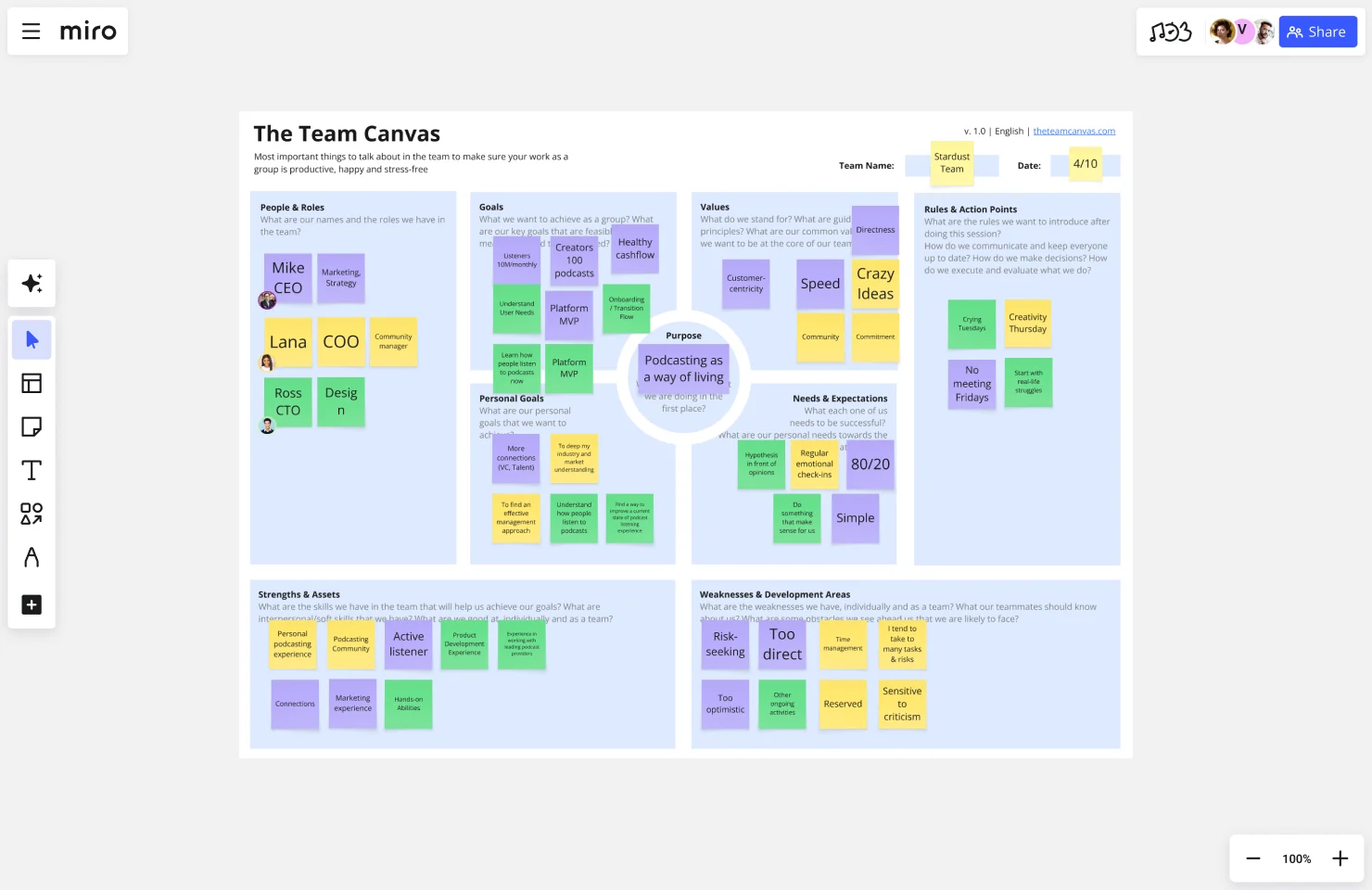
Not only do we love Alex Ivanov's team canvas board, we also love the fact that he details how to run a workshop with your team to fill it out.
Example 3: Team Norms + Personal Profiles by Danny Carvajal
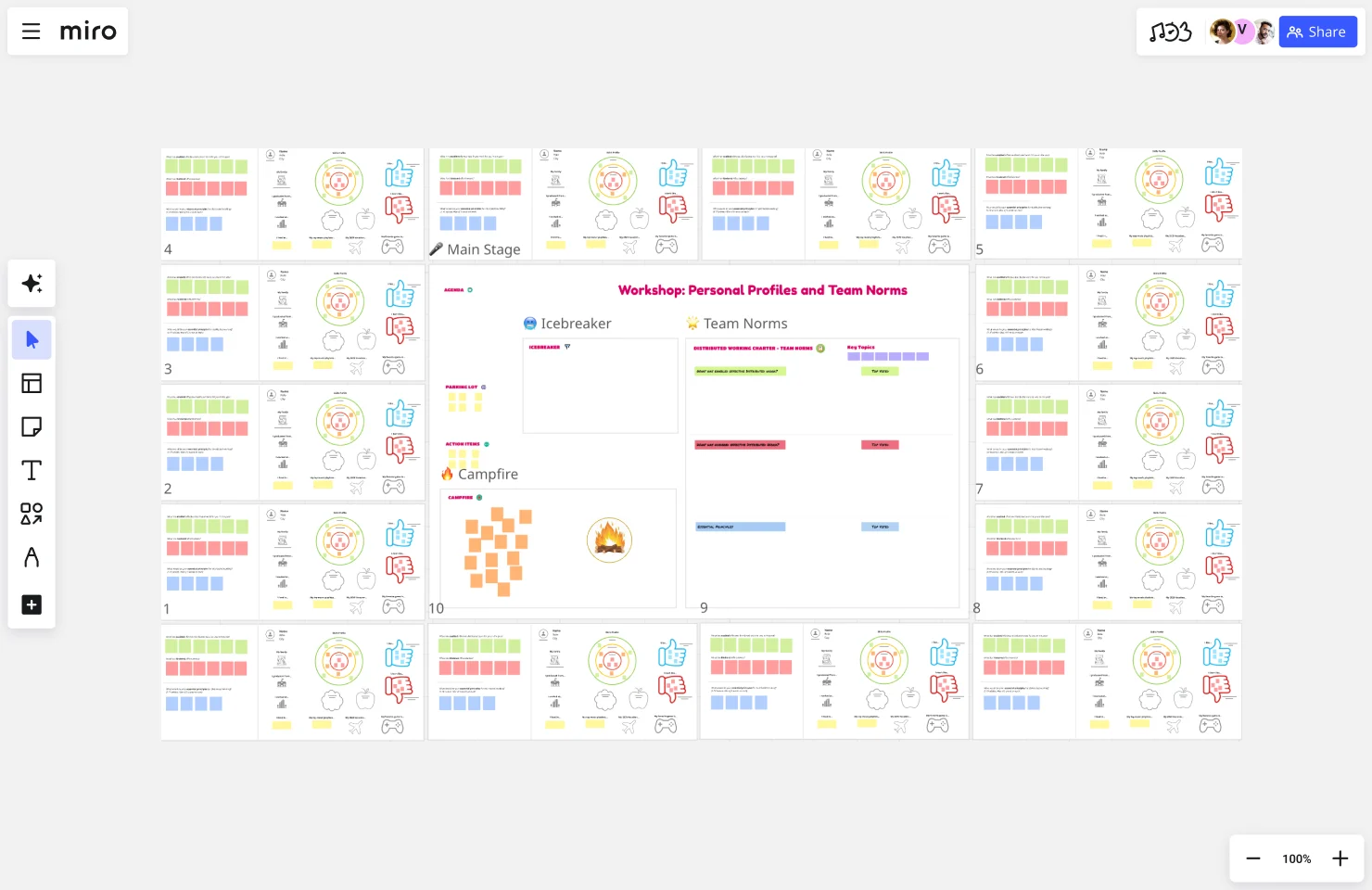
Team norms are crucial to define, especially when your team is remote or distributed. Danny Carvajal shows you how to do just that with this team norms template in Miroverse. The best part? It comes complete with a tutorial on how to lead this activity as a workshop with your team.
Example 4: Team Work Canvas
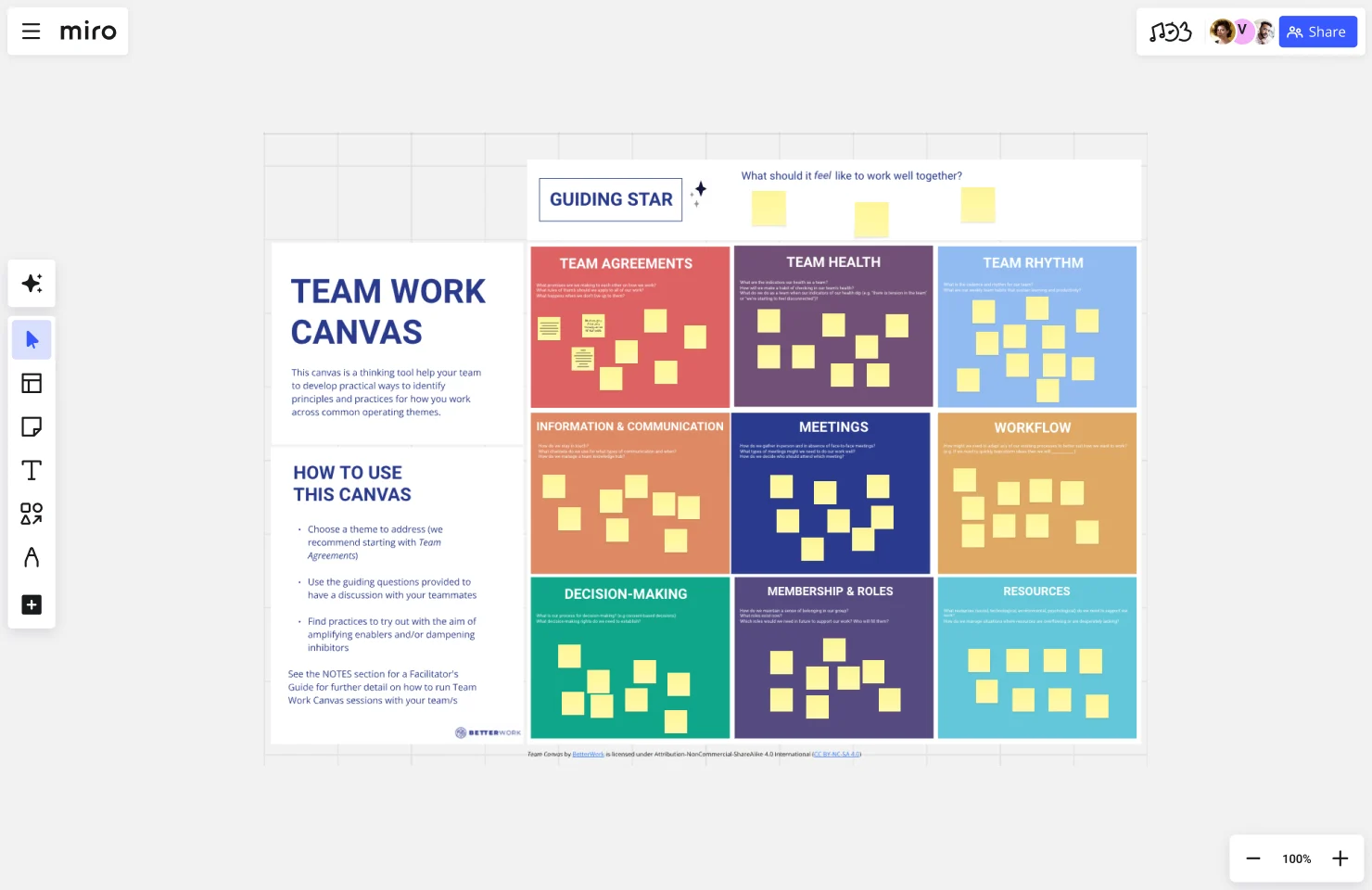
Add a section to your team charter board to identify principles and practices for how you work across common operating themes. This Miroverse template by BetterWork will walk you through how to reflect on, and define, how you work as a team.
A good way to complement a team charter at project level is to use a roles and responsibilities template. By offering clear task assignments and accountability, a roles and responsibilities template streamlines projects, minimizing confusion and boosting efficiency.
Need more team-building inspiration? Browse templates in Miroverse.
How to create a team charter in Miro
Creating a team charter in Miro is straightforward — the innovation workspace gives you the visual canvas, collaboration tools, and AI capabilities to build your charter fast and get everyone aligned from day one.
Start with a template or build from scratch
Head to Miro's template library and search for "team charter" to find pre-built frameworks that cover essential sections like team purpose, roles, goals, and working agreements. These templates save you from starting with a blank canvas and help ensure you don't miss critical components.
You'll find team charter examples for different use cases — whether you need a project team charter example for a specific initiative, an agile team charter example for sprint-based work, or frameworks for cross-functional collaboration. These examples show you what works in practice, not just theory.
If you prefer building from scratch, open a new board and use Miro's organizational chart widget to map your team structure visually. This widget makes it easy to show reporting relationships, define roles, and clarify who's responsible for what — all in a format that's clearer than traditional org charts buried in slide decks.
Use Miro AI-powered canvas to accelerate content creation
Here's where Miro's AI capabilities make charter creation significantly faster. Select Sidekicks from the creation bar and choose the format that works for your charter content:
Generate initial charter sections with AI-powered docs: Start by prompting Miro AI to draft your team charter outline. For example: "Create a team charter outline for a cross-functional product development team including purpose, goals, roles, and decision-making process." The AI generates a structured document you can refine rather than starting from a blank page. This approach works whether you're learning how to write a team charter for the first time or need to quickly draft a virtual team charter for distributed colleagues.
Build your org chart with AI assistance: Use AI to generate a diagram showing your team structure. Provide context like "Create an org chart for a product team with 1 PM, 2 designers, and 4 engineers" and Miro AI creates the visual hierarchy. You can then customize roles, add names, and adjust the structure.
Transform messy brainstorms into organized content: If your team has already captured ideas in sticky notes during discovery discussions, select those notes and use Miro AI to convert them into a structured doc. This turns raw input into charter content without manual rewriting — especially helpful when you're figuring out how to make a team charter from existing team conversations.
How to write a team charter statement that resonates
Your team charter statement — the core purpose and mission that anchors everything else — needs to be clear and compelling. Use Miro AI to draft multiple versions by prompting: "Write a team charter statement for a [describe your team] focused on [primary goal]." Review the AI-generated options with your team, then refine the language together on the board.
For virtual teams, writing a clear charter statement is even more critical since you can't rely on in-person context. When you're learning how to write a virtual team charter, focus on making communication norms and decision-making processes explicit. Miro AI can help by suggesting specific language around async collaboration, time zone considerations, and digital-first workflows.
Add visual context with the org chart widget
The org chart widget does more than show hierarchy — it helps clarify accountability. Drag the widget onto your board and add team members by name and role. You can customize each box with photos, contact information, and specific responsibilities.
This visual approach beats static documents because everyone can see at a glance who owns what. When responsibilities shift or new members join, updating the org chart takes seconds. Link the org chart directly to other sections of your charter so team structure lives alongside goals and working agreements in one accessible space.
Collaborate in real-time to build consensus
Invite your team to the board and work on the charter together — in real-time or async. Use comments to discuss specific sections, voting to prioritize team values, and timers to keep charter workshops moving. Miro's infinite canvas means everyone can contribute simultaneously without stepping on each other's work.
For distributed teams, Miro supports async collaboration so people across time zones can review, comment, and refine the charter at times that work for them. All changes are tracked and visible, making it easy to see how the charter evolved. This flexibility is essential when you're developing a virtual team charter — everyone gets input regardless of location.
Learn from team charter examples
Not sure what to include? Browse Miro's collection of team charter examples to see what other teams have built. A project team charter example might emphasize deliverables and milestones, while an agile team charter example focuses on sprint ceremonies and retrospective practices. Use these examples as inspiration, then customize for your specific team context.
Looking at real team charter examples helps you understand what "good" looks like — you'll see how successful teams articulate their purpose, define roles, establish working agreements, and set measurable goals.
Iterate with AI-powered suggestions
As your charter takes shape, use Miro AI Sidekicks to refine content. Select any text and ask the AI to make it more concise, adjust the tone, or clarify jargon. This helps ensure your charter is scannable and accessible — not a dense document people ignore.
You can also prompt the AI to generate variations of key sections. If your team's stuck on how to articulate decision-making processes, ask Miro AI to suggest three different approaches. Pick what resonates and customize from there.
Share and keep it alive
Once your team charter is complete, share the Miro board link with stakeholders and new team members. Unlike PDFs or slide decks, your charter stays editable and accessible. Set a quarterly reminder to review and update it as your team evolves.
Because everything lives in Miro — your org chart, your charter content, your working agreements — you have a single source of truth that's actually used, not filed away and forgotten. Whether you're building your first team charter or refining one for a new initiative, Miro gives you the tools to create something that actually guides how your team works.
Ready to build your team charter in Miro? Sign up for free and use our team charter templates to get started in minutes.
Frequently asked questions about team charters
What is a team charter in project management?
In project management, a team charter establishes the foundation for how a project team will operate throughout the project lifecycle. Unlike a project charter (which focuses on project scope, objectives, and deliverables), a team charter focuses on the people doing the work — their roles, responsibilities, decision-making processes, and collaboration norms. A project team charter example might include sections on stakeholder communication cadence, escalation paths, meeting schedules, and how the team will handle scope changes. This clarity prevents confusion and keeps project teams moving efficiently, especially when working across functions or time zones.
How long should a team charter be?
A team charter should be long enough to cover essential information but short enough that people actually read it. Aim for 1-2 pages or the equivalent in a visual format. If your charter runs longer than 3 pages, you're likely including too much detail that belongs in other documents like project plans or process documentation. The sweet spot is comprehensive enough to answer key questions about purpose, roles, and working agreements, but scannable enough that new team members can absorb it in 10 minutes. Remember — a concise charter that everyone references beats a comprehensive one that nobody reads.
When should you create a team charter?
Create your team charter at the very beginning of your team's formation — ideally during your first meeting or kick-off session. This timing ensures everyone starts with shared expectations rather than having to course-correct later when bad habits have already formed. You should also create or update a team charter when there are significant changes: new team members joining, a shift in team goals or scope, a reorganization affecting roles and responsibilities, or when you notice recurring conflicts around decision-making or communication. Think of charter creation as an investment in clarity that saves time by preventing misunderstandings down the road.
Who should be involved in creating a team charter?
Everyone on the team should participate in creating the team charter — not just the team leader or manager. This inclusive approach ensures buy-in and creates shared ownership over how the team operates. If you have a large team (10+ people), consider breaking into smaller groups to draft different sections, then reconvene to review and align. You might also involve key stakeholders who regularly interact with your team to get their input on communication preferences and expectations. The goal is collaborative creation, not top-down dictation. When team members help write the charter, they're far more likely to follow it.
What's the difference between a team charter and a project charter?
A team charter focuses on the people and how they'll work together, while a project charter focuses on the work itself and what will be delivered. A project charter typically includes project objectives, scope, deliverables, timelines, budget, and stakeholders. A team charter covers team purpose, member roles, decision-making processes, communication norms, and working agreements. You need both for successful projects — the project charter defines what you're building and why it matters to the business, while the team charter defines how the team will collaborate to get it done. Think of them as complementary documents that address different but equally important questions.
Author: Miro Team
Last update: December 23, 2025
Read more
Join our 100M+ users today


